
从源码角度深入分析log4j配置文件使用
log4j在日常开发中经常使用,但有时候对 配置文件应该放到什么位置有疑惑。现在我们通过从代码的角度来看待这个问题,
看完后你也许会恍然大悟哦。
开始吧。
Log4j的组成及架构:
Log4j由三个重要的组成构成:日志记录器(Loggers),输出端(Appenders)和日志格式化器(Layout)。
1.日志记录器(Loggers):控制要输出哪些日志记录语句,对日志信息进行级别限制。
2.输出端(Appenders):指定了日志将打印到控制台还是文件中。
3.日志格式化器(Layout):控制日志信息的显示格式。
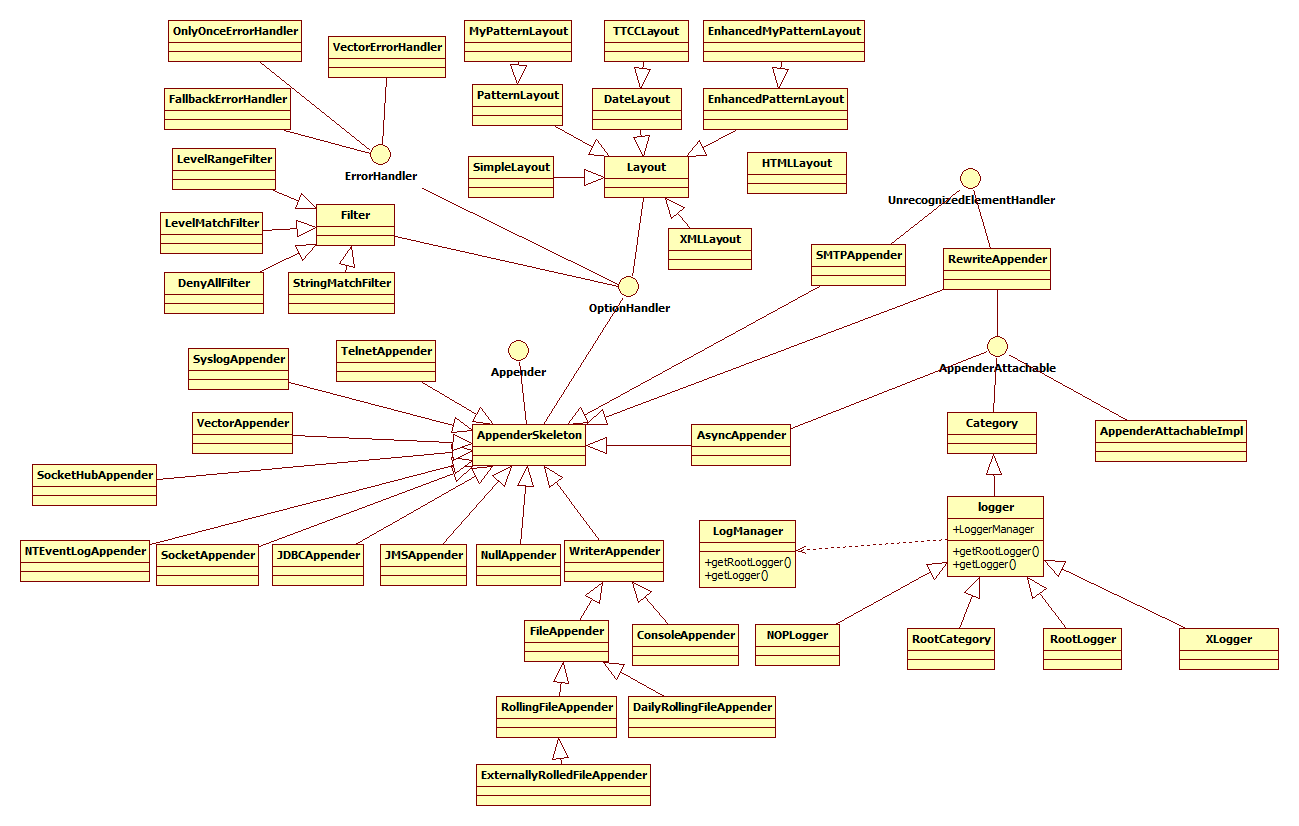
类图结构如下(不要眼花缭乱,我辛辛苦苦一个一个画出来的):
log4j初始化
从架构上我们可以看出logger的实现是从logManager来具体完成的,因此初始化在logManager的static块中,如下:
 static {

    // By default we use a DefaultRepositorySelector which always returns 'h'.

    Hierarchy h = new Hierarchy(new RootLogger(Level.DEBUG));

    repositorySelector = new DefaultRepositorySelector(h);

    /** Search for the properties file log4j.properties in the CLASSPATH.  */

    String override =OptionConverter.getSystemProperty(DEFAULT_INIT_OVERRIDE_KEY,

                               null);

    // if there is no default init override, then get the resource

    // specified by the user or the default config file.

    if(override == null || "false".equalsIgnoreCase(override)) {

      String configurationOptionStr = OptionConverter.getSystemProperty(

                              DEFAULT_CONFIGURATION_KEY,

                              null);

      String configuratorClassName = OptionConverter.getSystemProperty(

                                                   CONFIGURATOR_CLASS_KEY,

                           null);

      URL url = null;

      // if the user has not specified the log4j.configuration

      // property, we search first for the file "log4j.xml" and then

      // "log4j.properties"

      if(configurationOptionStr == null) {

    url = Loader.getResource(DEFAULT_XML_CONFIGURATION_FILE);

    if(url == null) {

      url = Loader.getResource(DEFAULT_CONFIGURATION_FILE);

    }

      } else {

    try {

      url = new URL(configurationOptionStr);

    } catch (MalformedURLException ex) {

      // so, resource is not a URL:

      // attempt to get the resource from the class path

      url = Loader.getResource(configurationOptionStr);

    }

      }

      // If we have a non-null url, then delegate the rest of the

      // configuration to the OptionConverter.selectAndConfigure

      // method.

      if(url != null) {

        LogLog.debug("Using URL ["+url+"] for automatic log4j configuration.");

        try {

            OptionConverter.selectAndConfigure(url, configuratorClassName,

                       LogManager.getLoggerRepository());

        } catch (NoClassDefFoundError e) {

            LogLog.warn("Error during default initialization", e);

        }

      } else {

        LogLog.debug("Could not find resource: ["+configurationOptionStr+"].");

      }

    } else {

        LogLog.debug("Default initialization of overridden by " +

            DEFAULT_INIT_OVERRIDE_KEY + "property.");

    }

  }
让我们深入进去看看是怎么初始化的?
第一步:创建一个默认的RepositorySelector,RepositorySelector在logManager中使用,它的实现类对特定的应用上下文提供了一个LoggerRespository。LoggerRespository的实现类负责追踪应用上下文。ResponsitorySelector提供了一个方法:
public LoggerRepository getLoggerRepository();
LoggerRepository从字面上理解,它是一个Logger的容器,它会创建并缓存Logger实例,从而具有相同名字的Logger实例不会多次创建,以提高性能。它的这种特性有点类似Spring的IOC概念。Log4J支持两种配置文件:properties文件和xml文件。Configurator解析配置文件,并将解析后的信息添加到LoggerRepository中。LogManager最终将LoggerRepository和Configurator整合在一起。
LoggerRepository是一个Logger的容器,它负责创建、缓存Logger实例,同时它也维护了Logger之间的关系,因为在Log4J中,所有Logger都组装成以RootLogger为根的一棵树,树的层次由Logger的Name来决定,其中以’.’分隔。
除了做为一个Logger容器,它还有一个Threshold属性,用于过滤所有在Threshold级别以下的日志。以及其他和Logger操作相关的方法和属性。
public interface LoggerRepository {

public void addHierarchyEventListener(HierarchyEventListener listener);

 boolean isDisabled(int level);

 public void setThreshold(Level level);

 public void setThreshold(String val);

public void emitNoAppenderWarning(Category cat);

 public Level getThreshold();

 public Logger getLogger(String name);

public Logger getLogger(String name, LoggerFactory factory);

 public Logger getRootLogger();

public abstract Logger exists(String name);

public abstract void shutdown();

public Enumeration getCurrentLoggers();

 public abstract void fireAddAppenderEvent(Category logger, Appender appender);

 public abstract void resetConfiguration();

}
Hierarchy类
Hierarchy是Log4J中默认对LoggerRepository的实现类,它用于表达其内部的Logger是以层次结构存储的。在对LoggerRepository接口的实现中,getLogger()方法是其最核心的实现,因而首先从这个方法开始。Hierarchy中用一个Hashtable来存储所有Logger实例,它以CategoryKey作为key,Logger作为value,其中CategoryKey是对Logger中Name字符串的封装,之所以要引入这个类是出于性能考虑,因为它会缓存Name字符串的hash code,这样在查找过程中计算hash code时就可以直接取得而不用每次都计算。
第二步:从classpath路径查找log4j.properties属性配置文件。
1. 判断配置文件有没有重写?
    /** Search for the properties file log4j.properties in the CLASSPATH.  */

    String override =OptionConverter.getSystemProperty(DEFAULT_INIT_OVERRIDE_KEY,null);
//public static final String DEFAULT_INIT_OVERRIDE_KEY = "log4j.defaultInitOverride";
 publicstatic String getSystemProperty(String key, String def) {

    try {

      return System.getProperty(key, def);

    } catch(Throwable e) { // MS-Java throws com.ms.security.SecurityExceptionEx

      LogLog.debug("Was not allowed to read system property \""+key+"\".");

      return def;

    }

  }
2. override为null或者为false时没有重写,然后从系统属性中查找key:log4j.configuration和log4j.configuratorClass属性。如果没有设置log4j.configuration属性,就查找log4j.xml,然后查找log4j.properties文件。使用方法:
     if(configurationOptionStr == null) {

    url = Loader.getResource(DEFAULT_XML_CONFIGURATION_FILE);

    if(url == null) {

      url = Loader.getResource(DEFAULT_CONFIGURATION_FILE);

    }
使用java2的线程上下文类加载器来查找资源,如果查找失败,则使用加载该类(loader)的类加载器来加载资源。
3.如果设置了log4j.configuration属性,则使用url形式读取,如果资源不是url,则从classpath获取资源:
    try {

      url = new URL(configurationOptionStr);

    } catch (MalformedURLException ex) {

      // so, resource is not a URL:

      // attempt to get the resource from the class path

      url = Loader.getResource(configurationOptionStr);

    }
4. 如果log4j.configuration属性为url形式:
      // If we have a non-null url, then delegate the rest of the

      // configuration to the OptionConverter.selectAndConfigure

      // method.

      if(url != null) {

        LogLog.debug("Using URL ["+url+"] for automatic log4j configuration.");

        try {

            OptionConverter.selectAndConfigure(url, configuratorClassName,

                       LogManager.getLoggerRepository());

        } catch (NoClassDefFoundError e) {

            LogLog.warn("Error during default initialization", e);

        }

      } else {

        LogLog.debug("Could not find resource: ["+configurationOptionStr+"].");

      }
小结:
The exact default initialization algorithm is defined as follows:
- Setting the log4j.defaultInitOverride system property to any other value then "false" will cause log4j to skip the default initialization procedure (this procedure).
- Set the resource string variable to the value of the log4j.configuration system property. The preferred way to specify the default initialization file is through the log4j.configuration system property. In case the system property log4j.configuration is not defined, then set the string variable resourceto its default value "log4j.properties".
- Attempt to convert the resource variable to a URL.
- If the resource variable cannot be converted to a URL, for example due to a MalformedURLException, then search for the resource from the classpath by calling org.apache.log4j.helpers.Loader.getResource(resource, Logger.class) which returns a URL. Note that the string "log4j.properties" constitutes a malformed URL.
See Loader.getResource(java.lang.String) for the list of searched locations.
- If no URL could not be found, abort default initialization. Otherwise, configure log4j from the URL.
The PropertyConfigurator will be used to parse the URL to configure log4j unless the URL ends with the ".xml" extension, in which case the DOMConfiguratorwill be used. You can optionaly specify a custom configurator. The value of the log4j.configuratorClass system property is taken as the fully qualified class name of your custom configurator. The custom configurator you specify must implement the Configurator interface.
参考文献:
1. http://www.2cto.com/kf/201207/139798.html
2. http://logging.apache.org/log4j/1.2/manual.html
从源码角度深入分析log4j配置文件使用的更多相关文章
- 从源码角度深入分析ant
Ant的基本概念 首先是ant的基本概念:Project,Target,Tasks,Properties,Paths 1.Project <project> build.xml文件最顶层的 ...
- 从源码角度深入分析 ant
[转自] http://www.tuicool.com/articles/eQvIRbA Ant的基本概念 首先是ant的基本概念: Project,Target,Tasks,Properties,P ...
- 从源码角度深入理解Toast
Toast这个东西我们在开发中经常用到,使用也很简单,一行代码就能搞定: 1: Toast.makeText(", Toast.LENGTH_LONG).show(); 但是我们经常会遇到这 ...
- Android -- 带你从源码角度领悟Dagger2入门到放弃
1,以前的博客也写了两篇关于Dagger2,但是感觉自己使用的时候还是云里雾里的,更不谈各位来看博客的同学了,所以今天打算和大家再一次的入坑试试,最后一次了,保证最后一次了. 2,接入项目 在项目的G ...
- Android -- 带你从源码角度领悟Dagger2入门到放弃(二)
1,接着我们上一篇继续介绍,在上一篇我们介绍了简单的@Inject和@Component的结合使用,现在我们继续以老师和学生的例子,我们知道学生上课的时候都会有书籍来辅助听课,先来看看我们之前的Stu ...
- 从源码角度入手实现RecyclerView的Item点击事件
RecyclerView 作为 ListView 和 GridView 的替代产物,相信在Android界已广为流传. RecyclerView 本是不会有类似 ListView 的那种点击事件,但是 ...
- 从template到DOM(Vue.js源码角度看内部运行机制)
写在前面 这篇文章算是对最近写的一系列Vue.js源码的文章(https://github.com/answershuto/learnVue)的总结吧,在阅读源码的过程中也确实受益匪浅,希望自己的这些 ...
- Android布局性能优化—从源码角度看ViewStub延迟加载技术
在项目中,难免会遇到这种需求,在程序运行时需要动态根据条件来决定显示哪个View或某个布局,最通常的想法就是把需要动态显示的View都先写在布局中,然后把它们的可见性设为View.GONE,最后在代码 ...
- Android进阶:二、从源码角度看透 HandlerThread 和 IntentService 本质
上篇文章我们讲日志的存储策略的时候用到了HandlerThread,它适合处理"多而小的任务"的耗时任务的时候,避免产生太多线程影响性能,那这个HandlerThread的原理到底 ...
随机推荐
- SSH框架中配置Hibernate使用proxool连接池
一.导入proxool.jar包 案例用的是proxool-0.8.3.jar,一般通过MyEclipse配置的SSH都会包含这个jar,如果没有,就去网上搜下下载导入就好了. 二.新建Proxool ...
- Spring AOP实现方式一【附源码】
基本代理模式 纯POJO切面 源码结构: 1.首先我们新建一个接口,love 谈恋爱接口. package com.spring.aop; /** * 谈恋爱接口 * * @author Admin ...
- 【HDOJ】2828 Lamp
DLX简单题目. /* */ #include <iostream> #include <sstream> #include <string> #include & ...
- 【POJ】1692 Crossed Matchings
经典DP,想了很久,开始想复杂了. #include <iostream> using namespace std; #define MAXNUM 100 int mymax(int a, ...
- hadoop namenode启动过程详细剖析及瓶颈分析
NameNode中几个关键的数据结构 FSImage Namenode 会将HDFS的文件和目录元数据存储在一个叫fsimage的二进制文件中,每次保存fsimage之后到下次保存之间的所有hdfs操 ...
- VS2012、VS2010、VS2008常用的快捷键
下面为大家带来VS各个版本常用的快捷方式,希望对大家开发过程中有帮助: 强迫智能感知:Ctrl+J: 强迫智能感知显示参数信息:Ctrl-Shift-空格: Ctrl+E,D ----格式化全部代码 ...
- JS中document.createElement()用法及注意事项
今天处理了一个日期选择器的ie和ff的兼容问题,本来这种情况就很难找错误,找了好久才把错误定位到js中创建元素的方法document.createElement(),这个方法在ie下支持这样创建元素 ...
- Android 系统日期时间的获取
import java.text.SimpleDateFormat; SimpleDateFormat formatter = new SimpleDateFormat ("yyyy年MM月 ...
- 两个结构体ifconf和ifreq
用ioctl获得本地ip地址时要用到两个结构体ifconf和ifreq,它们对于大多数人来说都是比较陌生的,这里给大家一种比较简单的理解方法,当然只一种帮助理解的方法,在描述中可能会有一些地方与真实定 ...
- HDU 1881
思路:一开始以为rating相同的点就直接比较rp然后建图,后来想想不对,因为这样发现不了冲突.后来一想对于rating相同的点可以不用排序,因为对于这些点,他们的rp必然不相同,也就是说在这些点的内 ...