
调用链系列二、Zipkin 和 Brave 实现(springmvc、RestTemplate)服务调用跟踪
Brave介绍
1、Brave简介
Brave 是用来装备 Java 程序的类库,提供了面向标准Servlet、Spring MVC、Http Client、JAX RS、Jersey、Resteasy 和 MySQL 等接口的装备能力,可以通过编写简单的配置和代码,让基于这些框架构建的应用可以向 Zipkin 报告数据。同时 Brave 也提供了非常简单且标准化的接口,在以上封装无法满足要求的时候可以方便扩展与定制。
虽然Brave提供了默认的实现,结合项目实际情况,基本上是需要定制才能满足要求的,本文针对默认实现就不再啰嗦,直接针对定制进行讲解。
由于项目中用到SpringMvc,HttpClient,Jprotobuf-Rpc-Socket,本文主要介绍针对SpringMvc,HttpClient,Jprotobuf-Rpc-Socket的扩展与定制。
2、服务调用常用的两种方式
1、服务以Http方式提供Rest接口,服务与服务之间通过HttpClient互相调用,对外以Http方式提供Rest接口,这里Rest以SpringMvc为例。

2、服务以jprotobufrpcsocket方式提供Rpc接口,服务与服务之间通过RPC互相调用,对外以Http方式提供Rest接口,这里Rest以SpringMvc为例,RPC以jprotobufrpcsocket为例。
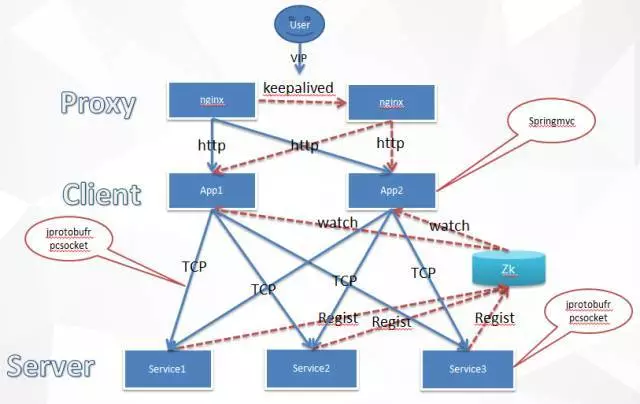
3、Brave环境准备
1、Maven引入
<project xmlns="http://maven.apache.org/POM/4.0.0" xmlns:xsi="http://www.w3.org/2001/XMLSchema-instance"

  xsi:schemaLocation="http://maven.apache.org/POM/4.0.0 http://maven.apache.org/xsd/maven-4.0.0.xsd">

  <modelVersion>4.0.</modelVersion>

  <groupId>io.zipkin.brave</groupId>

  <artifactId>brave-webmvc-example</artifactId>

  <version>1.0-SNAPSHOT</version>

  <packaging>war</packaging>

  <name>brave-webmvc-examplea</name>

  <description>Example using Brave to trace RPCs from Spring Web MVC</description>

  <url>https://github.com/openzipkin/brave-webmvc-example</url>

  <properties>

    <project.build.sourceEncoding>UTF-</project.build.sourceEncoding>

    <spring.version>4.3..RELEASE</spring.version>

    <jetty.version>8.1..v20160902</jetty.version>

    <brave.version>3.16.</brave.version>

    <zipkin-reporter.version>0.6.</zipkin-reporter.version>

  </properties>

  <dependencies>

  <dependency>

      <groupId>junit</groupId>

      <artifactId>junit</artifactId>

      <version>4.10</version>

      <scope>test</scope>

    </dependency>

    <dependency>

        <groupId>io.zipkin.brave</groupId>

        <artifactId>brave-core-spring</artifactId>

        <version>${brave.version}</version>

    </dependency>

    <dependency>

      <groupId>io.zipkin.reporter</groupId>

      <artifactId>zipkin-sender-okhttp3</artifactId>

      <version>${zipkin-reporter.version}</version>

    </dependency>

    <dependency>

      <groupId>io.zipkin.reporter</groupId>

      <artifactId>zipkin-sender-libthrift</artifactId>

      <version>${zipkin-reporter.version}</version>

    </dependency>

    <dependency>

      <groupId>io.zipkin.reporter</groupId>

      <artifactId>zipkin-sender-kafka08</artifactId>

      <version>${zipkin-reporter.version}</version>

    </dependency>

    <dependency>

        <groupId>io.zipkin.brave</groupId>

        <artifactId>brave-spring-web-servlet-interceptor</artifactId>

        <version>${brave.version}</version>

    </dependency>

    <dependency>

      <groupId>io.zipkin.brave</groupId>

      <artifactId>brave-spring-resttemplate-interceptors</artifactId>

      <version>${brave.version}</version>

    </dependency>

    <dependency>

        <groupId>org.springframework</groupId>

        <artifactId>spring-core</artifactId>

        <version>${spring.version}</version>

    </dependency>

    <dependency>

        <groupId>org.springframework</groupId>

        <artifactId>spring-context</artifactId>

        <version>${spring.version}</version>

    </dependency>

    <dependency>

        <groupId>org.springframework</groupId>

        <artifactId>spring-beans</artifactId>

        <version>${spring.version}</version>

    </dependency>

    <dependency>

        <groupId>org.springframework</groupId>

        <artifactId>spring-web</artifactId>

        <version>${spring.version}</version>

    </dependency>

    <dependency>

        <groupId>org.springframework</groupId>

        <artifactId>spring-webmvc</artifactId>

        <version>${spring.version}</version>

    </dependency>

    <dependency>

       <groupId>org.eclipse.jetty</groupId>

       <artifactId>jetty-server</artifactId>

       <version>${jetty.version}</version>

       <scope>test</scope>

    </dependency>

    <dependency>

       <groupId>org.eclipse.jetty</groupId>

       <artifactId>jetty-webapp</artifactId>

       <version>${jetty.version}</version>

       <scope>test</scope>

    </dependency>

        <dependency>

        <groupId>log4j</groupId>

        <artifactId>log4j</artifactId>

        <version>1.2.</version>

    </dependency>

    <dependency>

        <groupId>org.slf4j</groupId>

        <artifactId>slf4j-log4j12</artifactId>

        <version>1.7.</version>

    </dependency>

    <dependency>

        <groupId>org.slf4j</groupId>

        <artifactId>jcl-over-slf4j</artifactId>

        <version>1.7.</version>

    </dependency>

  </dependencies>

  <build>

       <plugins>

            <plugin>

                <inherited>true</inherited>

                <groupId>org.apache.maven.plugins</groupId>

                <artifactId>maven-compiler-plugin</artifactId>

                <version>2.5.</version>

                <configuration>

                    <source>1.6</source>

                    <target>1.6</target>

                    <optimize>true</optimize>

                    <debug>true</debug>

                </configuration>

            </plugin>

            <plugin>

                <groupId>org.apache.maven.plugins</groupId>

                <artifactId>maven-failsafe-plugin</artifactId>

                <version>2.19.</version>

                <executions>

                     <execution>

                        <id>integration-test</id>

                        <goals>

                           <goal>integration-test</goal>

                        </goals>

                       </execution>

                     <execution>

                         <id>verify</id>

                         <goals>

                           <goal>verify</goal>

                         </goals>

                     </execution>

                </executions>

           </plugin>

           <plugin>

                <groupId>org.apache.maven.plugins</groupId>

                <artifactId>maven-war-plugin</artifactId>

                <version>3.0.</version>

                <configuration>

                     <webResources>

                        <resource>

                           <directory>${basedir}/src/main/webapp</directory>

                           <filtering>true</filtering>

                           <includes>

                              <include>**/index.html</include>

                           </includes>

                        </resource>

                        <resource>

                           <directory>${basedir}/src/main/webapp/WEB-INF</directory>

                           <filtering>true</filtering>

                           <targetPath>WEB-INF</targetPath>

                           <includes>

                              <include>**/web.xml</include>

                           </includes>

                        </resource>

                     </webResources>

                     <packagingExcludes>WEB-INF/lib/servlet-api-*.jar</packagingExcludes>

                  </configuration>

           </plugin>

    </plugins>

  </build>

</project>
2、配置埋点(servlet拦截器)
WebTracingConfiguration.java
package com.example.demo.common;

import com.github.kristofa.brave.Brave;

import com.github.kristofa.brave.http.DefaultSpanNameProvider;

import com.github.kristofa.brave.http.SpanNameProvider;

import com.github.kristofa.brave.spring.BraveClientHttpRequestInterceptor;

import com.github.kristofa.brave.spring.ServletHandlerInterceptor;

import java.util.ArrayList;

import java.util.List;

import javax.annotation.PostConstruct;

import org.springframework.beans.factory.annotation.Autowired;

import org.springframework.context.annotation.Bean;

import org.springframework.context.annotation.Configuration;

import org.springframework.context.annotation.Import;

import org.springframework.http.client.ClientHttpRequestInterceptor;

import org.springframework.web.client.RestTemplate;

import org.springframework.web.servlet.config.annotation.InterceptorRegistry;

import org.springframework.web.servlet.config.annotation.WebMvcConfigurerAdapter;

import zipkin.Span;

import zipkin.reporter.AsyncReporter;

import zipkin.reporter.Reporter;

import zipkin.reporter.Sender;

import zipkin.reporter.okhttp3.OkHttpSender;

/**

 * This adds tracing configuration to any web mvc controllers or rest template clients. This should

 * be configured last.

 */

@Configuration

// import as the interceptors are annotation with javax.inject and not automatically wired

@Import({BraveClientHttpRequestInterceptor.class, ServletHandlerInterceptor.class})

public class WebTracingConfiguration extends WebMvcConfigurerAdapter {

    /** 发送器配置 */

    @Bean Sender sender() {

        return OkHttpSender.create("http://47.52.199.51:9411/api/v1/spans");

        //return LibthriftSender.create("127.0.0.1");

        // return KafkaSender.create("127.0.0.1:9092");

    }

    /** 用什么方式显示span信息 */

    @Bean Reporter<Span> reporter() {

        //取消注释,日志打印span信息

        //return new LoggingReporter(); // 打印日志本地,通过日志收集到ES

        return AsyncReporter.builder(sender()).build();

    }

    @Bean Brave brave() {

        return new Brave.Builder("brave-webmvc-zipkin").reporter(reporter()).build();

    }

    // span命名提供者,默认为http方法.

    @Bean SpanNameProvider spanNameProvider() {

        return new DefaultSpanNameProvider();

    }

    @Autowired

    private ServletHandlerInterceptor serverInterceptor;

    @Autowired

    private BraveClientHttpRequestInterceptor clientInterceptor;

    @Autowired

    private RestTemplate restTemplate;

    @Bean

    RestTemplate template() {

        return new RestTemplate();

    }

    // 添加rest template拦截器

    @PostConstruct

    public void init() {

        List<ClientHttpRequestInterceptor> interceptors = new ArrayList<ClientHttpRequestInterceptor>(restTemplate.getInterceptors());

        interceptors.add(clientInterceptor);

        restTemplate.setInterceptors(interceptors);

    }

    // 添加Severlet拦截器

    @Override

    public void addInterceptors(InterceptorRegistry registry) {

        registry.addInterceptor(serverInterceptor);

    }

}
2、ZipkinController.java
package com.example.demo.controller;

import org.springframework.beans.factory.annotation.Autowired;

import org.springframework.web.bind.annotation.GetMapping;

import org.springframework.web.bind.annotation.RestController;

import org.springframework.web.client.RestTemplate;

@RestController

public class ZipkinController {

    @Autowired RestTemplate template;

    @GetMapping("/zipkin")

    public String service() throws Exception {

        return template.getForObject("http://192.168.1.100:8080/service0", String.class);

    }

}
4、运行
1、访问:http://192.168.1.100:8084/zipkin
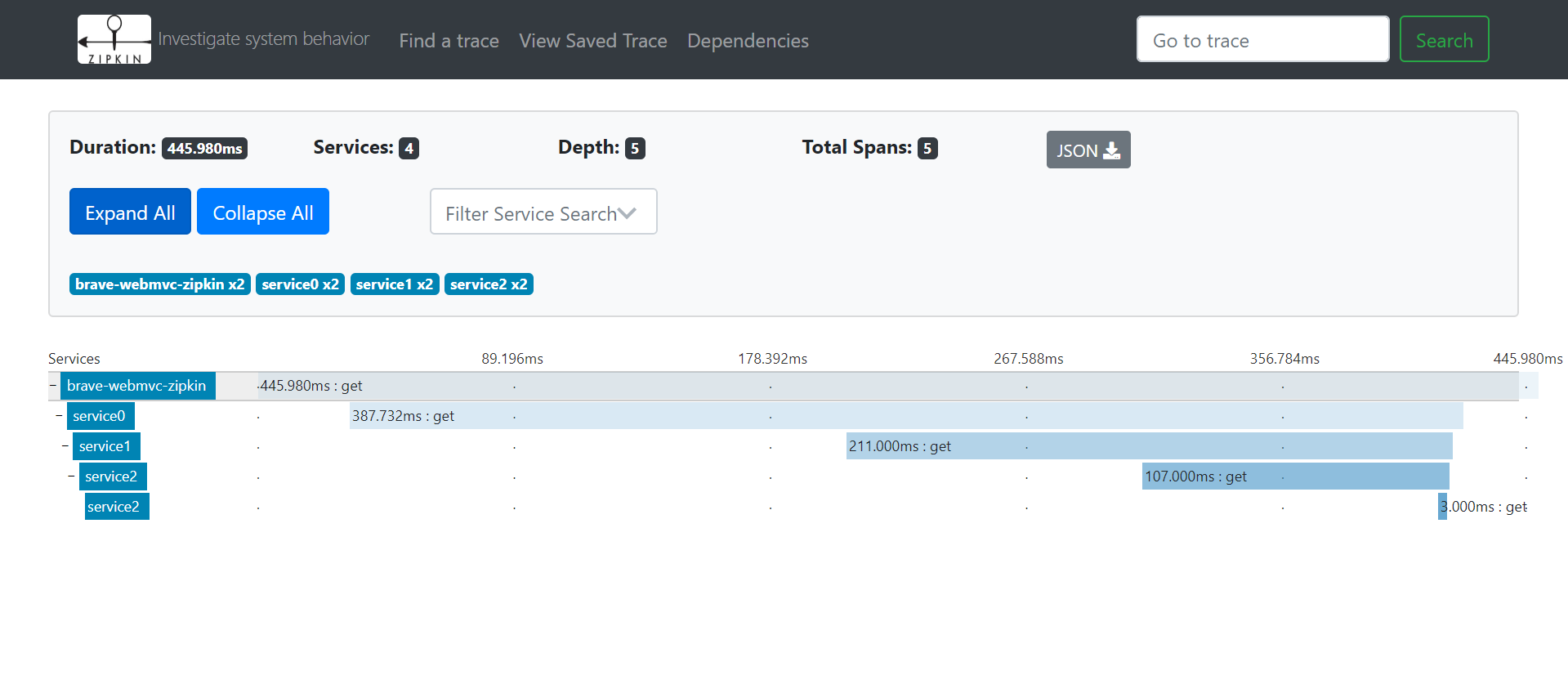
service0~service2部分请看:调用链系列一、Zipkin架构介绍、搭建、Springboot集承、Zipkin UI详解
调用链系列二、Zipkin 和 Brave 实现(springmvc、RestTemplate)服务调用跟踪的更多相关文章
- 调用链系列(3):如何从零开始捕获body和header
拓展阅读:调用链系列(1):解读UAVStack中的贪吃蛇 调用链系列(2):轻调用链实现 在Java中,HTTP协议的请求/响应模型是由Servlet规范+Servlet容器(如Tomcat)实现的 ...
- 调用链系列(1):解读UAVStack中的贪吃蛇
一.背景 对于分布式在线服务,一个请求需要经过多个系统中多个模块,可能多达上百台机器的协作才能完成单次请求.这种场景下单靠人力无法掌握整个请求中各个阶段的性能开销,更无法快速的定位系统中性能瓶颈.当发 ...
- dubbo+zipkin调用链监控(二)
*:first-child { margin-top: 0 !important; } body > *:last-child { margin-bottom: 0 !important; } ...
- C#制作Windows service服务系列二:演示一个定期执行的windows服务及调试(windows service)
系列一: 制作一个可安装.可启动.可停止.可卸载的Windows service(downmoon原创) 系列二:演示一个定期执行的windows服务及调试(windows service)(down ...
- C#调用C++系列二:传结构体
这一篇记录下C#调用C++的结构体的方式来使用OpenCV的数据格式,这里会有两种方式,第一种是C#传一个结构体和图像的路径给C++,然后C++将图像加载进来,再把传进来的结构体填满即可,第二种是C# ...
- spring cloud 入门系列五:使用Feign 实现声明式服务调用
一.Spring Cloud Feign概念引入通过前面的随笔,我们了解如何通过Spring Cloud ribbon进行负责均衡,如何通过Spring Cloud Hystrix进行服务断路保护,两 ...
- 调用链系列三、基于zipkin调用链封装starter实现springmvc、dubbo、restTemplate等实现全链路跟踪
一.实现思路 1.过滤器实现思路 所有调用链数据都通过过滤器实现埋点并收集.同一条链共享一个traceId.每个节点有唯一的spanId. 2.共享传递方式 1.rpc调用:通过隐式传参.dubbo有 ...
- Istio调用链埋点原理剖析—是否真的“零修改”分享实录(下)
调用链原理和场景 正如Service Mesh的诞生是为了解决大规模分布式服务访问的治理问题,调用链的出现也是为了对应于大规模的复杂的分布式系统运行中碰到的故障定位定界问题.大量的服务调用.跨进程.跨 ...
- 多语言(Java、.NET、Node.js)混合架构下开源调用链追踪APM项目初步选型
1. 背景 我们的技术栈包括了Java..NET.Node.js等,并且采用了分布式的技术架构,系统性能管理.问题排查成本越来越高. 2. 基本诉求 针对我们的情况,这里列出了选型的主要条件,作为最终 ...
随机推荐
- 【转】cJSON 源码阅读笔记
前言 cjson 的代码只有 1000+ 行, 而且只是简单的几个函数的调用. 而且 cjson 还有很多不完善的地方, 推荐大家看完之后自己实现一个 封装好的功能完善的 cjson 程序. json ...
- 洛谷 P1490 买蛋糕 解题报告
P1490 买蛋糕 题目描述 野猫过生日,大家当然会送礼物了(咳咳,没送礼物的同志注意了哈!!),由于不知道送什么好,又考虑到实用性等其他问题,大家决定合伙给野猫买一个生日蛋糕.大家不知道最后要买的蛋 ...
- SP1805 HISTOGRA (单调栈)
单调栈维护栈顶为高度最大的 记下来栈中每个元素入栈时顶掉的最靠左的一个位置(如果没顶掉就是它本身),那么在它出栈的时候,它所带来的面积就是(出栈位置-记录位置)*高度 (可能会有加一减一之类的细节) ...
- MyEclipse新建工作空间后的配置详细步骤
1. General --> Workspace --> UTF-8 2. General --> Editors -->File Associations --> J ...
- TCP协议、UDP协议、端口、套接字
TCP协议优缺点 可靠:反馈数据是否送达 效率低:需要创建连接请求,连接成功后发数据 UDP协议优缺点 不可靠:无任何反馈 效率高:不创建连接请求,直接发数据 端口(0~65535,其中0~1023用 ...
- (大数 string) Integer Inquiry hdu1047
Integer Inquiry Time Limit: 2000/1000 MS (Java/Others) Memory Limit: 65536/32768 K (Java/Others) ...
- ArrayList创建步骤及基本方法
ArrayList创建变量的步骤 ArrayList ------>集合 1: 导入包 java.util.ArrayList包中 2: 创建引用类型的变量 数据类型< 集合存储的数据类型 ...
- 利用ansible-playbook从测试环境获取tomcat中java项目新版本发布到生产环境
一.环境描述 安装有ansible的服务器:192.168.13.45 测试环境服务器:192.168.13.49 /home/app/api-tomcat/webapps/api.war为测试环境新 ...
- 五个免费UML建模工具
UML工具很多是商用的,价格不菲:而免费的UML建模工具,功能完善的很少.以下推荐的是五个免费的UML建模工具,相对而言还算功能比较不错. 免费UML建模工具推荐:JUDE – community 如 ...
- 加减乘除工具类BigDecimalUtil
场景:为毛要用BigDecimal这个类来实现加减乘除呢?我不说其他的,你去用小数乘小数,除小数就知道.话不多说,老规矩,开箱即用. BigDecimalUtil.java package com.m ...