
kali源
apt源:
#中科大

deb http://mirrors.ustc.edu.cn/kali kali-rolling main non-free contrib

deb-src http://mirrors.ustc.edu.cn/kali kali-rolling main non-free contrib

#阿里云

deb http://mirrors.aliyun.com/kali kali-rolling main non-free contrib

deb-src http://mirrors.aliyun.com/kali kali-rolling main non-free contrib

#清华大学

deb http://mirrors.tuna.tsinghua.edu.cn/kali kali-rolling main contrib non-free

deb-src https://mirrors.tuna.tsinghua.edu.cn/kali kali-rolling main contrib non-free

#浙大

deb http://mirrors.zju.edu.cn/kali kali-rolling main contrib non-free

deb-src http://mirrors.zju.edu.cn/kali kali-rolling main contrib non-free

#东软大学

deb http://mirrors.neusoft.edu.cn/kali kali-rolling/main non-free contrib

deb-src http://mirrors.neusoft.edu.cn/kali kali-rolling/main non-free contrib

#官方源

deb http://http.kali.org/kali kali-rolling main non-free contrib

deb-src http://http.kali.org/kali kali-rolling main non-free contrib
故障解决:
故障现象:
[root@host01 ~]# ssh 10.105.139.144

no hostkey alg
查看详细信息:
[root@host01 ssh]# ssh -v 10.105.139.144

OpenSSH_5.3p1, OpenSSL 1.0.1e-fips 11 Feb 2013

debug1: Reading configuration data /etc/ssh/ssh_config

debug1: Applying options for *

debug1: Connecting to 10.105.139.144 [10.105.139.144] port 22.

debug1: Connection established.

debug1: permanently_set_uid: 0/0

debug1: identity file /root/.ssh/identity type -1

debug1: identity file /root/.ssh/identity-cert type -1

debug1: identity file /root/.ssh/id_rsa type 1

debug1: identity file /root/.ssh/id_rsa-cert type -1

debug1: identity file /root/.ssh/id_dsa type -1

debug1: identity file /root/.ssh/id_dsa-cert type -1

debug1: identity file /root/.ssh/id_ecdsa type -1

debug1: identity file /root/.ssh/id_ecdsa-cert type -1

debug1: Remote protocol version 2.0, remote software version OpenSSH_7.8p1 Debian-1

debug1: match: OpenSSH_7.8p1 Debian-1 pat OpenSSH*

debug1: Enabling compatibility mode for protocol 2.0

debug1: Local version string SSH-2.0-OpenSSH_5.3

debug1: SSH2_MSG_KEXINIT sent

debug1: SSH2_MSG_KEXINIT received

debug1: kex: server->client aes128-ctr hmac-sha1 none

debug1: kex: client->server aes128-ctr hmac-sha1 none

no hostkey alg
解决方法:
在服务端执行以下命令:
ssh-keygen -t rsa -f /etc/ssh/ssh_host_rsa_key

ssh-keygen -t dsa -f /etc/ssh/ssh_host_dsa_key
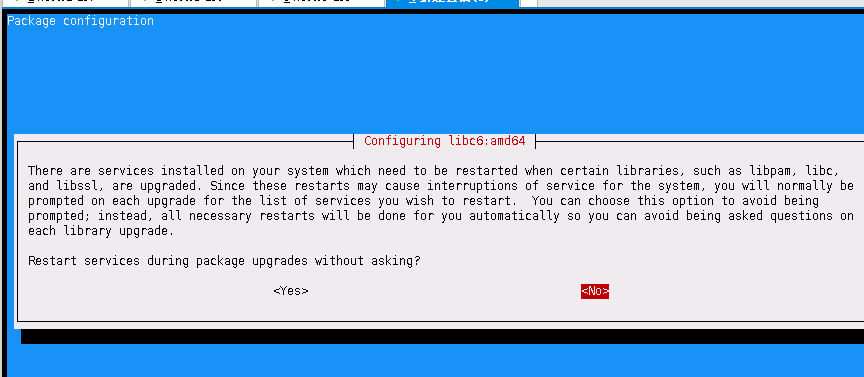
There are services installed on your system which need to be restarted when certain libraries, such as libpam, libc, x
and libssl, are upgraded. Since these restarts may cause interruptions of service for the system, you will normally be x
prompted on each upgrade for the list of services you wish to restart. You can choose this option to avoid being x
prompted; instead, all necessary restarts will be done for you automatically so you can avoid being asked questions on x
each library upgrade. x
Restart services during package upgrades without asking?
kali关闭iptables
安装
apt-get install ufw关闭
ufw disable # To disable the firewall开启
ufw enable # To enable the firewall下面简单讲一下这个问题的原理和比较长久的解决方案。
1、ssh会把你每个你访问过计算机的公钥(public key)都记录在~/.ssh/known_hosts。当下次访问相同计算机时,OpenSSH会核对公钥。如果公钥不同,OpenSSH会发出警告, 避免你受到DNS Hijack之类的攻击。
2、SSH对主机的public_key的检查等级是根据StrictHostKeyChecking变量来配置的。默认情况下,StrictHostKeyChecking=ask。
1.StrictHostKeyChecking=no

#最不安全的级别。如果连接server的key在本地不存在,那么就自动添加到文件中(默认是known_hosts),并且给出一个警告。

2.StrictHostKeyChecking=ask  #默认的级别,就是出现刚才的提示了。如果连接和key不匹配,给出提示,并拒绝登录。

3.StrictHostKeyChecking=yes  #最安全的级别,如果连接与key不匹配,就拒绝连接,不会提示详细信息。
ask状态:

vim /etc/ssh/ssh_config
StrictHostKeyChecking no

UserKnownHostsFile /dev/null
(注:这里为了简便,将knownhostfile设为/dev/null,就不保存在known_hosts中了)
SSH 登录失败:Host key verification failed 的处理方法
问题1:
SSH 登录失败:Host key verification failed
######################################
由于公钥不一样了,所以无法登录,提示信息是 KEY 验证失败。
解决方法是:
在 /root/.ssh/known_hosts 文件里面将原来的公钥信息删除即可。
SSH 报 “Host key verification failed.”。一般来说,出现该错误有这么几种可能:
1. .ssh/known_hosts 裡面记录的目标主机 key 值不正确。这是最普遍的情况,只要删除对应的主机记录就能恢复正常。
运行命令: sudo rm /home/yourname/.ssh/known_hosts
2. .ssh 目录或者 .ssh/known_hosts 对当前用户的权限设置不正确。这种情况比较少,一般正确设置读写权限以后也能恢复正常。
3. /dev/tty 对 other 用户没有放开读写权限。这种情况极为罕见。出现的现象是,只有 root 用户能够使用 ssh client,而所有其他的普通用户都会出现错误。
我今天遇到的就是第三种情况,修改 /dev/tty 的权限后,一切正常。为了避免以后忘记解决方法,记录在这里。
问题2:
ssh_exchange_identification: Connection closed by remote host
##################################################
解决办法:
修改/etc/hosts.allow文件,加入 sshd:ALL。
符相关配制说明: vi /etc/ssh/ssh_config
-------------------------------------------------
下面逐行说明上面的选项设置:
Host * :选项“Host”只对能够匹配后面字串的计算机有效。“*”表示所有的计算机。
ForwardAgent no :“ForwardAgent”设置连接是否经过验证代理(如果存在)转发给远程计算机。
ForwardX11 no :“ForwardX11”设置X11连接是否被自动重定向到安全的通道和显示集(DISPLAY set)。
RhostsAuthentication no :“RhostsAuthentication”设置是否使用基于rhosts的安全验证。
RhostsRSAAuthentication no :“RhostsRSAAuthentication”设置是否使用用RSA算法的基于rhosts的安全验证。
RSAAuthentication yes :RSAAuthentication”设置是否使用RSA算法进行安全验证。
PasswordAuthentication yes :“PasswordAuthentication”设置是否使用口令验证。
FallBackToRsh no:“FallBackToRsh”设置如果用ssh连接出现错误是否自动使用rsh。
UseRsh no :“UseRsh”设置是否在这台计算机上使用“rlogin/rsh”。
BatchMode no :“BatchMode”如果设为“yes”,passphrase/password(交互式输入口令)的提示将被禁止。当不能交互式输入口令的时候,这个选项对脚本文件和批处理任务十分有用。
CheckHostIP yes :“CheckHostIP”设置ssh是否查看连接到服务器的主机的IP地址以防止DNS欺骗。建议设置为“yes”。
StrictHostKeyChecking no :“StrictHostKeyChecking”如果设置成“yes”,ssh就不会自动把计算机 的密匙加入“$HOME/.ssh/known_hosts”文件,并且一旦计算机的密匙发生了变化,就拒绝连接。
IdentityFile ~/.ssh/identity :“IdentityFile”设置从哪个文件读取用户的RSA安全验证标识。
Port 22 :“Port”设置连接到远程主机的端口。
Cipher blowfish :“Cipher”设置加密用的密码。
EscapeChar ~ :“EscapeChar”设置escape字符。
https://blog.csdn.net/qq_42103479/article/details/90111365

kali源的更多相关文章
- 更换Kali源让你更新更快
在2016.1版本kali-linux(也就是kali滚动更新版)更新慢解决办法: (此源为2.0版本)中科大kali滚动更新版源(即kali2.0源) #kali官方源 deb http://htt ...
- ubuntu 1806 添加 kali 源
最近需要使用 kali 源安装一些软件: 配置 sources.list,根据如下链接:http://mirrors.ustc.edu.cn/help/kali.html 获取 公钥:apt-key ...
- ubuntu下导入kali源
Kali-Linux之前的渗透神器BackTrack是基于Ubuntu的,界面比较友好,字体渲染看起来也比较舒服(也可能是本人用惯了 Ubuntu的缘故).后来官方终止BackTrack,开发Kali ...
- kali 源
#阿里云 deb http://mirrors.aliyun.com/kali kali-rolling main non-free contrib deb-src http://mirrors.al ...
- kali源更新
对于新装kali的同学一点存在着更新源的问题 这是对初次安装,进行系统更新的教程 首先需要有gpg_key wget -q -O - https://archive.kali.org/archive- ...
- kali 源设置sources.list
由于阿里源有些问题,可能我设置的问题,所以就去掉了,163的很快 # deb cdrom:[Debian GNU/Linux 2016.1 _Kali-rolling_ - Official Snap ...
- 4.修改更新源sources.list,提高软件下载安装速度(提供Kali 2.0 更新源)
1.切换到root用户(如果已经是root用户就直接看第二步) dnt@HackerKali:~$ su 密码: 2.用文本编辑器打开sources.list,手动添加下面的更新源 root@Hack ...
- 修改更新源sources.list,提高软件下载安装速度(提供Kali 2.0 更新源)
1.切换到root用户(如果已经是root用户就直接看第二步) dnt@HackerKali:~$ su 密码: 2.用文本编辑器打开sources.list,手动添加下面的更新源 root@Hack ...
- kali 更新源
个人收集的kali 更新源: 修改更新源: vim /etc/apt/sources.list 更新源列表包: #apt-get update 更新系统软件: #apt-get upgrade #官方 ...
随机推荐
- docker 安装与常用命令与常用容器(containers)环境
注意区别 container 与 image 的关系,container 的建立需要 image 的承载,也即 container 依赖 image,停止并删除了 container 并不会删除 im ...
- bzoj 3533: [Sdoi2014]向量集 线段树维护凸包
题目大意: http://www.lydsy.com/JudgeOnline/problem.php?id=3533 题解: 首先我们把这些向量都平移到原点.这样我们就发现: 对于每次询问所得到的an ...
- vue2.0中的$router 和 $route的区别
1.router是VueRouter的一个对象,通过Vue.use(VueRouter)和VueRouter构造函数得到一个router的实例对象,这个对象中是一个全局的对象,他包含了所有的路由包含了 ...
- UML Design Via Visual Studio-Sequence Diagram
本文主要介绍在Visual Studio中设计时序图,内容如下: 何时使用时序图 时序图元素介绍 条件.循环在时序图中的使用 直接通过代码生成时序图 一.何时使用时序图 当要查看单个用例内若干对象的行 ...
- 洛谷【P3612】[USACO17JAN]Secret Cow Code秘密奶牛码
我对分治的理解:https://www.cnblogs.com/AKMer/p/9728574.html 题目传送门:https://www.luogu.org/problemnew/show/P36 ...
- android开发之数据库存取图片
Android数据库中存取图片通常使用两种方式,一种是保存图片所在路径,二是将图片以二进制的形式存储(sqlite3支持BLOB数据类型).对于两种方法的使用,好像第二种方法不如第一种方法更受程序员欢 ...
- angular-cli.json配置参数解析,常用命令解析
1.angular-cli.json配置参数解析 { "project": { "name": "ng-admin", //项目名称 &qu ...
- linux strace-跟踪进程的系统调用或是信号产生情况,lstrace-跟踪己丑年调用库函数情况,进程跟踪调试命令
本工具可以用来做大多数排除,比如mount一个NFS,很慢,找不出原因,我们可以使用strace命令来跟中mount这个经常所有的调用过程. strace 命令是一种强大的工具,它能够显示所有由用户空 ...
- 全面解析JS字符串和正则表达式中的match、replace、exec等函数
转自:https://www.jb51.net/article/87730.htm 正则表达式(regular expression)描述了一种字符串匹配的模式,可以用来检查一个串是否含有某种子串.将 ...
- python 基础 列表 增删改查
names = ["aaron", "alex", "james", "meihengfan"]names2 = [1, ...