
gdb tui中切换窗口
gdb的gui用法
http://beej.us/guide/bggdb/#compiling
简单来说就是在以往的gdb开始的时候添加一个-tui选项.有的版本已经有gdbtui这个程序了
在linux自带的终端里是正常显示的,但是在securecrt里面,可能由于编码的问题,边缘会有些乱码,不过不影响使用(如果你的程序有错误输出,会扰乱整个界面,所以在调试的时候,建议添加2>/dev/null,这样的话基本可用)
启动gdb之后,上面是src窗口,下面是cmd窗口,默认focus在src窗口的,这样的话上下键以及pagedown,pageup都是在移动显示代码,并不显示上下的调试命令.这个时候要切换focus,具体可简单参见
(gdb) info win  查看当前focus

        SRC     (36 lines)  <has focus>

        CMD     (18 lines)

(gdb) fs next  切换focus

Focus set to CMD window.

(gdb) info win

        SRC     (36 lines)

        CMD     (18 lines)  <has focus>

(gdb) fs SRC  切换指定focus

Focus set to SRC window.

(gdb)
(Window names are case in-sensitive.)
To start in neato and highly-recommended GUI mode, start the debugger with gdb -tui. (For many of the examples, below, I show the output of gdb's dumb terminal mode, but in real life I use TUI mode exclusively.)
And here is a screenshot of what you'll see, approximately:
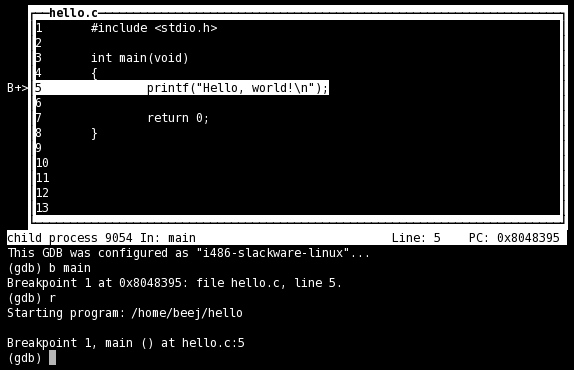
In TUI mode, the layout command controls which windows you see. Additionally, the tui reg allows control of the register window, and will open it if it's not already open.
The commands are:
| layout src | Standard layout—source on top, command window on the bottom |
| layout asm | Just like the "src" layout, except it's an assembly window on top |
| layout split | Three windows: source on top, assembly in the middle, and command at the bottom |
| layout reg | Opens the register window on top of either source or assembly, whichever was opened last |
| tui reg general | Show the general registers |
| tui reg float | Show the floating point registers |
| tui reg system | Show the "system" registers |
| tui reg next | Show the next page of registers—this is important because there might be pages of registers that aren't in the "general", "float", or "system" sets |
gdb tui中切换窗口的更多相关文章
- gdb tui设置默认窗口高度
gdb -p 12999 -tui 先显示win信息(输入:info win) 显示如下: SRC (35 lines) <has focus> CMD (17 lines) 我们要改的是 ...
- Qt中切换窗口功能的实现
两条语句就能够实现了: this->newNC.setWindowFlags(Qt::WindowStaysOnTopHint); this->newNC.show(); mark一下,防 ...
- selenium中三大窗口切换
我们在做UI自动化时,不得不会遇到一些窗口跳转与弹框,在这种的时候如果不进行切换的话,继续执行脚本必然会报错,所以我们就需要用到切换窗口的方法. selenium中主要是三种窗口 Windows窗口 ...
- Java中怎么切换窗口
首先,创建一个窗口对象: eg: JFram frame = JFrame();//创建一个窗体 frame.setVisible(true);//设置窗体可见,默认不可见 然后编写相关应用或组件… ...
- WebDriver(Selenium2) 根据新窗口title切换窗口
http://uniquepig.iteye.com/blog/1559321 在webdriver官方的api中,切换窗口的方法提供的参数是nameOrHandle. 引用 http://uniqu ...
- selenium切换窗口
在做网页自动化测试的时候,难免会打开很多个网页,那么,如何在多个窗口之间切换呢? 获取窗口的唯一标识用句柄(handle)表示,因此只需要切换句柄,就可以灵活的在各窗口之间切换. 下面介绍几个方法 c ...
- MFC关于多线程中传递窗口类指针时ASSERT_VALID出错的另类解决 转
MFC关于多线程中传递窗口类指针时ASSERT_VALID出错的另类解决 在多线程设计中,许多人为了省事,会将对话框类或其它类的指针传给工作线程,而在工作线程中调用该类的成员函数或成员变量等等. ...
- Selenium切换窗口,警告框处理,调用JavaScript代码
多窗口切换 在页面操作过程中有时候点击某个链接会弹出新的窗口,这时就需要主机切换到新打开的窗口上进行操作. WebDriver提供了switch_to.window()方法,可以实现在不同的窗口之间切 ...
- 【转】WPF中的窗口的生命周期
原文地址:http://www.cnblogs.com/Jennifer/articles/1997763.html WPF中的窗口的生命周期 WPF中所有窗口的基类型都是System.Windows ...
随机推荐
- Node.js如何找npm模板
首先需要去官网下载npm文件 https://www.npmjs.com/ 下载完成,使用CD查看是否安装完成 然后就是贴代码看npm模板的功能 var _ = require('underscore ...
- CF961F k-substrings
题意 给定一个字符串 \(S\) 求所有的 \(S[i,n-i+1]\) 的 \(border\) 长度(最长的前缀等于后缀),要求长度是奇数 \(n\le 10^6\) Sol 首先发现每次求的串都 ...
- laravel之路由汇总
- ORACLE数据仓库学习记录
一.数据仓库安装 安装ORACLE DATABASE 10g Release 2 ORACLE数据库版本是:10.2.0.1.0(服务器).执行基本安装(安装全部的组件)并创建示例数据库. 安装ORA ...
- android头像上传(获取头像加剪切)
因为项目中需要用到头像上传的功能,所以就下个Ddmo先来实现下. demo我是类似仿微信的,在一个GridView中展示所有的图片,其中第一个item可以去照相:获取到图片后再进行剪切. 图片的剪切是 ...
- postman trigger xdebug session in phpstorm
phpstorm是一款非常棒的php开发调试工具,一般情况下我们使用firefox/chrome的bookmark,开启phpstorm debug侦听,随后点击start debugger, 我们就 ...
- 让UpdatePanel支持文件上传(2):服务器端组件 .
我们现在来关注服务器端的组件.目前的主要问题是,我们如何让页面(事实上是ScriptManager控件)认为它接收到的是一个异步的回送?ScriptManager控件会在HTTP请求的Header中查 ...
- 实现UIView的无限旋转动画(非CALayer动画)
实现UIView的无限旋转动画(非CALayer动画) 效果: 素材: 源码: // // ViewController.m // Animation // // Created by YouXian ...
- Exchange Server 2007 多名称证书配置
Exchange Server 2007上配置多名称证书,有两种方式,一种是通过Exchange Management Shell利用命令行工具进行创建:另一种是通过证书管理器控制台进行创建.本文将介 ...
- 通过Windows Server 2008 R2建立iSCSI存储
名词解释:iSCSI技术是一种由IBM公司研究开发的,是一个供硬件设备使用的可以在IP协议的上层运行的SCSI指令集,这种指令集合可以实现在IP网络上运行 SCSI协议,使其能够在诸如高速千兆以太网上 ...