
[转]C#创建服务及使用程序自动安装服务,.NET创建一个即是可执行程序又是Windows服务的exe
写在前面
原文地址:C#创建服务及使用程序自动安装服务,.NET创建一个即是可执行程序又是Windows服务的exe
这篇文章躺在我的收藏夹中有很长一段时间了,今天闲着没事,就自己动手实践了一下。感觉作者还是蛮给力的。这里动手实践,把它变为自己的东西。多谢作者。
操作步骤
最近在弄的项目,一直在考虑是否弄windows服务来定时拉取数据。然后就按照这个思路,想了一下,发现跟之前看的一篇文章需求很是类似。就弄了个demo,把那种方式吸收下来。
首先,创建一个控制台应用程序。

然后,添加一个windows服务类。

项目
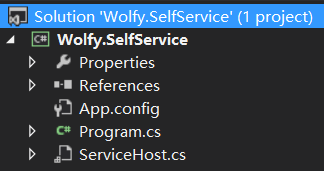
然后打开SericeHost.cs,右键查看代码

代码如下:
using System;

using System.Collections.Generic;

using System.ComponentModel;

using System.Data;

using System.Diagnostics;

using System.Linq;

using System.ServiceProcess;

using System.Text;

using System.Threading.Tasks;

namespace Wolfy.SelfService

{

    partial class ServiceHost : ServiceBase

    {

        public ServiceHost()

        {

            InitializeComponent();

        }

        protected override void OnStart(string[] args)

        {

            // TODO: Add code here to start your service.

            System.IO.File.AppendAllText("D:\\log.txt", "Service Is Started……" + DateTime.Now.ToString());

        }

        protected override void OnStop()

        {

            // TODO: Add code here to perform any tear-down necessary to stop your service.

            System.IO.File.AppendAllText("D:\\log.txt", "Service Is Stopped……" + DateTime.Now.ToString());

        }

    }

}
修改入口函数Main方法,根据agrs参数,来识别是安装服务,还是应用程序。如果是服务则执行安装服务的步骤,否则则运行程序。
using System;

using System.Collections.Generic;

using System.Diagnostics;

using System.Linq;

using System.ServiceProcess;

using System.Text;

using System.Threading.Tasks;

namespace Wolfy.SelfService

{

    class Program

    {

        static void Main(string[] args)

        {

            //如果传递了"s"参数就启动服务

            if (args.Length >  && args[] == "s")

            {

                //启动服务的代码,可以从其它地方拷贝

                ServiceBase[] ServicesToRun;

                ServicesToRun = new ServiceBase[]

                {

                    new ServiceHost(),

                };

                ServiceBase.Run(ServicesToRun);

            }

            else

            {

                Console.WriteLine("这是Windows应用程序");

                Console.WriteLine("请选择,[1]安装服务 [2]卸载服务 [3]退出");

                var rs = int.Parse(Console.ReadLine());

                switch (rs)

                {

                    case :

                        //取当前可执行文件路径,加上"s"参数,证明是从windows服务启动该程序

                        var path = Process.GetCurrentProcess().MainModule.FileName + " s";

                        Process.Start("sc", "create myserver binpath= \"" + path + "\" displayName= 我的服务 start= auto");

                        Console.WriteLine("安装成功");

                        Console.Read();

                        break;

                    case :

                        Process.Start("sc", "delete myserver");

                        Console.WriteLine("卸载成功");

                        Console.Read();

                        break;

                    case : break;

                }

            }

        }

    }

}
测试
以管理员身份运行Wolfy.SelfService.exe可执行程序。
这里需要注意,要以管理员身份运行,毕竟是安装windows服务,否则权限不够,造成安装失败。

输入1

然后win+R,输入services.msv
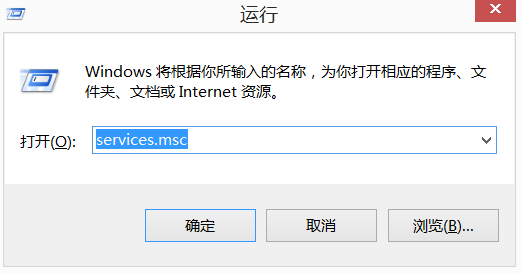

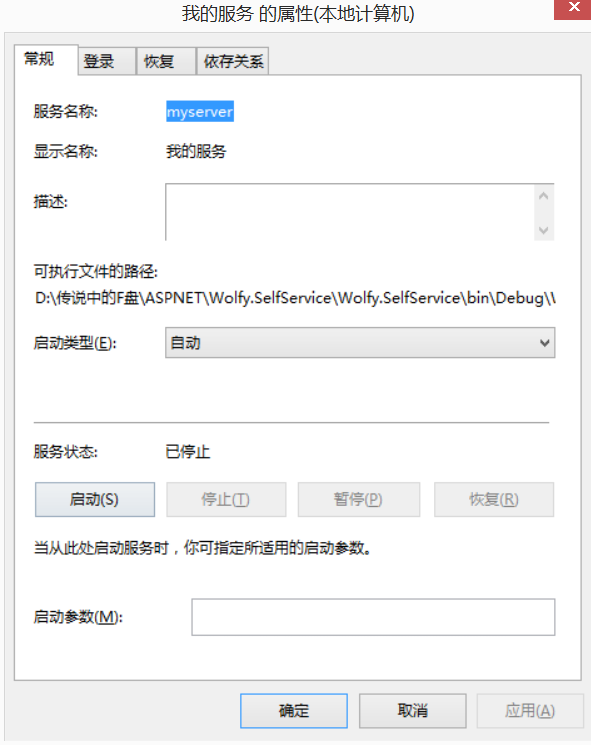
服务安装成功,下面我们启动服务。

查看下log.txt

说明服务安装成功,并启动成功。
停止服务,然后卸载服务。
Service Is Started……// ::11Service Is Stopped……// ::
说明服务停止成功,然后进行卸载。
同样,卸载也要以管理员身份运行。
然后在服务管理中,发现“我的服务”已经卸载。
总结
这里按照作者的思路,进行了实践,这个思路确实不错,实践一下,也算吸收了。多谢。这篇文章也可以从我的收藏夹中移除了。
[转]C#创建服务及使用程序自动安装服务,.NET创建一个即是可执行程序又是Windows服务的exe的更多相关文章
- C#创建服务及使用程序自动安装服务,.NET创建一个即是可执行程序又是Windows服务的exe
不得不说,.NET中安装服务很麻烦,即要创建Service,又要创建ServiceInstall,最后还要弄一堆命令来安装和卸载. 今天给大家提供一种方式,直接使用我们的程序来安装/卸载服务,并且可以 ...
- .NET创建一个即是可执行程序又是Windows服务的程序
不得不说,.NET中安装服务很麻烦,即要创建Service,又要创建ServiceInstall,最后还要弄一堆命令来安装和卸载. 今天给大家提供一种方式,直接使用我们的程序来安装/卸载服务,并且可以 ...
- C#创建服务及使用程序自动安装服务
.NET创建一个即是可执行程序又是Windows服务的exe 不得不说,.NET中安装服务很麻烦,即要创建Service,又要创建ServiceInstall,最后还要弄一堆命令来安装和卸载. 今天给 ...
- Topshelf一个用于使用.NET构建Windows服务框架
1 Topshelf是什么? Topshelf是用于托管使用.NET框架编写的Windows服务的框架.服务的创建得到简化,从而使开发人员可以创建一个简单的控制台应用程序,可以使用Topshelf将其 ...
- 可以自动安装mysql数据库的一个shell脚本
发布:thatboy 来源:脚本学堂 [大 中 小] 分享一例shell脚本,可以实现mysql数据库的自动安装,脚本写的不错,无论是用来学习,还是生产环境中应用,都是不错的,有需要的朋友 ...
- C#程序自动安装数字证书
using System.Security.Cryptography.X509Certificates; MessageBox.Show("开始"); //添加个人证书 X509C ...
- Quartz.Net在windows服务中的使用
写在前面 这几天在弄一个项目,需要定时抓取一些数据,当时也想直接用timer算了.因为之前也弄过这样的项目,但是一想,已经用过了,再去使用同一种思路,未免太乏味了.就换了一种新玩法.这里将之前看到的一 ...
- 定时执行exe、windows任务计划、windows服务
环境: Windows10 + VS2015 + SQL Server2014 + .NET Framework4.5 + C# + WCF 问题: 业务功能需要,做了一个windows应用程序供主程 ...
- c#创建、安装、卸载、调试windows服务的简单事例
最近工作中用到了windows服务,对其有深刻理解和丰富经验谈不上,本篇文章只是简单陈诉用c#创建.安装.卸载.调试windows服务的步骤. 一.创建windows服务 1.用VS创建windows ...
随机推荐
- Linux查看BIOS信息
http://www.linuxde.net/2013/02/12499.html
- Hadoop with tool interface
Often Hadoop jobsare executed through a command line. Therefore, each Hadoop job has to support read ...
- Oracle Jdbc demo
两种方式: thin是一种瘦客户端的连接方式,即采用这种连接方式不需要安装oracle客户端,只要求classpath中包含jdbc驱动的jar包就行.thin就是纯粹用Java写的ORACLE数据库 ...
- python实现插入排序
代码如下@.·.@ # *-* coding: utf- *-* if __name__ == '__main__': def insert_sort(l): ,len(l)): tmp = l[i] ...
- Network client/server
<Beginning Linux Programming_4th> chapter 15 Sockets 1 A simple local client/server 1) clie ...
- IUYYLIUIU
#include<cstdio> using namespace std; int main() { printf("IIIIU !"); ; } //http://c ...
- Spring 中注入 properties 中的值
<bean id="ckcPlaceholderProperties" class="org.springframework.beans.factory.confi ...
- java9-3 返回类型
1. 返回值类型 基本类型:(基本类型简单) 引用类型: 类:返回的是该类的对象 class Student2 { public void study() { System.out.println(& ...
- JQuery[一] 中如何选中$(this)下面的子元素
<ul> li><span></span></li> li><span></span></li> < ...
- js中的return,return true,return false小结
return 函数执行到这句时会终结,并返回调用函数,而且把表达式的值作为函数的结果返回 return false 可以防止默认的事件行为.例如,默认情况下点击一个<a>元素,页面会跳转 ...