
分布式icinga2安装与使用
目标
配置分布式的icinga2监控系统。分布式监控适用于服务器遍布在多个区域,且需要一个master做统一管理。
搭建环境
服务器
系统: ubuntu 15.04/ubuntu 14.04
icinga2主节点: 192.168.19.77 负责分发配置,统一展示监控结果。
icinga2子节点1: 192.168.19.45 负责监控openstack RegionOne区域的所有服务器
icinga2子节点2: 192.168.19.30 负责将空openstack RegionTwo区域的所有服务器
为了充分利用现有的nagios插件,使用nrpe监控服务器。
拓扑图
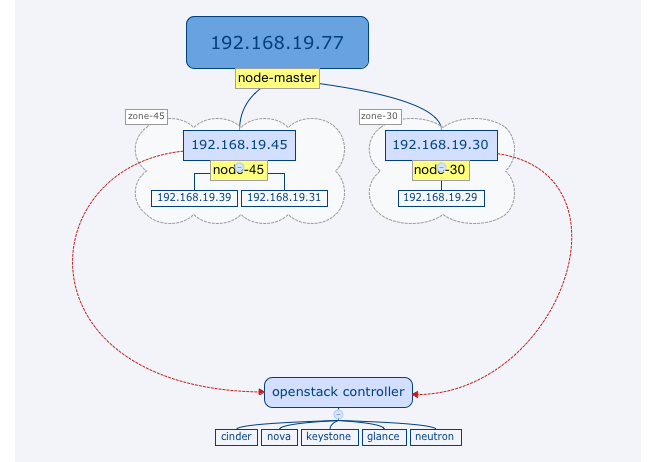
安装配置icinga2
注意: 如果特别说明,所有操作均在192.168.19.77,45,30执行。
设置包源
# add-apt-repository ppa:formorer/icinga

# apt-get update
安装icinga2
# apt-get install icinga2
安装classicui界面
在192.168.77上执行
apt-get install icinga2-classicui -y
配置分布式监控
设置ssl
在192.168.77上执行
生成ca证书
#icinga2 pki new-ca
生成各个节点需要用的key,crt
设置节点名
key与crt的名字需要与节点名吻合,默认使用hostname。如果要自定义节点名需要编辑/etc/icinga2/constants.conf,修改如下配置
const NodeName = "node-master"
node-master是新的节点名
生成key,crt
# cd /tmp

##192.168.19.77

# icinga2 pki new-cert --cn node-master --key node-master.key --csr node-master.csr

# icinga2 pki sign-csr --csr node-master.csr --cert node-master.crt

##192.168.19.45

# icinga2 pki new-cert --cn node-45 --key node-45.key --csr node-45.csr

# icinga2 pki sign-csr --csr node-45.csr --cert node-45.crt

##192.168.19.30

# icinga2 pki new-cert --cn node-30 --key node-30.key --csr node-30.csr

# icinga2 pki sign-csr --csr node-30.csr --cert node-30.crt
分布复制ca.crt,.crt,.key到3台服务器的/etc/icinga2/pki/目录。下面显示的是192.168.19.77的pki目录
# ll /etc/icinga2/pki/

total 20

drwxr-xr-x 2 root   root   4096 May 11 17:19 ./

drwxr-x--- 9 nagios nagios 4096 May 13 12:09 ../

-rw-rw-rw- 1 root   root   1688 May 11 15:25 ca.crt

-rw-rw-rw- 1 root   root   1663 May 11 15:28 node-master.crt

-rw-rw-rw- 1 root   root   3243 May 11 15:26 node-master.key
启用api功能
# icinga2 feature enable api
添加accept_config = true, accept_commands = true参数
# vim /etc/icinga2/features-enabled/api.conf

/**

 * The API listener is used for distributed monitoring setups.

 */

object ApiListener "api" {

  cert_path = SysconfDir + "/icinga2/pki/" + NodeName + ".crt"

  key_path = SysconfDir + "/icinga2/pki/" + NodeName + ".key"

  ca_path = SysconfDir + "/icinga2/pki/ca.crt"

  ticket_salt = TicketSalt

  accept_config = true

  accept_commands = true

}
# service icinga2 restart
配置endopoint,zone
EndPoint 需要与NodeName一致。
# vim /etc/icinga2/zones.conf

object Endpoint "node-master" {

  host = "192.168.19.77"

}

object Endpoint "node-45" {

  host = "192.168.19.45"

}

object Endpoint "node-30" {

  host = "192.168.19.30"

}

object Zone "zone-master" {

  endpoints = [ "node-master" ]

}

object Zone "zone-45" {

  parent = "zone-master"

  endpoints = [ "node-45" ]

}

object Zone "zone-30" {

  parent = "zone-master"

  endpoints = [ "node-30" ]

}

object Zone "global-templates" {

  global = true

}
这里配置了4个区域,分别是zone-master,zone-45,zone-30,global-templates。global-templates区域中的配置会分发到所有的区域。
配置文件管理
创建配置目录,目录名要与区域名一致。
在192.168.77上执行
# mkdir /etc/icinga2/zones.d/global-templates/

# mkdir /etc/icinga2/zones.d/zone-30/

# mkdir /etc/icinga2/zones.d/zone-45/

# mkdir /etc/icinga2/zones.d/zone-master/
将/etc/icinga2/conf.d中的文件复制到/etc/icinga2/zones.d/global-templates/
# cp -rf /etc/icinga2/conf.d/* /etc/icinga2/zones.d/global-templates/
注释掉3台服务器上conf.d目录
# vim /etc/icinga2/icinga2.conf

#include_recursive "conf.d"
配置master监控两个子节点
object Host NodeName {

  import "generic-host"

  address = "127.0.0.1"

  vars.os = "Linux"

  vars.disks["disk"] = {

  }

  vars.notification["mail"] = {

    groups = [ "icingaadmins" ]

  }

  /*NIC dell2950 */

  vars.interfaces["eth0"]={

    interface_speed = 100

  }

}

object Host "node-45" {

  import "generic-host"

  address = "192.168.19.45"

  vars.os = "Linux"

  vars.disks["disk"] = {

  }

  vars.notification["mail"] = {

    groups = [ "icingaadmins" ]

  }

  /*NIC*/

  vars.interfaces["em1"]={

    interface_speed = 1000

  }

  /* openstack */

  vars.openstack_controller_listen="192.168.19.45"

  vars.openstack["keystone"]="controller"

  vars.openstack["cinder"]="controller"

  vars.openstack["glance"]="controller"

  vars.openstack["heat"]="controller"

  vars.openstack["nova"]="controller"

}

object Host "node-30" {

  import "generic-host"

  address = "192.168.19.30"

  vars.os = "Linux"

  vars.disks["disk"] = {

  }

  vars.notification["mail"] = {

    groups = [ "icingaadmins" ]

  }

  /*NIC*/

  vars.interfaces["em1"]={

    interface_speed = 1000

  }

}
清空缓存
# rm -rf /var/lib/icinga2/api/zones/*
重启icinga2,查看结果
# service icinga2 restart
打开http://192.168.19.77/icinga2-classicui/
配置正确的话,应该可以看到77,45,39服务器的监控信息
使用SNMP监控网络
在icinga2服务端安装监控插件
安装依赖
apt-get install snmpd sudo perl libconfig-general-perl libdata-dumper-simple-perl libsort-naturally-perl libexception-class-perl libencode-perl
文档里漏掉下面几个包:
apt-get install libdata-dumper-simple-perl libsys-statistics-linux-perl libnet-snmp-perl
编译安装snmp网络检测程序
从
http://www.tontonitch.com/tiki/tiki-index.php?page=Nagios+plugins+-+interfacetable_v3t下载最新的包,解压进入目录后:./configure
make fullinstall
测试
/usr/local/nagios/libexec/check_interface_table_v3t.pl -V
启用icinga2监控脚本
cp /usr/share/icinga2/include/plugins-contrib.d/network-components.conf /etc/icinga2/zones.d/global-templates/注意:
修改其中的
command为正确脚本路径.修改
-C为正确的值,默认是public.应用检测命令到主机上
# vim services.conf

apply Service "network"{

  import "generic-service"

  display_name = "check network"

  check_command = "interfacetable"

  assign where host.vars.os == "Linux"

}
被监控端安装配置SNMP服务
apt-get install snmpd snmp修改监听地址,连接串,且只允许icinga2服务端连接
# vim /etc/snmp/snmpd.conf

agentAddress  udp:10.33.10.66:161

rocommunity NmQwZmVmZT  10.33.10.84

#注释掉这行

#rocommunity public  default    -V systemonly

#注释这行,它会监听一个随机端口

#trapsink     localhost public
重启snmpd服务
service snmpd restart
使用nrpe监控服务器
源码安装
不用apt的原因是apt安装的nrpe不接受监控命令传参。
创建nagios用户
useradd nagios -M -s /bin/false
编译安装
apt-get install build-essential libssl-dev libssl0.9.8 unzip make -y

cd /usr/local/src

wget http://sourceforge.net/projects/nagios/files/nrpe-2.x/nrpe-2.15/nrpe-2.15.tar.gz/download -O nrpe-2.15.tar.gz

tar -xf nrpe-2.15.tar.gz

cd nrpe-2.15

./configure --enable-command-args --with-ssl=/usr/bin/openssl --with-ssl-lib=/usr/lib/x86_64-linux-gnu

make all

make install-daemon
安装通用插件
apt-get install nagios-plugins -y
添加配置文件
mkdir /etc/nagios

vim /etc/nagios/nrpe.cfg

log_facility=daemon

pid_file=/var/run/nrpe.pid

server_address=172.16.240.30

server_port=5666

nrpe_user=nagios

nrpe_group=nagios

allowed_hosts=127.0.0.1,172.16.240.30

dont_blame_nrpe=1

debug=0

command_timeout=60

connection_timeout=300

command[check_load]=/usr/lib/nagios/libexec/check_load -w 20,15,10 -c 50,40,30

command[check_disk]=/usr/lib/nagios/libexec/check_disk -w 10% -c 5% -W 10% -K 5% -A

command[check_mem]=/usr/lib/nagios/libexec/check_mem -u -C -w 85 -c 90

command[check_proc_num]=/usr/lib/nagios/libexec/check_procs -m PROCS -w 1500:1000 -c 300000:1500

command[check_zombie_procs]=/usr/lib/nagios/libexec/check_procs -w 5 -c 10 -s Z

command[check_swap]=/usr/lib/nagios/libexec/check_swap -a -w 30% -c 15%

command[check_local_port]=/usr/lib/nagios/libexec/check_tcp -H localhost -p $ARG1$ -w 2 -c 5

command[check_linux_raid]=/usr/lib/nagios/libexec/check_linux_raid

command[check_md_raid]=/usr/lib/nagios/libexec/check_md_raid

command[check_icmp]=/usr/lib/nagios/libexec/check_icmp $ARG1$

command[check_lvs]=/usr/lib/nagios/libexec/check_ipvsadm

command[check_backup]=/usr/lib/nagios/libexec/check_backup

command[check_dns]=/usr/lib/nagios/libexec/check_dns -H www.baidu.com

command[check_http]=/usr/lib/nagios/libexec/check_http

command[check_rsyncd]=/usr/lib/nagios/libexec/check_rsyncd

command[check_monitorwebbackup]=/usr/lib/nagios/libexec/check_monitorwebbackup

command[check_monitormysqlbackup]=/usr/lib/nagios/libexec/check_monitormysqlbackup

command[check_diskhealth]=/usr/lib/nagios/libexec/check_openmanage --check storage -b ctrl_fw=all/ctrl_driver=all/ctrl_stdr=all/bat_charge=all/encl=all/ps=all -t 30

command[check_safe]=/usr/lib/nagios/libexec/check_safe $ARG1$

command[check_tcptraffic]=/usr/lib/nagios/plugins/contrib/check_tcptraffic -w $ARG1$ -c $ARG2$ -s $ARG3$ -i $ARG4$

command[check_iostat_io]=/usr/lib/nagios/libexec/check_iostat -d $ARG1$ -i -p

command[check_iostat_waittime]=/usr/lib/nagios/libexec/check_iostat -d $ARG1$ -W -p

command[check_keystone_api]=/usr/lib/nagios/libexec/check_keystone --auth_url "http://$ARG1$:35357/v2.0" --username $ARG2$ --tenant $ARG3$ --password $ARG4$

command[check_keystone_proc]=/usr/lib/nagios/plugins/check_procs -c 1: -u keystone

command[check_cinder_api_proc]=/usr/lib/nagios/libexec/check_service.sh -o linux -s cinder-api

command[check_cinder_scheduler_proc]=/usr/lib/nagios/libexec/check_service.sh -o linux -s cinder-scheduler

command[check_cinder_api]=/usr/lib/nagios/libexec/check_cinder_api --auth_url "http://$ARG1$:35357/v2.0" --username $ARG2$ --tenant $ARG3$ --password $ARG4$

command[check_cinder_scheduler_connectivity]=/usr/lib/nagios/libexec/check_cinder-scheduler.sh
在rc.local加入启动命令
# vim /etc/rc.local

/usr/local/nagios/bin/nrpe -c /etc/nagios/nrpe.cfg -d
从其他服务器拷贝libexec文件夹
例如: 221.228.84.84(无锡三线)
文件夹位置:/usr/lib/nagios/libexec
注意: 需要将check_icmp插件设置为root用户,然后设置setuid,不然没权限执行命令:
chown root.root /usr/lib/nagios/libexec/check_icmp

chmod u+s /usr/lib/nagios/libexec/check_icmp

chmod g+s /usr/lib/nagios/libexec/check_icmp
安装check_tcptraffic插件
apt-get install libnagios-plugin-perl libreadonly-xs-perl -y
在mac上解压后用zip重新打包上传到ubuntu,不然解压会出错
进入源码目录执行下面命令
perl Makefile.PL

make

make install
测试
/usr/lib/nagios/plugins/contrib/check_tcptraffic -w 10485760 -c 10485760 -s 1000 -i em1

/usr/lib/nagios/plugins/check_nrpe -H 127.0.0.1 -c check_tcptraffic -p 5666 -a 10485760 20971520 1000 em1
安装dell磁盘监控
设置软件源
echo 'deb http://linux.dell.com/repo/community/ubuntu trusty openmanage' | sudo tee -a /etc/apt/sources.list.d/linux.dell.com.sources.list

gpg --keyserver pool.sks-keyservers.net --recv-key 1285491434D8786F

gpg -a --export 1285491434D8786F | sudo apt-key add -
安装
apt-get update

apt-get install srvadmin-all
启动服务
service dataeng start
安装iostat监控
安装iostat
apt-get install sysstat(如果已有
check_iostat脚本则忽略) 下载监控脚本 到/usr/lib/nagios/libexec/check_iostat,添加执行权限,所属用户和组改为nagios注意:要下载评论里的脚本,原始脚本有问题。
记得在icinga2的host里配置里加入:
#check disk io and waittime

vars.disk_device = "sdb"
修改
sdb为需要监控的硬盘
启动nrpe
# /usr/local/nagios/bin/nrpe -c /etc/nagios/nrpe.cfg -d
在icinga2中启用nrpe
配置LibxecDir常量
根据系统取消选择相应的注释:
# vim /etc/icinga2/constants.conf

//ubuntu

//const LibexecDir = "/usr/lib/nagios/libexec"

//youfu centos

//const LibexecDir = "/usr/local/nagios/libexec"
配置checkcommand模板
# vim /etc/icinga2/zones.d/global-templates/nrpe_base.conf

template CheckCommand "nrpe-common" {

    import "plugin-check-command"

    command = [ LibexecDir + "/check_nrpe" ]

    arguments = {

        "-H" = "$nrpe_address$"

        "-t" = "$nrpe_timeout$"

        "-p" = "$nrpe_port$"

        "-c" = "$nrpe_command$"

        "-a" = {

            value = "$nrpe_args$"

            repeat_key = false

            order = 1

        }

    }

    vars.nrpe_address = "$address$"

    vars.nrpe_port = 5666

    vars.nrpe_timeout = 60

}
配置常用linux检测命令
# vim /etc/icinga2/zones.d/global-templates/nrpe_linux.conf

object CheckCommand "nrpe-disk" {

    import "nrpe-common"

    #vars.nrpe_args = [ "$disk_wfree$%", "$disk_cfree$%"]

    vars.nrpe_command = "check_disk"

    #vars.disk_wfree = 20

    #vars.disk_cfree = 10

}

object CheckCommand "nrpe-diskhealth" {

    import "nrpe-common"

    vars.nrpe_command = "check_diskhealth"

}

object CheckCommand "nrpe-tcptraffic" {

    import "nrpe-common"

    vars.nrpe_args = [ "$tcptraffic_wbytes$", "$tcptraffic_cbytes$","$interface_speed$","$interface_name$"]

    vars.nrpe_command = "check_tcptraffic"

    vars.tcptraffic_wbytes = 10485760 /*10M=10*1024*1024*/

    vars.tcptraffic_cbytes = 20971520 /*20M=20*1024*1024*/

    #vars.tcptraffic_wbytes = 1 /*10M=10*1024*1024*/

    #vars.tcptraffic_cbytes = 2 /*20M=20*1024*1024*/

}

object CheckCommand "nrpe-load" {

    import "nrpe-common"

    vars.nrpe_command = "check_load"

}

object CheckCommand "nrpe-mem" {

    import "nrpe-common"

    vars.nrpe_command = "check_mem"

}

object CheckCommand "nrpe-proc_num" {

    import "nrpe-common"

    vars.nrpe_command = "check_proc_num"

}

object CheckCommand "nrpe-zombie_procs" {

    import "nrpe-common"

    vars.nrpe_command = "check_zombie_procs"

}

object CheckCommand "nrpe-swap" {

    import "nrpe-common"

    vars.nrpe_command = "check_swap"

}

object CheckCommand "nrpe-dns" {

    import "nrpe-common"

    vars.nrpe_command = "check_dns"

}

object CheckCommand "nrpe-safe" {

    import "nrpe-common"

    vars.nrpe_command = "check_safe"

}

object CheckCommand "nrpe-iostat_io" {

    import "nrpe-common"

    vars.nrpe_command = "check_iostat_io"

    vars.nrpe_args = [ "$disk_device$" ]

}

object CheckCommand "nrpe-iostat_waittime" {

    import "nrpe-common"

    vars.nrpe_command = "check_iostat_waittime"

    vars.nrpe_args = [ "$disk_device$" ]

}

apply Service  "check_nrpe:" for (disk_nrpe_linux => config in host.vars.disks) {

  import "generic-service"

  display_name = "Check Nrpe:" + disk_nrpe_linux

  check_command = "nrpe-disk"

  vars += config

  assign where host.vars.os == "Linux"

}

#Storage Error! No controllers found on ubuntu15.04 dell r720

apply Service  "check_nrpe:diskhealth"{

  import "generic-service"

  display_name = "Check Nrpe: Diskhealth"

  check_command = "nrpe-diskhealth"

  assign where host.vars.os == "Linux"

}

apply Service  "check_nrpe:tcptraffic" for (interface_name =>interface_info in host.vars.interfaces){

  import "generic-service"

  display_name = "Check Nrpe: Tcptraffic "+ interface_name

  check_command = "nrpe-tcptraffic"

  vars.interface_name = interface_name

  vars+=interface_info

  assign where host.vars.interfaces && host.vars.os == "Linux"

}

apply Service  "check_nrpe:load"{

  import "generic-service"

  display_name = "Check Nrpe: Load"

  check_command = "nrpe-load"

  assign where host.vars.os == "Linux"

}

apply Service  "check_nrpe:mem"{

  import "generic-service"

  display_name = "Check Nrpe: Mem"

  check_command = "nrpe-mem"

  assign where host.vars.os == "Linux"

}

apply Service  "check_nrpe:proc_num"{

  import "generic-service"

  display_name = "Check Nrpe: proc_num"

  check_command = "nrpe-proc_num"

  assign where host.vars.os == "Linux"

}

apply Service  "check_nrpe:zombie_procs"{

  import "generic-service"

  display_name = "Check Nrpe: zombie_procs"

  check_command = "nrpe-zombie_procs"

  assign where host.vars.os == "Linux"

}

apply Service  "check_nrpe:swap"{

  import "generic-service"

  display_name = "Check Nrpe: swap"

  check_command = "nrpe-swap"

  assign where host.vars.os == "Linux"

}

apply Service  "check_nrpe:dns"{

  import "generic-service"

  display_name = "Check Nrpe: dns"

  check_command = "nrpe-dns"

  assign where host.vars.os == "Linux"

}

apply Service  "check_nrpe:safe"{

  import "generic-service"

  display_name = "Check Nrpe: safe"

  check_command = "nrpe-safe"

  assign where host.vars.os == "Linux"

}

apply Service  "check_nrpe:iostat_io"{

  import "generic-service"

  display_name = "Check Nrpe: iostat_io"

  check_command = "nrpe-iostat_io"

  vars.disk_device = host.vars.disk_device

  assign where host.vars.os == "Linux"

}

apply Service  "check_nrpe:iostat_waittime"{

  import "generic-service"

  display_name = "Check Nrpe: iostat_waittime"

  check_command = "nrpe-iostat_waittime"

  vars.disk_device = host.vars.disk_device

  assign where host.vars.os == "Linux"

}
配置常用window检测命令
# vim /etc/icinga2/zones.d/global-templates/nrpe_windows.conf

object CheckCommand "windows-nrpe-cpu" {

    import "nrpe-common"

    vars.nrpe_args = []

    vars.nrpe_command = "alias_cpu"

}

object CheckCommand "windows-nrpe-disk" {

    import "nrpe-common"

    vars.nrpe_args = []

    vars.nrpe_command = "alias_disk"

}

object CheckCommand "windows-nrpe-uptime" {

    import "nrpe-common"

    vars.nrpe_args = []

    vars.nrpe_command = "uptime"

}

object CheckCommand "windows-nrpe-mem" {

    import "nrpe-common"

    vars.nrpe_args = []

    vars.nrpe_command = "alias_mem"

}

apply Service  "windows_check_nrpe:cpu"{

  import "generic-service"

  display_name = "Windows-Check Nrpe: CPU"

  check_command = "windows-nrpe-cpu"

  assign where host.vars.os == "Windows"

}

apply Service  "windows_check_nrpe:disk"{

  import "generic-service"

  display_name = "Windows-Check Nrpe: Disk"

  check_command = "windows-nrpe-disk"

  assign where host.vars.os == "Windows"

}

apply Service  "windows_check_nrpe:uptime"{

  import "generic-service"

  display_name = "Windows-Check Nrpe: Uptime"

  check_command = "windows-nrpe-uptime"

  assign where host.vars.os == "Windows"

}

apply Service  "windows_check_nrpe:Mem"{

  import "generic-service"

  display_name = "Windows-Check Nrpe: Mem"

  check_command = "windows-nrpe-mem"

  assign where host.vars.os == "Windows"

}
重载icinga2
在reload后,master会自动分发配置给两个子节点,从而做到统一配置,统一分发。
# service icinga2 reload
url: /icinga2-classicui/
默认用户: icingaadmin
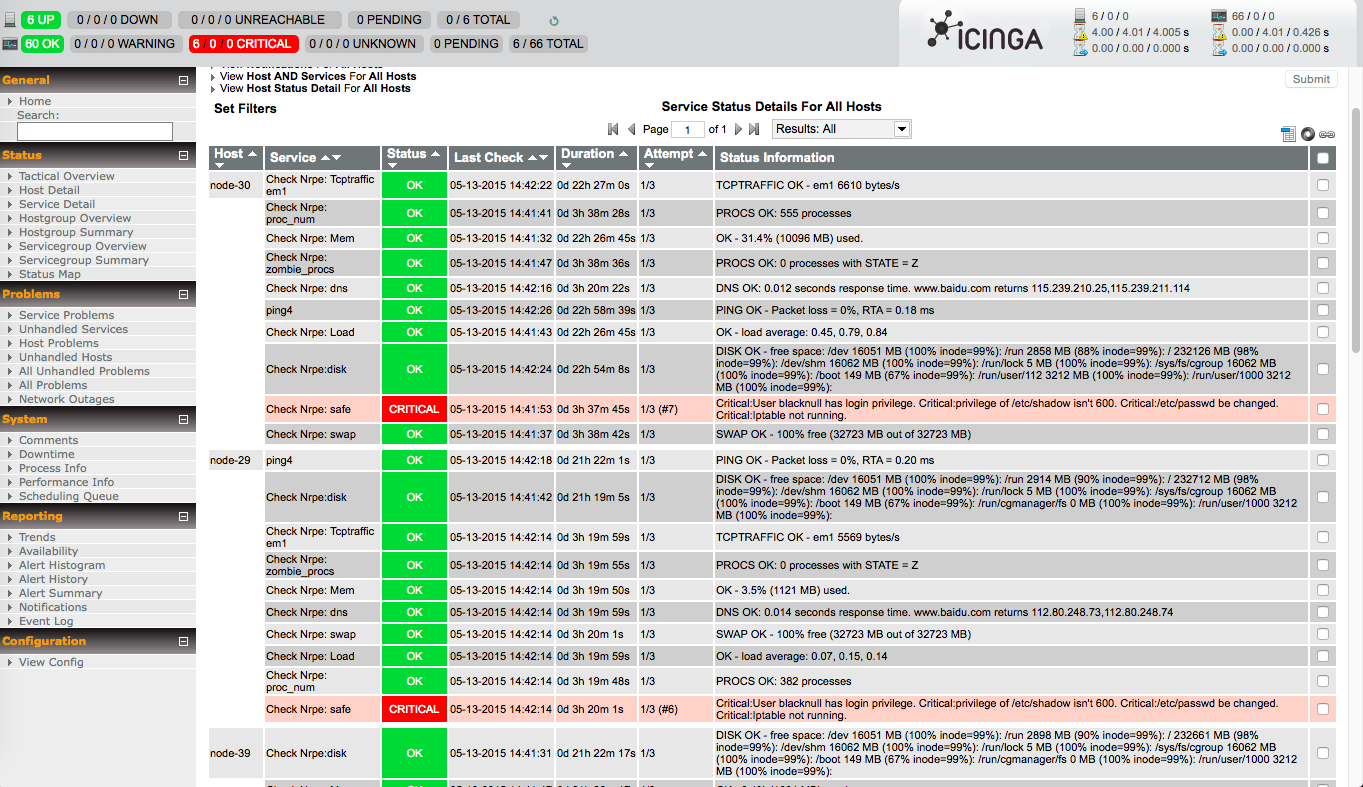
排错
如果配置分布式节点后发现无法监控,或者global-templates配置没有生效,可以删除
/var/lib/icinga2/api/zones下的文件,然后重启icinga2.CHECK_NRPE: Error - Could not complete SSL handshake.: 查看·nrpe.cfg·的
allowed_hosts配置项是否正确check_iostat_*没有数据:OK - I/O stats: Transfers/Sec= Read Requests/Sec= Write Requests/Sec= KBytes Read/Sec= KBytes_Written/Sec=,sysstat包没有安装。
分布式icinga2安装与使用的更多相关文章
- Hadoop 在windows 上伪分布式的安装过程
第一部分:Hadoop 在windows 上伪分布式的安装过程 安装JDK 1.下载JDK http://www.oracle.com/technetwork/java/javaee/d ...
- [大数据]-Elasticsearch5.3.1+Kibana5.3.1从单机到分布式的安装与使用<1>
一.Elasticsearch,Kibana简介: Elasticsearch是一个基于Apache Lucene(TM)的开源搜索引擎.无论在开源还是专有领域, Lucene可以被认为是迄今为止最先 ...
- [大数据]-Elasticsearch5.3.1+Kibana5.3.1从单机到分布式的安装与使用<2>
前言:上篇[大数据]-Elasticsearch5.3.1+Kibana5.3.1从单机到分布式的安装与使用<1>中介绍了ES ,Kibana的单机到分布式的安装,这里主要是介绍Elast ...
- Hadoop:Hadoop单机伪分布式的安装和配置
http://blog.csdn.net/pipisorry/article/details/51623195 因为lz的linux系统已经安装好了很多开发环境,可能下面的步骤有遗漏. 之前是在doc ...
- HBase入门基础教程之单机模式与伪分布式模式安装(转)
原文链接:HBase入门基础教程 在本篇文章中,我们将介绍Hbase的单机模式安装与伪分布式的安装方式,以及通过浏览器查看Hbase的用户界面.搭建HBase伪分布式环境的前提是我们已经搭建好了Had ...
- hadoop完全分布式手动安装(一主多从centos linux各版本均试验成功,文档完整无一遗漏)
hadoop完全分布式手动安装(一主多从centos linux各版本均试验成功,文档完整无一遗漏) 网上的文章99%都是垃圾,我凭良心书写,确保幼儿园同学也能安装成功! 查看系统环境 1.查看 ...
- HBase入门基础教程 HBase之单机模式与伪分布式模式安装
在本篇文章中,我们将介绍Hbase的单机模式安装与伪分布式的安装方式,以及通过浏览器查看Hbase的用户界面.搭建HBase伪分布式环境的前提是我们已经搭建好了Hadoop完全分布式环境,搭建Hado ...
- 【HBase基础教程】1、HBase之单机模式与伪分布式模式安装(转)
在这篇blog中,我们将介绍Hbase的单机模式安装与伪分布式的安装方式,以及通过浏览器查看Hbase的用户界面.搭建hbase伪分布式环境的前提是我们已经搭建好了hadoop完全分布式环境,搭建ha ...
- Hadoop全分布式模式安装
一.准备 1.准备至少三台linux服务器,并安装JDK 关闭防火墙如下 systemctl stop firewalld.service systemctl disable firewalld.se ...
随机推荐
- DropDownList怎样动态绑定数据库中的某一条数据
用Ajax动态绑定数据库的数据:点击后台查看代码,编写代码如下 if (!IsPostBack) { using (SnailTechDataContext con = new SnailTechDa ...
- Python 包的相对导入讲解
[Python 包的相对导入讲解] 参考:http://www.dai3.com/python-import.html
- [2015hdu多校联赛补题]hdu5372 Segment Game
题目链接:http://acm.hdu.edu.cn/showproblem.php?pid=5372 题意:进行n次操作,操作分两种,0和1,每一个0操作按出现顺序有一个编号(从1开始 0操作 0 ...
- URL验证
function isURL(str_url) { var strRegex = "^((https|http|ftp|rtsp|mms)?://)" + "?(([0- ...
- System.IO中的File、FileInfo、Directory与DirectoryInfo类(实例讲解)
一.建立的文件夹(对这些文件进行以上四个类的操作): 父目录: 父目录的子目录以及父目录下的文件: 子目录下的文件: 二.效果图 三.代码实现 using System; using System.I ...
- ZT 趋势移动安全apk
趋势移动安全 应用截图 应用简介 趋势移动安全( Mobile Security) 是一款专业的Android移动安全软件.利用趋势科技世界领先的云安全技术,保护用户避免被移动恶意程序骚扰,避免个 ...
- 集合框架之 List
集合框架就是Java中解决数组长度固定的问题,相当于动态数组,随时用,随时建立,内存释放 这个问题还不知道? 整个集合框架 概括为 List Set Map 这三个接口以及他们的实现类之间的应 ...
- ios开发 通讯录
一.通信录开发 通信录开发主要是获取用户手机中的联系人 通过获取用户的通信录,可以在应用中添加好友等 二.如何访问用户的通讯录 在iOS9之前,有2个框架可以访问用户的通讯录 目前需要适配iOS8,所 ...
- VB6.0 获取Excel文件工作表Sheet的名称
获取Excel文件工作表Sheet的名称 '产生Excel文档 Dim xlapp, xlbook As Object Dim sSheetName As String Set xlapp = Cre ...
- Ubuntu设置squid代理
1.安装squid sudo apt-get install squid 2,修改配置,增加需要使用代理的ip vi命令修改: vi /etc/squid/squid.conf 图形界面编辑 sudo ...