
基于binlog来分析mysql的行记录修改情况(python脚本分析)
1 实现内容
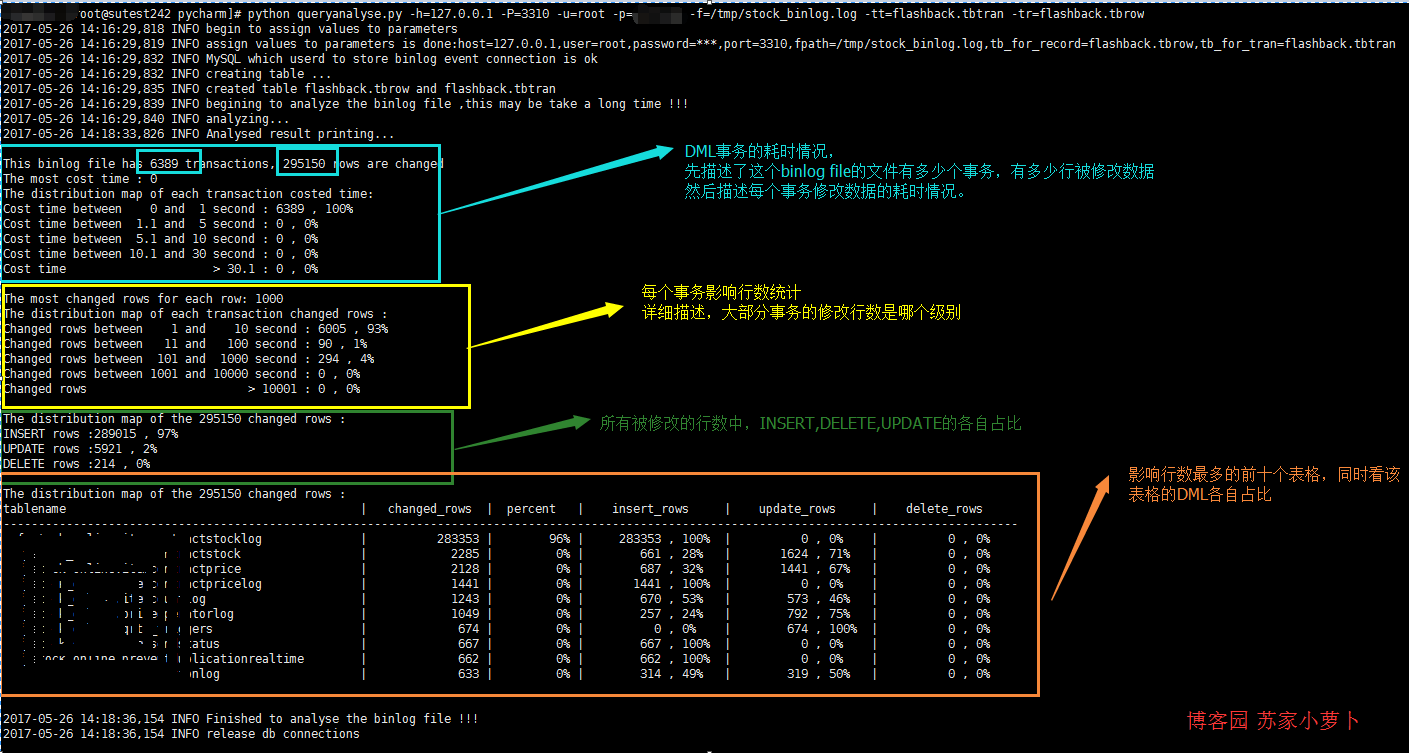
2 脚本简单描述
2.1 _get_db
2.2 create_tab
root@localhost:mysql3310.sock  14:42:29 [flashback]>show create table tbrow \G

*************************** 1. row ***************************

       Table: tbrow

Create Table: CREATE TABLE `tbrow` (

  `auto_id` int(10) unsigned NOT NULL AUTO_INCREMENT,

  `sqltype` int(11) NOT NULL COMMENT '1 is insert,2 is update,3 is delete',

  `tran_num` int(11) NOT NULL COMMENT 'the transaction number',

  `dbname` varchar(50) NOT NULL,

  `tbname` varchar(50) NOT NULL,

  PRIMARY KEY (`auto_id`),

  KEY `sqltype` (`sqltype`),

  KEY `dbname` (`dbname`),

  KEY `tbname` (`tbname`)

) ENGINE=InnoDB AUTO_INCREMENT=295151 DEFAULT CHARSET=utf8

1 row in set (0.00 sec)

root@localhost:mysql3310.sock  14:42:31 [flashback]>SHOW CREATE TABLE TBTRAN \G

*************************** 1. row ***************************

       Table: TBTRAN

Create Table: CREATE TABLE `tbtran` (

  `auto_id` int(10) unsigned NOT NULL AUTO_INCREMENT,

  `begin_time` datetime NOT NULL,

  `end_time` datetime NOT NULL,

  PRIMARY KEY (`auto_id`)

) ENGINE=InnoDB AUTO_INCREMENT=6390 DEFAULT CHARSET=utf8

1 row in set (0.00 sec)
2.3 rowrecord
- 每个事务的结束点,是以 'Xid = ' 来查找
- 事务的开始时间,是事务内的第一个 'Table_map' 行里边的时间
- 事务的结束时间,是以 'Xid = '所在行的 里边的时间
- 每个行数据是属于哪个表格,是以 'Table_map'来查找
- DML的类型是按照 行记录开头的情况是否为:'### INSERT INTO' 、'### UPDATE' 、'### DELETE FROM'
- 注意,单个事务可以包含多个表格多种DML多行数据修改的情况。
2.4 binlogdesc
- 分析修改行数据的 事务耗时情况
- 分析修改行数据的 事务影响行数情况
- 分析DML分布情况
- 分析 最多DML操作的表格 ,取前十个分析
2.5 closeconn
3 使用说明
4 python脚本
 import pymysql

 from pymysql.cursors import DictCursor

 import re

 import os

 import sys

 import datetime

 import time

 import logging

 import importlib

 importlib.reload(logging)

 logging.basicConfig(level=logging.DEBUG,format='%(asctime)s %(levelname)s %(message)s ')

 usage=''' usage: python [script's path] [option]

 ALL options need to assign:

 -h     : host, the database host,which database will store the results after analysis

 -u     : user, the db user

 -p     : password, the db user's password

 -P     : port, the db port

 -f     : file path, the binlog file

 -tr    : table name for record , the table name to store the row record

 -tt    : table name for transaction, the table name to store transactions

 Example: python queryanalyse.py -h=127.0.0.1 -P=3310 -u=root -p=password -f=/tmp/stock_binlog.log -tt=flashback.tbtran -tr=flashback.tbrow

 '''

 class queryanalyse:

     def __init__(self):

         #初始化

         self.host=''

         self.user=''

         self.password=''

         self.port=''

         self.fpath=''

         self.tbrow=''

         self.tbtran=''

         self._get_db()

         logging.info('assign values to parameters is done:host={},user={},password=***,port={},fpath={},tb_for_record={},tb_for_tran={}'.format(self.host,self.user,self.port,self.fpath,self.tbrow,self.tbtran))

         self.mysqlconn = pymysql.connect(host=self.host, user=self.user, password=self.password, port=self.port,charset='utf8')

         self.cur = self.mysqlconn.cursor(cursor=DictCursor)

         logging.info('MySQL which userd to store binlog event connection is ok')

         self.begin_time=''

         self.end_time=''

         self.db_name=''

         self.tb_name=''

     def _get_db(self):

         #解析用户输入的选项参数值,这里对password的处理是明文输入,可以自行处理成是input格式,

         #由于可以拷贝binlog文件到非线上环境分析,所以password这块,没有特殊处理

         logging.info('begin to assign values to parameters')

         if len(sys.argv) == 1:

             print(usage)

             sys.exit(1)

         elif sys.argv[1] == '--help':

             print(usage)

             sys.exit()

         elif len(sys.argv) > 2:

             for i in sys.argv[1:]:

                 _argv = i.split('=')

                 if _argv[0] == '-h':

                     self.host = _argv[1]

                 elif _argv[0] == '-u':

                     self.user = _argv[1]

                 elif _argv[0] == '-P':

                     self.port = int(_argv[1])

                 elif _argv[0] == '-f':

                     self.fpath = _argv[1]

                 elif _argv[0] == '-tr':

                     self.tbrow = _argv[1]

                 elif _argv[0] == '-tt':

                     self.tbtran = _argv[1]

                 elif _argv[0] == '-p':

                     self.password = _argv[1]

                 else:

                     print(usage)

     def create_tab(self):

         #创建两个表格:一个用户存储事务情况,一个用户存储每一行数据修改的情况

         #注意,一个事务可以存储多行数据修改的情况

         logging.info('creating table ...')

         create_tb_sql ='''CREATE TABLE IF NOT EXISTS  {} (

                           `auto_id` int(10) unsigned NOT NULL AUTO_INCREMENT,

                           `begin_time` datetime NOT NULL,

                           `end_time` datetime NOT NULL,

                           PRIMARY KEY (`auto_id`)

                         ) ENGINE=InnoDB DEFAULT CHARSET=utf8;

                         CREATE TABLE IF NOT EXISTS  {} (

                           `auto_id` int(10) unsigned NOT NULL AUTO_INCREMENT,

                           `sqltype` int(11) NOT NULL COMMENT '1 is insert,2 is update,3 is delete',

                           `tran_num` int(11) NOT NULL COMMENT 'the transaction number',

                           `dbname` varchar(50) NOT NULL,

                           `tbname` varchar(50) NOT NULL,

                           PRIMARY KEY (`auto_id`),

                           KEY `sqltype` (`sqltype`),

                           KEY `dbname` (`dbname`),

                           KEY `tbname` (`tbname`)

                         ) ENGINE=InnoDB DEFAULT CHARSET=utf8;

                         truncate table {};

                         truncate table {};

                         '''.format(self.tbtran,self.tbrow,self.tbtran,self.tbrow)

         self.cur.execute(create_tb_sql)

         logging.info('created table {} and {}'.format(self.tbrow,self.tbtran))

     def rowrecord(self):

         #处理每一行binlog

         #事务的结束采用 'Xid =' 来划分

         #分析结果,按照一个事务为单位存储提交一次到db

         try:

             tran_num=1    #事务数

             record_sql='' #行记录的insert sql

             tran_sql=''   #事务的insert sql

             self.create_tab()

             with open(self.fpath,'r') as binlog_file:

                 logging.info('begining to analyze the binlog file ,this may be take a long time !!!')

                 logging.info('analyzing...')

                 for bline in binlog_file:

                     if bline.find('Table_map:') != -1:

                         l = bline.index('server')

                         n = bline.index('Table_map')

                         begin_time = bline[:l:].rstrip(' ').replace('#', '')

                         if record_sql=='':

                             self.begin_time = begin_time[0:4] + '-' + begin_time[4:6] + '-' + begin_time[6:]

                         self.db_name = bline[n::].split(' ')[1].replace('`', '').split('.')[0]

                         self.tb_name = bline[n::].split(' ')[1].replace('`', '').split('.')[1]

                         bline=''

                     elif bline.startswith('### INSERT INTO'):

                        record_sql=record_sql+"insert into {}(sqltype,tran_num,dbname,tbname) VALUES (1,{},'{}','{}');".format(self.tbrow,tran_num,self.db_name,self.tb_name)

                     elif bline.startswith('### UPDATE'):

                        record_sql=record_sql+"insert into {}(sqltype,tran_num,dbname,tbname) VALUES (2,{},'{}','{}');".format(self.tbrow,tran_num,self.db_name,self.tb_name)

                     elif bline.startswith('### DELETE FROM'):

                        record_sql=record_sql+"insert into {}(sqltype,tran_num,dbname,tbname) VALUES (3,{},'{}','{}');".format(self.tbrow,tran_num,self.db_name,self.tb_name)

                     elif bline.find('Xid =') != -1:

                         l = bline.index('server')

                         end_time = bline[:l:].rstrip(' ').replace('#', '')

                         self.end_time = end_time[0:4] + '-' + end_time[4:6] + '-' + end_time[6:]

                         tran_sql=record_sql+"insert into {}(begin_time,end_time) VALUES ('{}','{}')".format(self.tbtran,self.begin_time,self.end_time)

                         self.cur.execute(tran_sql)

                         self.mysqlconn.commit()

                         record_sql = ''

                         tran_num += 1

         except Exception:

             return 'funtion rowrecord error'

     def binlogdesc(self):

         sql=''

         t_num=0

         r_num=0

         logging.info('Analysed result printing...\n')

         #分析总的事务数跟行修改数量

         sql="select 'tbtran' name,count(*) nums from {}  union all select 'tbrow' name,count(*) nums from {};".format(self.tbtran,self.tbrow)

         self.cur.execute(sql)

         rows=self.cur.fetchall()

         for row in rows:

             if row['name']=='tbtran':

                 t_num = row['nums']

             else:

                 r_num = row['nums']

         print('This binlog file has {} transactions, {} rows are changed '.format(t_num,r_num))

         # 计算 最耗时 的单个事务

         # 分析每个事务的耗时情况,分为5个时间段来描述

         # 这里正常应该是 以毫秒来分析的,但是binlog中,只精确时间到second

         sql='''select

                       count(case when cost_sec between 0 and 1 then 1 end ) cos_1,

                       count(case when cost_sec between 1.1 and 5 then 1 end ) cos_5,

                       count(case when cost_sec between 5.1 and 10 then 1 end ) cos_10,

                       count(case when cost_sec between 10.1 and 30 then 1 end ) cos_30,

                       count(case when cost_sec >30.1 then 1 end ) cos_more,

                       max(cost_sec) cos_max

                 from

                 (

                         select

                             auto_id,timestampdiff(second,begin_time,end_time) cost_sec

                         from {}

                 ) a;'''.format(self.tbtran)

         self.cur.execute(sql)

         rows=self.cur.fetchall()

         for row in rows:

             print('The most cost time : {} '.format(row['cos_max']))

             print('The distribution map of each transaction costed time: ')

             print('Cost time between    0 and  1 second : {} , {}%'.format(row['cos_1'],int(row['cos_1']*100/t_num)))

             print('Cost time between  1.1 and  5 second : {} , {}%'.format(row['cos_5'], int(row['cos_5'] * 100 / t_num)))

             print('Cost time between  5.1 and 10 second : {} , {}%'.format(row['cos_10'], int(row['cos_10'] * 100 / t_num)))

             print('Cost time between 10.1 and 30 second : {} , {}%'.format(row['cos_30'], int(row['cos_30'] * 100 / t_num)))

             print('Cost time                     > 30.1 : {} , {}%\n'.format(row['cos_more'], int(row['cos_more'] * 100 / t_num)))

         # 计算 单个事务影响行数最多 的行数量

         # 分析每个事务 影响行数 情况,分为5个梯度来描述

         sql='''select

                     count(case when nums between 0 and 10 then 1 end ) row_1,

                     count(case when nums between 11 and 100 then 1 end ) row_2,

                     count(case when nums between 101 and 1000 then 1 end ) row_3,

                     count(case when nums between 1001 and 10000 then 1 end ) row_4,

                     count(case when nums >10001 then 1 end ) row_5,

                     max(nums) row_max

                from

                   (

                     select

                              count(*) nums

                     from {} group by tran_num

                    ) a;'''.format(self.tbrow)

         self.cur.execute(sql)

         rows=self.cur.fetchall()

         for row in rows:

             print('The most changed rows for each row: {} '.format(row['row_max']))

             print('The distribution map of each transaction changed rows : ')

             print('Changed rows between    1 and    10 second : {} , {}%'.format(row['row_1'],int(row['row_1']*100/t_num)))

             print('Changed rows between   11 and   100 second : {} , {}%'.format(row['row_2'], int(row['row_2'] * 100 / t_num)))

             print('Changed rows between  101 and  1000 second : {} , {}%'.format(row['row_3'], int(row['row_3'] * 100 / t_num)))

             print('Changed rows between 1001 and 10000 second : {} , {}%'.format(row['row_4'], int(row['row_4'] * 100 / t_num)))

             print('Changed rows                       > 10001 : {} , {}%\n'.format(row['row_5'], int(row['row_5'] * 100 / t_num)))

         # 分析 各个行数 DML的类型情况

         # 描述 delete,insert,update的分布情况

         sql='select sqltype ,count(*) nums from {} group by sqltype ;'.format(self.tbrow)

         self.cur.execute(sql)

         rows=self.cur.fetchall()

         print('The distribution map of the {} changed rows : '.format(r_num))

         for row in rows:

             if row['sqltype']==1:

                 print('INSERT rows :{} , {}% '.format(row['nums'],int(row['nums']*100/r_num)))

             if row['sqltype']==2:

                 print('UPDATE rows :{} , {}% '.format(row['nums'],int(row['nums']*100/r_num)))

             if row['sqltype']==3:

                 print('DELETE rows :{} , {}%\n '.format(row['nums'],int(row['nums']*100/r_num)))

         # 描述 影响行数 最多的表格

         # 可以分析是哪些表格频繁操作,这里显示前10个table name

         sql = '''select

                       dbname,tbname ,

                       count(*) ALL_rows,

                       count(*)*100/{} per,

                       count(case when sqltype=1 then 1 end) INSERT_rows,

                       count(case when sqltype=2 then 1 end) UPDATE_rows,

                       count(case when sqltype=3 then 1 end) DELETE_rows

                 from {}

                 group by dbname,tbname

                 order by ALL_rows desc

                 limit 10;'''.format(r_num,self.tbrow)

         self.cur.execute(sql)

         rows = self.cur.fetchall()

         print('The distribution map of the {} changed rows : '.format(r_num))

         print('tablename'.ljust(50),

               '|','changed_rows'.center(15),

               '|','percent'.center(10),

               '|','insert_rows'.center(18),

               '|','update_rows'.center(18),

               '|','delete_rows'.center(18)

               )

         print('-------------------------------------------------------------------------------------------------------------------------------------------------')

         for row in rows:

             print((row['dbname']+'.'+row['tbname']).ljust(50),

                   '|',str(row['ALL_rows']).rjust(15),

                   '|',(str(int(row['per']))+'%').rjust(10),

                   '|',str(row['INSERT_rows']).rjust(10)+' , '+(str(int(row['INSERT_rows']*100/row['ALL_rows']))+'%').ljust(5),

                   '|',str(row['UPDATE_rows']).rjust(10)+' , '+(str(int(row['UPDATE_rows']*100/row['ALL_rows']))+'%').ljust(5),

                   '|',str(row['DELETE_rows']).rjust(10)+' , '+(str(int(row['DELETE_rows']*100/row['ALL_rows']))+'%').ljust(5),

                   )

         print('\n')

         logging.info('Finished to analyse the binlog file !!!')

     def closeconn(self):

         self.cur.close()

         logging.info('release db connections\n')

 def main():

     p = queryanalyse()

     p.rowrecord()

     p.binlogdesc()

     p.closeconn()

 if __name__ == "__main__":

     main()
基于binlog来分析mysql的行记录修改情况(python脚本分析)的更多相关文章
- 基于binlog来分析mysql的行记录修改情况
https://www.cnblogs.com/xinysu/archive/2017/05/26/6908722.html import pymysqlfrom pymysql.cursors im ...
- 使用Anemometer分析MySQL慢查询记录
数据库管理员一般是用percona的toolkit工具来分析MySQL慢查询记录,但是不够直观. 下面介绍一款比较直观的工具来统计分析MySQL慢查询记录anemometer. 在使用之前需要安装pe ...
- 使用Python脚本分析你的网站上的SEO元素
撰稿马尼克斯德芒克 上2019年1月, Sooda internetbureau Python就是自动执行重复性任务,为您的其他搜索引擎优化(SEO)工作留出更多时间.没有多少SEO使用Python来 ...
- mysql之行(记录)的详细操作
在Mysql管理软件中, 可以通过sql语句中的dml语言来实现数据的操作, 包括 使用INSERT实现数据的插入 UPDATE实现数据的更新 使用DELETE实现数据的删除 使用SELECT查询数据 ...
- MySql之行记录的详细操作,创建用户以及库表的授权
一 介绍 MySQL数据操作: DML ======================================================== 在MySQL管理软件中,可以通过SQL语句中的 ...
- 深入浅出分析MySQL MyISAM与INNODB索引原理、优缺点分析
本文浅显的分析了MySQL索引的原理及针对主程面试的一些问题,对各种资料进行了分析总结,分享给大家,希望祝大家早上走上属于自己的"成金之路". 学习知识最好的方式是带着问题去研究所 ...
- python脚本分析nginx访问日志
日志格式如下: 223.74.135.248 [11/May/2017:11:19:47 +0800] "POST /login/getValidateCode HTTP/1.1" ...
- mysql基于binlog回滚工具_flashback(python版本)
update.delete的条件写错甚至没有写,导致数据操作错误,需要恢复被误操作的行记录.这种情形,其实时有发生,可以选择用备份文件+binlog来恢复到测试环境,然后再做数据修复,但是这样 ...
- 百万年薪python之路 -- MySQL数据库之 MySQL行(记录)的操作(一)
MySQL的行(记录)的操作(一) 1. 增(insert) insert into 表名 value((字段1,字段2...); # 只能增加一行记录 insert into 表名 values(字 ...
随机推荐
- swust oj(0088)表达式的转换
表达式的转换(0088) Time limit(ms): 5000 Memory limit(kb): 65535 Submission: 435 Accepted: 93 Accepted 16级卓 ...
- 浩哥解析MyBatis源码(九)——Type类型模块之类型处理器注册器(TypeHandlerRegistry)
原创作品,可以转载,但是请标注出处地址:http://www.cnblogs.com/V1haoge/p/6709157.html 1.回顾 上一篇研究的是类型别名注册器TypeAliasRegist ...
- 如何用unity3d实现发送带附件的邮件
以Gmail为例.点击屏幕的Capture按钮得到当前屏幕截图,点击Send按钮将之前的截图作为附件发送邮件. using UnityEngine; using System.Collections; ...
- Jenkins: 使用groovy + job-dsl 创建并触发job
Jenkins: 使用groovy + job-dsl 创建并触发job 背景: 我们的 Automation 测试脚本需要在10个不同语言的机器上跑,本地化测试产品. 我们用Jenkins启动测试执 ...
- SQL基础函数
首先咱们一起来看一下SQL的基本函数 一.聚合函数 二.数学函数 三.字符串函数 四.转换函数 五.时间函数 这样子看起来可能很多,那咱们给变得---------------------------- ...
- Python-一些实用的函数
一,返回值为bool类型的函数 1.any()函数 any(iterable)->bool 当迭代器中有一个是Ture,则返回Ture:若interable=NUll,则返回False. > ...
- Hive 的简单使用及调优参考文档
Hive 的简单使用及调优参考文档 HIVE的使用 命令行界面 使用一下命令查看hive的命令行页面, hive --help --service cli 简化命令为hive –h 会输出下面的这 ...
- Linux 练习(1)
1) 新建用户natasha,uid为1000,gid为555,备注信息为"master" useradd -u 1000 -g 555 -c 'master' natasha2) ...
- & and &&区别
&:位逻辑运算: &&:逻辑运算: &&在java中又称为短路,第一个条件是false的话后面就不执行: &是所有条件都执行: System.out.p ...
- CVSS3.0打分学习
打分计算器: Common Vulnerability Scoring System Version 3.0 Calculator: https://www.first.org/cvss/calcul ...