
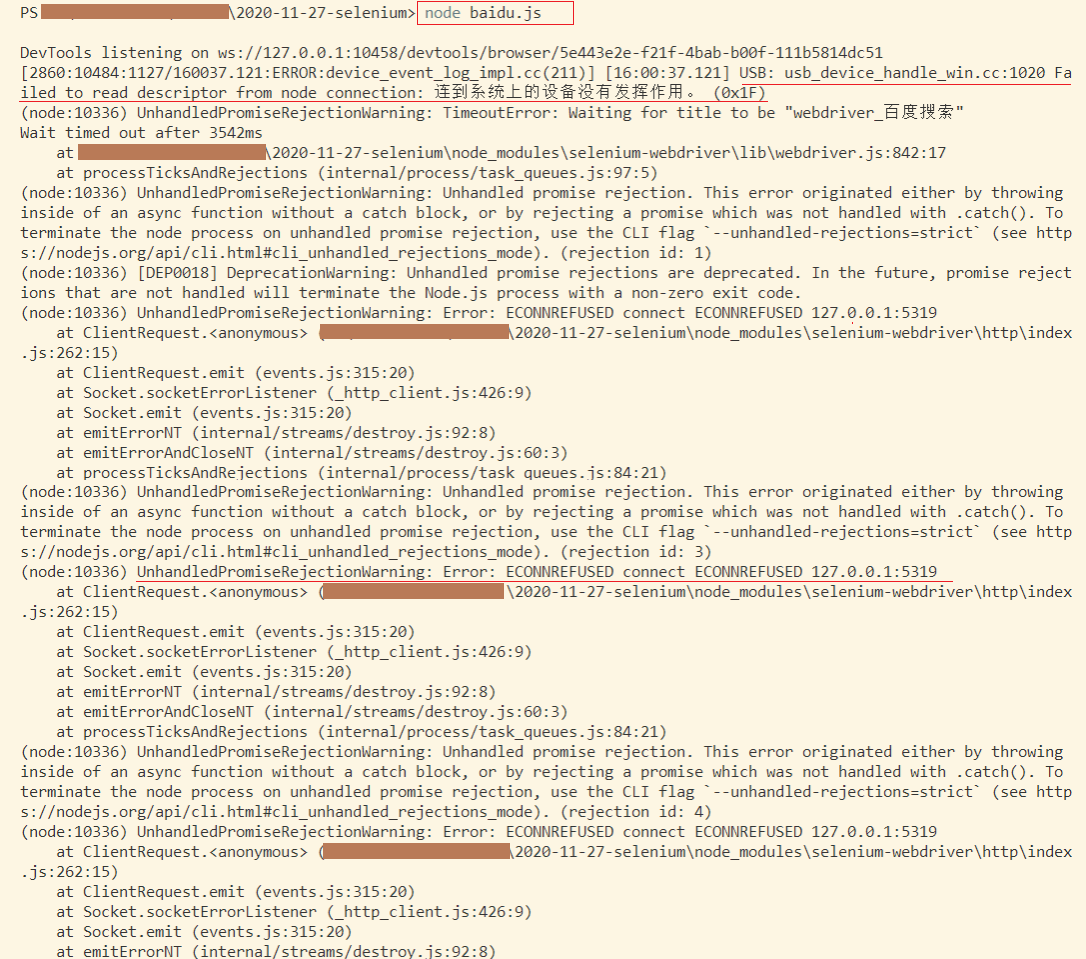
Node + Selenium 报错 UnhandledPromiseRejectionWarning: Error: ECONNREFUSED connect ECONNREFUSED 127.0.0.1:5319
安装selenium-webdriver
npm i selenium-webdriver
当前安装版本:
var webdriver = require("selenium-webdriver"),

  By = webdriver.By,

  until = webdriver.until;

var driver = new webdriver.Builder().forBrowser("chrome").build();

driver.get("https://www.baidu.com");

driver.findElement(By.id("kw")).sendKeys("webdriver");

driver.findElement(By.id("su")).click();

driver.wait(until.titleIs("webdriver_百度搜索"), 1000);

// driver.quit();
参考:https://stackoverflow.com/questions/48791928/error-from-selenium-unhandledpromiserejectionwarning-error-econnrefused-conne
问题分析:可能是因为当前的 selenium-webdriver 是 alpha 版本导致了报错
问题解决:
卸载当前的 selenium-webdriver 版本 npm uninstall selenium-webdriver
下载低一级版本 npm install selenium-webdriver@3
Node + Selenium 报错 UnhandledPromiseRejectionWarning: Error: ECONNREFUSED connect ECONNREFUSED 127.0.0.1:5319的更多相关文章
- 解决centos7下 selenium报错--unknown error: DevToolsActivePort file doesn't exist
解决centos7下 selenium报错--unknown error: DevToolsActivePort file doesn't exist 早上在linux下用selenium启动Chro ...
- 运行 puppeteer 报错 chrome: error while loading shared libraries: libpangocairo-1.0.so.0: cannot open shared object file: No such file or directory
运行 puppeteer 报错 chrome: error while loading shared libraries: libpangocairo-1.0.so.0: cannot open sh ...
- python selenium 报错unknown error: cannot focus element 解决办法
登录框由于js限制,定位到元素后无法sendkey ,sendky报错如下: selenium.common.exceptions.WebDriverException: Message: unkno ...
- Jenkins执行selenium报错unknown error: cannot find Chrome binary
问题描述:在Pycharm中执行selenium测试用例,可以正常运行, 集成在Jenkins中,构建时,发现构建成功,但是查看Console Output,报错:unknown error: can ...
- puppeteer报错 UnhandledPromiseRejectionWarning: Error: Protocol error (Page.getLayoutMetrics): Target closed.
puppeteer运行时报错: UnhandledPromiseRejectionWarning: Error: Protocol error (Page.getLayoutMetrics): Tar ...
- windows10下安装docker报错:error during connect
详细报错信息如下: C:\Users\zig>docker info error during connect: Get http://%2F%2F.%2Fpipe%2Fdocker_engin ...
- Shell脚本报错--syntax error near unexpected token for((i=0;i<$length;i++))
现象: shell脚本使用Nodepad++进行本地编辑,在编辑后上传到linux机器进行执行时提示“syntax error near unexpected token for((i=0;i< ...
- win7安装docker报错:error during connect: Get http ..... the system cannot find the file specified
因为是win7 所以使用了官方网站的dockertoolbox 安装一路顺利,结果启动就报上面的错误, 因为安装包附带安装了virtualbox 上面的错误后来排查出来是 virtualboox的问题 ...
- 11gR2数据库日志报错:Fatal NI connect error 12170、
11gR2数据库日志报错:Fatal NI connect error 12170.TNS-12535.TNS-00505 [问题点数:100分,结帖人MarkIII] 不显示 ...
随机推荐
- 使用 DataX 增量同步数据(转)
关于 DataX DataX 是阿里巴巴集团内被广泛使用的离线数据同步工具/平台,实现包括 MySQL.Oracle.SqlServer.Postgre.HDFS.Hive.ADS.HBase.Tab ...
- Vue Router的原理及history模式源码实现
Hash 模式 URL中 # 后面的内容作为路径地址,可以通过location.url直接切换路由地址,如果只改变了#后面的内容,浏览器不会向服务器请求这个地址,会把这个地址 记录到浏览器的访问历史中 ...
- OpenResty简介
OpenResty(也称为 ngx_openresty)是一个全功能的 Web 应用服务器.它打包了标准的 Nginx 核心,很多的常用的第三方模块,以及它们的大多数依赖项. 通过揉和众多设计良好的 ...
- JAVA入门基础及流程控制
JAVA入门基础及流程控制 数据类型 位 存储单位 eg:0001 0011 八位 字节 byte 处理数据单位 一字节等于八位 eg:1b=0011 0001 类变量: static int num ...
- C语言:已知三角形三边长求面积
//已知三角形三边长求面积 #include <stdio.h> #include <math.h> int main() { float a,b,c,p,s; int x=0 ...
- c语言:getch() getchar()
1.getchar();从键盘读取一个字符并输出,该函数的返回值是输入第一个字符的ASCII码:若用户输入的是一连串字符,函数直到用户输入回车时结束,输入的字符连同回车一起存入键盘缓冲区.若程序中有后 ...
- 用Python分析下王小波与李银河写情书最爱用哪些词
作家王小波其实也是我国最早期的程序员,突发奇想,王小波写情书最喜欢用哪些词呢?用Python词云分析下! 直接上代码吧,有注释很好理解.输出的图片设置的比较大,所以运行的比较慢,可以适当把图片尺寸改小 ...
- Leetcode1.两数之和——简洁易懂
> 简洁易懂讲清原理,讲不清你来打我~ 输入一个数组和一个整数,从数组中找到两个元素和为这个整数,输出下标 分钟就问老师为什么 \(T3\) 没有提交的窗口. 开题读题,一路自闭到 \(T3\) ,发现 \(T3\) 可打暴力,所以一 ...