
spring整合quartz时间任务调度框架
spring整合quartz框架
1.创建maven工程
2.导入jar包(pom.xml)
 <dependencies>

  		<dependency>

			<groupId>org.quartz-scheduler</groupId>

			<artifactId>quartz</artifactId>

			<version>2.2.1</version>

		</dependency>

		<dependency>

			<groupId>org.quartz-scheduler</groupId>

			<artifactId>quartz-jobs</artifactId>

			<version>2.2.1</version>

		</dependency>

		<dependency>

			<groupId>org.slf4j</groupId>

			<artifactId>slf4j-log4j12</artifactId>

			<version>1.7.12</version>

		</dependency>

		<dependency>

			<groupId>org.springframework</groupId>

			<artifactId>spring-context</artifactId>

			<version>4.1.7.RELEASE</version>

		</dependency>

		<dependency>

			<groupId>org.springframework</groupId>

			<artifactId>spring-context-support</artifactId>

			<version>4.1.7.RELEASE</version>

		</dependency>

		<dependency>

			<groupId>org.springframework</groupId>

			<artifactId>spring-web</artifactId>

			<version>4.1.7.RELEASE</version>

		</dependency>

		<dependency>

			<groupId>org.springframework</groupId>

			<artifactId>spring-tx</artifactId>

			<version>4.1.7.RELEASE</version>

		</dependency>

  </dependencies>

  <build>

		<plugins>

			<plugin>

				<groupId>org.codehaus.mojo</groupId>

				<artifactId>tomcat-maven-plugin</artifactId>

				<version>1.1</version>

				<configuration>

					<port>9003</port>

				</configuration>

			</plugin>

		</plugins>

	</build>
3.创建xml文件
<?xml version="1.0" encoding="UTF-8"?>

<web-app xmlns:xsi="http://www.w3.org/2001/XMLSchema-instance"

	xmlns="http://java.sun.com/xml/ns/javaee"

	xsi:schemaLocation="http://java.sun.com/xml/ns/javaee http://java.sun.com/xml/ns/javaee/web-app_2_5.xsd"

	id="WebApp_ID" version="2.5">

	<!-- spring配置文件位置 -->

	<context-param>

		<param-name>contextConfigLocation</param-name>

		<param-value>classpath:applicationContext.xml</param-value>

	</context-param>

	<!-- spring核心监听器 -->

	<listener>

		<listener-class>org.springframework.web.context.ContextLoaderListener</listener-class>

	</listener>

	<welcome-file-list>

		<welcome-file>index.html</welcome-file>

		<welcome-file>index.htm</welcome-file>

		<welcome-file>index.jsp</welcome-file>

		<welcome-file>default.html</welcome-file>

		<welcome-file>default.htm</welcome-file>

		<welcome-file>default.jsp</welcome-file>

	</welcome-file-list>

</web-app>
4.创建applicationContext.xml文件
<?xml version="1.0" encoding="UTF-8"?>

<beans xmlns="http://www.springframework.org/schema/beans"

	xmlns:xsi="http://www.w3.org/2001/XMLSchema-instance"

	xmlns:context="http://www.springframework.org/schema/context"

	xsi:schemaLocation="

		http://www.springframework.org/schema/beans http://www.springframework.org/schema/beans/spring-beans.xsd

		http://www.springframework.org/schema/context http://www.springframework.org/schema/context/spring-context.xsd ">

 	<context:component-scan base-package="com.baidu" />

 	<!-- job -->

 	<bean id="helloJob"

 		class="org.springframework.scheduling.quartz.JobDetailFactoryBean">
          <!--不能使用ref-->

 		 <property name="jobClass" value="com.baidu.quartz.HelloJob" />

 	</bean>

 	<!-- trigger -->

 	<bean id="simpleTrigger"

 		class="org.springframework.scheduling.quartz.SimpleTriggerFactoryBean">

 		<property name="jobDetail" ref="helloJob" />

 		<!-- 3秒后第一次执行 -->

 		<property name="startDelay" value="3000" />

 		<!-- 5秒后重复执行 -->

 		<property name="repeatInterval" value="5000" />

 	</bean>

 	<!-- scheduler  -->

 	<bean class="org.springframework.scheduling.quartz.SchedulerFactoryBean">

 		<property name="triggers">

 			<list>

 				<ref bean="simpleTrigger"/>

 			</list>

 		</property>

 	</bean>

</beans>
5.编写代码
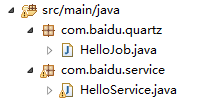
创建一个service
@Component

public class HelloService {

	public void sayHello(){

		System.out.println("say hello");

	}

}
方法一:
创建helloJob
@Component

public class HelloJob implements Job {

	@Autowired

	private HelloService helloService;

	public void execute(JobExecutionContext context)

			throws JobExecutionException {

		SpringBeanAutowiringSupport.processInjectionBasedOnCurrentContext(this);

		helloService.sayHello();

		System.out.println("test01");

	}

}
方法二:
创建一个JobFactory类
@Component

public class JobFactory extends AdaptableJobFactory{

	@Autowired

	private AutowireCapableBeanFactory autowireCapableBeanFactory;

	@Override

	protected Object createJobInstance(TriggerFiredBundle bundle)

			throws Exception {

		Object jobInstance = super.createJobInstance(bundle);

		autowireCapableBeanFactory.autowireBean(jobInstance);

		return jobInstance;

	}

}
修改applicationContext.xml文件
<!-- scheduler  -->

 	<bean class="org.springframework.scheduling.quartz.SchedulerFactoryBean">

 	    <property name="jobFactory" ref="jobFactory"></property>

 		<property name="triggers">

 			<list>

 				<ref bean="simpleTrigger"/>

 			</list>

 		</property>

 	</bean>
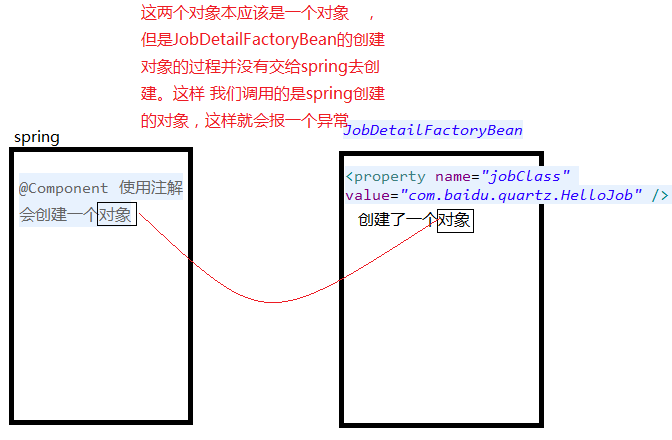
产生空指针异常

产生的原因:
quartz交给spring管理时,底层对于jobclass的管理并没有交给spring,这样在使用spring管理时会产生连个对象,
spring整合quartz时间任务调度框架的更多相关文章
- 项目一:第十四天 1.在realm中动态授权 2.Shiro整合ehcache 缓存realm中授权信息 3.动态展示菜单数据 4.Quartz定时任务调度框架—Spring整合javamail发送邮件 5.基于poi实现分区导出
1 Shiro整合ehCache缓存授权信息 当需要进行权限校验时候:四种方式url拦截.注解.页面标签.代码级别,当需要验证权限会调用realm中的授权方法 Shiro框架内部整合好缓存管理器, ...
- spring整合quartz框架
spring整合quartz: 网上也有很多教程,好多都是基于配置方式,我们使用当然怎么简单就怎么用,所以这里介绍基于注解方式整合quartz.前提:你需要有一个能运行的web项目. 1.引依赖: & ...
- 使用Spring整合Quartz轻松完成定时任务
一.背景 上次我们介绍了如何使用Spring Task进行完成定时任务的编写,这次我们使用Spring整合Quartz的方式来再一次实现定时任务的开发,以下奉上开发步骤及注意事项等. 二.开发环境及必 ...
- 项目ITP(五) spring4.0 整合 Quartz 实现任务调度
前言 系列文章:[传送门] 项目需求: 二维码推送到一体机上,给学生签到扫描用.然后需要的是 上课前20分钟 ,幸好在帮带我的学长做 p2p 的时候,接触过.自然 quartz 是首选.所以我就配置了 ...
- 初识quartz 并分析 项目中spring整合quartz的配置【原创+转载】
初识quartz 并分析 项目中spring整合quartz的配置[原创+转载]2018年01月29日 12:08:07 守望dfdfdf 阅读数:114 标签: quartz 更多个人分类: 工具 ...
- spring整合quartz并持久化
spring整合quartz有两种方式: 一.常见是使用配置文件,将定时任务保存到内存中 简单示例: <!-- 短信催还提醒任务调度 --> <bean id="overd ...
- Spring整合Quartz定时任务 在集群、分布式系统中的应用(Mysql数据库环境)
Spring整合Quartz定时任务 在集群.分布式系统中的应用(Mysql数据库环境) 转载:http://www.cnblogs.com/jiafuwei/p/6145280.html 单个Q ...
- Spring整合Quartz分布式调度
前言 为了保证应用的高可用和高并发性,一般都会部署多个节点:对于定时任务,如果每个节点都执行自己的定时任务,一方面耗费了系统资源,另一方面有些任务多次执行,可能引发应用逻辑问题,所以需要一个分布式的调 ...
- Spring整合Quartz分布式调度(山东数漫江湖)
前言 为了保证应用的高可用和高并发性,一般都会部署多个节点:对于定时任务,如果每个节点都执行自己的定时任务,一方面耗费了系统资源,另一方面有些任务多次执行,可能引发应用逻辑问题,所以需要一个分布式的调 ...
随机推荐
- android 线性布局
activity_main.xml线性布局 <?xml version="1.0" encoding="utf-8"?> <LinearLay ...
- CODE[VS]2494 Vani和Cl2捉迷藏
原题链接 这里有一个结论:最多能选取的藏身点个数等于最小路径可重复点覆盖的路径总数. 所以我们可以先传递闭包,然后求最小路径点覆盖即可. #include<cstdio> #include ...
- How to execute sudo command in remote host via SSH
Question: I have an interactive shell script, that at one place needs to ssh to another machine (Ubu ...
- [SoapUI] Groovy获取HTTP Status
def value = messageExchange.responseHeaders["#status#"] def httpResponseHeaders = context. ...
- Python之路(第二篇):Python基本数据类型字符串(一)
一.基础 1.编码 UTF-8:中文占3个字节 GBK:中文占2个字节 Unicode.UTF-8.GBK三者关系 ascii码是只能表示英文字符,用8个字节表示英文,unicode是统一码,世界通用 ...
- linux_开启mysql服务
想要连接mysql的时候必须先开启mysql的服务 service mysqld start mysql -u root -p 输入密码
- Django的学习(二)————Templates
一.django的模板: 在settings.py的文件中可以看到并设置这个模板. 1.直接映射: 通过建立的文件夹(templates)和文件(html)来映射. <!DOCTYPE html ...
- decode 横竖转换
select rq 日期,sum(decode(shengfu,'胜',1,'负',0)) 胜,sum(decode(shengfu,'负',1,'胜',0)) 负 from tmp group by ...
- oracle创建表空间、添加数据库文件
创建表空间: create [undo|TEMPORARY]tablespace venn datafile '/opt/oracle/db01/app/oracle/oradata/OSSORCL/ ...
- 2019.01.08 bzoj3809: Gty的二逼妹子序列(莫队+权值分块)
传送门 题意:多组询问,问区间[l,r]中权值在[a,b]间的数的种类数. 看了一眼大家应该都知道要莫队了吧. 然后很容易想到用树状数组优化修改和查询做到O(mnlogamax)O(m\sqrt nl ...