
[Python Study Notes]CS架构远程访问获取信息--Client端v2.0
更新内容:
1.增加内存信息获取
2.增加电池信息获取
3.增加磁盘信息获取
4.重新布局窗体
5.增加窗体名称
6.增加连接成功之前,不可按压
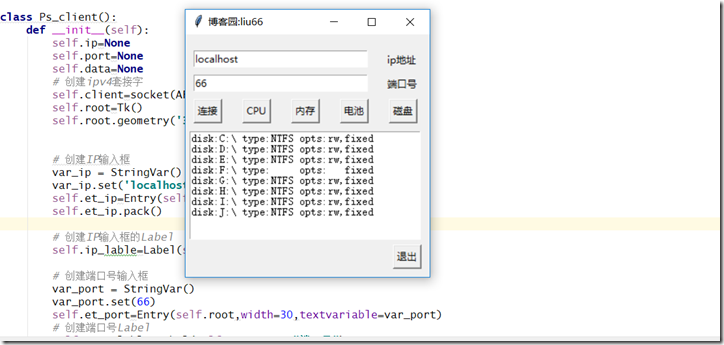
效果图:
'''''''''''''''''''''''''''''''''''''''''''''''''''''''''''''''''''''''''''''''''''''''''''''''''''

>>文件: ps_client.py

>>作者: liu yang

>>邮箱: liuyang0001@outlook.com

>>博客: www.cnblogs.com/liu66blog

'''''''''''''''''''''''''''''''''''''''''''''''''''''''''''''''''''''''''''''''''''''''''''''''''''

#!/usr/bin/env python

# -*- coding: utf-8 -*-

import sys, os

from socket import *

from tkinter import *

class Ps_client():

    def __init__(self):

        self.ip=None

        self.port=None

        self.data=None

        # 创建ipv4套接字

        self.client=socket(AF_INET,SOCK_STREAM)

        self.root=Tk()

        self.root.geometry('300x300+250+250')

        # 创建IP输入框

        var_ip = StringVar()

        var_ip.set('localhost')

        self.et_ip=Entry(self.root,width=30,textvariable=var_ip)

        self.et_ip.pack()

        # 创建IP输入框的Label

        self.ip_lable=Label(self.root,text="ip地址")

        # 创建端口号输入框

        var_port = StringVar()

        var_port.set(66)

        self.et_port=Entry(self.root,width=30,textvariable=var_port)

        # 创建端口号Label

        self.port_lable=Label(self.root,text="端口号")

        # 创建连接按钮,注意!!!command=后面的连接的不加括号

        self.connButton=Button(self.root,text="连接",command=self.connect)

        # 创建获取cpu按钮

        self.getCpuButton=Button(self.root,text="CPU",state='disable',command=self.get_cpu_info)

        # 创建获取memory按钮

        self.getMemoryButton=Button(self.root,text="内存",state='disable',command=self.get_memory_info)

        # 创建获取battery按钮

        self.getBatteryButton = Button(self.root, text="电池", state='disable', command=self.get_battery_info)

        # 创建获取disk按钮

        self.getDiskButton=Button(self.root,text="磁盘",state='disable',command=self.get_disk_info)

        # 创建断开按钮

        self.exitButton=Button(self.root,text="退出",state='disable',command=self.exit_connect)

        self.txtBox=Text(self.root,width=40,height=10)

    def main(self):

        self.root.title('博客园:liu66')

        self.et_ip.place(x=10,y=20)

        self.et_port.place(x=10,y=50)

        self.ip_lable.place(x=245,y=20)

        self.port_lable.place(x=245,y=50)

        self.connButton.place(x=10,y=80)

        self.getCpuButton.place(x=70,y=80)

        self.getMemoryButton.place(x=130,y=80)

        self.getBatteryButton.place(x=190,y=80)

        self.getDiskButton.place(x=250,y=80)

        self.txtBox.place(x=5,y=120)

        self.exitButton.place(x=255,y=260)

        # self.txtBox.insert(INSERT,'在这里显示内容')

        self.root.mainloop()

    def connect(self):

        self.ip=self.et_ip.get()

        try:

            self.port=int(self.et_port.get())

        except ValueError:

            self.txtBox.delete(0.0,END)

            self.txtBox.insert(0.0,"请输入合法的ip和端口...")

        else:

            print("ip:%s"%self.ip)

            print("port:%s"%self.port)

            self.txtBox.delete(0.0,END)

            self.txtBox.insert(0.0,"正在链接中...")

            try:

                self.client.connect((self.ip,self.port))

            except OSError:

                print("向一个无法连接的网络尝试了一个套接字操作")

                self.txtBox.delete(0.0, END)

                self.txtBox.insert(0.0, "%s:%d连接失败..."%(self.ip,self.port))

            else:

                print("%s连接成功..."%self.ip)

                self.txtBox.delete(0.0, END)

                self.txtBox.insert(0.0, "%s:%d连接成功..."%(self.ip,self.port))

                # 连接成功则将其他按钮变为可按状态

                self.exitButton['state']='active'

                self.getCpuButton['state']='active'

                self.getMemoryButton['state']='active'

                self.getBatteryButton['state']='active'

                self.getDiskButton['state']='active'

    def get_cpu_info(self):

        self.data='cpu'

        self.client.send(self.data.encode('utf-8'))

        # 将接受的数据装换成浮点数据

        cpu_used=float(self.client.recv(1024).decode('utf-8'))

        print('CPU使用率:%0.2f'%cpu_used+'%')

        self.txtBox.delete(0.0, END)

        # 字符串前加上r为防转义

        self.txtBox.insert(0.0, "当前的cpu使用率:%0.2f"%cpu_used+r"%")

    def get_memory_info(self):

        self.data='memory'

        self.client.send(self.data.encode('utf-8'))

        memory_message=self.client.recv(1024).decode('utf-8')

        print(memory_message)

        # 清除显示

        self.txtBox.delete(0.0, END)

        # 显示内存信息

        self.txtBox.insert(0.0, "%s" %memory_message)

    def get_battery_info(self):

        self.data='battery'

        self.client.send(self.data.encode('utf-8'))

        battery_message=self.client.recv(1024).decode('utf-8')

        print(battery_message)

        # 清除显示

        self.txtBox.delete(0.0, END)

        # 显示内存信息

        self.txtBox.insert(0.0, "%s" %battery_message)

    def get_disk_info(self):

        self.data='disk'

        self.client.send(self.data.encode('utf-8'))

        disk_message=self.client.recv(1024).decode('utf-8')

        print(disk_message)

        # 清除显示

        self.txtBox.delete(0.0, END)

        # 显示内存信息

        self.txtBox.insert(0.0, "%s" %disk_message)

    def exit_connect(self):

        self.client.close()

        self.txtBox.delete(0.0, END)

        self.txtBox.insert(0.0, "当前连接已断开...")

        print("当前连接已断开...")

        self.exitButton['state'] = 'disable'

        self.getCpuButton['state'] = 'disable'

        self.getMemoryButton['state'] = 'disable'

        # 关闭当前窗口

        self.root.destroy()

if __name__ == '__main__':

    Ps=Ps_client()

    Ps.main()
[Python Study Notes]CS架构远程访问获取信息--Client端v2.0的更多相关文章
- [Python Study Notes]CS架构远程访问获取信息--SERVER端v2.0
更新内容: 1.增加内存信息获取 2.增加电池信息获取 3.增加磁盘信息获取 4.重新布局窗体 5.增加窗体名称 6.增加连接成功之前,不可按压 ''''''''''''''''''''''''''' ...
- [Python Study Notes]CS架构远程访问获取信息--Client端v1.0
更新内容: 1.添加entry栏默认ip和port口 2.修正退出功能 3.添加退出自动关闭窗口功能 4.优化cpu显示为固定保留两位小数 '''''''''''''''''''''''''''''' ...
- [Python Study Notes]CS架构远程访问获取信息--Client端
''''''''''''''''''''''''''''''''''''''''''''''''''''''''''''''''''''''''''''''''''''''''''''''''''' ...
- [Python Study Notes]CS架构远程访问获取信息--SERVER端
''''''''''''''''''''''''''''''''''''''''''''''''''''''''''''''''''''''''''''''''''''''''''''''''''' ...
- Eureka系列(三)获取服务Client端具体实现
获取服务Client 端流程 我们先看下面这张图片,这张图片简单描述了下我们Client是如何获取到Server已续约实例信息的流程: 从图片中我们可以知晓大致流程就是Client会自己开启一个 ...
- [Python Study Notes]进程信息(丁丁软件监控进程,http-post)
''''''''''''''''''''''''''''''''''''''''''''''''''''''''''''''''''''''''''''''''''''''''''''''''''' ...
- [Python Study Notes]cpu信息
''''''''''''''''''''''''''''''''''''''''''''''''''''''''''''''''''''''''''''''''''''''''''''''''''' ...
- [Python Study Notes]电池信息
''''''''''''''''''''''''''''''''''''''''''''''''''''''''''''''''''''''''''''''''''''''''''''''''''' ...
- [Python Study Notes]内存信息
''''''''''''''''''''''''''''''''''''''''''''''''''''''''''''''''''''''''''''''''''''''''''''''''''' ...
随机推荐
- Apache、IIS、Nginx等绝大多数web服务器,都不允许静态文件响应POST请求,否则会返回“HTTP/1.1 405 Method not allowed”错误。
例1:用Linux下的curl命令发送POST请求给Apache服务器上的HTML静态页 [root@new-host ~]# curl -d 1=1 http://www.sohu.com/inde ...
- Docker问题: Layer already being pulled by another client. Waiting.什么原因
问题描述:Layer already being pulled by another client. Waiting. 问题分析:这是 1.8版本的一个bug,会在1.9版本中修复.http://st ...
- Android知识点剖析系列:深入了解layout_weight属性
摘录自:http://www.cnblogs.com/net168/p/4227144.html 前言 Android中layout_weight这个属性对于经常捣鼓UI的我们来说,肯定不会陌生.但是 ...
- jQuery学习笔记一
一.jQuery版本兼容 jQuery版本2以上不支持IE6,7,8浏览器. 如果需要支持IE6/7/8,那么请选择1.9 同样还可以通过条件注释在使用IE6/7/8时只包含进1.9 <!--[ ...
- 解决myeclipse10.1导出War包出错:Security Alert:Integrity check error
解决myeclipse10.1导出War包出错:Security Alert:Integrity check error 解决myeclipse10.1不能导出war包报 ============== ...
- c#套料程序设计
上的套料基本上都没有源码,开放的sdk都没有,这让很多想做套料,但是又成本太高了. 另外,大部分套料都是c++实现的,效率高,本人尝试用c#做一个套料程序,发现效率也不低,当然会比c++差点. 以下是 ...
- 【fail2ban】使用fail2ban进行攻击防范
使用fail2ban进行攻击防范 转自:https://kyle.ai/blog/6215.html 最近总有一些无聊的人,会来扫描一下我的服务器,看有没有啥漏洞可以利用的... 可以看到类似这样的4 ...
- 异步式I/O与实践式编程
阻塞 线程在执行中如果遇到磁盘读写或网络通信(统称为I/O操作)通常要消耗很长时间 这时操作系统会剥夺这个线程的CPU控制权,使其暂停执行,同时将资源让给其他工作线程 异步I/O 非阻塞IO 针对所有 ...
- scss 编译方法
第一种: 手动创建 scss文件夹 用Node.js command promt 进入项目目录 在项目目录下面 输入 sass scss/main.scss css/main.css s ...
- CSS学习(一)
/*</br> * color</br> * background-color background-image background-repeat background-po ...