
Java线程组(ThreadGroup)使用
JDK 对线程组类注释:
A thread group represents a set of threads. In addition, a thread group can also include other thread groups. The thread groups form a tree in which every thread group except the initial thread group has a parent.
A thread is allowed to access information about its own thread group, but not to access information about its thread group's parent thread group or any other thread groups.
可以把线程归属到某一个线程组中,线程组中可以有线程对象,也可以有线程组,组中还可以有线程,这样的组织结构有点类似于树的形式,如图所示.
线程组的作用是:可以批量管理线程或线程组对象,有效地对线程或线程组对象进行组织
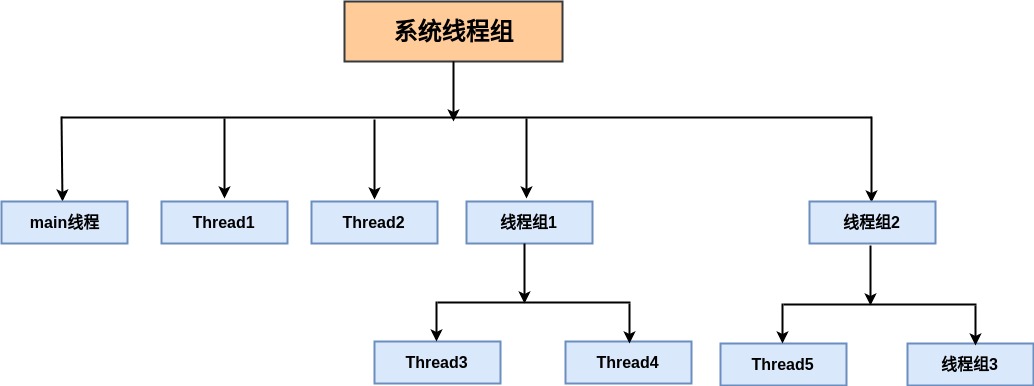
1.线程组示例:
展示线程组结构代码实例如下:
/**

 * 类功能描述:

 *

 * @author WangXueXing create at 18-12-27 下午3:25

 * @version 1.0.0

 */

public class ThreadGroupTest implements Runnable {

    @Override

    public void run() {

        try {

            while (!Thread.currentThread().isInterrupted()) {

                Thread currentThread = Thread.currentThread();

                System.out.println("current thread:" + currentThread.getName()

                        +" thread group:"+currentThread.getThreadGroup().getName()

                        +" parent thread group:"+currentThread.getThreadGroup().getParent().getName());

                Thread.sleep(3000);

            }

        } catch (InterruptedException e) {

            e.printStackTrace();

        }

    }

    public static void main(String[] args) {

        ThreadGroup rootThreadGroup = new ThreadGroup("root线程组1");

        Thread t0 = new Thread(rootThreadGroup, new ThreadGroupTest(), "Thread 0");

        t0.start();

        ThreadGroup tg = new ThreadGroup(rootThreadGroup,"线程组1");

        ThreadGroup tg2 = new ThreadGroup(rootThreadGroup,"线程组2");

        Thread t1 = new Thread(tg, new ThreadGroupTest(), "Thread 1");

        Thread t2 = new Thread(tg, new ThreadGroupTest(), "Thread 2");

        t1.start();

        t2.start();

        Thread t3 = new Thread(tg2, new ThreadGroupTest(), "Thread 3");

        Thread t4 = new Thread(tg2, new ThreadGroupTest(), "Thread 4");

        t3.start();

        t4.start();

    }

}
打印结果如下:
current thread:Thread 0 thread group:root线程组1 parent thread group:main

current thread:Thread 2 thread group:线程组1 parent thread group:root线程组1

current thread:Thread 1 thread group:线程组1 parent thread group:root线程组1

current thread:Thread 3 thread group:线程组2 parent thread group:root线程组1

current thread:Thread 4 thread group:线程组2 parent thread group:root线程组1

current thread:Thread 1 thread group:线程组1 parent thread group:root线程组1

current thread:Thread 0 thread group:root线程组1 parent thread group:main

current thread:Thread 2 thread group:线程组1 parent thread group:root线程组1

current thread:Thread 3 thread group:线程组2 parent thread group:root线程组1

......
2.线程组项目中应用(线程组内的线程异常统一管理):
最近有个需求,生成复杂报表-从很多表数据中分析统计到一个报表。
实现思路:
多个线程分别到不同表中查数据并统计分析,任何一个线程失败整体报表生成失败,记录日志并立即中断其他线程。全部线程成功,报表生成成功。
废话少说以下利用Java线程组结合CountDownLatch实现代码如下:
/**

  * 多线程获取报表数据

  * @param reportId 报表ID

  * @return

  */

def getReportData(reportId: Long, supplierDetailMap: ConcurrentHashMap[Integer, Supplier]):

                                                     ConcurrentHashMap[Integer, AnyRef] = {

  val dataMap = new ConcurrentHashMap[Integer, AnyRef]()

  //多线程同步器

  val conutDownLatch = new CountDownLatch(3)

  //实例化线程组

  val genThreadGroup = new GenThreadGroup(request.reportInfo.reportType.name, reportId)

  //获取当月已开返利

  new Thread(genThreadGroup, new Runnable {

    override def run(): Unit = {

      dataMap.put(OPENED_REBATE_CODE, SupplierAccountDetailQuerySql.getTaxDiscountByMonth(request))

      conutDownLatch.countDown()

    }

  }, "获取当月已开返利").start()

  //获取当月累计解押款

  new Thread(genThreadGroup, new Runnable {

    override def run(): Unit = {

      dataMap.put(DEPOSIT_BY_MONTH, SupplierAccountDetailQuerySql.getDepositAmountByMonth(request))

      conutDownLatch.countDown()

    }

  }, "获取当月累计解押款").start()

  //结算单的含税金额

  new Thread(genThreadGroup, new Runnable {

    override def run(): Unit = {

      dataMap.put(ACCOUNT_PAYABLE_AMOUNT, SupplierAccountDetailQuerySql.getAccountPayableAmount(request))

      conutDownLatch.countDown()

    }

  }, "获取结算单的含税金额").start()

  //所有线程都执行完成

  conutDownLatch.await()

  dataMap

}
统一捕获异常的线程组定义如下:
/**

  * 定义报表生成线程组

  *

  * @author BarryWang create at 2018/5/21 11:04

  * @version 0.0.1

  */

class GenThreadGroup(groupName: String, reportId: Long) extends ThreadGroup(groupName){

  val logger: Logger = LoggerFactory.getLogger(classOf[GenThreadGroup])

  /**

    * 定义线程组中任意一个线程异常处理

    * @param thread 当前线程

    * @param exception 异常

    */

  override def uncaughtException(thread: Thread, exception: Throwable): Unit = {

    logger.error(s"报表(ID:${reportId})生成异常, 线程组:${groupName}; 线程:${thread.getName} 失败", exception)

    thread.getThreadGroup.interrupt()

  }

}
Java线程组(ThreadGroup)使用的更多相关文章
- “全栈2019”Java多线程第十三章:线程组ThreadGroup详解
难度 初级 学习时间 10分钟 适合人群 零基础 开发语言 Java 开发环境 JDK v11 IntelliJ IDEA v2018.3 文章原文链接 "全栈2019"Java多 ...
- 线程组ThreadGroup分析详解 多线程中篇(三)
线程组,顾名思义,就是线程的组,逻辑类似项目组,用于管理项目成员,线程组就是用来管理线程. 每个线程都会有一个线程组,如果没有设置将会有些默认的初始化设置 而在java中线程组则是使用类ThreadG ...
- 线程组ThreadGroup
ThreadGroup线程组表示一个线程的集合.此外,线程组也可以包含其他线程组. 线程组构成一棵树,在树中,除了初始线程组外,每个线程组都有一个父线程组. 允许线程访问有关自己的线程组的信息,但 ...
- java线程组
1 简介 一个线程集合.是为了更方便地管理线程.父子结构的,一个线程组可以集成其他线程组,同时也可以拥有其他子线程组. 从结构上看,线程组是一个树形结构,每个线程都隶属于一个线程组,线程组又有父线程组 ...
- 浅析Java中线程组(ThreadGroup类)
Java中使用ThreadGroup类来代表线程组,表示一组线程的集合,可以对一批线程和线程组进行管理.可以把线程归属到某一个线程组中,线程组中可以有线程对象,也可以有线程组,组中还可以有线程,这样的 ...
- java 多线程 线程组ThreadGroup;多线程的异常处理。interrupt批量停止组内线程;线程组异常处理
1,线程组定义: 线程组存在的意义,首要原因是安全.java默认创建的线程都是属于系统线程组,而同一个线程组的线程是可以相互修改对方的数据的.但如果在不同的线程组中,那么就不能"跨线程组&q ...
- JDK中线程组ThreadGroup
如果线程有100条...分散的不好管理... 线程同样可以分组ThreadGroup类. 线程组表示一个线程的集合.此外,线程组也可以包含其他线程组.线程组构成一棵树,在树中,除了初始线程组外,每个线 ...
- 多线程 线程组 ThreadGroup
package org.zln.thread; import java.util.Date; /** * Created by sherry on 000024/6/24 22:30. */ publ ...
- 0039 Java学习笔记-多线程-线程控制、线程组
join线程 假如A线程要B线程去完成一项任务,在B线程完成返回之前,不进行下一步执行,那么就可以调用B线程的join()方法 join()方法的重载: join():等待不限时间 join(long ...
随机推荐
- [爬虫]爬虫时碰到的IOError: [Errno ftp error] [Errno 10060]错误的原因以及解决方法
IOError: [Errno ftp error] [Errno 10060] 原因是爬取页面过快造成暂时被网站ban掉的情况,设置time.sleep(1)就好,后来发现ban的时间不定,就自己动 ...
- Django—models相关操作
一.在django后台admin管理页面添加自己增加的表结构 通过终端命令:python3 manage.py makemigrations, python3 manage.py migrate 我们 ...
- BZOJ_2440_[中山市选2011]完全平方数_容斥原理+线性筛
BZOJ_2440_[中山市选2011]完全平方数_容斥原理 题意: 求第k个不是完全平方数倍数的数 分析: 二分答案,转化成1~x中不是完全平方数倍数的数的个数 答案=所有数-1个质数的平方的倍数+ ...
- laravel 分页和共多少条 加参数的分页链接
<div class="pagers "> <span class="fs pager">共 {{$trades->total() ...
- 记一次logback传输日志到logstash根据自定义设置动态创建ElasticSearch索引
先说背景,由于本人工作需要创建很多小应用程序,而且在微服务的大环境下,服务越来越多,然后就导致日志四分五裂,到处都有,然后就有的elk,那么问题来了 不能每个小应用都配置一个 logstash 服务来 ...
- linux系统光盘开机自动挂载-配置本地yum源
一.光盘开机自动挂载 1.修改配置文件 执行命令 :vi /etc/fstab 添加/dev/cdrom /mnt iso9660 ...
- 跟我一起学opencv 第四课之图像的基本操作
1.图像是由像素组成的,所以修改了像素就可以实现图像的改变. 2先看灰度图像(单通道): *****2.获取灰度图像的像素值使用: int gray = gray_src.at<uchar&g ...
- python接口自动化(十五)--参数关联接口(详解)
简介 我们用自动化新建任务之后,要想接着对这个新建任务操作,那就需要用参数关联了,新建任务之后会有一个任务的Jenkins-Crumb,获取到这个Jenkins-Crumb,就可以通过传这个任务Jen ...
- ES 11 - 配置Elasticsearch的映射 (mapping)
目录 1 映射的相关概念 1.1 什么是映射 1.2 映射的组成 1.3 元字段 1.4 字段的类型 2 如何配置mapping 2.1 创建mapping 2.2 更新mapping 2.3 查看m ...
- 开箱即用Bumblebee独立部署搭建webapi网关详解
在之前的章节里都是讲述如何在程序中使用Bumblebee来构建一个Webapi网关:但这样显然有些麻烦,毕竟很多时候可能只需要一个简单负载处理,还需要写个程序针对服务进行编写代码或配置的确是比较麻烦的 ...