
element-ui tree树形组件自定义实现可展开选择表格
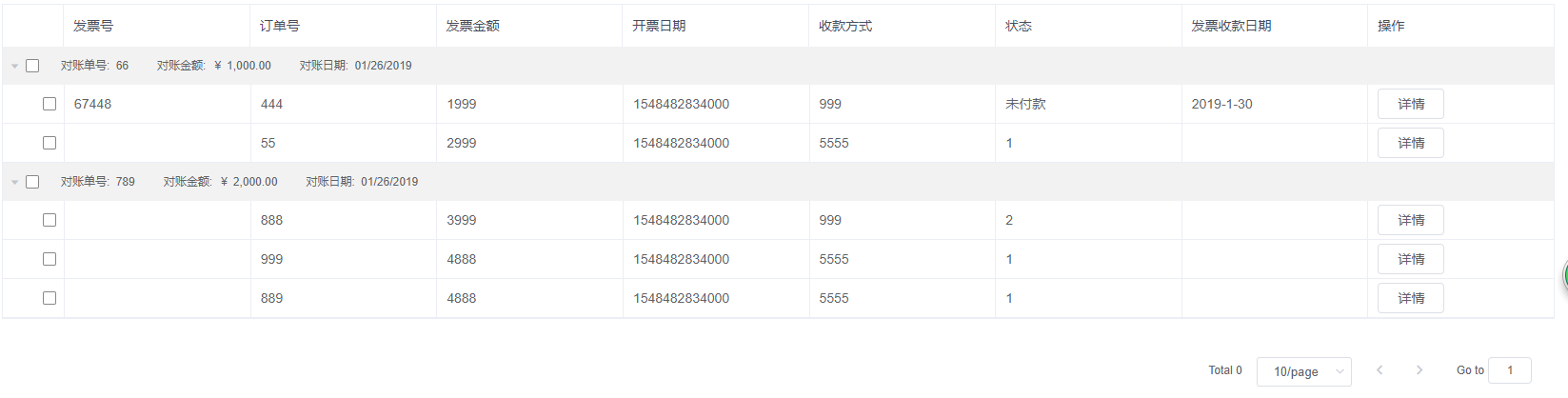


<div class="invoice-list">

      <!-- 表头的值,自己单独写的 -->

      <ul class="invoice-header">

        <li class="invoice-item">发票号</li>

        <li class="invoice-item">订单号</li>

        <li class="invoice-item">发票金额</li>

        <li class="invoice-item">开票日期</li>

        <li class="invoice-item">收款方式</li>

        <li class="invoice-item">状态</li>

        <li class="invoice-item">发票收款日期</li>

        <li class="invoice-item">操作</li>

      </ul>

      <el-tree

        :props="props"

        :data="tableData"

        show-checkbox

        default-expand-all

        ref="treeData"

        @check-change="handleCheckChange">

        <!-- 使用自定义,需要加slot-scope,返回两个值,node是当前节点指定的对象

        data是当前节点的数据 -->

        <div class="custom-tree-node" slot-scope="{ node, data }">

          <div class="total_info_box clearfix" v-if="data.span">

            <span><i>对账单号:</i> {{data.accountNo | isEmptyVal}}</span>

            <span><i>对账金额:</i> {{data.totalReconciledAmount | formatUSD}}</span>

            <span><i>对账日期:</i> {{data.confirmAccountDate | formatYMD}}</span>

          </div>

          <span v-else class="table_info_node">

            <span class="table_info_item">{{data.invoiceNo}}</span>

            <span class="table_info_item">{{data.orderNo}}</span>

            <span class="table_info_item">{{data.totalAmountTax}}</span>

            <span class="table_info_item">{{data.billingDate}}</span>

            <span class="table_info_item">{{data.forCollection}}</span>

            <span class="table_info_item">{{data.requestStatus}}</span>

            <span class="table_info_item">{{data.receiptDate}}</span>

            <span class="table_info_item"><el-button @click="toInvoiceDetail(data)">详情</el-button></span>

          </span>

        </div>

      </el-tree>

    </div>
js部分
data () {

    return {

      props: {

        label: 'accountNo', // 需要指定的节点渲染对象属性

        children: 'orderInvoiceAssemblyList' // 指定的子级

      },

      tableData: [] // tree组件渲染的数据

    }

  },

// 方法集合

  methods: {

    // tree组件渲染的数据列表

    getSupplierPayInvoice () {

      this.tableData = [{

        accountId: 13,

        accountNo: `66`,

        orderNo: '444',

        totalReconciledAmount: 1000,

        confirmAccountDate: 1548482834000,

        span: true,

        orderInvoiceAssemblyList: [{

          invoiceNo: '67448',

          orderNo: '444',

          totalAmountTax: 1999,

          billingDate: 1548482834000,

          forCollection: 999,

          requestStatus: '未付款',

          receiptDate: '2019-1-30',

          accountInvoiceId: 11

        }, {

          orderNo: '55',

          totalAmountTax: 2999,

          billingDate: 1548482834000,

          forCollection: 5555,

          requestStatus: 1,

          accountInvoiceId: 12

        }]

      }, {

        accountId: 14,

        accountNo: '789',

        orderNo: '444',

        totalReconciledAmount: 2000,

        confirmAccountDate: 1548482834000,

        span: true,

        orderInvoiceAssemblyList: [{

          orderNo: '888',

          totalAmountTax: 3999,

          billingDate: 1548482834000,

          forCollection: 999,

          requestStatus: 2,

          accountInvoiceId: 13

        }, {

          orderNo: '999',

          totalAmountTax: 4888,

          billingDate: 1548482834000,

          forCollection: 5555,

          requestStatus: 1,

          accountInvoiceId: 14

        }, {

          orderNo: '889',

          totalAmountTax: 4888,

          billingDate: 1548482834000,

          forCollection: 5555,

          requestStatus: 1,

          accountInvoiceId: 15

        }]

      }]

    },

    // tree组件选择改变事件

    handleCheckChange (val) {

      // console.log(val)

      // 使用getCheckedNodes可以获取当前被选中的节点数据

      let selected = this.$refs.treeData.getCheckedNodes()

      console.log(33, selected)

    }

}
sass样式
  .invoice-list {

    border: 1px solid #ebeef5;

    margin-top: 10px;

    .invoice-header {

      background-color: #f8f8f9;

      display: flex;

      padding-left: 63px;

      border-bottom: 1px solid #ebeef5;

      .invoice-item {

        padding: 10px;

        padding-right: 0;

        flex: 1;

        border-left: 1px solid #ebeef5;

        padding-left: 10px;

      }

    }

    .el-tree-node__content {

      background: #f2f2f2;

      height: 40px;

    }

    .el-tree-node__children {

      .el-tree-node__content {

        background: #fff;

        border-bottom: 1px solid #ebeef5;

      }

    }

    .custom-tree-node {

      width: 100%;

      height: 100%;

      .total_info_box {

        background: #f2f2f2;

        line-height: 40px;

        span{

          float: left;

          font-size: 12px;

          margin: 0 15px;

          i{

            display: inline-block;

            margin-right: 3px;

          }

        }

      }

      .table_info_node {

        display: flex;

        height: 100%;

        .table_info_item {

          flex: 1;

          height: 100%;

          border-left: 1px solid #ebeef5;

          padding-left: 10px;

          line-height: 40px;

        }

      }

    }

  }
element-ui tree树形组件自定义实现可展开选择表格的更多相关文章
- Element ui tree树形控件获取当前节点id和父节点id
低版本Element ui tree树形控件获取当前节点id和父节点id的方法:点击查看 最新版本Element ui tree树形控件获取当前节点id和父节点id教程: 1.找到node_modul ...
- Element ui tree树形控件获取父节点id
Element-ui官网给的方法 getCheckedKeys() { console.log(this.$refs.tree.getCheckedKeys()); }, 这种只有在所有子级都被选中的 ...
- iview实战 : 树形组件自定义
Tree树形组件是 iview 中相对复杂的一个组件. 自定义节点内容 使用强大的 Render 函数可以自定义节点显示内容和交互,比如添加图标,按钮等. ——官方文档 但官方的 example 只有 ...
- vue问题三:element ui的upload组件上传图片成功和移除事件
element ui的upload组件上传图片成功和移除事件: 登录后获取到后台传的token存到中: sessionStorage.setItem("token",data.ob ...
- vue的$nextTick使用总结,this.$refs为undefined的解决办法,element Ui的树形控件setCheckedKeys方法无法使用
其实这3个讲的是一个问题,先说下问题,我在watch里设置一个监听,当弹窗打开时,自动添加树形的默认选中项, 但奇怪的是this.$refs为undefined,自然setCheckedKeys无法使 ...
- Element UI tree 回显问题
Part.1 问题 写项目时遇到一个棘手的问题,在做关于权限功能时,点击修改需要显示角色原本对应的权限.涉及到了 tree 组件回显,但是有一个很尴尬的问题:tree 组件只要父节点选中,那么子节点就 ...
- vue+Element实现tree树形数据展示
组件: Element(地址:http://element.eleme.io/#/zh-CN/component/tree):Tree树形控件 <el-tree ref="expand ...
- Element中Tree树结构组件中实现Ctrl和Shift多选
在Element中的树结构中, 实现多选功能,首先的是判断有没有按下键盘ctrl和shift按键.但是在Element中的tree组件的左键点击事件是没有提供$event鼠标属性判断的.所以就需要在函 ...
- 关于Element UI中select组件中遇到的问题
问题一:在使用select组件设置多选功能后,窗口抖动问题? 详细描述:在我使用select做多选的功能时出现了窗口抖动的问题,测试的时候发现,在有些人的电脑上抖动,有些人的电脑上不抖,找了很多文档, ...
随机推荐
- [GO]方法的继承
package main import "fmt" type Person struct { name string sex byte age int } func (tmp Pe ...
- ArcGIS中地图导出格式比较(转)
转自:http://blog.sina.com.cn/s/blog_6438c8360101eqfx.html 有人问过这样的问题,用于出挂图的地图格式应该怎么选择?熟悉ArcGIS的用户都知道, ...
- ASP.NET’s compilation system
Compilation in ASP.NET applications First, let’s take a moment to revisit compilation in the context ...
- Type Hierarchy
Window - Preferences - General - Keys Name: Open Type Hierarchy Description: Open a type hie ...
- jquery cookie用法
jquery cookie用法(获取cookie值,删除cookie) cookie在jquery中有指定的cookie操作类,下面我先来介绍我们在使用cookie操作类时的一些问题,然后介绍正确的使 ...
- Duplicate entry '127' for key 'PRIMARY'的解决方法
如果这个时候数据表里面没有数据,而且我们用使用 INSERT INTO VALUES 这样的语句插入,就会提示 Duplicate entry '127' for key 'PRIMARY'
- MySQL语句基础
该笔记使用的数据库为MySQL-5.6.34,使用的建表语句为 : /* Navicat MySQL Data Transfer Source Server : 127.0.0.1 Source Se ...
- yum使用,使用rpm指令安装rpm,使用dpkg指令安装deb
yum安装时如果报错提示安装失败,缺少库文件,可以使用: yum whatprovides 库名 之后安装提供的程序 yum remove xxx卸载 yum update 更新 解决 Require ...
- sampling method
sampling method 背景 在贝叶斯框架下,利用后验分布对参数进行估计,也即 其中 (1)是参数的先验分布. (2)是似然分布,数据集的生成联合概率 (3)是参数的后验分布. 通常分布很复杂 ...
- 网易对象存储NOS图床神器
本文来自网易云社区 注:使用过程中有什么问题或建议欢迎到如下链接提交:http://note.youdao.com/noteshare?id=6321086fa4d7a6c003656354c1aa6 ...