
Java web 简单的增删改查程序(超详细)
就是简单的对数据进行增删改查。代码如下:
1.bean层:用来封装属性及其get set方法 toString方法,有参构造方法,无参构造方法等。
public class Bean {

    private int id;

    private String name;

    private String password;

    private String sex;

    public int getId() {

        return id;

    }

    public void setId(int id) {

        this.id = id;

    }

    public String getName() {

        return name;

    }

    public void setName(String name) {

        this.name = name;

    }

    public String getPassword() {

        return password;

    }

    public void setPassword(String password) {

        this.password = password;

    }

    public String getSex() {

        return sex;

    }

    public void setSex(String sex) {

        this.sex = sex;

    }

    @Override

    public String toString() {

        return "Bean [id=" + id + ", name=" + name + ", password=" + password + ", sex=" + sex + "]";

    }

    public Bean(int id, String name, String password, String sex) {

        super();

        this.id = id;

        this.name = name;

        this.password = password;

        this.sex = sex;

    }

    public Bean() {

        // TODO Auto-generated constructor stub

    }

}
2.DBUtil:对数据库连接关闭操作的封装:
import java.sql.Connection;

import java.sql.DriverManager;

import java.sql.ResultSet;

import java.sql.SQLException;

import java.sql.Statement;

public class DBUtil {

    private static String url = "jdbc:mysql://localhost:3306/db10?useUnicode=true&characterEncoding=utf8";

    private static String user = "root";

    private static String password = "root";

    private static String jdbcName="com.mysql.jdbc.Driver";

    private Connection con=null;

    public static  Connection getConnection() {

        Connection con=null;

        try {

            Class.forName(jdbcName);

            con=DriverManager.getConnection(url, user, password);

            //System.out.println("数据库连接成功");

        } catch (Exception e) {

            // TODO Auto-generated catch block

            //System.out.println("数据库连接失败");

            e.printStackTrace();

        }

        return con;

    }

    public static void close(Connection con) {

        if(con!=null)

            try {

                con.close();

            } catch (SQLException e) {

                // TODO Auto-generated catch block

                e.printStackTrace();

            }

    }

    public static void close(Statement state, Connection conn) {

        if(state!=null) {

            try {

                state.close();

            } catch (SQLException e) {

                e.printStackTrace();

            }

        }

        if(conn!=null) {

            try {

                conn.close();

            } catch (SQLException e) {

                e.printStackTrace();

            }

        }

    }

    public static void close(ResultSet rs, Statement state, Connection conn) {

        if(rs!=null) {

            try {

                rs.close();

            } catch (SQLException e) {

                e.printStackTrace();

            }

        }

        if(state!=null) {

            try {

                state.close();

            } catch (SQLException e) {

                e.printStackTrace();

            }

        }

        if(conn!=null) {

            try {

                conn.close();

            } catch (SQLException e) {

                e.printStackTrace();

            }

        }

    }

}
可以将其定义为一个工具类,每次使用的时候直接复制,然后更改url里数据库的名字,这样可以提高效率。
dao层:对数据库的各种增删改查方法的封装:
 import java.sql.Connection;

 import java.sql.PreparedStatement;

 import java.sql.ResultSet;

 import java.sql.SQLException;

 import java.sql.Statement;

 import java.util.ArrayList;

 import java.util.List;

 import org.junit.jupiter.api.Test;

 public class Dao {//dao层

         private DBUtil dbutil=new DBUtil();

     public Dao() {

         // TODO Auto-generated constructor stub

     }

     @Test

     public boolean insert(Bean bean) {//插入数据的方法

         boolean f=false;

         String sql="insert into info(id,name,password,sex) values('"+bean.getId()+"','"+bean.getName()+"','"+bean.getPassword()+"','"+bean.getSex()+"')";

         Connection conn=DBUtil.getConnection();//数据库连接,加载驱动

         Statement state=null;

         try

         {

             state=conn.createStatement();//实例化Statement对象,方便对sql语句进行操作

             System.out.println(conn);

             state.executeUpdate(sql);

             f=true;

             //执行数据库更新操作用于执行INSERT、UPDATE或DELETE语句以及SQLDDL(数据定义语言)语句,

             //例如CREATETABLE和DROPTABLE,(创建表和删除表)

         }catch(Exception e)//当try语句中s出现异常时,会执行catch中的语句

           {

             e.printStackTrace();//捕获异常的语句

           }

          finally //finally作为异常处理的一部分,它只能用在try/catch语句中,并且附带一个语句块,表示这段语句最终一定会被执行(不管有没有抛出异常),经常被用在需要释放资源的情况下。

          {

              DBUtil.close(conn);

          }

         return f;

     }

     public boolean delete(int id ) {//删除方法

         String sql="delete from info where id='"+id+"'";

         boolean f=false;

         Connection conn =DBUtil.getConnection();

         Statement st=null;

         try {

             st=conn.createStatement();

             st.executeUpdate(sql);

             f=true;

         } catch (SQLException e) {

             // TODO Auto-generated catch block

             e.printStackTrace();

         }

         finally{

             DBUtil.close(st, conn);

         }

         return f;

     }

     public boolean update(Bean bean) {//更新方法

         String sql="update info set name='"+bean.getName()+"',password='"+bean.getPassword()+"',sex='"+bean.getSex()+"'where id='"+bean.getId()+"'";

         Connection conn=DBUtil.getConnection();

         boolean f=false;

         Statement st=null;

         try {

             st=conn.createStatement();

             st.executeUpdate(sql);

             f=true;

         } catch (SQLException e) {

             // TODO Auto-generated catch block

             e.printStackTrace();

         }

         return f;

     }

     public List<Bean> list(){//查询所有方法

         String sql="select * from info order by id ASC";

         Connection conn=DBUtil.getConnection();

         Statement st=null;

         List<Bean> list=new ArrayList<>();

         ResultSet rs=null;

         Bean bean=null;

         try {

             st=conn.createStatement();

             st.executeQuery(sql);

             rs=st.executeQuery(sql);

             while(rs.next()) {

                 int id=rs.getInt("id");

                 String name = rs.getString("name");

                 String password = rs.getString("password");

                 String sex = rs.getString("sex");

                 bean=new Bean(id,name,password,sex);

                 list.add(bean);

             }

         } catch (SQLException e) {

             // TODO Auto-generated catch block

             e.printStackTrace();

         }

         finally {

             DBUtil.close(rs, st, conn);

         }

         return list;

     }

     }
对数据库进行操作的方法都封装在里面。
servlet:简单说servlet就是跳转的类,当什么情况下干什么跳转到哪里。
import java.io.IOException;

import java.io.UnsupportedEncodingException;

import java.util.List;

import javax.servlet.ServletException;

import javax.servlet.annotation.WebServlet;

import javax.servlet.http.HttpServlet;

import javax.servlet.http.HttpServletRequest;

import javax.servlet.http.HttpServletResponse;

/**

 * Servlet implementation class servlet

 */

@WebServlet("/servlet")

public class servlet extends HttpServlet {

    Dao dao=new Dao();

    private static final long serialVersionUID = 1L;

    /**

     * @see HttpServlet#HttpServlet()

     */

    public servlet() {

        super();

        // TODO Auto-generated constructor stub

    }

    private void update(HttpServletRequest request, HttpServletResponse response) throws ServletException, IOException {

        // TODO Auto-generated method stub

        request.setCharacterEncoding("utf-8");

        int id = Integer.parseInt(request.getParameter("id"));

        String name = request.getParameter("name");

        String password = request.getParameter("password");

        String sex = request.getParameter("sex");

        Bean bean=new Bean(id,name,password,sex);

        dao.update(bean);

        request.setAttribute("message", "修改成功");

        request.getRequestDispatcher("servlet?method=list").forward(request, response);

    }

    private void list(HttpServletRequest request, HttpServletResponse response) throws Exception {

        // TODO Auto-generated method stub

        request.setCharacterEncoding("utf-8");

        List<Bean> list = dao.list();

        request.setAttribute("list", list);

        request.getRequestDispatcher("list.jsp").forward(request,response);

    }

    private void delete(HttpServletRequest request, HttpServletResponse response) throws Exception, IOException {

        // TODO Auto-generated method stub

        request.setCharacterEncoding("UTF-8");

        int id=Integer.parseInt(request.getParameter("id"));

        dao.delete(id); //进行数据库的删除操作

        request.setAttribute("message", "删除成功");

        request.getRequestDispatcher("servlet?method=list").forward(request, response);

    }

    private void insert(HttpServletRequest request, HttpServletResponse response) throws IOException, ServletException {

        // TODO Auto-generated method stub

        request.setCharacterEncoding("utf-8");

        int id = Integer.parseInt(request.getParameter("id"));

        String name = request.getParameter("name");

        String password = request.getParameter("password");

        String sex = request.getParameter("sex");

        Bean bean=new Bean(id,name,password,sex);

        if(dao.insert(bean)) {

            request.setAttribute("message", "添加成功");

            request.getRequestDispatcher("index.jsp").forward(request, response);

        }

    }

    /**

     * @see HttpServlet#doGet(HttpServletRequest request, HttpServletResponse response)

     */

    protected void doGet(HttpServletRequest request, HttpServletResponse response) throws ServletException, IOException {

        // TODO Auto-generated method stub

        request.setCharacterEncoding("utf-8");

        String method=request.getParameter("method");

        if("insert".equals(method)) {

            insert(request,response);

        }

        else if("delete".equals(method)) {

            try {

                delete(request,response);

            } catch (Exception e) {

                // TODO Auto-generated catch block

                e.printStackTrace();

            }

        }

        else if("update".equals(method)) {

            update(request,response);

        }

        else if("list".equals(method)) {

            try {

                list(request,response);

            } catch (Exception e) {

                // TODO Auto-generated catch block

                e.printStackTrace();

            }

        }

    }

    /**

     * @see HttpServlet#doPost(HttpServletRequest request, HttpServletResponse response)

     */

    protected void doPost(HttpServletRequest request, HttpServletResponse response) throws ServletException, IOException {

        // TODO Auto-generated method stub

        doGet(request, response);

    }

}
注意:在创建的时候一定要选择创建servlet而不是类如图:
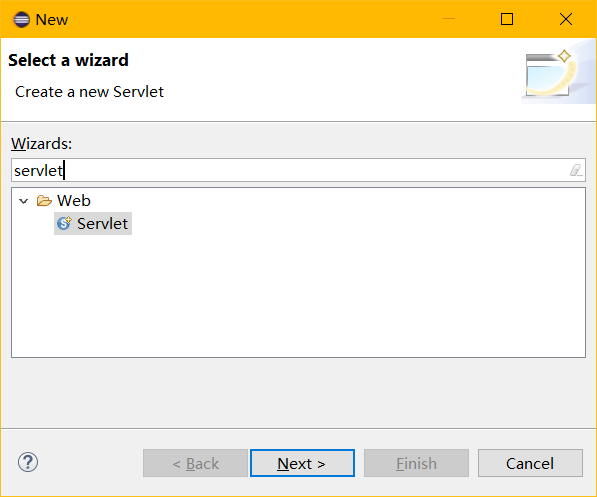
输入完名字以后点击next选择自己要写的方法:
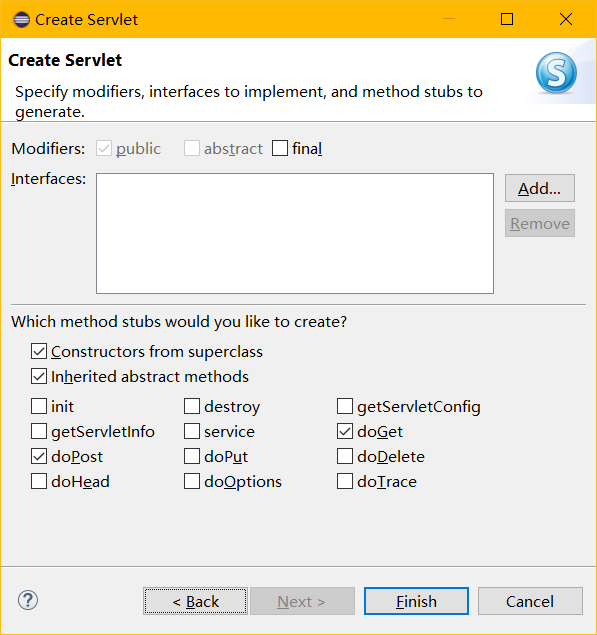
jsp页面:
index.jsp:主页面:
<%@ page language="java" contentType="text/html; charset=UTF-8"

    pageEncoding="UTF-8"%>

<!DOCTYPE html>

<html>

<head>

<meta charset="UTF-8">

<title>首页</title>

</head>

<body><%

Object message =request.getAttribute("message");

if(message!=null&&!"".equals(message)){

%>

    <script type="text/javascript">

    alert("<%=request.getAttribute("message")%>");

    </script>

<%}%>

    <div align="center">

        <h1>简单的增删改查</h1>

        <div>

            <a href="insert.jsp">添加</a>

        </div>

        <div>

            <a href="servlet?method=list">删除</a>

        </div>

        <div>

            <a href="servlet?method=list">修改</a>

        </div>

        <div>

            <a href="servlet?method=list">查询</a>

        </div>

    </div>

</body>

</html>
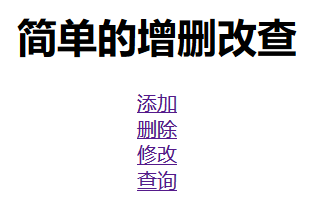
主页面就是一个菜单,至于为什么删除修改查询的链接都是servlet?method=list,那是因为他们都去调用servlet里面的list方法:
    private void list(HttpServletRequest request, HttpServletResponse response) throws Exception {

        // TODO Auto-generated method stub

        request.setCharacterEncoding("utf-8");

        List<Bean> list = dao.list();

        request.setAttribute("list", list);

        request.getRequestDispatcher("list.jsp").forward(request,response);

    }
先把数据库里所有的信息显示出来,然后在通过request.getRequestDispatcher("list.jsp").forward(request,response);进行跳转,跳转到list.jsp界面,并将之前的所有数据(request,response)一并转发过去
insert.jsp:
<%@ page language="java" contentType="text/html; charset=UTF-8"
pageEncoding="UTF-8"%>
<!DOCTYPE html>
<html>
<head>
<meta charset="UTF-8">
<title>添加</title>
</head>
<body>
<%
Object message = request.getAttribute("message");
if (message != null && !"".equals(message)) {
%>
<script type="text/javascript">
alert("<%=request.getAttribute("message")%>"); //弹出对话框
</script>
<%
}
%>
<div align="center">
<h1>添加信息</h1>
<a href="index.jsp">返回主页</a>
<form action="servlet?method=insert" method="post">
<div>
id<input type="text" id="id" name="id" />
</div>
<div>
name<input type="text" id="name" name="name" />
</div>
<div>
password<input type="text" id="password" name="password" />
</div>
<div>
sex<input type="radio" id="sex" name="sex" value="男"/>男 <input type="radio"
id="sex" name="sex" value="女" />女
</div>
<div>
<button type="submit">添 加</button>
</div>
</form>
</div>
</body>
</html>
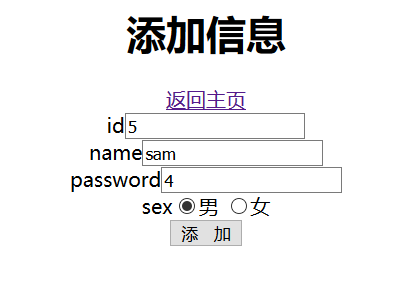
正常的添加页面。
list.jsp界面:
<%@ page language="java" contentType="text/html; charset=UTF-8"

    pageEncoding="UTF-8"%>

   <%@taglib uri="http://java.sun.com/jsp/jstl/core" prefix="c"%>

<!DOCTYPE html>

<html>

<head>

<meta charset="UTF-8">

<title>Insert title here</title>

</head>

<body>

<%

         Object message = request.getAttribute("message");

         Object grade_list = request.getAttribute("grade_list");

         if(message!=null && !"".equals(message)){

    %>

         <script type="text/javascript">

              alert("<%=request.getAttribute("message")%>");

         </script>

    <%} %>

    <div align="center">

        <h1 >信息列表</h1>

        <a href="index.jsp">返回主页</a>

        <table >

            <tr>

                <td>id</td>

                <td>姓名</td>

                <td>密码</td>

                <td>性别</td>

                <td align="center" colspan="2">操作</td>

            </tr>

            <c:forEach items="${list}" var="item">

                <tr>

                    <td>${item.id}</td>

                    <td>${item.name}</td>

                    <td>${item.password}</td>

                    <td>${item.sex}</td>

                    <td><a href="update.jsp?id=${item.id}&name=${item.name}&password=${item.password}&sex=${item.sex}">修改</a></td>

                    <td><a href="servlet?method=delete&id=${item.id}">删除</a></td>

                </tr>

            </c:forEach>

        </table>

    </div>

</body>

</html>
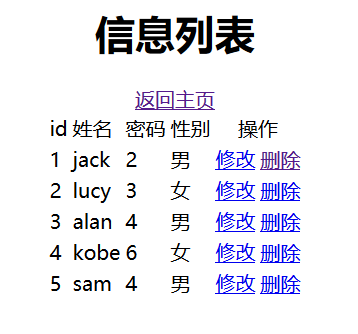
其中用到了标签库(<c:forEach>),需要导入jstl的包,并且加入其核心依赖,为固定值,如果不了解请点击:https://www.cnblogs.com/tkg1314/p/12008284.html查看jstl标签库。用<c:forEach>来遍历信息,然后每行信息都有删除和修改操作。修改的话跳转到update.jsp并且将id,name,password,sex的值传过去。删除是跳转到servlet的delete方法:
private void delete(HttpServletRequest request, HttpServletResponse response) throws Exception, IOException {

        // TODO Auto-generated method stub

        request.setCharacterEncoding("UTF-8");

        int id=Integer.parseInt(request.getParameter("id"));

        dao.delete(id); //进行数据库的删除操作

        request.setAttribute("message", "删除成功");

        request.getRequestDispatcher("servlet?method=list").forward(request, response);

    }
因为delete只需要id所以只需要将id传过去。
至于每个jsp里面的:
<%

         Object message = request.getAttribute("message");

         Object grade_list = request.getAttribute("grade_list");

         if(message!=null && !"".equals(message)){

    %>

         <script type="text/javascript">

              alert("<%=request.getAttribute("message")%>");

         </script>

    <%} %>
是用来获取servlet里面你通过setAttribute方法添加的信息(红色加粗):并且提示出来
    private void insert(HttpServletRequest request, HttpServletResponse response) throws IOException, ServletException {

        // TODO Auto-generated method stub

        request.setCharacterEncoding("utf-8");

        int id = Integer.parseInt(request.getParameter("id"));

        String name = request.getParameter("name");

        String password = request.getParameter("password");

        String sex = request.getParameter("sex");

        Bean bean=new Bean(id,name,password,sex);

        if(dao.insert(bean)) {

            request.setAttribute("message", "添加成功");

            request.getRequestDispatcher("index.jsp").forward(request, response);

        }

    }
这样便完成了一个简单的java web 数据库的简单增删改查,没有做页面,那个password不是密码,只是一个名字,因此<input>标签没用password类型。
运行结果:
主页面:
添加操作:
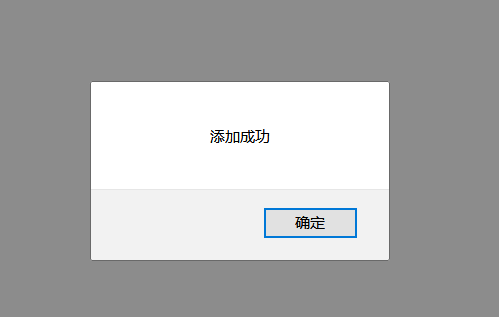
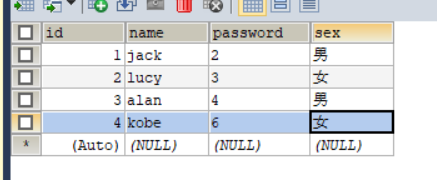
添加之前的表数据:
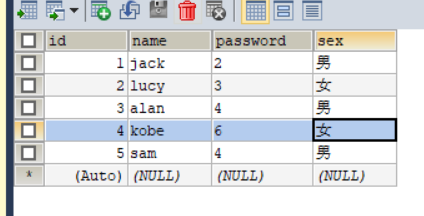
添加之后
修改操作:
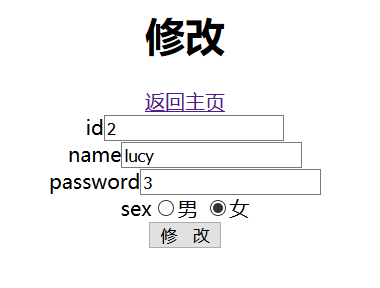
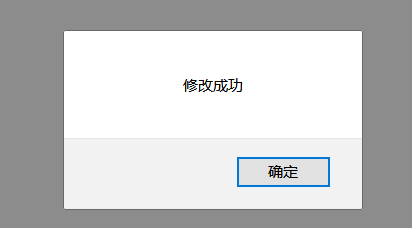
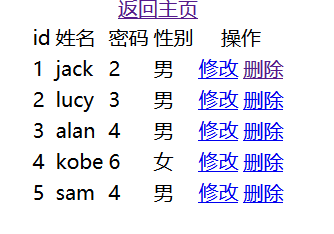
删除操作:
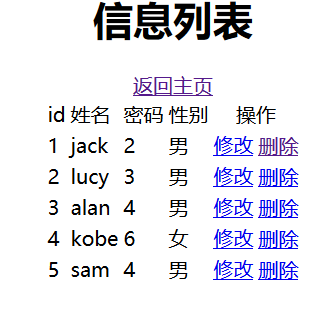
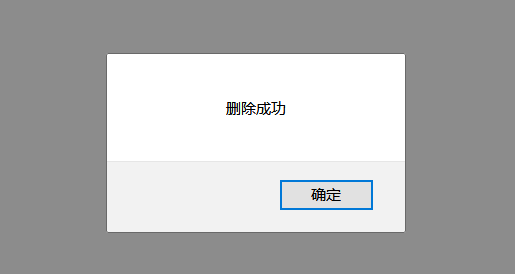
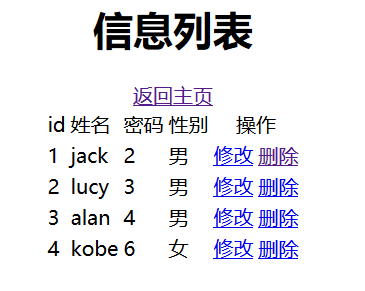
体会:做了一个简单的增删改查明白了每个类的作用以及联系。bean是用将属性的get,set等方法进行封装。dao层,是对数据库表操作的封装,里面有sql语句的执行等。而DBUtil是对数据库连接和关闭等操作的封装。servlet是跳转,通过调用dao层的方法实现跳转操作。然后jsp页面,有一个主页面 写超链接链接到其他页面。当然你对数据的删改都是在查询的基础上操作的,如果没有显示出信息就不能去删除和修改。当然我把id设为了主键自增,但我没有写验证主键的条件。另外还有什么不对的地方希望大家和老师多多指点!
Java web 简单的增删改查程序(超详细)的更多相关文章
- java web简单的增删改查
1.主要的文件,运行结果,运行界面,数据库创建的表等图片. 所要创建的文件和要导入的包: 主页面: 显示界面: 数据库的信息: 删除.查找.修改就不一 一列出来,自己可以运行看看.哈哈 2.接下来我将 ...
- Java实现简单的增删改查操作
需求分析:通过数组 ,完成 对学生信息的 管理 (增删改查)创建1个 学生类创建1个 CRUD的类 – 学生管理类 并测试 在这个程序中我只运用了两个类进行操作 package com.hopu.de ...
- java web数据库的增删改查详细
本次课上实验是完成数据库的增删改查. 包括增加用户信息.删除用户信息.多条件查找用户信息.修改用户信息(主要是复选框单选框等的相关操作.) 下面下看一下各个界面的样子. 总页面:显示全部页面:增加页面 ...
- JAVA JDBC 简单的增删改查
package jdbc_util; import java.sql.Connection; import java.sql.DriverManager; import java.sql.Prepar ...
- salesforce 零基础学习(五十一)使用 Salesforce.com SOAP API 实现用户登录以及简单的增删改查(JAVA访问salesforce)
此篇请参看:https://resources.docs.salesforce.com/202/latest/en-us/sfdc/pdf/salesforce_developer_environme ...
- 通过flask实现web页面简单的增删改查bootstrap美化版
通过flask实现web页面简单的增删改查bootstrap美化版 项目目录结构 [root@node1 python]# tree -L 2 . ├── animate.css ├── fileut ...
- 通过flask实现web页面简单的增删改查
通过flask实现web页面简单的增删改查 # 1.后台程序falsk_web01.py #coding:utf-8 from flask import Flask,render_template,r ...
- Java通过JDBC进行简单的增删改查(以MySQL为例)
Java通过JDBC进行简单的增删改查(以MySQL为例) 目录: 前言:什么是JDBC 一.准备工作(一):MySQL安装配置和基础学习 二.准备工作(二):下载数据库对应的jar包并导入 三.JD ...
- ElasticSearch6(三)-- Java API实现简单的增删改查
基于ElasticSearch6.2.4, Java API创建索引.查询.修改.删除,pom依赖和获取es连接 可查看此文章. package com.xsjt.learn; import java ...
随机推荐
- Online Meeting CodeForces - 420B (思维)
大意: 给定某一段连续的上线下线记录, 老板上线或下线时房间无人, 并且每次会议都在场, 求哪些人可能是老板. 结论1: 从未出现过的人一定可以是老板. 结论2: 出现过的人中老板最多只有1个. 结论 ...
- jenkins转换显示语言为中文简体(jenkins汉化)
jenkins版本2.117 单位使用的jenkins一直是英文版本,有同事建议切换为中文版. 以下过程完成转换. 一.安装插件 主界面-->系统管理-->插件管理-->可选插件 图 ...
- C++入门基础知识(二)
一:引用 概念:是给一个已经存在的变量取一个别名,编译器不会为引用变量开辟内存空间,它和引用的变量公用一块内存空间. 例如: 类型& 引用变量名(对象名)= 引用实体 int& a = ...
- django 支持跨域请求配置
参考:https://www.jianshu.com/p/63fb55bee142 核心注意点:
- 将磁盘从FAT格式转换为NTFS格式的方法
不需要进行格式化,只需在命令提示符中输入如下内容:CONVERT X:/FS:NTFS把X换成你需要的盘符,转一个盘需十几或几十秒不等..注意:此方法不可逆转,FAT32转到NTFS后不可转回,当然也 ...
- java实现spark常用算子之mapPartitionsWithIndex
import org.apache.spark.SparkConf;import org.apache.spark.api.java.JavaRDD;import org.apache.spark.a ...
- WebStorm 启动时提示Failed to load JVM DLL
环境:win7 64位:时间:2019-11-18 问题描述 启动webstorm 时提示failed to load JVM DLL 解决方法 启动时快捷方式要选到64位的exe
- vue入门:(v-for指令与列表渲染)
v-for渲染列表 维护状态 数组变异方法与替换数组 $set.$remove 对象属性实现列表渲染 一.v-for渲染列表 语法:v-for="item in items" 先来 ...
- node jade || ejs引擎模板
1.jade:破坏式2.ejs:保留式 -------------------------------------------------------------------------------- ...
- winfrom 操作Excel
利用Aspose.Cells.dll 操作Excel,内容如下: 1.界面设计: 2.逻辑: using System; using System.Collections.Generic; using ...