
spring boot:用spring security加强spring boot admin的安全(spring boot admin 2.3.0 / spring boot 2.3.3)
一,spring boot admin的安全环节:
1,修改context-path,默认时首页就是admin,
我们修改这个地址可以更安全
2,配置ip地址白名单,有ip限制才安全,
我们使用了spring security,
可以在防火墙中也配置上ip限制
3,登录用户有相应的role授权才能访问
4,actuator端也要配置ip/路径/权限
说明:刘宏缔的架构森林是一个专注架构的博客,地址:https://www.cnblogs.com/architectforest
对应的源码可以访问这里获取: https://github.com/liuhongdi/
说明:作者:刘宏缔 邮箱: 371125307@qq.com
二,演示项目的相关信息
1,项目地址:
https://github.com/liuhongdi/bootadmin
2,项目功能说明:
演示了spring boot admin 服务端和actuator客户端的安全配置
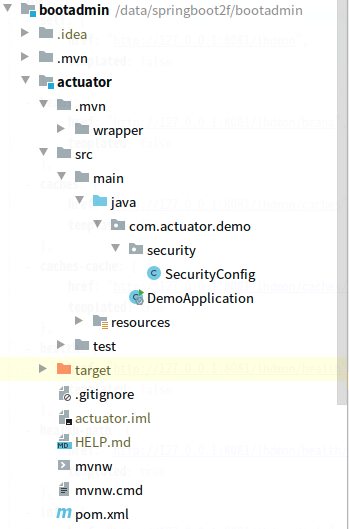
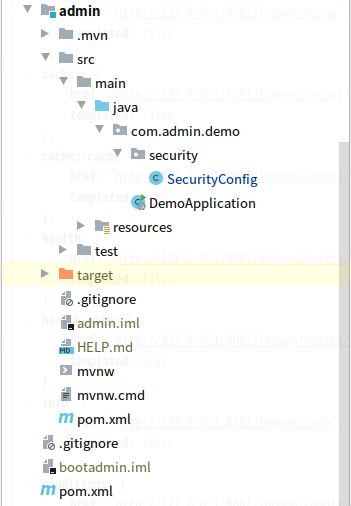
3,项目结构;如图:
三,配置文件说明
1,admin模块的pom.xml
        <dependency>

            <groupId>org.springframework.boot</groupId>

            <artifactId>spring-boot-starter-web</artifactId>

        </dependency>

        <!--admin sever-->

        <dependency>

            <groupId>de.codecentric</groupId>

            <artifactId>spring-boot-admin-starter-server</artifactId>

            <version>2.3.0</version>

        </dependency>

        <!-- spring security -->

        <dependency>

            <groupId>org.springframework.boot</groupId>

            <artifactId>spring-boot-starter-security</artifactId>

        </dependency>
2,actuator模块的pom.xml
        <!--admin client-->

        <dependency>

            <groupId>de.codecentric</groupId>

            <artifactId>spring-boot-admin-starter-client</artifactId>

            <version>2.3.0</version>

        </dependency>

        <!--actuator begin-->

        <dependency>

            <groupId>org.springframework.boot</groupId>

            <artifactId>spring-boot-starter-actuator</artifactId>

        </dependency>

        <!-- spring security -->

        <dependency>

            <groupId>org.springframework.boot</groupId>

            <artifactId>spring-boot-starter-security</artifactId>

        </dependency>
3,admin模块的application.properties
#admin context-path

spring.boot.admin.context-path=/lhdadmin

#admin white ip list

spring.boot.admin.access.iplist=192.168.3.1,127.0.0.1

#admin status intertal

spring.boot.admin.monitor.status-interval=60000ms

spring.boot.admin.monitor.status-lifetime=60000ms

#error

server.error.include-stacktrace=always

#error

logging.level.org.springframework.web=trace
4,actuator模块的application.properties
#admin url

spring.boot.admin.client.url=http://localhost:8080/lhdadmin

spring.boot.admin.client.username=lhdadmin

spring.boot.admin.client.password=123456

spring.boot.admin.client.connect-timeout=5000ms

spring.boot.admin.client.period=60000ms

spring.boot.admin.client.instance.metadata.user.name=lhdadmin

spring.boot.admin.client.instance.metadata.user.password=123456

#port

server.port=8081

#exposure

management.endpoints.web.exposure.include=*

#路径映射

management.endpoints.web.base-path=/lhdmon

#health显示

management.endpoint.health.show-details=always

#允许访问的ip列表

management.access.iplist = 127.0.0.1,192.168.1.100,192.168.2.3/24,192.168.1.6,localhost

#error

server.error.include-stacktrace=always

#error

logging.level.org.springframework.web=trace
说明:
spring.boot.admin.client.username=lhdadmin
spring.boot.admin.client.password=123456
这两项是用来访问server的账号
spring.boot.admin.client.instance.metadata.user.name=lhdadmin
spring.boot.admin.client.instance.metadata.user.password=123456
这两项是供server访问actuator时使用
spring.boot.admin.client.url=http://localhost:8080/lhdadmin
此处注意使用服务端设置的context-path
四,java代码说明
1,admin模块的application:DemoApplication.java
@SpringBootApplication

@EnableAdminServer

public class DemoApplication {

    public static void main(String[] args) {

        SpringApplication.run(DemoApplication.class, args);

    }

}
注意添加了@EnableAdminServer注解,用来启动admin sever
2,admin模块的SecurityConfig.java
@Configuration

@EnableWebSecurity

 public class SecurityConfig extends WebSecurityConfigurerAdapter {

     @Value("${spring.boot.admin.access.iplist}")

     private String iplist;

     @Override

     protected void configure(HttpSecurity http) throws Exception {

                 //得到iplist列表

                String iprule = "";

                //hasIpAddress('10.0.0.0/16') or hasIpAddress('127.0.0.1/32')

                String[] splitAddress=iplist.split(",");

                for(String ip : splitAddress){

                     if (iprule.equals("")) {

                         iprule = "hasIpAddress('"+ip+"')";

                     } else {

                         iprule += " or hasIpAddress('"+ip+"')";

                     }

                }

                String adminRule = "hasAnyRole('ADMIN','DEV') and ("+iprule+")";

                  //login和logout

                  http.formLogin()

                          .loginPage("/lhdadmin/login")

                         .defaultSuccessUrl("/lhdadmin/wallboard")

                        .failureUrl("/login-error.html")

                        .permitAll()

                       .and()

                       .logout().logoutUrl("/lhdadmin/logout").permitAll()

                       .and()

                       .httpBasic();

         http.csrf()

                 .csrfTokenRepository(CookieCsrfTokenRepository.withHttpOnlyFalse())

                 .ignoringAntMatchers(

                         "/lhdadmin/**",

                         "/actuator/**"

                 );

                  //匹配的页面,符合限制才可访问

                  http.authorizeRequests()

                  .antMatchers("/lhdadmin/login/**","/lhdadmin/assets/**").access(iprule)

                  .antMatchers("/lhdadmin/**").access(adminRule);

                  //剩下的页面,允许访问

                 http.authorizeRequests().anyRequest().permitAll();

             }

     @Autowired

     public  void configureGlobal(AuthenticationManagerBuilder auth) throws Exception {

         //添加两个账号用来做测试

         auth.inMemoryAuthentication().passwordEncoder(new BCryptPasswordEncoder())

                 .withUser("lhdadmin")

                 .password(new BCryptPasswordEncoder().encode("123456"))

                 .roles("ADMIN","USER")

                 .and()

                 .withUser("lhduser")

                 .password(new BCryptPasswordEncoder().encode("123456"))

                 .roles("USER");

     }

 }
3,actuator模块的SecurityConfig.java
@Configuration

@EnableWebSecurity

 public class SecurityConfig extends WebSecurityConfigurerAdapter {

     @Value("${management.access.iplist}")

     private String iplist;

    @Override

    protected void configure(HttpSecurity http) throws Exception {

        //得到iplist列表

        String iprule = "";

        String[] splitAddress=iplist.split(",");

        for(String ip : splitAddress){

            if (iprule.equals("")) {

                iprule = "hasIpAddress('"+ip+"')";

            } else {

                iprule += " or hasIpAddress('"+ip+"')";

            }

        }

        String actuatorRule = "hasAnyRole('ADMIN','DEV') and ("+iprule+")";

        //login和logout

        http.formLogin()

                .defaultSuccessUrl("/lhdmon")

                .failureUrl("/login-error.html")

                .permitAll()

                .and()

                .logout()

                .and()

                .httpBasic();

        //匹配的页面,符合限制才可访问

        http.authorizeRequests()

                .antMatchers("/lhdmon/**").access(actuatorRule);

        //剩下的页面,允许访问

        http.authorizeRequests().anyRequest().permitAll();

    }

    @Autowired

    public  void configureGlobal(AuthenticationManagerBuilder auth) throws Exception {

        //添加两个账号用来做测试

        auth.inMemoryAuthentication().passwordEncoder(new BCryptPasswordEncoder())

                .withUser("lhdadmin")

                .password(new BCryptPasswordEncoder().encode("123456"))

                .roles("ADMIN","USER")

                .and()

                .withUser("lhduser")

                .password(new BCryptPasswordEncoder().encode("123456"))

                .roles("USER");

    }

 }
五,测试效果
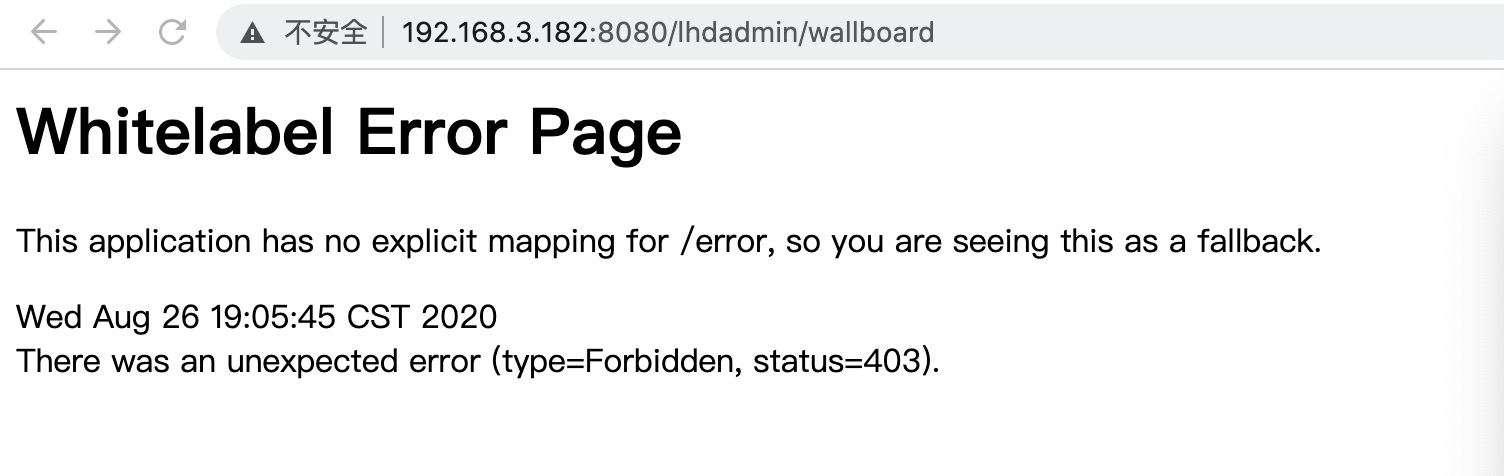
1,spring boot admin 非授权ip地址访问
http://192.168.3.182:8080/lhdadmin/wallboard
登录后返回:
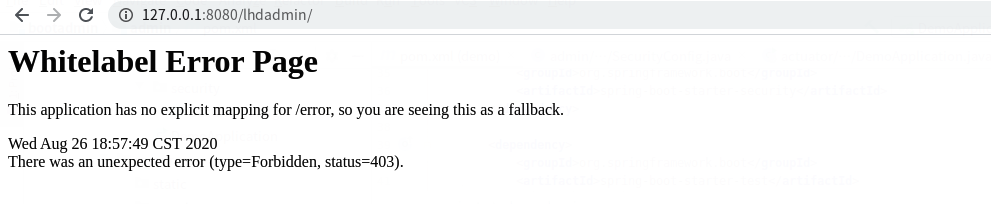
2,spring boot admin 非授权账号访问
http://127.0.0.1:8080/lhdadmin/login
页面:用lhduser登录
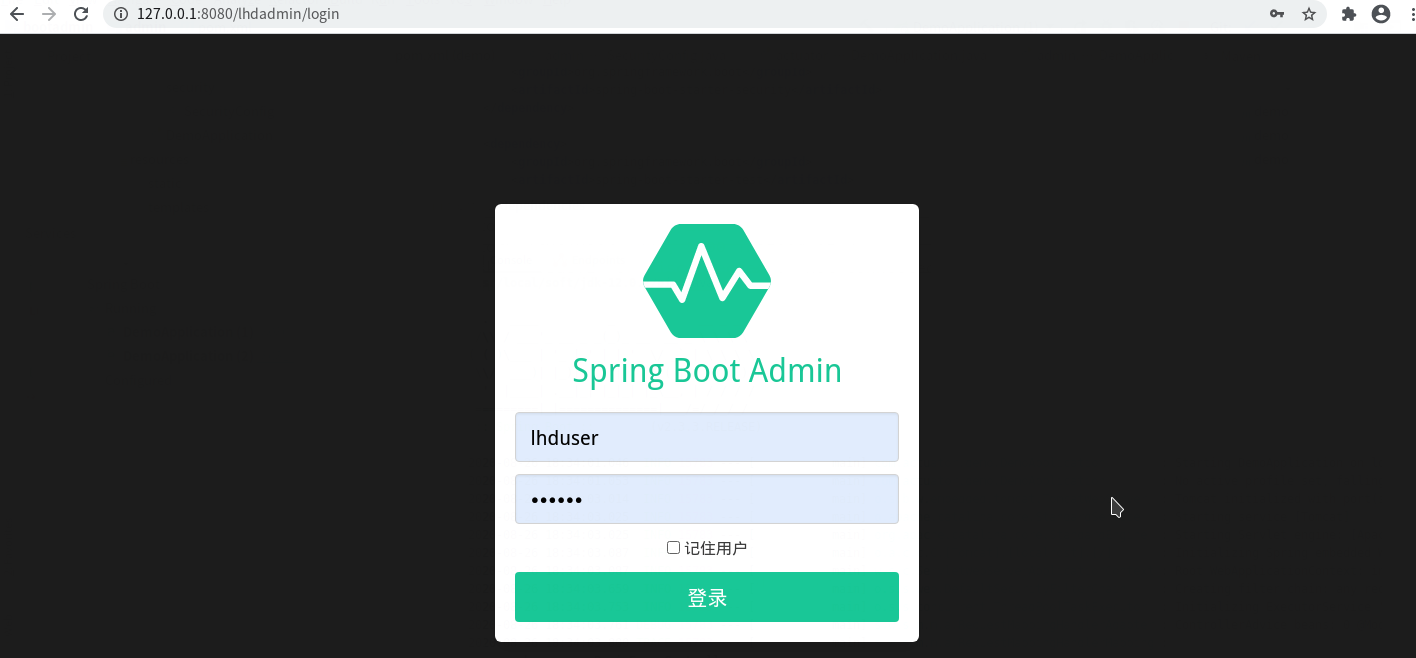
lhduser这个账号无权访问
3,spring boot admin从授权ip用有授权账号登录:
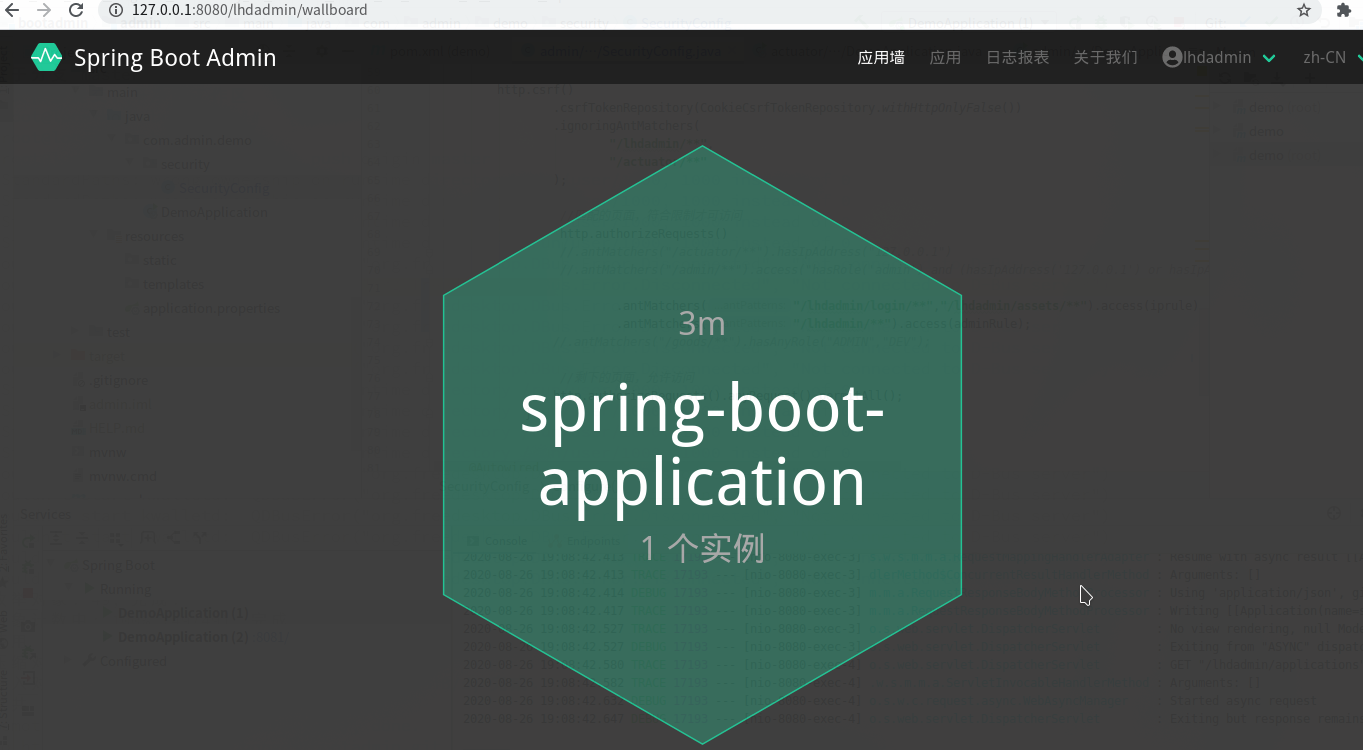
http://127.0.0.1:8080/lhdadmin/login
用lhdadmin这个账号登录:

跳转到了wallboard
点击进入:

六,查看spring boot的版本
  .   ____          _            __ _ _

 /\\ / ___'_ __ _ _(_)_ __  __ _ \ \ \ \

( ( )\___ | '_ | '_| | '_ \/ _` | \ \ \ \

 \\/  ___)| |_)| | | | | || (_| |  ) ) ) )

  '  |____| .__|_| |_|_| |_\__, | / / / /

 =========|_|==============|___/=/_/_/_/

 :: Spring Boot ::        (v2.3.3.RELEASE)
spring boot:用spring security加强spring boot admin的安全(spring boot admin 2.3.0 / spring boot 2.3.3)的更多相关文章
- 曹工说Spring Boot源码系列开讲了(1)-- Bean Definition到底是什么,附spring思维导图分享
写在前面的话&&About me 网上写spring的文章多如牛毛,为什么还要写呢,因为,很简单,那是人家写的:网上都鼓励你不要造轮子,为什么你还要造呢,因为,那不是你造的. 我不是要 ...
- 基于spring boot2.0+spring security +oauth2.0+ jwt微服务架构
github地址:https://github.com/hankuikuide/microservice-spring-security-oauth2 项目介绍 该项目是一个演示项目,主要演示了,基于 ...
- 0.spring cloud目录
1. 微服务架构概述 1.0. 单体架构是什么 1.1. 单体应用架构存在的问题 1.2. 如何解决单体应用架构存在的问题 1.3. 什么是微服务 1.4. 微服务架构的优点与挑战 1.4.1. 微服 ...
- spring boot系列03--spring security (基于数据库)登录和权限控制(下)
(接上篇) 后台 先说一下AuthConfig.java Spring Security的主要配置文件之一 AuthConfig 1 @Configuration 2 @EnableWebSecuri ...
- spring boot:swagger3的安全配置(swagger 3.0.0 / spring security / spring boot 2.3.3)
一,swagger有哪些环节需要注意安全? 1,生产环境中,要关闭swagger application.properties中配置: springfox.documentation.swagger- ...
- spring boot系列03--spring security (基于数据库)登录和权限控制(上)
这篇打算写一下登陆权限验证相关 说起来也都是泪,之前涉及权限的比较少所以这次准备起来就比较困难. 踩了好几个大坑,还好最终都一一消化掉(这是废话你没解决你写个什么劲
- spring boot中实现security错误信息本地化
一.修改messages.properties 找源码中的messages.properties,复制一份放在classpath下,修改你要修改的内容 AbstractUserDetailsAuthe ...
- Spring Boot发布2.6.2、2.5.8:升级log4j2到2.17.0
12月22日,Spring官方发布了Spring Boot 2.5.8(包括46个错误修复.文档改进和依赖项升级)和2.6.2(包括55个错误修复.文档改进和依赖项升级). 这两个版本均为缺陷修复版本 ...
- Spring Boot中采用Mockito来mock所测试的类的依赖(避免加载spring bean,避免启动服务器)
最近试用了一下Mockito,感觉真的挺方便的.举几个应用实例: 1,需要测试的service中注入的有一个dao,而我并不需要去测试这个dao的逻辑,只需要对service进行测试.这个时候怎么办呢 ...
随机推荐
- C# .Net 委托和事件的区别
在.net中,事件是一种特殊的委托,那他到底特殊在哪,换句话说,加上event关键字到底有什么用,我理解主要有两方面,下面用实例说明: 一 .事件只能在本类型内部“触发”,委托不管在本类型内部还是外部 ...
- 再见了SpringMVC!这个框架有点厉害,甚至干掉了Servlet!
# 前言 对 Java 开发者来说, Spring 发布 5.0 正式版,而新版 Spring 的一大特色,就是 Reactive Web 方案 Web Flux,这是用来替代 Spring Web ...
- 利用Python爬取疫情数据并使用可视化工具展示
import requests, json from pyecharts.charts import Map, Page, Pie, Bar from pyecharts import options ...
- goto 无条件跳转
0. 基本模型 goto 顾言思义,是跳转的意思. goto 后接一个标签,这个标签的意义是告诉 Go程序下一步要执行哪里的代码. 所以这个标签如何放置,放置在哪里,是 goto 里最需要注意的. g ...
- ECMAScript 6新特性简介
目录 简介 ECMAScript和JavaScript的关系 let和const 解构赋值 数组的扩展 函数的扩展 简介 ECMAScript 6.0(以下简称 ES6)是 JavaScript 语言 ...
- 加权图的最小生成树、最短路径算法 - java实现
加权图相关算法 前言 本文主要介绍加权图算法中两个重要应用:最小生成树和最短路径. 求最小生成树时针对的是加权无向图,加权有向图的最小生成树算法成为"最小属树形图"问题,较为复杂, ...
- dbdeployer MySQL沙盒部署详解
一.工具介绍 前几日用mysql-sandbox来搭建MySQL8.0新版本时发现用不了,提示需要使用dbdeployer才行,瞬间觉得mysql-sandbox不香了,只好咬咬牙来熟悉dbdeplo ...
- 软件定义网络实验记录③--Mininet 实验——测量路径的损耗率
一.实验目的 在实验 2 的基础上进一步熟悉 Mininet 自定义拓扑脚本,以及与损耗率相关的设定: 初步了解 Mininet 安装时自带的 POX 控制器脚本编写,测试路径损耗率. 二.实验任务 ...
- 井字棋小游戏(C语言)
最近沉迷于<NetHack>.<DCSS>等字符游戏,对其很感兴趣,于是用C语言写了个字符界面的井字棋小游戏.欢迎大家指教. 编写时遇到了一些问题,我原先准备用循环,直到读取到 ...
- 061 01 Android 零基础入门 01 Java基础语法 06 Java一维数组 08 一维数组总结
061 01 Android 零基础入门 01 Java基础语法 06 Java一维数组 08 一维数组总结 本文知识点:一维数组总结 总结 注意点