
C# 创建Windows Service
当我们需要一个程序长期运行,但是不需要界面显示时可以考虑使用Windows Service来实现。这篇博客将简单介绍一下如何创建一个Windows Service,安装/卸载Windows Service。
新建Windows Service项目:
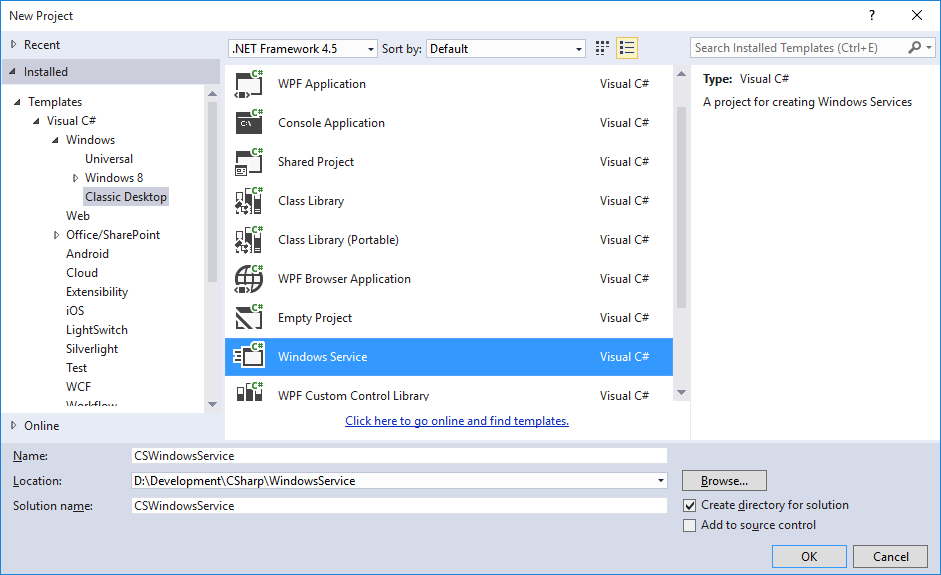
删除自动生成的Service1.cs文件,新建WindowsService类,继承ServiceBase。
    class WindowsService : ServiceBase

    {

        public WindowsService()

        {

            this.ServiceName = "Test Windows Service";

            this.EventLog.Log = "Application";

            this.CanHandlePowerEvent = true;

            this.CanHandleSessionChangeEvent = true;

            this.CanPauseAndContinue = true;

            this.CanShutdown = true;

            this.CanStop = true;

        }

        #region

        // 可以把需求实现代码放置在重写方法内

        protected override void Dispose(bool disposing)

        {

            base.Dispose(disposing);

        }

        protected override void OnStart(string[] args)

        {

            base.OnStart(args);

        }

        protected override void OnStop()

        {

            base.OnStop();

        }

        protected override void OnPause()

        {

            base.OnPause();

        }

        protected override void OnContinue()

        {

            base.OnContinue();

        }

        protected override void OnShutdown()

        {

            base.OnShutdown();

        }

        protected override void OnCustomCommand(int command)

        {

            base.OnCustomCommand(command);

        }

        protected override bool OnPowerEvent(PowerBroadcastStatus powerStatus)

        {

            return base.OnPowerEvent(powerStatus);

        }

        protected override void OnSessionChange(SessionChangeDescription changeDescription)

        {

            base.OnSessionChange(changeDescription);

        }

        #endregion

    }
新建WindowsServiceInstaller类,添加System.Configuration.Install引用,
    [RunInstaller(true)]

    class WindowsServiceInstaller : Installer

    {

        public WindowsServiceInstaller()

        {

            ServiceProcessInstaller serviceProcessInstaller = new ServiceProcessInstaller();

            ServiceInstaller serviceInstaller = new ServiceInstaller();

            serviceProcessInstaller.Account = ServiceAccount.LocalSystem;

            serviceProcessInstaller.Username = null;

            serviceProcessInstaller.Password = null;

            serviceInstaller.DisplayName = "CSharp Windows Service";

            serviceInstaller.StartType = ServiceStartMode.Automatic;

            serviceInstaller.ServiceName = "Windows Service";

            this.Installers.Add(serviceProcessInstaller);

            this.Installers.Add(serviceInstaller);

        }

    }
编译项目,此时编译完的CSWindowsService.exe运行后提示:
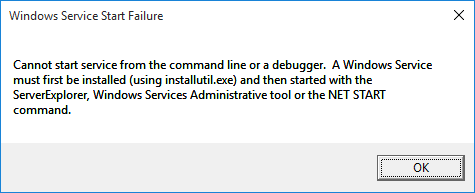
我们需要通过installutil.exe来部署Windows Service。
以管理员身份运行Developer Command Prompt。部署命令:installutil /i 文件路径。
例如:installutil /i D:\CSWindowsService.exe
卸载命令 installutil /u 文件路径。
到这里,一个简单的Windows Serive就讲完了。
关于Windows Service更多的内容,请参考MSDN文档。
感谢您的阅读,代码点击这里下载。
C# 创建Windows Service的更多相关文章
- C#创建Windows Service(Windows 服务)基础教程
Windows Service这一块并不复杂,但是注意事项太多了,网上资料也很凌乱,偶尔自己写也会丢三落四的.所以本文也就产生了,本文不会写复杂的东西,完全以基础应用的需求来写,所以不会对Window ...
- 创建Windows Service
基本参照使用C#创建Windows服务,添加了部分内容 目录 创建Windows Service 可视化管理Windows Service 调试 示例代码 创建Windows Service 选择C# ...
- C# 创建Windows Service(Windows服务)程序
本文介绍了如何用C#创建.安装.启动.监控.卸载简单的Windows Service 的内容步骤和注意事项. 一.创建一个Windows Service 1)创建Windows Service项目 2 ...
- .NET 6学习笔记(2)——通过Worker Service创建Windows Service
通过Visual Studio中的Windows Service模板,我么可以创建.NET Framework版本的Windows Service,网络上对此已有详细且丰富的各路教程.但在我们升级到. ...
- 目前.NET Core创建Windows Service比较好的一个开源框架:DasMulli.Win32.ServiceUtils
新建一个.NET Core控制台程序,搜索并下载Nuget包:DasMulli.Win32.ServiceUtils GitHub 链接及使用指南 Write a windows service us ...
- 通过TopShelf简单创建windows service
目前很多项目都是B/S架构的,我们经常会用到webapi.MVC等框架,实际项目中可能不仅仅是一些数据的增删改查,需要对数据进行计算,但是将计算逻辑放到api层又会拖累整个项目的运行速度,从而会写一些 ...
- 使用.net 创建windows service
最近公司项目需要,写了个windows 服务,windows 服务的内容可以在VS 中新建一个"windows服务项目", (1)服务中的主要代码: public partial ...
- 【C#】C#创建Windows Service服务
目录结构: contents structure [+] 创建Windows服务 配置 安装Windows服务 在Visual Studio中调试 常见问题 最近写了一个TCP连接的程序,由于这种通信 ...
- VS2010 创建 windows service 程序
参考网上保护眼睛程序,自写程序如下. 1.创建一个名词为“CareEyeService”,类型为“WindowsService”的应用程序. 自动生成代码如下图: 2.修改ServiceCareEye ...
随机推荐
- jquery实现input输入框实时输入触发事件代码 ---jQuery 中bind(),live(),delegate(),on() 区别
复制代码 代码如下: <input id="productName" name="productName" value="" /> ...
- POJ 2121
http://poj.org/problem?id=2121 一道字符串的转换的题目. 题意:就是把那个英文数字翻译成中文. 思路:首先打表,然后把每一个单独的单词分离出来,在组合相加相乘. #inc ...
- Context.managedQuery()和context.getContentResolver()获取Cursor关闭注意事项
在获取图片缩略图时,获取游标并进行相关的操作. Cursor cursor = context.getContentResolver().query(MediaStore.Images.Thumbna ...
- linux学习之一些琐碎知识点
一.python 问:django中project和app之间到底有什么不同? 答:他们的区别就是一个是配置,另一个是代码. 一个project包含很多个django app以及对它们的配置.技术上, ...
- MongoDB 分片的原理、搭建、应用
一.概念: 分片(sharding)是指将数据库拆分,将其分散在不同的机器上的过程.将数据分散到不同的机器上,不需要功能强大的服务器就可以存储更多的数据和处理更大的负载.基本思想就是将集合切成小块,这 ...
- C字符串和指针问题汇总
空指针和传参问题 1) 段错误.形参改为二级指针即可 void GetMemory( char *p ){ p = ( ); } void Test( void ){ char *str = NULL ...
- JSP题库
一. 填空题 一个完整的JSP页面是由普通的HTML标记.JSP指令标记.JSP动作标记. 变量声明 与方法声明 .程序片 .表达式 . 注释 7种要素构成. JSP页面的基本构 ...
- 闭包(block)
block主要解决反向传值和传值问题 1.block申明的公式 返回值类型 (^名字)(参数列表); 2.block实现的公式 名字= ^(参数列表){}; 3.局部变量 ...
- September 3rd 2016 Week 36th Saturday
Calculation never made a hero. 举棋不定,难以称雄. We change. We have to. Or we spend the rest of our lives f ...
- spring集成activeMQ
1.安装activehttp://activemq.apache.org/activemq-5140-release.html2.运行D:\apache-activemq-5.14.0\bin\win ...