
abp web.mvc项目中的菜单加载机制
abp中的菜单加载机制
在abp中菜单的定义与我们传统写的框架不一样,它是在编写代码的时候配置,而我们一般写的通用权限管理系统中,是后期在后台界面中添加的。这一点有很大不同。abp关于菜单的定义及管理挺复杂的。
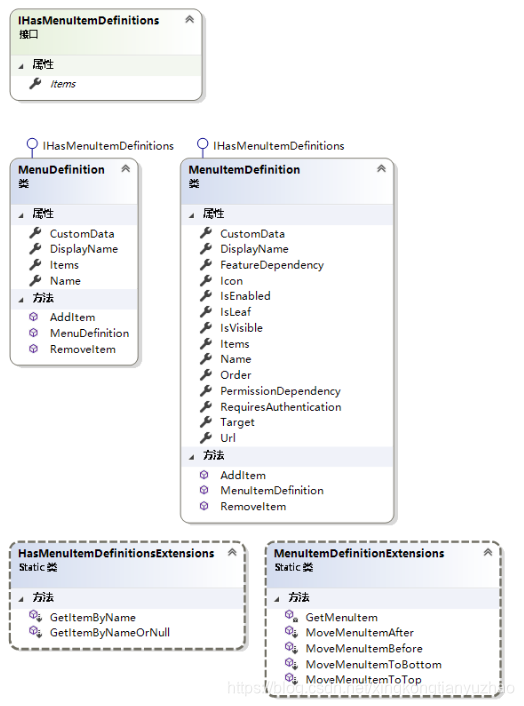
与菜单相关的结构类、接口及扩展方法类
- MenuDefinition:定义应用程序的菜单的结构
- MenuItemDefinition:定义应用程序的菜单项的结构
- IHasMenuItemDefinitions: 定义子菜单的接口
- HasMenuItemDefinitionsExtensions:查询子菜单项的扩展方法类
- MenuItemDefinitionExtensions:操作菜单项的扩展方法类
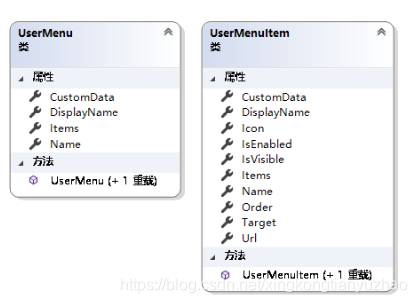
- UserMenu:单个用户的菜单结构
- UserMenuItem:单个用户的菜单中的菜单项
与菜单相关的操作类
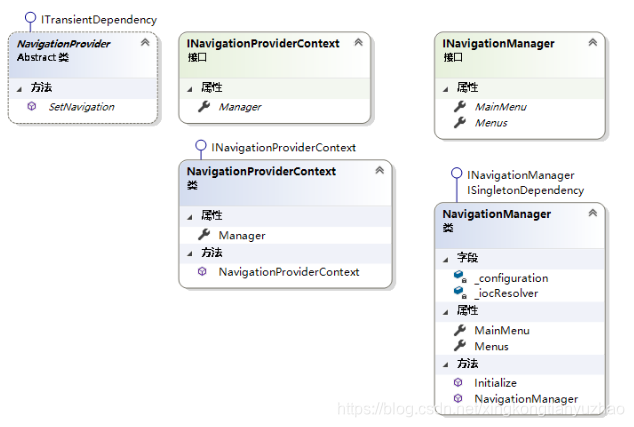
这里分为两类,一类是针对应用系统的菜单:
- NavigationProvider:提供设置应用系统导航菜单及菜单项的方法SetNavigation
- INavigationProviderContext:Provider模式的上下文接口
- NavigationProviderContext:Provider模式的上下文类,设置NavigationManager
- INavigationManager:导航菜单管理应用服务接口
- NavigationManager:导航菜单管理应用服务类,包括构造默认主菜单,初始化菜单的所有菜单项方法。
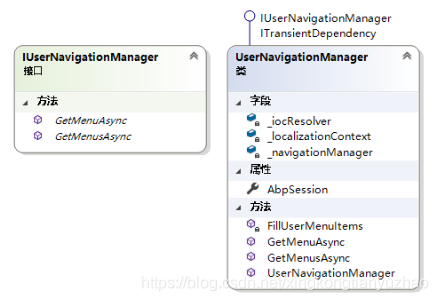
另一类是针对用户菜单的操作: - IUserNavigationManager: 用户菜单管理应用服务接口
- UserNavigationManager:用户菜单管理应用服务类,提供了获取指定用户的菜单, 根据用户权限填充菜单项方法。
上面的所有类及接口都是在Abp这个项目中定义的。
Web.MVC中的菜单应用
菜单的定义
菜单定义在ContosoAbp.Web.Startup命名空间下的ContosoAbpNavigationProvider类中,这里ContosoAbp为自定义的项目名。ContosoAbpNavigationProvide继承自NavigationProvider抽象类,是实际菜单的定义者。这里利用了Provider模式,微软经常用这种模式。
using Abp.Application.Navigation;

using Abp.Authorization;

using Abp.Localization;

using ContosoAbp.Authorization;

namespace ContosoAbp.Web.Startup

{

    /// <summary>

    /// This class defines menus for the application.

    /// 定义应用程序的菜单

    /// </summary>

    public class ContosoAbpNavigationProvider : NavigationProvider

    {

        public override void SetNavigation(INavigationProviderContext context)

        {

            context.Manager.MainMenu

                .AddItem(

                    new MenuItemDefinition( //首页

                        PageNames.Home,

                        L("HomePage"),

                        url: "",

                        icon: "fas fa-home",

                        requiresAuthentication: true,

                        order:0

                    )

                ).AddItem(

                    new MenuItemDefinition( //空页面

                        PageNames.Empty,

                        L("EmptyPage"),

                        url: "Home/Empty",

                        icon: "fas fa-home",

                        requiresAuthentication: false,

                        order: 1

                    )

                ).AddItem(

                    new MenuItemDefinition( //附件

                        PageNames.Attachment,

                        L("Attachment"),

                        url: "Attachment",

                        icon: "fas fa-home",

                        requiresAuthentication: false,

                        order: 2

                    )

                ).AddItem(

                    new MenuItemDefinition( //租户

                        PageNames.Tenants,

                        L("Tenants"),

                        url: "Tenants",

                        icon: "fas fa-building",

                        permissionDependency: new SimplePermissionDependency(PermissionNames.Pages_Tenants),

                        order: 3

                    )

                ).AddItem(

                    new MenuItemDefinition( // 用户

                        PageNames.Users,

                        L("Users"),

                        url: "Users",

                        icon: "fas fa-users",

                        permissionDependency: new SimplePermissionDependency(PermissionNames.Pages_Users),

                        order: 4

                    )

                ).AddItem(

                    new MenuItemDefinition( //角色

                        PageNames.Roles,

                        L("Roles"),

                        url: "Roles",

                        icon: "fas fa-theater-masks",

                        permissionDependency: new SimplePermissionDependency(PermissionNames.Pages_Roles),

                        order: 5

                            )

                )

                .AddItem(

                    new MenuItemDefinition( //关于

                        PageNames.About,

                        L("About"),

                        url: "About",

                        icon: "fas fa-info-circle",

                        order: 6

                    )

                ).AddItem( // Menu items below is just for demonstration!

                    new MenuItemDefinition( //多级菜单

                        "MultiLevelMenu",

                        L("MultiLevelMenu"),

                        icon: "fas fa-circle",

                        order: 7

                    ).AddItem(

                        new MenuItemDefinition(

                            "AspNetBoilerplate",

                            new FixedLocalizableString("ASP.NET Boilerplate"),

                            icon: "far fa-circle"

                        ).AddItem(

                            new MenuItemDefinition(

                                "AspNetBoilerplateHome",

                                new FixedLocalizableString("Home"),

                                url: "https://aspnetboilerplate.com?ref=abptmpl",

                                icon: "far fa-dot-circle"

                            )

                        ).AddItem(

                            new MenuItemDefinition(

                                "AspNetBoilerplateTemplates",

                                new FixedLocalizableString("Templates"),

                                url: "https://aspnetboilerplate.com/Templates?ref=abptmpl",

                                icon: "far fa-dot-circle"

                            )

                        ).AddItem(

                            new MenuItemDefinition(

                                "AspNetBoilerplateSamples",

                                new FixedLocalizableString("Samples"),

                                url: "https://aspnetboilerplate.com/Samples?ref=abptmpl",

                                icon: "far fa-dot-circle"

                            )

                        ).AddItem(

                            new MenuItemDefinition(

                                "AspNetBoilerplateDocuments",

                                new FixedLocalizableString("Documents"),

                                url: "https://aspnetboilerplate.com/Pages/Documents?ref=abptmpl",

                                icon: "far fa-dot-circle"

                            )

                        )

                    ).AddItem(

                        new MenuItemDefinition(

                            "AspNetZero",

                            new FixedLocalizableString("ASP.NET Zero"),

                            icon: "far fa-circle"

                        ).AddItem(

                            new MenuItemDefinition(

                                "AspNetZeroHome",

                                new FixedLocalizableString("Home"),

                                url: "https://aspnetzero.com?ref=abptmpl",

                                icon: "far fa-dot-circle"

                            )

                        ).AddItem(

                            new MenuItemDefinition(

                                "AspNetZeroFeatures",

                                new FixedLocalizableString("Features"),

                                url: "https://aspnetzero.com/Features?ref=abptmpl",

                                icon: "far fa-dot-circle"

                            )

                        ).AddItem(

                            new MenuItemDefinition(

                                "AspNetZeroPricing",

                                new FixedLocalizableString("Pricing"),

                                url: "https://aspnetzero.com/Pricing?ref=abptmpl#pricing",

                                icon: "far fa-dot-circle"

                            )

                        ).AddItem(

                            new MenuItemDefinition(

                                "AspNetZeroFaq",

                                new FixedLocalizableString("Faq"),

                                url: "https://aspnetzero.com/Faq?ref=abptmpl",

                                icon: "far fa-dot-circle"

                            )

                        ).AddItem(

                            new MenuItemDefinition(

                                "AspNetZeroDocuments",

                                new FixedLocalizableString("Documents"),

                                url: "https://aspnetzero.com/Documents?ref=abptmpl",

                                icon: "far fa-dot-circle"

                            )

                        )

                    )

                );

        }

        private static ILocalizableString L(string name)

        {

            return new LocalizableString(name, ContosoAbpConsts.LocalizationSourceName);

        }

    }

}
菜单的加载
菜单的加载是利用的视图组件,定义了一个SideBarMenuViewComponent的视图组件,在这个SideBarMenuViewComponent类中,利用IUserNavigationManager获取用户的菜单,返回SideBarMenuViewModel给前端,前端遍历输出菜单及子项。
后端视图组件的定义
using System.Threading.Tasks;

using Abp.Application.Navigation;

using Abp.Runtime.Session;

using Microsoft.AspNetCore.Mvc;

namespace ContosoAbp.Web.Views.Shared.Components.SideBarMenu

{

    /// <summary>

    /// 侧边栏视图组件

    /// </summary>

    public class SideBarMenuViewComponent : ContosoAbpViewComponent

    {

        /// <summary>

        /// 侧边栏用户导航管理

        /// </summary>

        private readonly IUserNavigationManager _userNavigationManager;

        /// <summary>

        /// Session服务

        /// </summary>

        private readonly IAbpSession _abpSession;

        /// <summary>

        /// 构造函数

        /// </summary>

        /// <param name="userNavigationManager"></param>

        /// <param name="abpSession"></param>

        public SideBarMenuViewComponent(

            IUserNavigationManager userNavigationManager,

            IAbpSession abpSession)

        {

            _userNavigationManager = userNavigationManager;

            _abpSession = abpSession;

        }

        public async Task<IViewComponentResult> InvokeAsync()

        {

            var model = new SideBarMenuViewModel

            {

                MainMenu = await _userNavigationManager.GetMenuAsync("MainMenu", _abpSession.ToUserIdentifier())

            };

            return View(model);

        }

    }

}
前端遍历输出菜单
@using ContosoAbp.Web.Views.Shared.Components.SideBarMenu

@model SideBarMenuViewModel

@{

    var orderedMenuItems = Model.MainMenu.Items.Where(x => x.IsVisible).OrderByCustom().ToList();

}

<nav class="mt-2">

    <ul class="nav nav-pills nav-sidebar flex-column nav-flat" data-widget="treeview" role="menu" data-accordion="false">

        @{

            foreach (var item in orderedMenuItems)

            {

                @await Html.PartialAsync("Components/SideBarMenu/_MenuItem", item)

            }

        }

    </ul>

</nav>
abp web.mvc项目中的菜单加载机制的更多相关文章
- 2、手把手教你Extjs5(二)项目中文件的加载过程
上一节中用sencha工具自动创建了一个项目,并且可以在浏览器中查看.现在我们来看看js类加载过程.如下图所示: 1、首先:浏览器中输入 localhost:1841 ,调用 index.html; ...
- django中的懒加载机制
懒加载在前端中的意义: 懒加载的主要目的就是作为服务器前端的优化,减少请求次数或者延迟请求数. 实现原理: 先加载一部分数据,当触发某个条件时利用异步加载剩余的数据,新得到的数据不会影响原有数据的显示 ...
- web项目中配置文件的加载顺序
当一个项目启动时,首先是web.xml: 这里面的配置: 为什么要在web.xml中配置struts的过滤器? 因为一个web项目运行的时需要加载的,或者默认的部分配置都会在web.xml中配置,中间 ...
- 关于web项目中静态资源加载不了的一些解决思路
问题的产生: <!--springMVC前端控制器加载--> <servlet> <servlet-name>springmvc</servlet-name& ...
- extjs5(项目中文件的加载过程)
现在来看看js类加载过程.如下图所示: 1、首先:浏览器中输入 localhost:1841 ,调用 index.html; <!DOCTYPE HTML> <html> &l ...
- Spring项目中Properties不能加载多个的问题
A模块和B模块都分别拥有自己的Spring XML配置,并分别拥有自己的配置文件: A模块 A模块的Spring配置文件如下: <?xml version="1.0" enc ...
- 项目中spring容器加载的问题
今天做一个项目采用的是传统架构,没有采用分布式,部署时出现了异常,信息是: org.springframework.beans.factory.NoSuchBeanDefinitionExceptio ...
- Vue编写的页面部署到springboot网站项目中出现页面加载不全问题
问题描述: 在用Vue脚手架 编写出一个页面之后, 部署到后台项目中, 因为做的是一个页面 按理来说 怎么都能够在服务器上运行 , 我也在自己的node环境测试 , 在同学的springboot上运行 ...
- SpringMVC项目中启动自加载Listener
package com.kuman.cartoon.listener; import java.util.List; import org.springframework.beans.factory. ...
随机推荐
- ubuntu允许root远程登录
之前说了,怎么设置root用户登录,但是使用Xshell等工具操作Ubuntu,用户登录不进去,原因很简单,没有开启root登录的权限. 1.检查ssh服务是否开启 使用以下命令,查看是否开启 ps ...
- linux CVE-2019-14287 Sudo提权漏洞
CVE-2019-14287 sudo介绍 sudo,也就是以超级管理员身份运行(superuser do)的意思.sudo 是 Linux 中最常使用的重要实用程序之一,它功能十分强大,几乎安装在每 ...
- PHP 语法字符串函数 strcmp、strlen 使用及实现
说明 这里基于 php7.2.5 进行测试,php7 之后内部结构变化应该不是太大,但与 php5.X 有差别. 函数分类 用户自定义函数 say(); function say() { echo & ...
- Java IO 流 -- 随机读取和写入流 RandomAccessFile (文件分割和合并)
RandomAccessFile 相对其它流多了一个seek() 方法指定指针的偏移量. 1.指定起始位置读取剩余内容 public static void test01() throws IOExc ...
- 从源码解读Spring如何解决bean循环依赖
1 什么是bean的循环依赖 循环依赖的原文是circular reference,指多个对象相互引用,形成一个闭环. 以两个对象的循环依赖为例: Spring中的循环依赖有 3 种情况: 构造器(c ...
- 关于go的init函数
亲测,如果加载一个包,如果一个包里的每个文件,均含有init函数,那么均会执行. 目前来看,init的执行顺序,是文件名称的自然排序进行执行的. 并且只是所加载包里的go文件的init函数执行,对于包 ...
- BUAA_OO 第一单元总结
1.简单多项式求导 第一次作业的难点,我认为是对输入的预处理,尤其是正则表达式的使用.这次作业的思路是:首先将表达式进行预处理,(由于题目中要求不会有空格产生的WF,所以可以放心大胆的消除空格). 消 ...
- <algorithm>中常用函数
先说一下STL操作的区间是 [a, b),左边是闭区间,右边是开区间,这是STL的特性,所以<algorithm>里面的函数操作的区间也都是 [a, b). 先声明一下, sort()函数 ...
- Python数据分析:大众点评数据进行选址
前言 本文的文字及图片来源于网络,仅供学习.交流使用,不具有任何商业用途,版权归原作者所有,如有问题请及时联系我们以作处理. 作者:砂糖侠 如果你处于想学Python或者正在学习Python,Pyth ...
- tp5.1 模型 where多条件查询 like 查询
来源:https://blog.csdn.net/qq_41241684/article/details/87866416 所以我改成这样: $paperTypeModel = new PaperTy ...