
动手动脑 4 String 类
动手动脑1:
请运行以下示例代码StringPool.java,查看其输出结果。如何解释这样的输出结果?从中你能总结出什么?
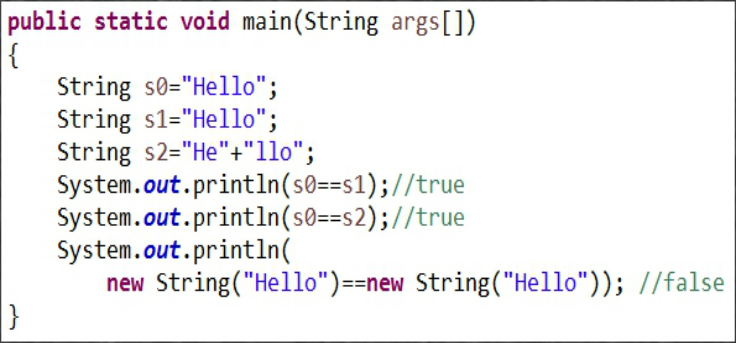
在Java中,内容相同的字串常量(“Hello”)只保存一份以节约内存,所以s0,s1,s2实际上引用的是同一个对象。编译器在编译s2一句时,会去掉“+”号,直接把两个字串连接起来得一个字串(“Hello”)。这种优化工作由Java编译器自动完成。当直接使用new关键字创建字符串对象时,虽然值一致(都是“Hello”),但仍然是两个独立的对象。==在此比较是它们的地址,因为开辟空间,初始化的不同,所以地址不同,所以结果是False;
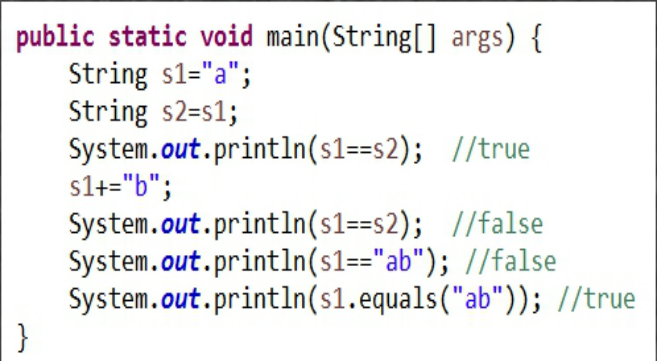
从上述代码中可得到:
给字串变量赋值意味着:两个变量(s1,s2)现在引用同一个字符串对象“a”!
String对象的内容是只读的,使用“+”修改s1变量的值,实际上是得到了一个新的字符串对象,其内容为“ab”,它与原先s1所引用的对象”a”无关,所以,s1==s2返回false;
代码中的“ab”字符串是一个常量,它所引用的字符串与s1所引用的“ab”对象无关。
String.equals()方法可以比较两个字符串的内容。
动手动脑 2::
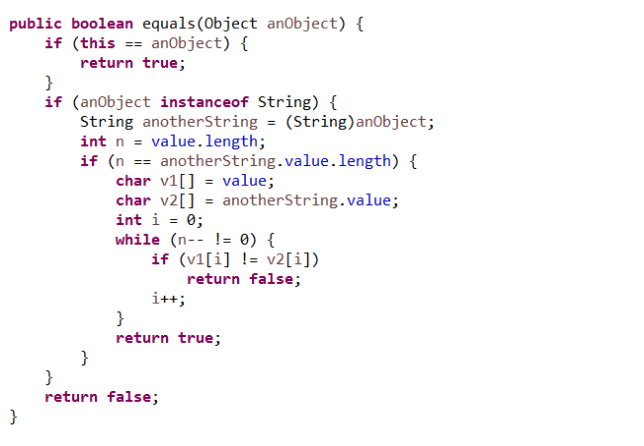
String.equal() jdk源代码的源代码如下:
使用说明:
用于判断两个字符串的值是否相等
阅读笔记:
方法体实质上是先比较两个字符串的长度是否相等,然后,在将字符串转化为字符数组,通过比较对应位置的字符是否相同,进而来判断两个字符串值是否相同。
该方法首先判断this == anObject ?,也就是说判断要比较的对象和当前对象是不是同一个对象,如果是直接返回 true,如不是再继续比较,然后在判断
anObject 是不是 String类型的,如果不是,直接返回 false,如果是他还是先比较了两个数组的长度,不一样直接返回 false,一样再逐一比较字符数组的值。
动手动脑 3:
每当一个对象创建后,Java虚拟机会给这个对象分配一个引用自身的指针,这个指针的名字就是 this。因此,this只能在类中的非静态方法中使用,静态方法和静态的代码块中绝对不能出现this的用法。因为这里需要实现级联调用特性,所以将方法返回值设为对象类型(以该类作类型),即方法本身可再调用方法。
String.concat()函数
将字符串与字符串连接起来。创建新的字符数组,新的length=两字符串长度之和,将长度,首元赋给字符数组
String.trim()函数
去掉字符串首尾的空格,为防止不必要的空格产生的错误,该方法返回字符串对象的一个副本。
String.toUpperCase()函数
string.toUpperCase()为将字符串string中字符变为大写。
所以实现级调的实例如下:
 package String;

 public  class MyCounter {

     int  num;

      public MyCounter increase(int j)//public是对别的类公开,该方法需要返回MyCounter对象,所以应用this指针,下面同理

     {

         num+=j;

         return this;

     }

     public MyCounter decrease(int n)

     {

         num-=n;

         return this;

     }

     MyCounter(int k)

     {

         num=k;

     }

     public static void main(String[] args) {

         MyCounter counter1=new MyCounter(1);

         MyCounter counter2=counter1.increase(100).decrease(2).increase(3);

         System.out.println("The result is:"+counter2.num);

     }

 }
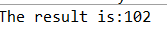
执行结果:
Java中String类的length()、charAt()、getChars()、replace()、toUpperCase()、toLowerCase()、trim()、toCharArray()使用说明
在Java语言中String类有很多以处理函数,例如length()、charAt()、getChars()、replace()、toUpperCase()、toLowerCase()、trim()、toCharArray()等,用法如下:
1 string.length()是用来求字符串的长度,返回值为字符串的长度。
2 string.charAt()为取该字符串某个位置的字符,从0开始,例如string.charAt(0)就会返回该字符串的第一个字符。
3 string.getChars()为将这个字符串中的字符复制到目标字符数组。
4 string.replace()为将原string 中的元素或子串替换。返回替换后的string。
5 string.toUpperCase()为将字符串string中字符变为大写。
6 string.toLowerCase()为将字符串string中字符变为小写。
7 string.trim()为去除字符串的头为空格。
8 string.toCharArray()为将字符串转换为字符数组。
举个例子:
 public class Example

     {

     public static void main(String args[])

     {

         String s1=new String("you are a student");

         String s2=new String("HOW ARE YOU");

         String s3=new String("  Hello  ");

         //string.length()求长度

         System.out.println("length of string is:"+s1.length());

         //string.charAt()取指定位置字符

         System.out.println("the first char of string::"+s1.charAt(0));

         //string.getChars()为将这个字符串中的字符复制到目标字符数组。

         char[] c = new char[s1.length()];

         s1.getChars(0, s1.length(), c, 0);

         System.out.print("输出数组:");

         for(int i=0;i<s1.length()-1; i++)

         {

             System.out.print(" "+c[i]);

         }

         //string.replace()为将原string 中的元素或子串替换。返回替换后的string。

         System.out.println("\ns1替换为s2后是:"+s1.replace(s1, s2));

         //string.toUpperCase()为将字符串string中字符变为大写。

         System.out.println("s1变为大写后为:"+s1.toUpperCase());

         //string.toLowerCase()为将字符串string中字符变为小写。

         System.out.println("s2变为小写后为:"+s2.toLowerCase());

         //string.trim()为去除字符串的头为空格。

         System.out.println("s1变为大写后为:"+s3.trim());

         //string.toCharArray()为将字符串转换为字符数组

         char a[]=s1.toCharArray();

         System.out.println("转换为数组a后a[1]= "+a[1]);

     }

 }
结果截图:

各方法的源码如下:
1.String.length()
 public int length() {

     return value.length;

 }
2.String.charAt()
 public char charAt(int index) {

     if ((index < 0) || (index >= value.length)) {

         throw new StringIndexOutOfBoundsException(index);

     }

     return value[index];

 }
3.String.getChars()
 void getChars(char dst[], int dstBegin) {

         System.arraycopy(value, 0, dst, dstBegin, value.length);

     }
1.//将value从srcBegin到srcEnd的字符串复制到dst的dstBegin处

2.public void getChars(int srcBegin, int srcEnd, char[] dst, int dstBegin)

3.{

4.    if (srcBegin < 0)

5.        throw new StringIndexOutOfBoundsException(srcBegin);

6.    if ((srcEnd < 0) || (srcEnd > count))

7.        throw new StringIndexOutOfBoundsException(srcEnd);

8.    if (srcBegin > srcEnd)

9.        throw new StringIndexOutOfBoundsException("srcBegin > srcEnd");

10.    //将value从srcBegin起的(srcEnd-srcBegin)个字符复制到dst的dstBegin位置处

11.    System.arraycopy(value, srcBegin, dst, dstBegin, srcEnd - srcBegin);

}
4.String.replace()方法
- replace 的参数是 char 和 CharSequence,即可以支持字符的替换, 也支持字符串的替换, 把源字符串中的某一字符或字符串全部换成指定的字符或字符串
1.public AbstractStringBuilder replace(int start, int end, String str) {

2.    if (start < 0)

3.        throw new StringIndexOutOfBoundsException(start);

4.    if (start > count)

5.        throw new StringIndexOutOfBoundsException("start > length()");

6.    if (start > end)

7.        throw new StringIndexOutOfBoundsException("start > end");

8.    if (end > count)

9.        end = count;

10.    int len = str.length();

11.    //计算新长度

12.    int newCount = count + len - (end - start);

13.    //扩容

14.    ensureCapacityInternal(newCount);

15.    //复制,实际上是删除start到end间的字符串

16.    System.arraycopy(value, end, value, start + len, count - end);

17.    //复制

18.    str.getChars(value, start);

19.    //更新长度

20.    count = newCount;

21.    return this;

22.}
public String replace(char oldChar, char newChar) {
if (oldChar != newChar) {
int len = value.length;
int i = -1;
char[] val = value; /* avoid getfield opcode */ while (++i < len) {
if (val[i] == oldChar) {
break;
}
}
if (i < len) {
char buf[] = new char[len];
for (int j = 0; j < i; j++) {
buf[j] = val[j];
}
while (i < len) {
char c = val[i];
buf[i] = (c == oldChar) ? newChar : c;
i++;
}
return new String(buf, true);
}
}
return this;
} - 5. String.toUpperCase()
 public String toUpperCase() {

         return toUpperCase(Locale.getDefault());

 }

 public String toUpperCase(Locale locale) {

         if (locale == null) {

             throw new NullPointerException();

         }

         int firstLower;

         final int len = value.length;

         /* Now check if there are any characters that need to be changed. */

         scan: {

             for (firstLower = 0 ; firstLower < len; ) {

                 int c = (int)value[firstLower];

                 int srcCount;

                 if ((c >= Character.MIN_HIGH_SURROGATE)

                         && (c <= Character.MAX_HIGH_SURROGATE)) {

                     c = codePointAt(firstLower);

                     srcCount = Character.charCount(c);

                 } else {

                     srcCount = 1;

                 }

                 int upperCaseChar = Character.toUpperCaseEx(c);

                 if ((upperCaseChar == Character.ERROR)

                         || (c != upperCaseChar)) {

                     break scan;

                 }

                 firstLower += srcCount;

             }

             return this;

         }

         /* result may grow, so i+resultOffset is the write location in result */

         int resultOffset = 0;

         char[] result = new char[len]; /* may grow */

         /* Just copy the first few upperCase characters. */

         System.arraycopy(value, 0, result, 0, firstLower);

         String lang = locale.getLanguage();

         boolean localeDependent =

                 (lang == "tr" || lang == "az" || lang == "lt");

         char[] upperCharArray;

         int upperChar;

         int srcChar;

         int srcCount;

         for (int i = firstLower; i < len; i += srcCount) {

             srcChar = (int)value[i];

             if ((char)srcChar >= Character.MIN_HIGH_SURROGATE &&

                 (char)srcChar <= Character.MAX_HIGH_SURROGATE) {

                 srcChar = codePointAt(i);

                 srcCount = Character.charCount(srcChar);

             } else {

                 srcCount = 1;

             }

             if (localeDependent) {

                 upperChar = ConditionalSpecialCasing.toUpperCaseEx(this, i, locale);

             } else {

                 upperChar = Character.toUpperCaseEx(srcChar);

             }

             if ((upperChar == Character.ERROR)

                     || (upperChar >= Character.MIN_SUPPLEMENTARY_CODE_POINT)) {

                 if (upperChar == Character.ERROR) {

                     if (localeDependent) {

                         upperCharArray =

                                 ConditionalSpecialCasing.toUpperCaseCharArray(this, i, locale);

                     } else {

                         upperCharArray = Character.toUpperCaseCharArray(srcChar);

                     }

                 } else if (srcCount == 2) {

                     resultOffset += Character.toChars(upperChar, result, i + resultOffset) - srcCount;

                     continue;

                 } else {

                     upperCharArray = Character.toChars(upperChar);

                 }

                 /* Grow result if needed */

                 int mapLen = upperCharArray.length;

                 if (mapLen > srcCount) {

                     char[] result2 = new char[result.length + mapLen - srcCount];

                     System.arraycopy(result, 0, result2, 0, i + resultOffset);

                     result = result2;

                 }

                 for (int x = 0; x < mapLen; ++x) {

                     result[i + resultOffset + x] = upperCharArray[x];

                 }

                 resultOffset += (mapLen - srcCount);

             } else {

                 result[i + resultOffset] = (char)upperChar;

             }

         }

         return new String(result, 0, len + resultOffset);

     }
6.String.toLowerCase()
 public String toLowerCase() {

         return toLowerCase(Locale.getDefault());

 }

 public String toLowerCase(Locale locale) {

         if (locale == null) {

             throw new NullPointerException();

         }

         int firstUpper;

         final int len = value.length;

         /* Now check if there are any characters that need to be changed. */

         scan: {

             for (firstUpper = 0 ; firstUpper < len; ) {

                 char c = value[firstUpper];

                 if ((c >= Character.MIN_HIGH_SURROGATE)

                         && (c <= Character.MAX_HIGH_SURROGATE)) {

                     int supplChar = codePointAt(firstUpper);

                     if (supplChar != Character.toLowerCase(supplChar)) {

                         break scan;

                     }

                     firstUpper += Character.charCount(supplChar);

                 } else {

                     if (c != Character.toLowerCase(c)) {

                         break scan;

                     }

                     firstUpper++;

                 }

             }

             return this;

         }

         char[] result = new char[len];

         int resultOffset = 0;  /* result may grow, so i+resultOffset

                                 * is the write location in result */

         /* Just copy the first few lowerCase characters. */

         System.arraycopy(value, 0, result, 0, firstUpper);

         String lang = locale.getLanguage();

         boolean localeDependent =

                 (lang == "tr" || lang == "az" || lang == "lt");

         char[] lowerCharArray;

         int lowerChar;

         int srcChar;

         int srcCount;

         for (int i = firstUpper; i < len; i += srcCount) {

             srcChar = (int)value[i];

             if ((char)srcChar >= Character.MIN_HIGH_SURROGATE

                     && (char)srcChar <= Character.MAX_HIGH_SURROGATE) {

                 srcChar = codePointAt(i);

                 srcCount = Character.charCount(srcChar);

             } else {

                 srcCount = 1;

             }

             if (localeDependent ||

                 srcChar == '\u03A3' || // GREEK CAPITAL LETTER SIGMA

                 srcChar == '\u0130') { // LATIN CAPITAL LETTER I WITH DOT ABOVE

                 lowerChar = ConditionalSpecialCasing.toLowerCaseEx(this, i, locale);

             } else {

                 lowerChar = Character.toLowerCase(srcChar);

             }

             if ((lowerChar == Character.ERROR)

                     || (lowerChar >= Character.MIN_SUPPLEMENTARY_CODE_POINT)) {

                 if (lowerChar == Character.ERROR) {

                     lowerCharArray =

                             ConditionalSpecialCasing.toLowerCaseCharArray(this, i, locale);

                 } else if (srcCount == 2) {

                     resultOffset += Character.toChars(lowerChar, result, i + resultOffset) - srcCount;

                     continue;

                 } else {

                     lowerCharArray = Character.toChars(lowerChar);

                 }

                 /* Grow result if needed */

                 int mapLen = lowerCharArray.length;

                 if (mapLen > srcCount) {

                     char[] result2 = new char[result.length + mapLen - srcCount];

                     System.arraycopy(result, 0, result2, 0, i + resultOffset);

                     result = result2;

                 }

                 for (int x = 0; x < mapLen; ++x) {

                     result[i + resultOffset + x] = lowerCharArray[x];

                 }

                 resultOffset += (mapLen - srcCount);

             } else {

                 result[i + resultOffset] = (char)lowerChar;

             }

         }

         return new String(result, 0, len + resultOffset);

     }
7.String.trim()
 public String trim() {

         int len = value.length;

         int st = 0;

         char[] val = value;    /* avoid getfield opcode */

         while ((st < len) && (val[st] <= ' ')) {

             st++;

         }

         while ((st < len) && (val[len - 1] <= ' ')) {

             len--;

         }

         return ((st > 0) || (len < value.length)) ? substring(st, len) : this;

     }
8.String.toCharArray()
 public char[] toCharArray() {

         // Cannot use Arrays.copyOf because of class initialization order issues

         char result[] = new char[value.length];

         System.arraycopy(value, 0, result, 0, value.length);

         return result;

     }
9.String.concat()函数
创建新的字符数组,新的length=两字符串长度之和,将长度,首元赋给字符数组
 public String concat(String str) {

     int otherLen = str.length();

     if (otherLen == 0) {

         return this;

     }

     int len = value.length;

     char buf[] = Arrays.copyOf(value, len + otherLen);

     str.getChars(buf, len);

     return new String(buf, true);

 }
动手动脑 4 String 类的更多相关文章
- 05_动手动脑之String.equals()方法的实现代码
Question: 请查看String.equals()方法的实现代码,注意学习其实现方法. Answer: java中的String.equals()方法的实现代码: equals()法是根类Obj ...
- 动手动脑:String.equals()的使用方法
public class StringEquals { /** * @param args the command line arguments */ public static void main( ...
- 05-String动手动脑问题及课后实验性问题总结
一.请运行以下实例代码StringPool.java,查看其输出结果.如何解释这样的输出结果?从中你能总结出什么? (1)在Java中,内容相同的字符常量("Hello")只保存一 ...
- java动手动脑和课后实验型问题String类型
1.请运行以下示例代码StringPool.java,查看其输出结果.如何解释这样的输出结果?从中你能总结出什么? true true false 总结: 使用new关键字创建字符串对象时, 每次申请 ...
- Java类和对象动手动脑
动手动脑1 以下代码为何无法通过编译?哪儿出错了?
- 05-Java中的String类
程序设计思路: 首先目标是使输入的字符串加上某个数变成另一个字符串,从而相当于对字符串进行加密. 第一步输入一个字符串String类型: 第二步把这个字符串转变成字符数组: 第三步让这个数组的每一个字 ...
- Java文件与类动手动脑
动手动脑1: 使用Files. walkFileTree()找出指定文件夹下所有大于指定大小(比如1M)的文件. package classJava; import java.io.IOExcepti ...
- 动手动脑之查看String.equals()方法的实现代码及解释
动手动脑 请查看String.equals()方法的实现代码,注意学习其实现方法. 第一个是false,后三个是true. package stringtest; public class Strin ...
- JAVA String作业——动手动脑以及课后实验性问题
一:如何解释这样的输出结果?从中你能总结出什么?1.源码 //mao2015.10.20 //==的两个分辨 //对原始数据而言 //对引用类型变量 public class StringPool { ...
随机推荐
- python练习题4
1.将字符串“老男孩”转换成UTF-8编码的字节类型 s = "老男孩" bytes(s,'utf8') s.encode('utf8') 2.简述globals(),locals ...
- (转)如何判断VPS是基于哪种虚拟技术?Xen、OpenVZ、Xen HVM、KVM还是VMware
对于VPS新手来说,怕被无良的奸商给忽悠,下的Xen的却给的OpenVZ的,如何来判断自己买的VPS是那种虚拟技术的,下面VPS侦探整理一些常见的方法. 1.通过系统上的相关目录或文件判断 执行:ls ...
- 123.ModelForm的使用
ModelForm 在我们的实例中,需要通过models.py中定义相关的模型字段,之后在forms.py中同样需要定义每个字段进行相应的验证,这样的话,我们会需要重复定义,这样的话,就相对比较麻烦, ...
- BFPRT(中位数的中位数算法)
BFPRT(中位数的中位数算法) 类似于快排,但是划分区间的策略不一样. 分组,组内排序: 取出每组的中位数组成一个数组,再取这个数组的中位数: 以取出的中位数作为partition的轴.
- makecert 制作数字证书 给DLL加一个数字签名
声明:文章整理自互联网 我仅需要给dll添加(替换)一个签名,所以我只看了第一步和第三步,其余的部分我没有测试,不能保证内容的是否正确. 看了很多关于DLL加签名的教程 大多是错误的 完全无法正常走下 ...
- Netty 中队列的使用
任务队列中的Task有3种典型使用场景 用户程序自定义的普通任务 此前代码: 参考https://www.cnblogs.com/ronnieyuan/p/12016712.html NettySer ...
- Java 用户输入
章节 Java 基础 Java 简介 Java 环境搭建 Java 基本语法 Java 注释 Java 变量 Java 数据类型 Java 字符串 Java 类型转换 Java 运算符 Java 字符 ...
- Centos 8双网卡设置
原理:不管开发板是通过直连.路由器还是交换机连接到PC机,最终都是接到PC的以太网网卡(对笔记本来说,一般存在两个网卡,一个WIFI网卡和以太网网卡):因此要实现PC机与虚拟机的互ping,必须把虚拟 ...
- HttpClient测试
导入maven依赖 <dependency> <groupId>com.alibaba</groupId> <artifactId>fastjson&l ...
- MQTT 协议学习:008-在STM32上移植MQTT
前言 通过前面了解MQTT有关概念.分析了有关的报文,我们对于这个协议也有了更深的认识.但纸上谈来终觉浅,绝知此事要躬行. 本文参考:<STM32+W5500+MQTT+Android实现远程数 ...