
翻译BonoboService官网的安装教程
This page covers simple Bonobo Git Server installation. Be sure to check prerequisites page before installation and for other sections visit the documentation page.
此页包括简单的Bonobo Git 服务安装。在安装和查看文档页之前要先查看系统要求页。
The following steps covers an installation with Windows 2008 Server and IIS 7. They are exactly the same for any higher platforms (Windows Server 2012 and IIS 8.0+).
接下来的步骤涵盖在Windows 2008和IIS 7上安装Bonobo Git 服务。在更高的平台上(Windows Server 2012和IIS 8.0及以上)也是一样的。
- Download the latest version of Bonobo Git Server from the front page
从首页上下载最新版本的Bonobo Git 服务
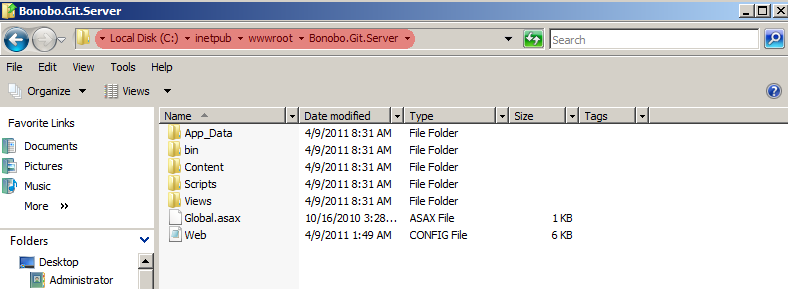
- Extract the files from the installation archive to
C:\inetpub\wwwroot
将压缩包解压到“C:\inetpub\wwwroot”
- Allow IIS User to modify
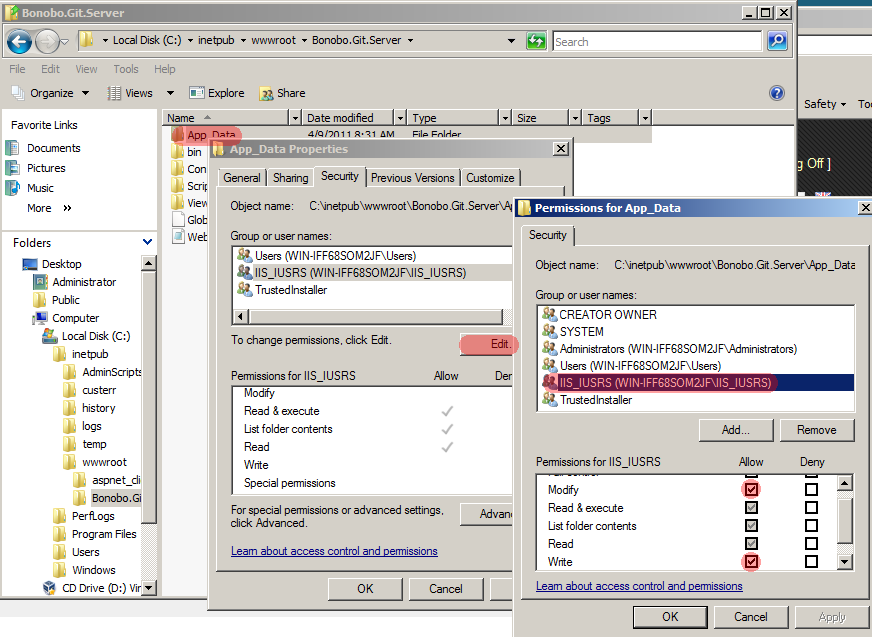
C:\inetpub\wwwroot\Bonobo.Git.Server\App_Datafolder. To do so(允许IIS用户修改“C:\inetpub\wwwroot\Bonobo.Git.Server\App_Data”文件夹。操作步骤如下:)- select Properties of App_Data folder(右击“App_Data”文件夹,选择“属性”),
- go to Security tab(切换到“安全”选项卡),
- click edit(点击“编辑”按钮),
- select IIS user (in my case IIS_IUSRS) and add Modify and Write permission(选择“IIS_IUSRS”并赋予“修改”和“写入”权限),
- confirm these settings with Apply button(点击“应用”按钮来确认这些设置).
如果没有“”这个用户,请先添加该用户,操作如下:
- Convert Bonobo.Git.Server to Application in IIS(在IIS中将Bonobo.Git.Server转换为应用程序)
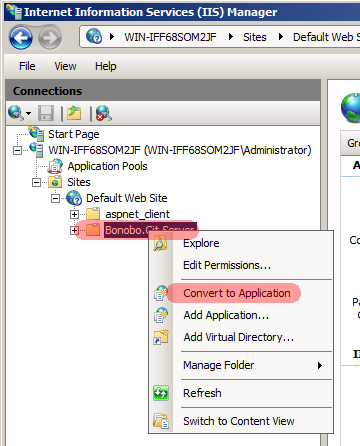
- Run IIS Manager and navigate to Sites -> Default Web Site. You should see Bonobo.Git.Server(打开IIS并导航到默认网站。你将看到“Bnobo.Git.Server”).
- Right click on Bonobo Git Server and convert to application(在“Bnobo.Git.Server”右击,并选择“转换为应用程序”).
- Check if the selected application pool runs on .NET 4.0 and convert the site(检查选中的应用池是否运行在.NET 4.0上,如果不是,则切换到.NET 4.0).
- Configure Authentication(配置身份验证)
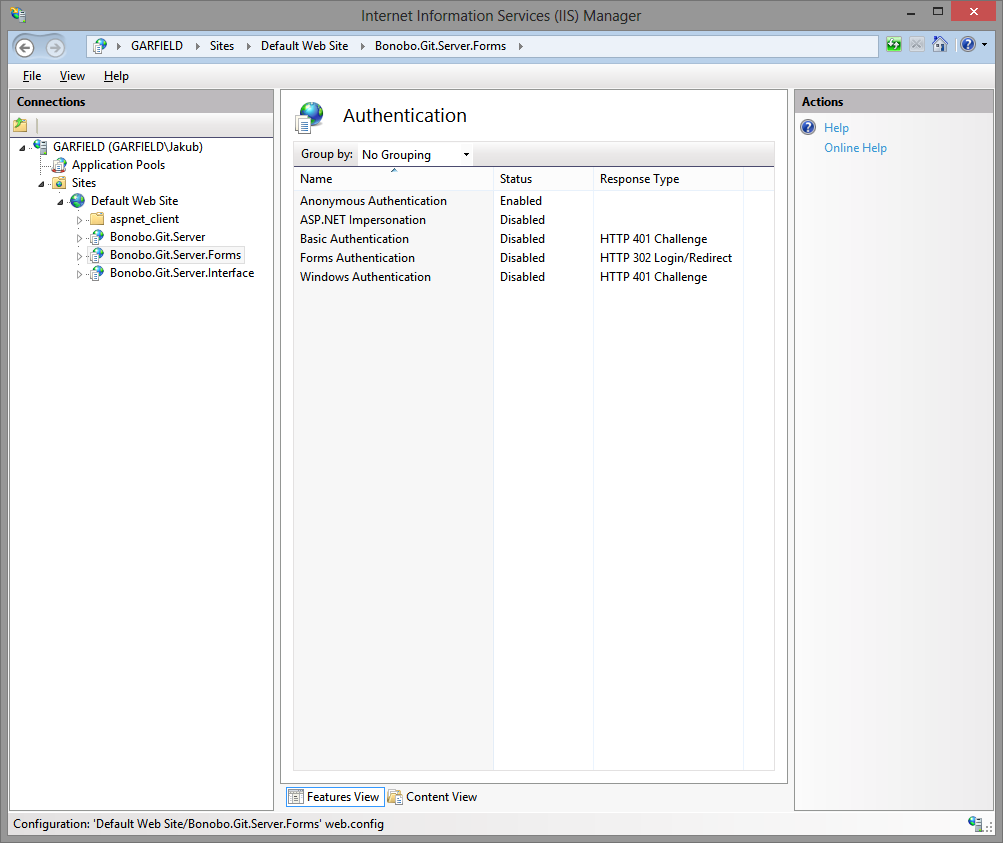
Enable Anonymous Authentication in IIS and disable the others. To do so, select the application, click on the authentication icon and set the value to of Anonymous Authentication to Enabled. The configuration should look like the following screenshot.
在IIS中启用匿名身份验证并禁用其他身价验证。要这么做,选择“Bonobo.Git.Server”应用,点击“身份验证”图标并设置“匿名身份验证”为启用。最终配置应同下面的快照一样:
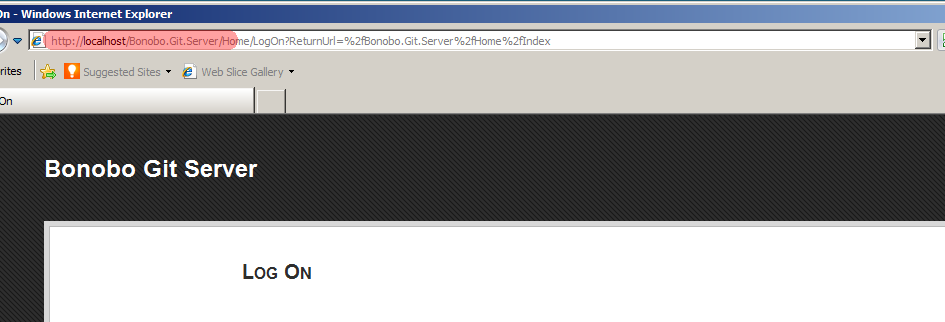
- Launch your browser and go to http://localhost/Bonobo.Git.Server. Now you can see the initial page of Bonobo Git Server and everything is working(打开浏览器并浏览“http://localhost/Bonobo.Git.Server”。现在你能看到Bonobo Git服务的起始页和正在运行的所有工作).
- Default credentials are username: admin password: admin(默认证书是用户名:admin,密码:admin)
The authentication and membership service functions have been split up into separate configurable modules in the latest version of Bonobo Git Server. By default, it is configured to use Cookie Authentication and the Internal Membership Service. Please follow up on how to use the different methods using the following sites.
在最新版本的Bonobo Git服务中,身份验证和成员资格服务功能被分离到单独的配置模块。默认情况下,它们分别用“Cookie身份验证”和“集成成员资格服务”来配置。关于“怎样使用不同的方式”,请继续看下面的网站。
Authentication Providers(身份验证提供程序)
- Cookie Authentication(Cookie身份验证)
- Windows Authentication(Windows身份验证)
- Federation Authentication(联合验证)
Membership Services(成员资格服务)
- Internal Membership Service(集成成员资格服务)
- Active Directory Membership Service(活动目录成员资格服务)
If you are have a previous version installed, you should review these migration notes.
如果你安装过以前的版本,你应该查看这些迁移注意事项。
If you have any issues with the installation try to search FAQ and forum.
翻译BonoboService官网的安装教程的更多相关文章
- PyCharm 2017 官网 下载 安装 设置 配置 (主题 字体 字号) 使用 入门 教程
一.安装 Python 3.6 首先,要安装好 Python 3.6.如果你还没有安装,可以参考咪博士之前的教程 Python 3.6.3 官网 下载 安装 测试 入门教程 (windows) 二.官 ...
- go语言,golang学习笔记1 官网下载安装,中文社区,开发工具LiteIDE
go语言,golang学习笔记1 官网下载安装,中文社区,开发工具LiteIDE Go语言是谷歌2009发布的专门针对多处理器系统应用程序的编程进行了优化,使用Go编译的程序可以媲美C或C++代码的速 ...
- Centos 7 官网下载安装mysql server 5.6
Centos 7 官网下载安装 mysql server # wget http://dev.mysql.com/get/mysql-community-release-el7-5.noarch.rp ...
- 照着官网来安装openstack pike之创建并启动instance
有了之前组件(keystone.glance.nova.neutron)的安装后,那么就可以在命令行创建并启动instance了 照着官网来安装openstack pike之environment设置 ...
- Python 3.6.3 官网 下载 安装 测试 入门教程 (windows)
1. 官网下载 Python 3.6.3 访问 Python 官网 https://www.python.org/ 点击 Downloads => Python 3.6.3 下载 Python ...
- git官网和安装使用教程链接
git官网 https://git-scm.com/download/win git安装教程 https://www.cnblogs.com/wj-1314/p/7993819.html
- bcache 状态/配置 文件详细介绍(翻译自官网)
声明: 文中 斜体带下划线 的段落为翻译不够准确的段落 原文:https://www.kernel.org/doc/Documentation/bcache.txt 官网:https://bcach ...
- 无法从NVIDA官网下载安装CUDA安装包?NVIDA官网怎么了?
最近几天由于不知名的原因,导致很多人无法从官网下载NVIDA的CUDA安装包,下载时,浏览器提示此文件可能危害你的计算机,选择保留下载下来也只是一个42字节的exe文件 双击进行安装又出现以下问题: ...
- 照着官网来安装openstack pike之environment设置
安装openstack前的准备环境: 两个centos7系统的环境:192.168.101.10 node1,192.168.101.11 node2 控制节点node1,计算节点node2 1.统一 ...
随机推荐
- loj2046 「CQOI2016」路由表
大傻逼trie树,更傻逼的是我这都没独立想出来,以后要少看题解,多多思考 #include <algorithm> #include <iostream> #include & ...
- 【Word Search】cpp
题目: Given a 2D board and a word, find if the word exists in the grid. The word can be constructed fr ...
- leetcode 【 Swap Nodes in Pairs 】python 实现
题目: Given a linked list, swap every two adjacent nodes and return its head. For example,Given 1-> ...
- Django中从本地上传excel文件并将数据存储到数据库
Django中从本地上传excel文件并将数据存储到数据库 一.前端界面 <div class="page-container"> <form action=&q ...
- Leetcode 521.最长特殊序列I
最长特殊序列 I 给定两个字符串,你需要从这两个字符串中找出最长的特殊序列.最长特殊序列定义如下:该序列为某字符串独有的最长子序列(即不能是其他字符串的子序列). 子序列可以通过删去字符串中的某些字符 ...
- 【Appnium+C#+Winform自动化测试系列】一、获取本机连接的设备、启动多个Appnium和获取本机启动的Appnium
本系列内容,准备根据所完成的项目为基线,一步一步的把整个设计和实现过程梳理. 先从基本的一些环境问题入手,梳理清楚关于手机设备和Appnium.因为我们在后面的建立Appnium连接时,需要设备名字和 ...
- 【转】unity自带寻路Navmesh入门教程(三)
http://liweizhaolili.blog.163.com/blog/static/16230744201271225812998/ 继续介绍NavMesh寻路的功能,接下来阿赵打算讲一下以下 ...
- 【bzoj1520】[POI2006]Szk-Schools 费用流
题目描述 输入 输出 如果有可行解, 输出最小代价,否则输出NIE. 样例输入 5 1 1 2 3 1 1 5 1 3 2 5 5 4 1 5 10 3 3 3 1 样例输出 9 题解 费用流 设xi ...
- 大素数判断和素因子分解(miller-rabin,Pollard_rho算法)
#include<stdio.h> #include<string.h> #include<stdlib.h> #include<time.h> #in ...
- 笔记 docker入门笔记
安装sudo apt-get remove docker docker-engine docker-ce docker.iosudo apt-get updatesudo apt-get instal ...