
Python学习笔记:装饰器
Python 装饰器的基本概念和应用
- 代码编写要遵循开放封闭原则,虽然在这个原则是用的面向对象开发,但是也适用于函数式编程,简单来说,它规定已经实现的功能代码不允许被修改,但可以被扩展,即:
- 封闭:已实现的功能代码块
- 开放:对扩展开发
装饰器是 Python 高阶函数的语法糖,可以为已经存在的对象添加额外的功能,比如:
- 引入日志
- 函数执行时间统计
- 执行函数前预备处理
- 执行函数后清理功能
- 权限校验等场景
- 缓存
Python 装饰器的基本实现
装饰器的例程:
 #!/usr/bin/env python3

 #-*- coding:utf-8 -*-

 #File Name:04_decorator_simple.py

 #Created Time:2019-01-09 15:24:38

 import time

 def timefun(func):

     # wrapped_fun 即为闭包, func 为要装饰的函数

     def wrapped_fun():

         start_time = time.time()

         func()

         end_time = time.time()

         print("%s\t运行用时 %f s" % (func.__name__, end_time - start_time))

     return wrapped_fun # 返回内部函数的引用

 def foo1():

     for i in range(10000):

         pass

 @timefun # 相当于 foo = timefun(foo)

 def foo():

     for i in range(100000):

         pass

 if __name__ == "__main__":

     foo1 = timefun(foo1)

     foo1()

     foo()
装饰器例程
foo1    运行用时 0.000491 s

foo     运行用时 0.002976 s
装饰器例程的运行结果
运行过程分析见下图:

Python 装饰器实现的基础为闭包,其会在闭包中调用目标函数,关于闭馆的详细内容,请参考 Python 学习笔记:闭包
Python 装饰器的使用
多个装饰器
 #!/usr/bin/env python3

 #-*- coding:utf-8 -*-

 #File Name:05_decorator_multi.py

 #Created Time:2019-01-09 15:55:31

 def make_body(func):

     """添加 body"""

     def wrapped():

         return "<b>" + func() + "</b>"

     return wrapped

 def make_italic(func):

     """设置为斜体"""

     def wrapped():

         return "<i>" + func() + "</i>"

     return wrapped

 # 相当于 make_body(make_italic(foo))

 @make_body

 @make_italic

 def foo():

     return "Hello World"

 def foo1():

     return "Hello Python"

 if __name__ == "__main__":

     print(foo())

     foo1 = make_body(make_italic(foo1))

     print(foo1())
01 多个装饰器
<b><i>Hello World</i></b>

<b><i>Hello Python</i></b>
01 多个装饰器——运行结果
多个装饰器的运行过程分析:
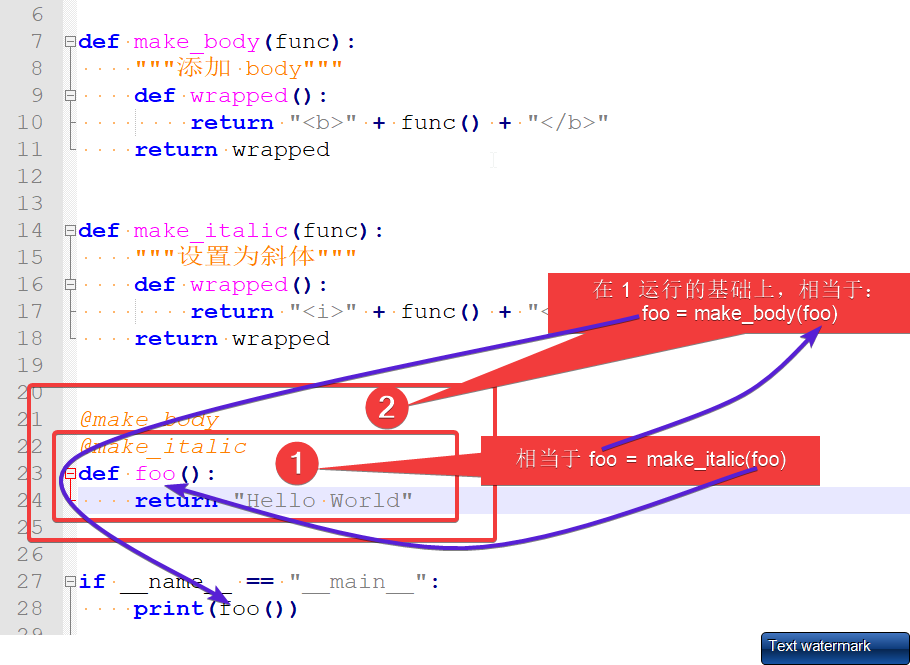
含有不定长参数
 #!/usr/bin/env python3

 #-*- coding:utf-8 -*-

 #File Name:06_decorator_multi_var.py

 #Created Time:2019-01-09 16:20:30

 from time import ctime

 def timefun(func):

     def wrapped_func(*args, **kwargs):

         print("%s called at %s" % (func.__name__, ctime()))

         print("wrapped_func: ", end="")

         print(args, kwargs)

         func(*args, **kwargs)  # 拆包

     return wrapped_func

 @timefun

 def foo(a,b,*args, **kwargs):

     print("foo: %s, %s, %s, %s" %(a, b, args, kwargs))

 if __name__ == "__main__":

     foo(1,2,3,4,5, tmp=2)
02 含有不定长参数
foo called at Wed Jan  9 16:32:48 2019

wrapped_func: (1, 2, 3, 4, 5) {'tmp': 2}

foo: 1, 2, (3, 4, 5), {'tmp': 2}
02 含有不定长参数——运行结果
带有返回值
 #!/usr/bin/env python3

 #-*- coding:utf-8 -*-

 #File Name: 07_decorator_multi_retrun.py

 #Created Time:2019-01-09 16:20:30

 from time import ctime

 def timefun(func):

     def wrapped_func(*args, **kwargs):

         print("%s called at %s" % (func.__name__, ctime()))

         print("wrapped_func: ", end="")

         print(args, kwargs)

         return func(*args, **kwargs)  # 此处如何没有 return,则26行会输出 None

     return wrapped_func

 @timefun

 def foo(a,b,*args, **kwargs):

     print("foo: %s, %s, %s, %s" %(a, b, args, kwargs))

     return "Hello world!"

 if __name__ == "__main__":

     print(foo(1,2,3,4,5, tmp=2))
03带有返回值
foo called at Wed Jan  9 16:38:05 2019

wrapped_func: (1, 2, 3, 4, 5) {'tmp': 2}

foo: 1, 2, (3, 4, 5), {'tmp': 2}

Hello world!
03带有返回值——运行结果
装饰器中设置外部变量
 #!/usr/bin/env python3

 #-*- coding:utf-8 -*-

 #File Name: 08_decorator_outside_var.py

 #Created Time:2019-01-09 16:20:30

 def timefun_arg(outside_var="Hello"):

     def timefun(func):

         def wrapped_func(*args, **kwargs):

             print("wrapped_func: %s" % outside_var)

             return func(*args, **kwargs)

         return wrapped_func

     return timefun

 @timefun_arg()

 def foo(a,b,*args, **kwargs):

     return "foo: Hello world!"

 @timefun_arg("Python")  # 相当于 foo1 = timefun_arg("Python")(foo1)

 def foo1(a,b,*args, **kwargs):

     return "foo1: Hello world!"

 if __name__ == "__main__":

     print(foo(1,2,3,4,5, tmp=2))

     print(foo1(1,2,3,4,5, tmp=2))
04 装饰器中设置外部变量
定义多层函数,相当于双层的装饰器。
wrapped_func: Hello

foo: Hello world!

wrapped_func: Python

foo1: Hello world!
04装饰器中设置外部变量——运行结果
类装饰器
 #!/usr/bin/env python3

 #-*- coding:utf-8 -*-

 #File Name:09_decorator_class.py

 #Created Time:2019-01-09 16:53:33

 class Test(object):

     def __init__(self, func):

         print("******初始化******")

         print("Called by %s." % func.__name__)

         self.func = func

     def __call__(self):

         return self.func()

 @Test  # 相当于 foo = Test(foo)

 def foo():

     return "Hello world!"

 def foo1():

     return "Hello python!"

 if __name__ == "__main__":

     print(foo())

     foo1 = Test(foo1)

     print(foo1())
05 类装饰器
类对象借助 __call__() 魔术方法,即可实现相应的类装饰器
******初始化******

Called by foo.

Hello world!

******初始化******

Called by foo1.

Hello python!
05 类装饰器运行结果
Python学习笔记:装饰器的更多相关文章
- python学习笔记--装饰器
1.首先是一个很无聊的函数,实现了两个数的加法运算: def f(x,y): print x+y f(2,3) 输出结果也ok 5 2.可是这时候我们感觉输出结果太单一了点,想让代码的输出多一点看起来 ...
- Python学习笔记--装饰器的实验
装饰器既然可以增加原来函数的功能,那能不能改变传给原函数的参数呢? 我们实验一下,先上代码: #!/usr/bin/env python # -*- coding: utf-8 -*- # @Date ...
- Python学习笔记: 装饰器Decorator
介绍 装饰器是对功能函数的加强. 在原来的功能函数之外,另外定义一个装饰器函数,对原来的功能函数进行封装(wrapper)并在wrapper的过程中增加一些辅助功能. 应用场景 如下场景: 业务函数f ...
- python 学习分享-装饰器篇
本篇内容为偷窃的~哈哈,借用一下,我就是放在自己这里好看. 引用地址:http://www.cnblogs.com/rhcad/archive/2011/12/21/2295507.html 第一步: ...
- python学习之装饰器-
python的装饰器 2018-02-26 在了解python的装饰器之前我们得了解python的高阶函数 python的高阶函数我们能返回一个函数名并且能将函数名作为参数传递 def outer() ...
- python学习day14 装饰器(二)&模块
装饰器(二)&模块 #普通装饰器基本格式 def wrapper(func): def inner(): pass return func() return inner def func(): ...
- Python学习 :装饰器
装饰器(函数) 装饰器作为一个函数,可以为其他函数在不修改原函数代码的前提下添加新的功能 装饰器的返回值是一个函数对象.它经常用于有切面需求的场景,比如:插入日志.性能测试.事务处理.缓存.权限校验等 ...
- python学习之-- 装饰器
高阶函数+嵌套函数 == 装饰器 什么是装饰器: 其实也是一个函数. 功能:为其他的函数添加附加功能 原则:不能修改被装饰的函数的源代码和调用方式 学习装饰器前首先要明白以下3条事项: 1:函数 即 ...
- 6月4日 python学习总结 装饰器复习
1. 装饰器的原理以及为什么要使用装饰器 在代码运行期间动态增加功能的方式,称之为"装饰器"(Decorator). 在不影响原代码结构的情况下为其添加功能 2. 装饰器的基本 ...
- 学习笔记——装饰器模式Decorator
装饰器模式,最典型的例子. 工厂新开了流水线,生产了手机外壳,蓝天白云花色.刚准备出厂,客户说还要印奶牛在上面,WTF…… 时间上来不及,成本也不允许销毁了重来,怎么办?弄来一机器A,专门在蓝天白云的 ...
随机推荐
- 【Unity3D】Unity中用C#读取CSV文件
1.创建csv文件 既然做实验嘛,没有资源怎么行,自己徒手写个csv文件吧,打开Numbers工具,新建一个表格文件,我的文件编辑截图如下: 创建完成后,导出成csv格式,我这里文件名为test.cs ...
- Entity Framewrok 7beta7中不同版本sql server自动生成分页sql语句的问题
在EF中,使用linq进行分页是很方便的,假如我们有一个EMP表,结构如下: public class Emp { [Key] public Guid No { get; set; } public ...
- jquery调用asp.net 页面后台的实现代码
先创建一个aspx页面编写一个客户端控件<input type="button" id="AjaxDemo" value="AjaxDemo&q ...
- Windbg .net内存调试有用的命令(笔记 )
和.net内存调试相关的Windbg命令 首先.load sosex.dll加载ex调试扩展dll 1.!gcgen [obj地址] 显示对象属于gc代数 2.!dumpgen [0/1/2] dum ...
- Spring cloud Eureka 服务治理(搭建服务注册中心)
服务之类是微服务架构中最为核心的基础模块,它主要用来实现各个微服务实例的自动化注册和发现. 1. 服务注册 在服务治理框架中,通常会构建一个注册中心,每个服务单元向注册中心登记自己提供的服务,将主机. ...
- android sqlite 递归删除一棵子树
背景:android studio 3.0 GreenDao 目标:在android 中,如何做到递归删除某颗子树?? ======================================== ...
- vue $set用法
需求,想给下面的数据添加一个hoby属性 {{data.hoby}}-->让这里的视图改变 data:{ name: "简书", age: '3', info: { cont ...
- Array负载均衡控制器(vAPV)
平台: freebsd 类型: 虚拟机镜像 软件包: apache python basic software load balance network infrastructure slb ssl ...
- shell实现mysql数据库备份
#!/bin/bash DB_USER="root" #数据库用户名 DB_PASS="12345678" #数据库密码 BACK_DIR="/bac ...
- 定义多个属性 Object.defineProperties()
var book = {} Object.defineProperties(book,{ _year:{ value:2004 }, editable:{ value:1 }, year:{ get: ...