
Freemarker生成HTML静态页面
这段时间的工作是做一个网址导航的项目,面向用户的就是一个首页,于是就想到了使用freemarker这个模板引擎来对首页静态化。
之前是用jsp实现,为了避免用户每次打开页面都查询一次数据库,所以使用了jsp的内置对象application,在Controller中将数据都查询出来,
然后放入application,最后在JSP页面使用jstl标签配合EL表达式 将数据遍历出来。这样做是从一定程度上减轻了服务器的压力和页面的响应速度,
但是仍然没有静态页面响应快。
使用Freemarker步骤:
- jar包,我的项目中使用maven来构建,所以在pom.xml中引入Freemarker jar包的坐标就可以了。
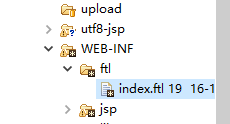
- ftl模板,我在WEB-INF下面创建一个文件夹ftl,里面只放ftl模板文件,我创建了一个index.ftl文件。
- ftl模板文件中写的就是html标签和css样式之类的,但是数据部分需要使用Freemarker提供的标签遍历出来。如下
                        <!--广告悬浮-->

                        <div class="subMenu">

                            <!--工具-->

                            <div class='xff'>

                                <div class="slideTxtBox">

                                    <div class="hd">

                                        <span class="arrow"><a class="next"></a><a class="prev"></a></span>

                                        <ul>

                                            <#list newsMap?keys as testKey>

                                                <li>${testKey}</li>

                                            </#list>

                                        </ul>

                                    </div>

                                    <div class="bd" style="padding: 5px 10px;">

                                        <#list newsMap?values as value>

                                            <div style="text-align: left; table-layout: fixed; word-wrap: break-word; width: 100%;" class="baidu">

                                            <#list value as newsList>

                                                <a target="_blank" href="${newsList.newsurl }" title="${newsList.newsname }">${newsList.newsname }</a>

                                            </#list>

                                            </div>

                                        </#list>

                                    </div>

                                </div>

                            </div>

                        </div>
其中<#list></#list>是Freemarker提供的遍历标签,Freemarker提供了很多的标签,这里不一一叙述。
- Contorller中将数据都查询出来,通过ftl模板取出数据,最后将完整的数据写入html
    // 获取搜索引擎

        List<SearchEngines> searchEngines = this.indexService.findSearchEngines();

        // 获取热搜客户

        List<Catalog> hotSearchs = this.indexService.findHotSearchs();

        // 获取前25个一级目录

        CatalogCustom custom = new CatalogCustom();

        custom.setCatalogLevel(1);

        List<Catalog> topLevelCatalog = this.indexService.findCustomers(custom);

        // 获取一级目录下的前十个客户

        Map<String, List<Catalog>> customerMap = new HashMap<String, List<Catalog>>();

        for (Catalog catalog : topLevelCatalog) {

            CatalogCustom customer = new CatalogCustom();

            customer.setCatalogLevel(3);

            customer.setGfid(catalog.getCatalogId());

            List<Catalog> customerList = this.indexService.findCustomers(customer);

                customerMap.put(catalog.getCatalogName(), customerList);

        }

        // 获取新闻相关数据

        Map<String, List<News>> newsMap = new HashMap<String, List<News>>();

        List<NewsCatalog> newsCatalogs = this.indexService.findNewsCatalog();

        for (NewsCatalog newsCatalog : newsCatalogs) {

            News news = new News();

            news.setPid(newsCatalog.getId());

            List<News> newsList = this.indexService.findNews(news);

            newsMap.put(newsCatalog.getNewscatalog(), newsList);

        }

        // 获取关键词

        List<Keywords> keywords = this.indexService.findKeywords();

        /*

        application.setAttribute("newsMap", newsMap);

        application.setAttribute("searchEngines", searchEngines);

        application.setAttribute("hotSearchs", hotSearchs);

        application.setAttribute("customerMap", customerMap);

        application.setAttribute("keywords", keywords);

        */

        String ftlPath = session.getServletContext().getRealPath("/WEB-INF/ftl");

        Configuration configuration = new Configuration();

        configuration.setDirectoryForTemplateLoading(new File(ftlPath));

        configuration.setDefaultEncoding("UTF-8");

        // 获取或创建一个模版。

        Template template = configuration.getTemplate("index.ftl");

        // 获取html静态页面文件

        String indexPath = session.getServletContext().getRealPath("/index.html");

        //设置文件输入流编码,不然生成的html文件会中文乱码

        FileWriterWithEncoding out = new FileWriterWithEncoding(indexPath,"UTF-8");

        // 将页面中要展示的数据放入一个map中

        HashMap<String,Object> map = new HashMap<String, Object>();

        map.put("newsMap", newsMap);

        map.put("searchEngines", searchEngines);

        map.put("hotSearchs", hotSearchs);

        map.put("customerMap", customerMap);

        map.put("keywords", keywords);

        //将map中的数据输入到index.ftl这个模板文件中并遍历出来,最后再将整个模板的数据写入到index.html中。

        template.process(map, out);

        out.close();
Freemarker生成HTML静态页面的更多相关文章
- 网页静态化解决方案:Freemarker生成简单html页面
FreeMarker 是一个用 Java 语言编写的模板引擎,它基于模板来生成文本输出.FreeMarker与 Web 容器无关,即在 Web 运行时,它并不知道 Servlet 或 HTTP.它不仅 ...
- asp .net 模板引擎 使用 Razor 生成html静态页面
刚开始不是理解 写完之后 觉得还蛮简单的 分为这几个步骤 1.获取页面模板Html 2.获取数据 3.解析模板和数据,生成静态页Html代码 4.生成静态文件 模板形式是mvc的模式,会mvc 看一下 ...
- PHP生成HTML静态页面。
function Generate(){ $html = '<!DOCTYPE html><html lang="en"><head> < ...
- [freemarker篇]02.生成HTML的静态页面
昨天完成了一部分的今天在上次的基础上,完成完成生成HTML静态页面的操作,中间会涉及一点标签的简单使用.今天的代码有一丢丢的对付的感觉!抱歉了,直接就上代码吧!求原谅! 项目结构目录如下: 第一步,新 ...
- 浅谈php生成静态页面
一.引 言 在速度上,静态页面要比动态页面的比方php快很多,这是毫无疑问的,但是由于静态页面的灵活性较差,如果不借助数据库或其他的设备保存相关信息的话,整体的管理上比较繁琐,比方修改编辑.比方阅读权 ...
- 用 Smarty 生成静态页面入门介绍
why Smarty? 随着公司首页(以下简称首页)流量越来越大,最近开始考虑使用后台语言生成静态页面的技术. 我们知道,一个简单页面一般是一个 .html(或者 .htm ..shtml)后缀的文件 ...
- 比较详细PHP生成静态页面教程
一,PHP脚本与动态页面. PHP脚本是一种服务器端脚本程序,可通过嵌入等方法与HTML文件混合, 也可以类,函数封装等形式,以模板的方式对用户请求进行处理.无论以何种方式,它的基本原理是这样的.由客 ...
- 三种C#.net生成静态页面的方法
ASP.NET生成静态页面方法主要有三种 第一种方法:向服务器的动态页面发送请求,获取页面的html代码.这种方法缺点显而易见:速度慢.另外如果请求的动态页面有验证控件的话,返回的html页面却无 ...
- PHP代码为什么不能直接保存HTML文件——>PHP生成静态页面教程
1.server会依据文件的后缀名去进行解析,假设是HTML文件则server不会进行语法解析.而是直接输出到浏览器. 2.假设一个页面中所有都是HTML代码而没有须要解析的PHP语法,则没有必要保存 ...
随机推荐
- Python Socket编程基础篇
Socket网络编程 socket通常也称作"套接字",用于描述IP地址和端口,是一个通信链的句柄,应用程序通常通过"套接字"向网络发出请求或者应答网络请求. ...
- BabelMap 10.0.0.5 汉化版已经发布
新的 BabelMap 调整了用户体验的一些细节.修正了西夏语表意文字序列.修正了一些文字显示不全的问题. 请点击页面左上角连接,进入下载页面下载.
- 中国用户通过rchange用银联充值到PerfectMoney再给BTC-E充值进行搬砖的方法
最近迷上了比特币这个疯狂的东西,相信很多技术人员都感兴趣. 比特币.莱特币钱包下载和把数据迁移到C盘以外其他盘的方法. 莱特币和山寨币的原理跟比特币基本上一样,可以参考这个方法进行,莱特币的钱包数据迁 ...
- python基础五--dict
一.昨日内容回顾 1. 列表: 增 insert:按照指定下标插入 append:在列表最后增加 extend:迭代式的增加到列表的最后,相当于列表扩展 删 pop:根据指定下标删除,返回删除的元素, ...
- 看阿里P9架构师如何向你定义架构及架构师
架构的定义 先来看看软件架构的普遍定义吧. 一个程序和计算系统软件体系结构是指系统的一个或多个结构.结构中包括软件的构建,构建的外部可见属性以及它们之间的相互关系. 体系结构并非可运行软件.确切的说, ...
- python模块-json、pickle、shelve
json模块 用于文件处理时其他数据类型与js字符串之间转换.在将其他数据类型转换为js字符串时(dump方法),首先将前者内部所有的单引号变为双引号,再整体加上引号(单或双)转换为js字符串:再使用 ...
- Eclipse启动Tomcat时,45秒超时解决方式
Eclipse启动Tomcat时,45秒超时解决方式 在Eclipse中启动Tomcat服务器时,经常由于系统初始化项目多,导致出现45秒超时的Tomcat服务器启动错误. 一般通过找到XML配置文 ...
- __NSCFConstantString && __NSPlaceholderDictionary
一 -[__NSCFConstantString size]: unrecognized selector sent to instance 0x53ea70 该错误是在我将NSString类型的参数 ...
- JavaScript 开闭原则OCP
代码: <!DOCTYPE html PUBLIC "-//W3C//DTD XHTML 1.0 Transitional//EN" "http://www.w3. ...
- SPOJ - POLYNOM Polynomial(数论乱搞)题解
题意 :给你n个数,问你是否存在一个多项式(最多三次方)满足f(i)= xi. 思路:讲一个神奇的思路: x3 - (x - 1)3 = 3x2 - 3x + 1 x2 - (x - 1)2 = 2x ...