
vue2.0 富文本组件(基于wangeditor)
1. 本组件基于 wangeditor
如有侵权 请告知,
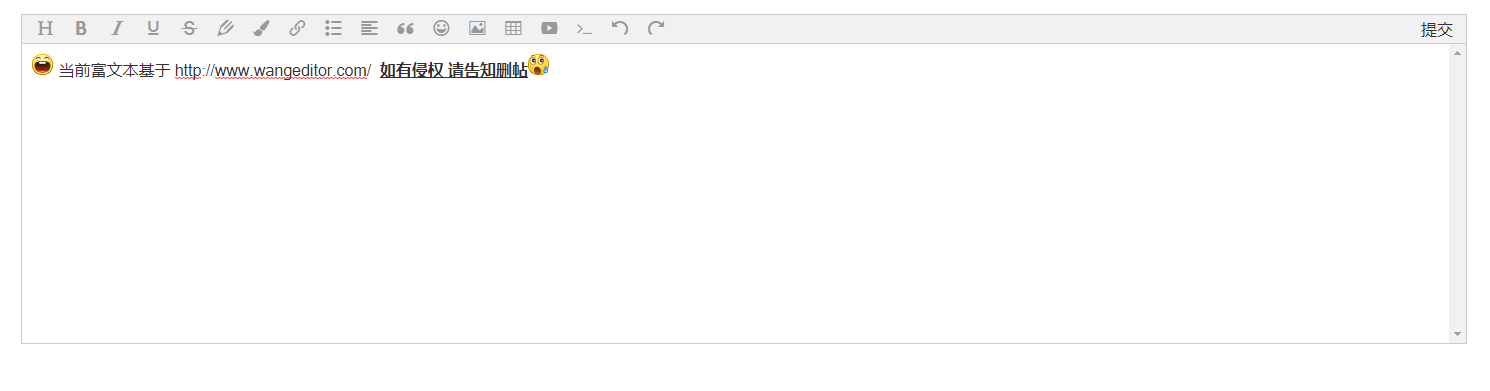
2. 效果图
3. 依赖安装
package.json 中 devDependencies
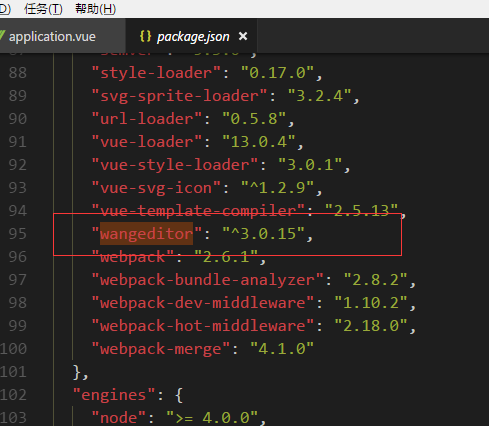
或者直接 npm install wangeditor --save-dev
2. 引入
<script>
import Editor from '@/components/Editor/Editor'
</script>
3.注册组件 && 获取组件编辑数据
export default {
components: {
Editor
},
data() {
return {
editorData: ''
}
},
methods: {
getEditorData(val) {
this.editorData = val
}
}
}
4. HTML中写入
<template>
<div>
...
<Editor @getEditorData="getEditorData"></Editor>
</div>
</template>
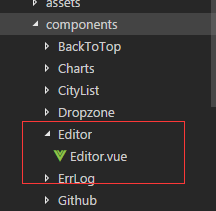
5. 源码:
<template>

    <div class="editorWrap">

        <div id="editorElem" style="text-align:left"></div>

        <div id="submit" :style="'height:' + submitHeight + 'px;line-height:' + submitHeight + 'px;'" v-on:click="getContent">提交</div>

    </div>

</template>

<script>

    import E from 'wangeditor'

    export default {

      name: 'editor',

      data() {

        return {

          editorContent: '',

          submitHeight: 30

        }

      },

      methods: {

        getContent: function() {

          this.$emit('getEditorData', this.editorContent)

        }

      },

      mounted() {

        const editor = new E('#editorElem')

        editor.customConfig.onchange = (html) => {

          this.editorContent = html

        }

        editor.customConfig.uploadImgShowBase64 = true   // 使用 base64 保存图片

//        editor.customConfig.uploadImgServer = '/upload'  // 上传图片到服务器

        editor.create()

        this.submitHeight = document.getElementsByClassName('w-e-toolbar')[0].offsetHeight

      }

    }

</script>

<style lang="scss">

  .editorWrap {

    position: relative;

    #submit {

    position: absolute;

    top: 0;

    right: 0;

    width: 60px;

    text-align: center;

    cursor: pointer;

    }

    #submit:hover {

      color: #00b7ee;

    }

    .w-e-text-container {

      z-index: 200!important;

    }

  }

</style>
git 地址:https://github.com/IceGogh/vue-components
vue2.0 富文本组件(基于wangeditor)的更多相关文章
- 基于vue2.0的分页组件开发
今天安排的任务是写基于vue2.0的分页组件,好吧,我一开始是觉得超级简单的,但是越写越写不出来,写的最后乱七八糟的都不知道下句该写什么了,所以重新捋了思路,小结一下- 首先写组件需要考虑: 要从父组 ...
- Angular封装WangEditor富文本组件
富文本组件是web程序中很常用的一个组件,特别是要开发一个博客,论坛这类的网站后台. 得益于Angular的强大,封装WangEditor组件非常简单 1.使用yarn或者npm安装wangedito ...
- Vue2.0的通用组件
饿了么基于Vue2.0的通用组件开发之路(分享会记录) Element:一套通用组件库的开发之路 Element 是由饿了么UED设计.饿了么大前端开发的一套基于 Vue 2.0 的桌面端组件库. ...
- vue2.0实现分页组件
最近使用vue2.0重构项目, 需要实现一个分页的表格, 没有找到合适的组件, 就自己写了一个, 效果如下: 该项目是使用 vue-cli搭建的, 如果你的项目中没有使用webpack,请根据代码自己 ...
- iOS富文本组件的实现—DTCoreText源码解析 数据篇
本文转载 http://blog.cnbang.net/tech/2630/ DTCoreText是个开源的iOS富文本组件,它可以解析HTML与CSS最终用CoreText绘制出来,通常用于在一些需 ...
- Extjs6 编写自己的富文本组件(以ueditor为基础)
一.下载ueditor 地址:http://ueditor.baidu.com/website/ 二.将ueitor资源引入自己的项目 在index.html中引入ueditor.config.js. ...
- vue2.0 之文本渲染-v-html、v-text
vue2.0 之文本渲染-v-html.v-text 1.index.html代码 <!DOCTYPE html> <html> <head> <meta c ...
- 【rich-text】 富文本组件说明
[rich-text] 富文本组件可以显示HTML代码样式. 1)支持事件:tap.touchstart.touchmove.touchcancel.touchend和longtap 2)信任的HTM ...
- 支付宝小程序开发——rich-text富文本组件支持html代码
前言: 与微信小程序不同,支付宝小程序的富文本组件并不能直接支持html代码,如: 如上,支付宝小程序的富文本组件只支持数组类型,html代码需要使用 mini-html-parser 转换,具体用法 ...
随机推荐
- Android CTS Test failed to run to conmpletion 测试超时问题
引用“Android cts all pass 全攻略”里面的一段话: ❀ testcase timeout 测试某个testcase的时候一直出现 “........”,迟迟没有pass或者fail ...
- Windows Python虚拟环境配置(Distribute + pip + virtualenv + virtualenvwrapper-powershell)
对于Python开发新手,很多人会迷茫那些各种名目的工具和概念,如Python2.7, Python3.3, Distribute, pip, virtualenv,Setuptools, easy_ ...
- Android无布局文件下自定义通知栏notification的 icon
在开发项目一个与通知栏有关的功能时,由于自己的项目是基于插件形式的所以无法引入系统可用的布局文件,这样无法自定义布局,造成无法自定义通知栏的icon. 在网上也有一种不用布局文件更换icon的方法,但 ...
- qt在windows下的udp通信(最简单)
qt编程:windows下的udp通信 本文博客链接:http://blog.csdn.net/jdh99,作者:jdh,转载请注明. 环境: 主机:win7 开发环境:qt 功能: 用udp进行收发 ...
- MFC使用的风格(CButton, CEdit, CStatic, CWnd等等)
风格 描述按钮风格 应用于CButton类对象,例如单选框.复选框和按钮.在CButton::Create的dwStyle参数中设置一个组合的风格.组合框风格 应用于CComboBox类对象.在CCo ...
- SYN591-A型 计数器
SYN591-A型 计数器 秒表计数器累计计数器电机测速表使用说明视频链接: http://www.syn029.com/h-pd-248-0_310_44_-1.html 请将此链接复制到浏览 ...
- Spring之Bean的装配
一.Bean的装配Bean的装配,即Bean对象的创建.容器根据代码要求创建Bean对象后再传递给代码的过程,称为Bean的装配.1.默认装配方式代码通过getBean()方式从容器获取指定的Bean ...
- Python连载13-shutile模块(续)和zipfile模块
一.shutil模块(续) 1.函数:upack_archive() (1)用法:解包操作 (2)格式:shutil.unpack_archive("归档文件地址“,”解包之后的地址“) ( ...
- Redis 学习笔记(篇四):整数集合和压缩列表
整数集合 Redis 中当一个集合(set)中只包含整数,并且元素不多时,底层使用整数集合实现,否则使用字典实现. 那么: 为什么会出现整数集合呢?都使用字典存储不行吗? 整数集合在 Redis 中的 ...
- java虚拟机-GC-调优
1. 年轻代大小选择 * 响应时间优先的应用:尽可能设大,直到接近系统的最低响应时间限制(根据实际情况选择).在此种情况下,年轻代收集发生的频率也是最小的.同时,减少到达年老代的对象. * 吞吐量优先 ...