
自定义Jquery 下拉框
(function ($){

    'use strict';

    var g_id = 0;

    var g_open_id = [];

    $.fn.select3 = function () {

        var _id = g_id++;

        var _isShow = false;

        var _this = $(this);

        var _val = _this.children('option:selected').text();

        var _w = _this.css('width');

        var tpl = '<dl class="select2_wrap" style="width:'+_w+'"><dt class="open-dt" id="select2_title'+ _id +'" data-val=""><span>'+_val+'</span><i class="fa fa-sort-down"></i></dt>';

        _this.children('option').each(function (){

            tpl += '<dd style="display:none" data-val="'+ $(this).val() +'">' + $(this).text() + '</dd>';

        });

        tpl += '</dl>';

        _this.hide().before(tpl);

        _this.bind('change', function () {

            $('#select2_title').text($(this).val()).attr('data-val', $(this).val());

        });

        $('#select2_title'+_id).attr('data-val', $(this).val());

        $('#select2_title'+_id).siblings().click(function () {

            var text = $(this).text();

            var _val = $(this).attr('data-val');

            _this.val(_val);

            $('#select2_title'+_id).attr('data-val',$(this).attr('data-val')).children('span').text(text);

            $(this).parent('dl').children('dd').slideUp(200, function() {

                $(this).siblings('dt').css({'borderBottom':'1px solid #ccc', 'border-bottom-right-radius':'5px', 'border-bottom-left-radius':'5px'});

            });

            _this.change();

        });

        $('#select2_title'+_id).click(function() {

            $('dd').slideUp(100, function () {

                $('dt[role-page]').attr('style', '');

            });

            var _id = $(this).attr('id');

            g_open_id.push(_id);

            $.each(g_open_id, function(i) {

                if (g_open_id[i] != _id) {

                    $('#'+g_open_id[i]).siblings('dd').slideUp(200, function () {

                        $(this).siblings('dt').css({'borderBottom': '1px solid #ccc', 'border-bottom-right-radius': '5px', 'border-bottom-left-radius': '5px'});

                    });

                    delete g_open_id[i];

                }

            });

            _isShow  = $(this).siblings('dd').css('display') == 'none' ? false : true;

            if (!_isShow) {

                $(this).css({'borderBottom':'none', 'border-bottom-right-radius':'0', 'border-bottom-left-radius':'0'});

                $(this).siblings('dd').slideDown(300);

            }else{

                $(this).siblings('dd').slideUp(200, function () {

                    $(this).siblings('dt').css({'borderBottom': '1px solid #ccc', 'border-bottom-right-radius': '5px', 'border-bottom-left-radius': '5px'});

                });

            }

        });

        $(window).click(function(e){

            var pType = e.target.tagName;

            var className = e.target.className;

            if (pType == 'I' || pType == 'SPAN') {

                className = e.target.parentElement.className;

            }

            if (className == 'open-dt') {

                return;

            }

            $('dd').slideUp(100, function () {

                $('.select2_wrap').children('dt').css({'borderBottom': '1px solid #ccc', 'border-bottom-right-radius': '5px', 'border-bottom-left-radius': '5px'});

                $('dt[role-page]').attr('style', '');

            });

        });

    };

})(jQuery);
样式:
/* select3 style */

.select3-wrap{

    display: inline-flex;

    height: 30px;

    width: 100%;

}

.select2_wrap{

    height: 30px;

    line-height: 30px;

    margin:;

    padding:;

    text-align:left;

    display: inline-block;

    font-size: 12px;

    z-index:;

}

.select2_wrap dt{

    border:1px solid #ccc;

    border-radius: 5px;

    padding-left:10px;

    font-weight: normal;

    cursor:pointer;

    overflow: hidden;

}

.select2_wrap dt>i{

    float:right;

    margin-right: 10px;

    margin-top:3px;

}

.select2_wrap dd{

    padding-left:10px;

    background-color: #FFFFFF;

    border-left: 1px solid #ccc;

    border-right: 1px solid #ccc;

}

.select2_wrap dd:last-child{

    border-bottom:1px solid #ccc;

    border-bottom-left-radius: 5px;

    border-bottom-right-radius: 5px;

    height: 35px;

}

.select2_wrap dt, .select2_wrap dd{

    height:30px;

    line-height: 30px;

}

.select2_wrap dd:hover{

    background-color:#414C59;

    color:white;

    cursor:pointer;

}

.hide {

    display: none;

}
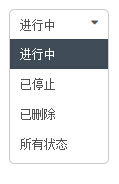
效果:

自定义Jquery 下拉框的更多相关文章
- jquery 下拉框 收藏
jquery 下拉框 Query获取Select选择的Text和Value: 语法解释: 1. $("#select_id").change(function(){//code. ...
- 带搜索框的jQuery下拉框插件
由于下拉框的条数有几十个,于是打算找一个可以搜索查找功能的下拉框,刚开始在网上看了几个,都是有浏览器兼容性问题,后来看到这个“带搜索框的jQuery下拉框美化插件 searchable”,看演示代码简 ...
- jQuery下拉框操作系列$("option:selected",this) &&(锋利的jQuery)
jQuery下拉框操作系列$("option:selected",this) &&(锋利的jQuery) <!DOCTYPE html> <ht ...
- Ajax jQuery下拉框联动案例
需求: 使用ajax和jQuery实现下拉框联动. 注意:需要加入jquery-2.1.1.min.js 前台 <!DOCTYPE html> <html> <head& ...
- 自定义SWT控件一之自定义单选下拉框
一.自定义下拉控件 自定义的下拉框,是自定义样式的,其中的下拉框使用的是独立的window,非复选框的下拉框双击单机其它区域或选择完之后,独立window构成的下拉框会自动消失. package co ...
- jQuery下拉框插件8种效果
jQuery自定义漂亮的下拉框插件8种效果 jquery美化选择器实例有:边框.下划线. 伸缩 .滑动. 覆盖. 旋转. 弹出层选择 .环形效果. 在线预览 <body class=" ...
- 自制Jquery下拉框插件
(function ($) { $.fn.select3 = function (option) { $(this).each(function () { var _this = $(this); v ...
- Android自定义spinner下拉框实现的实现
一:前言 本人参考博客:http://blog.csdn.net/jdsjlzx/article/details/41316417 最近在弄一个下拉框,发现Android自带的很难实现我的功能,于是去 ...
- jQuery下拉框扩展和美化插件Chosen
Chosen 是一个支持jquery的select下拉框美化插件,它能让丑陋的.很长的select选择框变的更好看.更方便.不仅如此,它更扩展了select,增加了自动筛选的功能.它可对列表进行分组, ...
随机推荐
- [Codeforces 914D] Bash and a Tough Math Puzzle
[题目链接] https://codeforces.com/contest/914/problem/D [算法] 显然 , 当一个区间[l , r]中为d倍数的数的个数 <= 1 , 答案为Ye ...
- 修改cocos2dx 背景颜色
只需要在AppDelegate的设置FPS后面加入一行: glClearColor(1.0, 1.0, 1.0, 1.0); 同理如果要修改成其它颜色,只需修改里面的值即可( r, g, b, a);
- 文本质量巧设置,一招让Visio 2007字体从模糊到清晰
微软的Visio是一款很好用的画图工具,不过,它有一个地方不太好,就是中文字体比较模糊. 如下图: 矩形框内是宋体,9pt,字体很不清晰.无奈我就只好用雅黑字体,略微好一些. 今天发现一个设置,只有修 ...
- poj1015【DP.......无奈了】
首先,读题,真是一窍不通.后来看完程序的意思,才明白吧.. 题意: n个人中选m个,条件是取sum|D-P|最小,当有|D-P|相同的时候取|D+P|最大的.然后输出那些m个人的sumD,sumP,最 ...
- cocos2d-html5基础
1 环境搭建 版本Cocos2d-html5-v2.2,tomcat7.0 配置tomcat,然后直接解压Cocos2d-html5-v2.2.zip,访问解压后的根目录的index.html就可以看 ...
- C++ C# 默认对齐是8字节
C++ C# 默认对齐是8字节 以上,一直以为是4字节,尼玛
- JAVA多线程(一) Thread & Runnable
githut代码地址:https://github.com/showkawa/springBoot_2017/tree/master/spb-demo/spb-brian-query-service/ ...
- git apply
1. git 安装 2.git 与服务器的验证 1.生成ssh ssh-keygen -t rsa -C "1107247128@qq.com" 2.查看生成的pub文件, ...
- 手把手教你如何在Fire fox火狐浏览器里在线识别下载视频(超强大)(博主推荐)
网址是 Firefox about:addons
- 害死人不偿命的(3n+1)猜想 (15)
#include <iostream> #include <algorithm> using namespace std; int main(){ int n; while ( ...