
springmvc+swagger2
一、swagger2依赖
<!--swagger-->

<dependency>

    <groupId>io.springfox</groupId>

    <artifactId>springfox-swagger2</artifactId>

    <exclusions>

        <exclusion>

            <artifactId>spring-aop</artifactId>

            <groupId>org.springframework</groupId>

        </exclusion>

        <exclusion>

            <artifactId>jackson-annotations</artifactId>

            <groupId>com.fasterxml.jackson.core</groupId>

        </exclusion>

    </exclusions>

</dependency>

<dependency>

    <groupId>io.springfox</groupId>

    <artifactId>springfox-swagger-ui</artifactId>

</dependency>
二、springmvc配置文件加入
<mvc:default-servlet-handler />
三、web.xml配置
<welcome-file-list>

    <welcome-file>swagger-ui.html</welcome-file>

</welcome-file-list>
四、swagger2配置
可创建多个Docket,对restful api进行分组管理
import io.swagger.annotations.Api;

import io.swagger.annotations.ApiOperation;

import org.springframework.context.annotation.Bean;

import org.springframework.context.annotation.Configuration;

import org.springframework.web.servlet.config.annotation.EnableWebMvc;

import org.springframework.web.servlet.config.annotation.WebMvcConfigurationSupport;

import springfox.documentation.builders.ApiInfoBuilder;

import springfox.documentation.builders.PathSelectors;

import springfox.documentation.builders.RequestHandlerSelectors;

import springfox.documentation.service.ApiInfo;

import springfox.documentation.service.Contact;

import springfox.documentation.spi.DocumentationType;

import springfox.documentation.spring.web.plugins.Docket;

import springfox.documentation.swagger2.annotations.EnableSwagger2;

@EnableWebMvc

@EnableSwagger2

@Configuration

public class Swagger2Config extends WebMvcConfigurationSupport {

    @Bean

    public Docket docket() {

        return new Docket(DocumentationType.SWAGGER_2)

                .apiInfo(apiInfo())

                .groupName("admin")

                .select()

                .apis(RequestHandlerSelectors.withClassAnnotation(Api.class))

                .apis(RequestHandlerSelectors.withMethodAnnotation(ApiOperation.class))

                .paths(PathSelectors.ant("/**"))

                .build();

    }

//    @Bean

//    public Docket xxx() {

//        return new Docket(DocumentationType.SWAGGER_2)

//                .apiInfo(apiInfo())

//                .groupName("xxx")

//                .select()

//                .apis(RequestHandlerSelectors.withClassAnnotation(Api.class))

//                .apis(RequestHandlerSelectors.withMethodAnnotation(ApiOperation.class))

//                .paths(PathSelectors.ant("/xxx/**"))

//                .build();

//    }

    private ApiInfo apiInfo() {

        return new ApiInfoBuilder()

                .title("shiro 无状态组件")

                .contact(new Contact("胡俊哲个", "", "2570230521@qq.com"))

                .version("1.0")

                .build();

    }

}
五、效果演示
Restful API 访问路径:

 * http://IP:port/{context-path}/swagger-ui.html
六、注意事项
1、如果有拦截器或者过滤器 对项目根路径进行拦截,可能<welcome-file>的配置不生效!
2、如果 配置 <welcome-file>swagger-ui.html</welcome-file>,访问 http://IP:port/{context-path}/,虽然可以看到页面,但是接口内容显示不出来。原因如下:
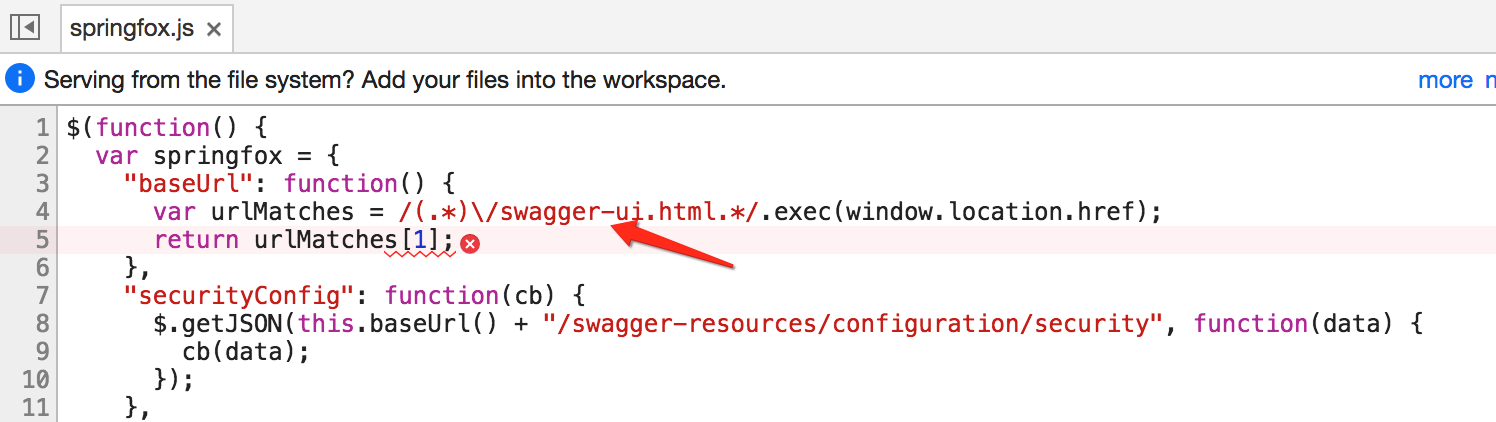
这个js在匹配url的时候 要包含“swagger-ui.html”,所以就出错了。解决方案如下:
(1)修改web.xml
 <welcome-file-list>

     <welcome-file>index.html</welcome-file>

 </welcome-file-list>
(2)新建index.html
<!DOCTYPE html>

<html lang="en">

<head>

    <meta charset="UTF-8">

    <title>首页</title>

</head>

<body>

<script type="application/javascript">

    window.location.href = window.location.origin + "/shiro/swagger-ui.html";

</script>

</body>

</html>
七、swagger2常用注解参考
springmvc+swagger2的更多相关文章
- SpringMVC集成springfox-swagger2自动生成接口文档
本节内容: 什么是Swaggger Springfox与Swagger的关系 SpringMVC集成springfox-swagger2 一.什么是Swaggger Swagger是一个流行的API开 ...
- springmvc集成swaggerui
这里先写下需要的pom.xml配置(我引用的2.4.0,相对稳定) 在集成springfox-swagger2之前,我也尝试着集成了swagger-springmvc,方式差不多,但是swagger- ...
- SpringMVC中使用Swagger2整合
Swagger2是什么 Swagger 是一款RESTFUL接口的文档在线自动生成+功能测试功能软件. Swagger 是一个规范和完整的框架,用于生成.描述.调用和可视化 RESTful 风格的 W ...
- 快速构建springmvc+spring+swagger2环境
快速构建springmvc+spring+swagger2环境 开发工具:Intellij idea jdk: 1.8 开发步骤: 1.创建maven工程,如图建立工程结构 ...
- MP实战系列(十)之SpringMVC集成SpringFox+Swagger2
该示例基于之前的实战系列,如果公司框架是使用JDK7以上及其Spring+MyBatis+SpringMVC/Spring+MyBatis Plus+SpringMVC可直接参考该实例. 不过建议最好 ...
- 03、Swagger2和Springmvc整合详细记录(爬坑记录)
时间 内容 备注 2018年6月18日 基本使用 spirngmvc整合swagger2 开始之前这个系列博文基本是,在项目的使用中一些模块的内容记录,但是后期逐渐优化,不单单是整合内容. swagg ...
- springmvc与swagger2
首先呢我们导入相关的jar包文件 为了方便copy我copy一份 <!-- 导入java ee jar 包 --> <dependency> ...
- 使用Swagger2构建SpringMVC项目中的Restful API文档
使用Swagger自动生成API文档,不仅增加了项目的可维护性,还提高了API的透明度更利于快速测试等工作,便于更快地发现和解决问题. 本篇文章只记录整合过程,关于Security Configura ...
- 基于Maven的Springboot+Mybatis+Druid+Swagger2+mybatis-generator框架环境搭建
基于Maven的Springboot+Mybatis+Druid+Swagger2+mybatis-generator框架环境搭建 前言 最近做回后台开发,重新抓起以前学过的SSM(Spring+Sp ...
随机推荐
- 收藏:IPicture总结
1.IPicture接口对象的创建方法1:直接通过文件创建LPCSTR szFileUrl; IPicture *pIPicture; OleLoadPicturePath(CComBSTR(szFi ...
- word 大纲-目录
- cygwin简介及使用
一个是真实的假货,一个是冒牌的真品前指 Cygwin,后指 Linux/VMWare 路不管平还是陡,终归你要走的,如果你愿意投入到linux开发的社群中来,不会安装linux系统,不会配置工作环境是 ...
- linux command ------ source
source FileName 等效于. FileName,注 . 和 FileName 有空格 source命令也称为“点命令”,也就是一个点符号(.),作用是在当前bash环境下读取并执行File ...
- 【leetcode】Path Sum2
Given a binary tree and a sum, find all root-to-leaf paths where each path's sum equals the given su ...
- vue+webpack开发(三)
上一篇博文讲了怎么使用路由,这次主要讲讲怎么编写一个vue组件 vue定义了一种“单文件组件”后缀为‘.vue’的文件,大概长这样子: <template> <div> < ...
- [转]python ctypes 探究 ---- python 与 c 的交互
近几天使用 python 与 c/c++ 程序交互,网上有推荐swig但效果都不理想,所以琢磨琢磨了 python 的 ctypes 模块.同时,虽然网上有这方面的内容,但是感觉还是没说清楚.这里记录 ...
- imperva—waf 敏感字段显现
imperva WAF中看到的日志内容信息有些都是敏感的 比如登录登出的信息 如何调整敏感信息的现实方式,并可以自定义敏感字段? 这里添加字段就可以了 这样就将******转变为明文了
- android休眠唤醒驱动流程分析【转】
转自:http://blog.csdn.net/hanmengaidudu/article/details/11777501 标准linux休眠过程: l power managemen ...
- 阿里云RDS的mysql数据库占用空间超过90%的处理
阿里云RDS数据库最大支持2T,目前已经占用了90%,如果进行分库或者迁移比较麻烦,思路是找出占用空间过大的日志或不重要的文件进行删除操作 查询所有数据库占用磁盘空间大小的SQL语句: show bi ...