
WPF备忘录(1)有笑脸,有Popup
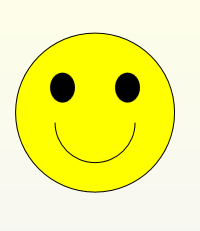
1.画个笑脸给大家娱乐一下:
 <Canvas Width="200" Height="180" VerticalAlignment="Center" Margin="772,577,466,390">

            <Ellipse Canvas.Left="10" Canvas.Top="10" Width="160" Height="160"

                     Fill="Yellow" Stroke="Black"/>

            <Ellipse Canvas.Left="45" Canvas.Top="50" Width="25" Height="30"

                     Fill="Black"/>

            <Ellipse Canvas.Left="110" Canvas.Top="50" Width="25" Height="30"

                     Fill="Black"/>

            <Path Data="M 50,100 A 30,30 0 0 0 130,100" Stroke="Black"/>

        </Canvas>
效果如下:
2.Xaml日期格式化
<Label Content="{Binding TaskDate,StringFormat='yyyy-MM-dd'}" Grid.Column="3"/>
3.让按钮有按钮的感觉,汗,不是废话吗,就是让按钮有按下去的感觉
 <ControlTemplate.Triggers>

                        <Trigger Property="Button.IsPressed" Value="True">

                            <Setter Property="RenderTransform">

                                <Setter.Value>

                                    <ScaleTransform ScaleX=".9" ScaleY=".9"/>

                                </Setter.Value>

                            </Setter>

                            <Setter Property="RenderTransformOrigin" Value=".5,.5"/>

                        </Trigger>

                    </ControlTemplate.Triggers>
4.Popup的使用方法
1.Popup控件永远不会自动显示,为了显示Popup控件必须设置IsOpen属性。
2.默认情况下,Popup.StaysOen属性被设置为True,并且Popup控件会一直显示,直到显式地将IsOpen属性设置为False。
如果将Popup.StaysOpen属性设置为False,当用户在其他地方单击鼠标时,Popup控件就会消失。
如果Popup控件的IsOpen属性设置为True时,通过Popup控件的PopupAnimation属性可以设置Popup控件的显示方式。
由于Popup控件不和任何控件相关联,所以无论在哪定义Popup标签都无所谓。
3.关联控件可以这样:
PlacementTarget="{Binding ElementName=button1}"   //绑定在哪个控件上,这里是和button1这个控件绑定

Placement="Bottom"                   //在控件的那个位置显示,这里是在button1这个控件下方显示
小例子:
<Popup PopupAnimation="Fade"

                       Placement="Center"

                       Name="_pupup">

                    <Button>Hello</Button>

                </Popup>
5.RenderTransform与LayoutTransform的区别
RenderTransform与LayoutTransform的之间的唯一区别是在什么时候应用变换,
RenderTransform在呈现之前,而后者在布局之前应用。先看下RenderTransform:
 <StackPanel Background="Gainsboro" Width="200" Height="80" Orientation="Horizontal" Margin="366,220,12,221">

            <Button Width="75" Content="15">

                <Button.RenderTransform>

                    <RotateTransform Angle="15"></RotateTransform>

                </Button.RenderTransform>

            </Button>

            <Button Width="75" Content="45">

                <Button.RenderTransform>

                    <RotateTransform Angle="45"></RotateTransform>

                </Button.RenderTransform>

            </Button>

            <Button Width="75" Content="65">

                <Button.RenderTransform>

                    <RotateTransform Angle="65"></RotateTransform>

                </Button.RenderTransform>

            </Button>

        </StackPanel>
效果:
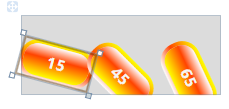 按钮出现了重叠
LayoutTransform:
<StackPanel Background="Gainsboro" Width="250" Height="80" Orientation="Horizontal" Margin="71,220,257,221">

            <Button Width="75" Content="15">

                <Button.LayoutTransform>

                    <RotateTransform Angle="15"></RotateTransform>

                </Button.LayoutTransform>

            </Button>

            <Button Width="75" Content="45">

                <Button.LayoutTransform>

                    <RotateTransform Angle="45"></RotateTransform>

                </Button.LayoutTransform>

            </Button>

            <Button Width="75" Content="65">

                <Button.LayoutTransform>

                    <RotateTransform Angle="65"></RotateTransform>

                </Button.LayoutTransform>

            </Button>

        </StackPanel>
效果:
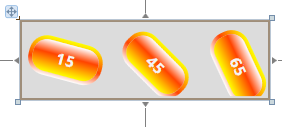
可以看出LayoutTransform不像RenderTransform出现了重叠,面板已经改变尺寸来完全适应所包含的按钮。因为LayoutTransform
在布局之前应用,所以系统完全知道这样的效果。
未完待续……
WPF备忘录(1)有笑脸,有Popup的更多相关文章
- WPF listview item mouse enter/over popup
This is because the routing strategy of the Loaded event is Direct, which means that the routed even ...
- WPF备忘录(3)如何从 Datagrid 中获得单元格的内容与 使用值转换器进行绑定数据的转换IValueConverter
一.如何从 Datagrid 中获得单元格的内容 DataGrid 属于一种 ItemsControl, 因此,它有 Items 属性并且用ItemContainer 封装它的 items. 但是,W ...
- WPF备忘录(2)WPF获取和设置鼠标位置与progressbar的使用方法
一.WPF 中获取和设置鼠标位置 方法一:WPF方法 Point p = Mouse.GetPosition(e.Source as FrameworkElement); Point p = (e.S ...
- WPF备忘录(6)WPF实现打印功能
在WPF 中可以通过PrintDialog 类方便的实现应用程序打印功能,本文将使用一个简单实例进行演示.首先在VS中编辑一个图形(如下图所示). 将需要打印的内容放入同一个<Canvas> ...
- WPF备忘录(7)WPF图片资源路径介绍
在项目中增加两张图片Content.jpg和Resource.jpg,分别将其生成操作属性设置为Content和Resource. 在界面中增加两个Image控件ImgContent和ImgR ...
- C# WPF抽屉效果实现(C# WPF Material Design UI: Navigation Drawer & PopUp Menu)
时间如流水,只能流去不流回! 点赞再看,养成习惯,这是您给我创作的动力! 本文 Dotnet9 https://dotnet9.com 已收录,站长乐于分享dotnet相关技术,比如Winform.W ...
- WPF备忘录(5)怎样修改模板中的控件
首先,想问大家一个问题,你们如果要给一个Button添加背景图片会怎么做?(呵呵,这个问题又点小白哈) 是这样吗? <Button Height="57" Horizonta ...
- WPF备忘录(4)打个勾画个叉娱乐下
<Path Grid.Column="2" Data="M43,5 L20,40 20,40 0,20 6,15 18,26 37,7 43,5 z" F ...
- 2018-12-21-WPF-弹出-popup-里面的-TextBox-无法输入汉字
title author date CreateTime categories WPF 弹出 popup 里面的 TextBox 无法输入汉字 lindexi 2018-12-21 18:10:30 ...
随机推荐
- Android-Kotlin-具名参数
先看一个这样的案例,[案例一]: package cn.kotlin.kotlin_base05 fun showAction1(country: String, volk: String) { pr ...
- Android-HttpClient-Get与Post请求登录功能
HttpClient 是org.apache.http.* 包中的: 第一种方式使用httpclient-*.jar (需要在网上去下载httpclient-*.jar包) 把httpclient-4 ...
- JS学习笔记5_DOM
1.DOM节点的常用属性(所有节点都支持) nodeType:元素1,属性2,文本3 nodeName:元素标签名的大写形式 nodeValue:元素节点为null,文本节点为文本内容,属性节点为属性 ...
- UICollectionView设置首个cell默认选中
设置UICollectionView中某个cell的默认选中,刚开始为追求性能,采用同一个cellId去标识UICollectionViewCell,却由于cell的重用会导致之前选中的cell在被重 ...
- centos7上mysql5.6版本主从复制
做主从复制实验: 第一步:主服务器上操作 1.修改主服务器master: [root@localhost ~]# vim /etc/my.cnf server_id = 1 //[必须]服务器唯一I ...
- mongodb初始化并使用node.js实现mongodb操作封装
mongodb的下载只要在https://www.mongodb.com/网站就能够下载 下载后安装只用一直点next就可以,注意最好使用默认路径安装到C盘,然后在任意位置建立一个文件夹用于储存你的数 ...
- 记录cacl()函数中使用scss变量不生效的问题
问题 使用cacl()动态计算元素的高度,运算中包含一个scss变量.如下: height: calc(100% - $ws-header-height); 在浏览器中发现并没有达到预期效果,scss ...
- c++中的const和volatile知识自我总结
学习了下c++中的const关键字,总结如下. 1.const限制一个变量不能修改其内容,如果强行修改的话,如下面代码这样子,编译就会报错,“表达式必须是可修改的左值”. int main() { c ...
- 【sping揭秘】10、SpringIOC容器扩展
关于component-scan操作(去除,失效) 这个spring中的配置项,可以扫描我们对应的包下面的类,自动把带上@component,@service,@controller, @reposi ...
- 学习推荐-Redis学习手册
redis之旅: http://www.cnblogs.com/stephen-liu74/archive/2012/02/27/2370212.html