
springboot使用RestTemplate以post方式发送json字符串参数(以向钉钉机器人发送消息为例)
使用springboot之前,我们发送http消息是这么实现的
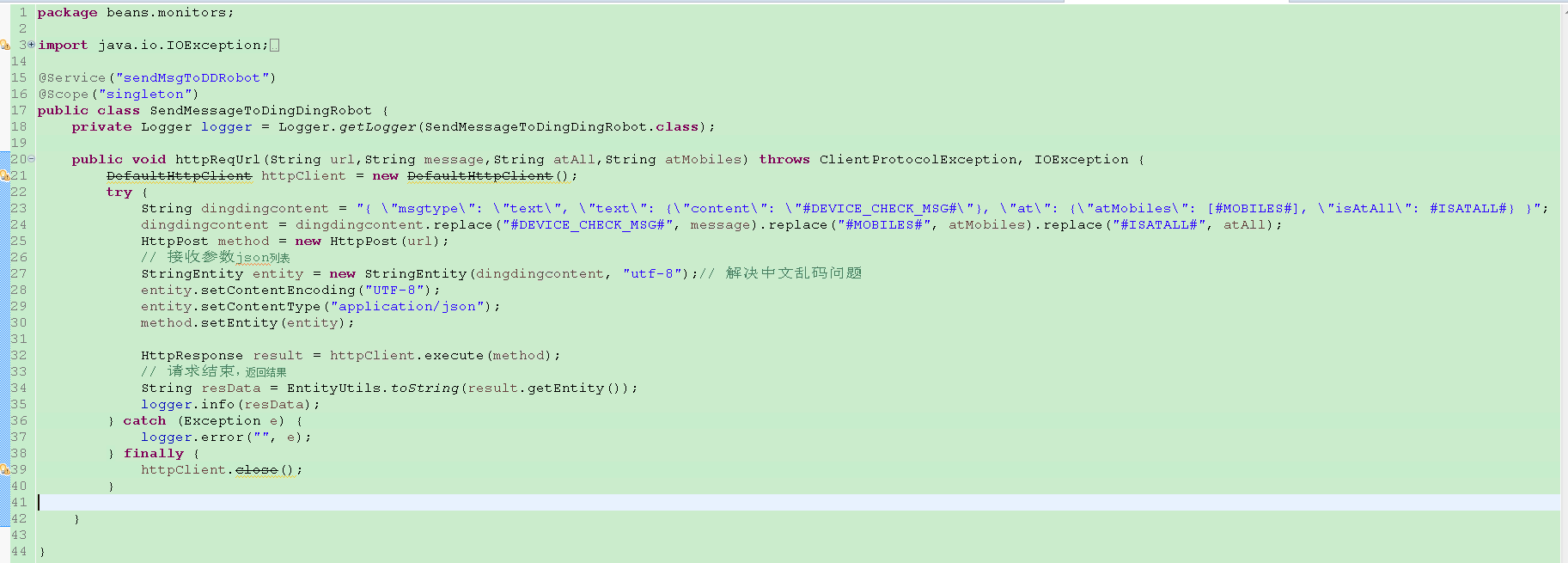
我们用了一个过时的类,虽然感觉有些不爽,但是出于一些原因,一直也没有做处理,最近公司项目框架改为了springboot,springboot中有一种很方便的发送http请求的实现,就是RestTemplate,而且实现起来非常简单,代码也很清晰。
从上面代码可以看到,向钉钉发送的参数为一个json字符串,所以需要的HttpEntity的泛型应该是String,如果是键值对,就需要声明MultiValueMap<String, String> map = new LinkedMultiValueMap<>();,将其作为第一个参数传递到HttpEntity构造方法中。
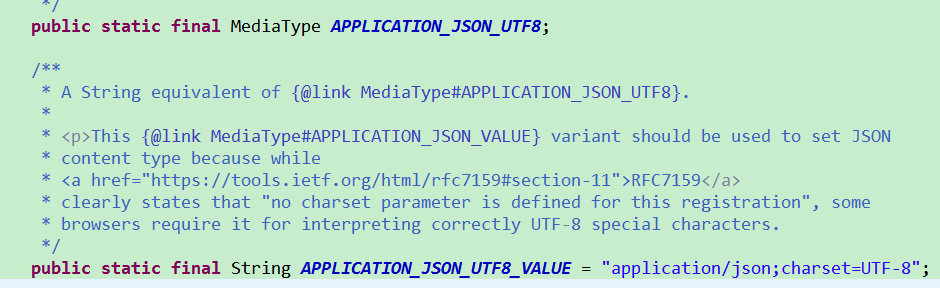
MediaType中定义了很多类型,我们这里使用的为APPLICATION_JSON_UTF8,进入源码,可以看到,该字段对应的值为属性APPLICATION_JSON_UTF8_VALUE的值,而属性APPLICATION_JSON_UTF8_VALUE的值为application/json;charset=UTF-8,这也正是我们需要的。
本例发送的json字符串,查找钉钉机器人的地址比较简单,具体步骤为"群设置 -- 群机器人 -- 设置 -- 复制"即可,
需要的maven依赖
<dependency>

     <groupId>org.springframework.boot</groupId>

     <artifactId>spring-boot-starter-web</artifactId>

</dependency>
如果只是这样引入依赖,则程序启动后,会启动一个内嵌的tomcat,程序将一直运行下去,如果程序是一次性的,执行完就想让其自动结束,并且不需要启动一个web项目,那么可以在上述依赖中去除对内嵌tocmat的依赖。在本例中,发送了钉钉消息之后就会结束程序,故去除了内嵌tomcat
<dependency>

     <groupId>org.springframework.boot</groupId>

     <artifactId>spring-boot-starter-web</artifactId>

     <exclusions>

           <exclusion>

                <groupId>org.springframework.boot</groupId>

                <artifactId>spring-boot-starter-tomcat</artifactId>

           </exclusion>

     </exclusions>

</dependency>
具体代码实现也很简单,如下
package com.demo.webboot;

import javax.annotation.Resource;

import org.springframework.boot.CommandLineRunner;

import org.springframework.http.HttpEntity;

import org.springframework.http.HttpHeaders;

import org.springframework.http.MediaType;

import org.springframework.http.ResponseEntity;

import org.springframework.stereotype.Component;

import org.springframework.web.client.RestTemplate;

@Component

public class RestCommandLine implements CommandLineRunner {

    @Resource

    private RestTemplate restTemplate;

    @Override

    public void run(String... args) throws Exception {

        HttpHeaders headers = new HttpHeaders();

        headers.setContentType(MediaType.APPLICATION_JSON_UTF8);

        String content = "{ \"msgtype\": \"text\", \"text\": {\"content\": \"This is a test case.\"}, \"at\": {\"atMobiles\": [phone num], \"isAtAll\": false}}";

        HttpEntity<String> request = new HttpEntity<>(content, headers);

        String url = "https://oapi.dingtalk.com/robot/send?access_token=65eff73abfd26a3e5e11dc87c2c8bcbf359f15b65cd1d3bcb60443307fba675a1";

        ResponseEntity<String> postForEntity = restTemplate.postForEntity(url, request, String.class);

        String body = postForEntity.getBody();

        System.out.println(body);

    }

}
在启动类中配置RestTemplate,没有对RestTemplate做较多的处理,直接调用build方法创建。
package com.demo.webboot;

import javax.annotation.Resource;

import org.springframework.boot.SpringApplication;

import org.springframework.boot.autoconfigure.SpringBootApplication;

import org.springframework.boot.web.client.RestTemplateBuilder;

import org.springframework.context.annotation.Bean;

import org.springframework.web.client.RestTemplate;

@SpringBootApplication

public class WebbootApplication {

    @Resource

    private RestTemplateBuilder builder;

    public static void main(String[] args) {

        SpringApplication.run(WebbootApplication.class, args);

    }

    @Bean

    public RestTemplate restTemplate() {

        return builder.build();

    }

}
运行结果如下
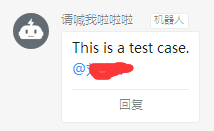
通过以上简单代码,就可以想钉钉机器人发送消息了,当然,这里只是一个demo。
springboot使用RestTemplate以post方式发送json字符串参数(以向钉钉机器人发送消息为例)的更多相关文章
- httpclient工具类,post请求发送json字符串参数,中文乱码处理
在使用httpclient发送post请求的时候,接收端中文乱码问题解决. 正文: 我们都知道,一般情况下使用post请求是不会出现中文乱码的.可是在使用httpclient发送post请求报文含中文 ...
- 钉钉自定义机器人 发送文本 换行 \n无效果
今天用php做钉钉自定义机器人 发送文本 换行 \n无效果,原来是我一直用单引号作为定义字符串,换成双引号就ok了.
- spring mvc各种常见类型参数绑定方式以及json字符串绑定对象
在使用spring mvc作为框架的时候,为了规范,我们通常希望客户端的请求参数符合规范直接通过DTO的方式从客户端提交到服务端,以便保持规范的一致性,除了很简单的情况使用RequestParam映射 ...
- ajax post 请求发送 json 字符串
$.ajax({ // 请求方式 type:"post", // contentType contentType:"application/json", // ...
- Springboot 通过FastJson实现bean对象和Json字符串互转
Json格式在后台服务中的重要性就不多说了,直入正题.首先引入pom文件,这里使用的是1.2.83版本 1 <dependency> 2 <groupId>com.alibab ...
- springMVC 接收json字符串参数
/** 前台js拼接了一个数组 myparam = [a,b,c]; 在ajax中直接 {"myparam":JSON.stringify(myparam)} 传入springMV ...
- json字符串参数
jsp部分 json字符串的属性应该都是实体类的属性 function saveCashier(){ layer.closeAll(); var Reapply = document.g ...
- 【spring mvc】spring mvc POST方式接收单个字符串参数,不加注解,接收到的值为null,加上@RequestBody,接收到{"uid":"品牌分类大”},加上@RequestParam报错 ---- GET方式接收单个参数的方法
spring mvc POST方式 接收单个参数,不加任何注解,参数名对应,接收到的值为null spring mvc POST方式 接收单个参数,加上@RequestBody,接收到参数格式:{&q ...
- httpclient的调用 发送json字符串
public static String postHttp(JSONObject jsonObject, String jsonUrl){ String responseMsg="" ...
随机推荐
- mysql authentication plugin 'caching_sha2_password'
解决办法: ALTER USER 'root'@'%' IDENTIFIED WITH mysql_native_password BY 'root1';
- Category VS Extension 原理详解
(一)Category 1.什么是Category? category是Objective-C 2.0之后添加的语言特性,别人口中的分类.类别其实都是指的category.category的主要作用是 ...
- PHP中RabbitMQ之phpAmqplib实现(五
本章讲诉如何使用php-amqplib实现RabbitMQ. 环境:CoentOS,PHP 7 简单介绍一下php-amqplib php-amqplib是Advanced Message Queui ...
- redis cluster(集群)模式的创建方式
redis常用的架构有三种,单例.哨兵.集群,其他的都说过了,这里只简单介绍集群搭建. 单例最简单没什么好说的. 哨兵之前说过,该模式下有哨兵节点监视master和slave,若master宕机可自动 ...
- shell脚本编程进阶及RAID和LVM应用1
bash脚本编程 脚本文件格式: 第一行,顶格写: #!/bin/bash 注释行:#开头 代码注释:写清楚注释 规范写脚本:适度缩进,添加空白行 编程语言:有编程语法格式,库,算法和数据结构 编程思 ...
- LoadRunner(4)
一.LoadRunner工具的组成 1.VuGen 虚拟用户脚本生成器 脚本好比:武器 VuGen好比:兵工厂 VU好比:士兵 2.Controller 压力调度控制台 好比:总指挥部 3.Analy ...
- R的数据结构--数组
数组:可以认为数组是矩阵的扩展,它将矩阵扩展到2维以上.如果给定的数组是1维的则相当于向量,2维的相当于矩阵. R语言中的数组元素的类型也是单一的,可以是数值型,逻辑型,字符型或复数型 参数解释 ar ...
- Webpack v4.8.3 快速入门指南
一.进入 https://webpack.docschina.org/ 官方文档,点击 "文档" 进入 文档页面,文档中包含 “概念,配置,API,指南,LOADERS,插件&q ...
- RHEL8 创建本地YUM存储库
yum 的好处及本地yum的好处不在本文讨论范畴,本文针对rhel8中的新功能yum做简要介绍和配置,在 RHEL 8中分为两个存储库: BaseOS 应用程序流(AppStream) BaseOS中 ...
- 粗暴,干就完了----徐晓冬似的C语言自学笔记-----实现一个链表结构
#include <stdio.h> #include <stdlib.h> #define N 5 /*N 假定数组长度为5*/ typedef struct snode { ...