
jsp利用webuploader实现超大文件分片上传、断点续传
1,项目调研
因为需要研究下断点上传的问题。找了很久终于找到一个比较好的项目。
在GoogleCode上面,代码弄下来超级不方便,还是配置hosts才好,把代码重新上传到了github上面。
https://github.com/freewebsys/java-large-file-uploader-demo
效果:
上传中,显示进度,时间,百分比。
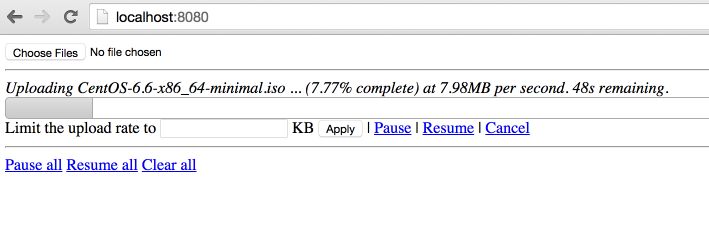
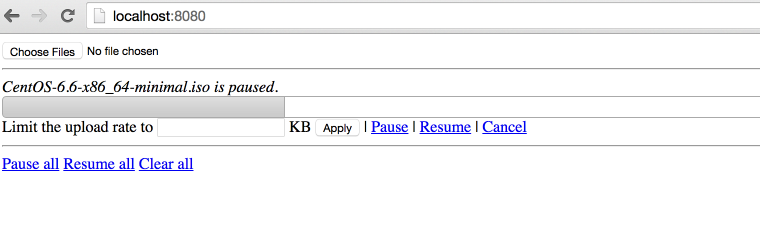
点击【Pause】暂停,点击【Resume】继续。
2,代码分析
原始项目:
https://code.google.com/p/java-large-file-uploader/
这个项目最后更新的时间是 2012 年,项目进行了封装使用最简单的方法实现了http的断点上传。
因为html5 里面有读取文件分割文件的类库,所以才可以支持断点上传,所以这个只能在html5 支持的浏览器上面展示。
同时,在js 和 java 同时使用 cr32 进行文件块的校验,保证数据上传正确。
代码在使用了最新的servlet 3.0 的api,使用了异步执行,监听等方法。
上传类UploadServlet
@Component("javaLargeFileUploaderServlet")
@WebServlet(name = "javaLargeFileUploaderServlet", urlPatterns = { "/javaLargeFileUploaderServlet" })
public class UploadServlet extends HttpRequestHandlerServlet
implements HttpRequestHandler {
private static final Logger log = LoggerFactory.getLogger(UploadServlet.class);
@Autowired
UploadProcessor uploadProcessor;
@Autowired
FileUploaderHelper fileUploaderHelper;
@Autowired
ExceptionCodeMappingHelper exceptionCodeMappingHelper;
@Autowired
Authorizer authorizer;
@Autowired
StaticStateIdentifierManager staticStateIdentifierManager;
@Override
public void handleRequest(HttpServletRequest request, HttpServletResponse response)
throws IOException {
log.trace("Handling request");
Serializable jsonObject = null;
try {
// extract the action from the request
UploadServletAction actionByParameterName =
UploadServletAction.valueOf(fileUploaderHelper.getParameterValue(request, UploadServletParameter.action));
// check authorization
checkAuthorization(request, actionByParameterName);
// then process the asked action
jsonObject = processAction(actionByParameterName, request);
// if something has to be written to the response
if (jsonObject != null) {
fileUploaderHelper.writeToResponse(jsonObject, response);
}
}
// If exception, write it
catch (Exception e) {
exceptionCodeMappingHelper.processException(e, response);
}
}
private void checkAuthorization(HttpServletRequest request, UploadServletAction actionByParameterName)
throws MissingParameterException, AuthorizationException {
// check authorization
// if its not get progress (because we do not really care about authorization for get
// progress and it uses an array of file ids)
if (!actionByParameterName.equals(UploadServletAction.getProgress)) {
// extract uuid
final String fileIdFieldValue = fileUploaderHelper.getParameterValue(request, UploadServletParameter.fileId, false);
// if this is init, the identifier is the one in parameter
UUID clientOrJobId;
String parameter = fileUploaderHelper.getParameterValue(request, UploadServletParameter.clientId, false);
if (actionByParameterName.equals(UploadServletAction.getConfig) && parameter != null) {
clientOrJobId = UUID.fromString(parameter);
}
// if not, get it from manager
else {
clientOrJobId = staticStateIdentifierManager.getIdentifier();
}
// call authorizer
authorizer.getAuthorization(
request,
actionByParameterName,
clientOrJobId,
fileIdFieldValue != null ? getFileIdsFromString(fileIdFieldValue).toArray(new UUID[] {}) : null);
}
}
private Serializable processAction(UploadServletAction actionByParameterName, HttpServletRequest request)
throws Exception {
log.debug("Processing action " + actionByParameterName.name());
Serializable returnObject = null;
switch (actionByParameterName) {
case getConfig:
String parameterValue = fileUploaderHelper.getParameterValue(request, UploadServletParameter.clientId, false);
returnObject =
uploadProcessor.getConfig(
parameterValue != null ? UUID.fromString(parameterValue) : null);
break;
case verifyCrcOfUncheckedPart:
returnObject = verifyCrcOfUncheckedPart(request);
break;
case prepareUpload:
returnObject = prepareUpload(request);
break;
case clearFile:
uploadProcessor.clearFile(UUID.fromString(fileUploaderHelper.getParameterValue(request, UploadServletParameter.fileId)));
break;
case clearAll:
uploadProcessor.clearAll();
break;
case pauseFile:
List<UUID> uuids = getFileIdsFromString(fileUploaderHelper.getParameterValue(request, UploadServletParameter.fileId));
uploadProcessor.pauseFile(uuids);
break;
case resumeFile:
returnObject =
uploadProcessor.resumeFile(UUID.fromString(fileUploaderHelper.getParameterValue(request, UploadServletParameter.fileId)));
break;
case setRate:
uploadProcessor.setUploadRate(UUID.fromString(fileUploaderHelper.getParameterValue(request, UploadServletParameter.fileId)),
Long.valueOf(fileUploaderHelper.getParameterValue(request, UploadServletParameter.rate)));
break;
case getProgress:
returnObject = getProgress(request);
break;
}
return returnObject;
}
List<UUID> getFileIdsFromString(String fileIds) {
String[] splittedFileIds = fileIds.split(",");
List<UUID> uuids = Lists.newArrayList();
for (int i = 0; i < splittedFileIds.length; i++) {
uuids.add(UUID.fromString(splittedFileIds[i]));
}
return uuids;
}
private Serializable getProgress(HttpServletRequest request)
throws MissingParameterException {
Serializable returnObject;
String[] ids =
new Gson()
.fromJson(fileUploaderHelper.getParameterValue(request, UploadServletParameter.fileId), String[].class);
Collection<UUID> uuids = Collections2.transform(Arrays.asList(ids), new Function<String, UUID>() {
@Override
public UUID apply(String input) {
return UUID.fromString(input);
}
});
returnObject = Maps.newHashMap();
for (UUID fileId : uuids) {
try {
ProgressJson progress = uploadProcessor.getProgress(fileId);
((HashMap<String, ProgressJson>) returnObject).put(fileId.toString(), progress);
}
catch (FileNotFoundException e) {
log.debug("No progress will be retrieved for " + fileId + " because " + e.getMessage());
}
}
return returnObject;
}
private Serializable prepareUpload(HttpServletRequest request)
throws MissingParameterException, IOException {
// extract file information
PrepareUploadJson[] fromJson =
new Gson()
.fromJson(fileUploaderHelper.getParameterValue(request, UploadServletParameter.newFiles), PrepareUploadJson[].class);
// prepare them
final HashMap<String, UUID> prepareUpload = uploadProcessor.prepareUpload(fromJson);
// return them
return Maps.newHashMap(Maps.transformValues(prepareUpload, new Function<UUID, String>() {
public String apply(UUID input) {
return input.toString();
};
}));
}
private Boolean verifyCrcOfUncheckedPart(HttpServletRequest request)
throws IOException, MissingParameterException, FileCorruptedException, FileStillProcessingException {
UUID fileId = UUID.fromString(fileUploaderHelper.getParameterValue(request, UploadServletParameter.fileId));
try {
uploadProcessor.verifyCrcOfUncheckedPart(fileId,
fileUploaderHelper.getParameterValue(request, UploadServletParameter.crc));
}
catch (InvalidCrcException e) {
// no need to log this exception, a fallback behaviour is defined in the
// throwing method.
// but we need to return something!
return Boolean.FALSE;
}
return Boolean.TRUE;
}
}
异步上传UploadServletAsync
@Component("javaLargeFileUploaderAsyncServlet")
@WebServlet(name = "javaLargeFileUploaderAsyncServlet", urlPatterns = { "/javaLargeFileUploaderAsyncServlet" }, asyncSupported = true)
public class UploadServletAsync extends HttpRequestHandlerServlet
implements HttpRequestHandler {
private static final Logger log = LoggerFactory.getLogger(UploadServletAsync.class);
@Autowired
ExceptionCodeMappingHelper exceptionCodeMappingHelper;
@Autowired
UploadServletAsyncProcessor uploadServletAsyncProcessor;
@Autowired
StaticStateIdentifierManager staticStateIdentifierManager;
@Autowired
StaticStateManager<StaticStatePersistedOnFileSystemEntity> staticStateManager;
@Autowired
FileUploaderHelper fileUploaderHelper;
@Autowired
Authorizer authorizer;
/**
* Maximum time that a streaming request can take.<br>
*/
private long taskTimeOut = DateUtils.MILLIS_PER_HOUR;
@Override
public void handleRequest(final HttpServletRequest request, final HttpServletResponse response)
throws ServletException, IOException {
// process the request
try {
//check if uploads are allowed
if (!uploadServletAsyncProcessor.isEnabled()) {
throw new UploadIsCurrentlyDisabled();
}
// extract stuff from request
final FileUploadConfiguration process = fileUploaderHelper.extractFileUploadConfiguration(request);
log.debug("received upload request with config: "+process);
// verify authorization
final UUID clientId = staticStateIdentifierManager.getIdentifier();
authorizer.getAuthorization(request, UploadServletAction.upload, clientId, process.getFileId());
//check if that file is not paused
if (uploadServletAsyncProcessor.isFilePaused(process.getFileId())) {
log.debug("file "+process.getFileId()+" is paused, ignoring async request.");
return;
}
// get the model
StaticFileState fileState = staticStateManager.getEntityIfPresent().getFileStates().get(process.getFileId());
if (fileState == null) {
throw new FileNotFoundException("File with id " + process.getFileId() + " not found");
}
// process the request asynchronously
final AsyncContext asyncContext = request.startAsync();
asyncContext.setTimeout(taskTimeOut);
// add a listener to clear bucket and close inputstream when process is complete or
// with
// error
asyncContext.addListener(new UploadServletAsyncListenerAdapter(process.getFileId()) {
@Override
void clean() {
log.debug("request " + request + " completed.");
// we do not need to clear the inputstream here.
// and tell processor to clean its shit!
uploadServletAsyncProcessor.clean(clientId, process.getFileId());
}
});
// then process
uploadServletAsyncProcessor.process(fileState, process.getFileId(), process.getCrc(), process.getInputStream(),
new WriteChunkCompletionListener() {
@Override
public void success() {
asyncContext.complete();
}
@Override
public void error(Exception exception) {
// handles a stream ended unexpectedly , it just means the user has
// stopped the
// stream
if (exception.getMessage() != null) {
if (exception.getMessage().equals("Stream ended unexpectedly")) {
log.warn("User has stopped streaming for file " + process.getFileId());
}
else if (exception.getMessage().equals("User cancellation")) {
log.warn("User has cancelled streaming for file id " + process.getFileId());
// do nothing
}
else {
exceptionCodeMappingHelper.processException(exception, response);
}
}
else {
exceptionCodeMappingHelper.processException(exception, response);
}
asyncContext.complete();
}
});
}
catch (Exception e) {
exceptionCodeMappingHelper.processException(e, response);
}
}
}
3,请求流程图:
主要思路就是将文件切分,然后分块上传。
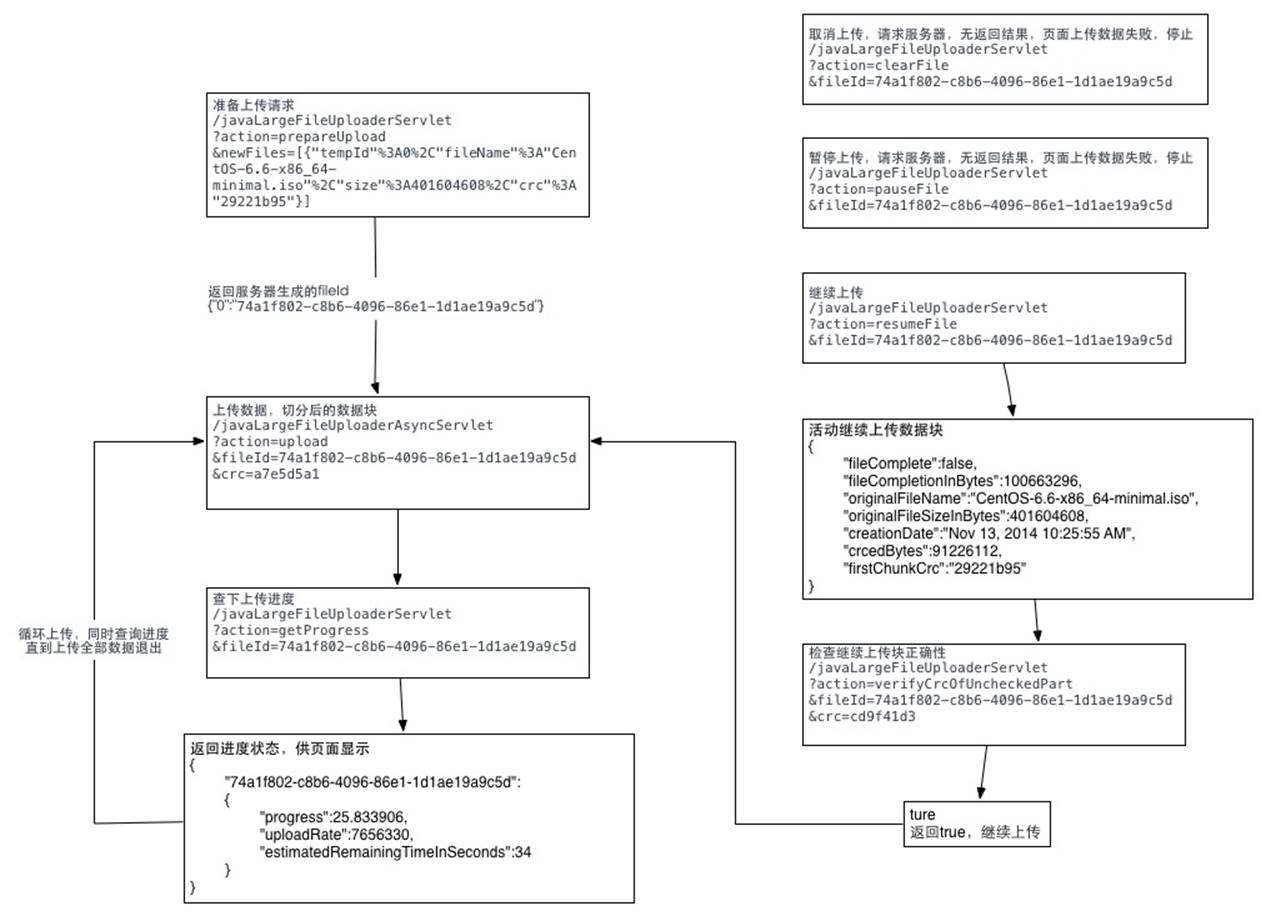
详细代码可以参照我写的这篇文章:http://t.cn/AiHwnJaB
jsp利用webuploader实现超大文件分片上传、断点续传的更多相关文章
- b/s利用webuploader实现超大文件分片上传、断点续传
本人在2010年时使用swfupload为核心进行文件的批量上传的解决方案.见文章:WEB版一次选择多个文件进行批量上传(swfupload)的解决方案. 本人在2013年时使用plupload为核心 ...
- 前端利用webuploader实现超大文件分片上传、断点续传
本人在2010年时使用swfupload为核心进行文件的批量上传的解决方案.见文章:WEB版一次选择多个文件进行批量上传(swfupload)的解决方案. 本人在2013年时使用plupload为核心 ...
- 利用webuploader实现超大文件分片上传、断点续传
之前仿造uploadify写了一个HTML5版的文件上传插件,没看过的朋友可以点此先看一下~得到了不少朋友的好评,我自己也用在了项目中,不论是用户头像上传,还是各种媒体文件的上传,以及各种个性的业务需 ...
- java利用webuploader实现超大文件分片上传、断点续传
我们平时经常做的是上传文件,上传文件夹与上传文件类似,但也有一些不同之处,这次做了上传文件夹就记录下以备后用. 首先我们需要了解的是上传文件三要素: 1.表单提交方式:post (get方式提交有大小 ...
- php利用webuploader实现超大文件分片上传、断点续传
PHP用超级全局变量数组$_FILES来记录文件上传相关信息的. 1.file_uploads=on/off 是否允许通过http方式上传文件 2.max_execution_time=30 允许脚本 ...
- asp.net利用webuploader实现超大文件分片上传、断点续传
ASP.NET上传文件用FileUpLoad就可以,但是对文件夹的操作却不能用FileUpLoad来实现. 下面这个示例便是使用ASP.NET来实现上传文件夹并对文件夹进行压缩以及解压. ASP.NE ...
- thinkphp+webuploader实现大文件分片上传
大文件分片上传,简单来说就是把大文件切分为小文件,然后再一个一个的上传,到最后由这些小文件再合并成原来的文件 webuploader下载地址及其文档:http://fex.baidu.com/webu ...
- 在React中使用WebUploader实现大文件分片上传的踩坑日记!
前段时间公司项目有个大文件分片上传的需求,项目是用React写的,大文件分片上传这个功能使用了WebUploader这个组件. 具体交互是: 1. 点击上传文件button后出现弹窗,弹窗内有选择文件 ...
- 以寡治众各个击破,超大文件分片上传之构建基于Vue.js3.0+Ant-desgin+Tornado6纯异步IO高效写入服务
原文转载自「刘悦的技术博客」https://v3u.cn/a_id_218 分治算法是一种很古老但很务实的方法.本意即使将一个较大的整体打碎分成小的局部,这样每个小的局部都不足以对抗大的整体.战国时期 ...
随机推荐
- django修改表数据结构后报错的解决办法
1.进入数据库删除app之前创建的表,如果删除有关联的表报错的话可以先删除其他表然后再删除因关联关系删除不了的表 2.删除django_migrations表中对应的app记录,删除命令delete ...
- Oracle通过ODBC链接SqlServer数据库
原网址:https://www.cnblogs.com/jijm123/p/11598515.html 第一步.创建ODBC数据源 这一步要考虑数据源是32位还是64位的问题,其实就是选择不同的exe ...
- Thread interrupted() 线程的中断
问题: 1.线程的中断方式. 2.为什么中断阻塞中的线程,会抛出异常. 代码示例: package com.hdwl.netty; public class ThreadInterrupted { p ...
- gitlab私有环境搭建
1. 环境准备 安装所需的依赖包 yum install curl openssh-server openssh-clients postfix cronieGitLab使用postfix发送邮件 s ...
- sql 语句实现一串数字位数不足在左侧补0的技巧
https://www.cnblogs.com/mylydg/p/5725189.html 在日常使用sql做查询插入操作时,我们通常会用到用sql查询一串编号,这串编号由数字组成.为了统一美观,我们 ...
- element-ui 页面刷新自动弹Message问题
问题: 通过加载插件的方式引入Message,导致每次页面刷新的时候会自动弹出一个通知消息 该情况只在引入局部插件才会引起 import Vue from 'vue' import 'element- ...
- Java 面向对象_多态
多态图解 代码中体现多态性 父类名称 对象名 = new 子类名称(); or 接口名称 对象名 = new 实现类名称(); // 父类 public class Father { public v ...
- ios9 字符串与UTF-8 互相转换
在数据网路请求或其他情况下,需要将字符串转换成UTF-8编码 ios9后对其方法进行了修改 NSString *str = @"北京"; 把这个转成UTF8以前我们使用的是 NSS ...
- springboot 日志配置
maven依赖中添加了 spring-boot-starter-logging : <dependency> <groupId>org.springframework.boot ...
- ubuntu18.04安装wine
wine是一个兼容层,可以从多平台(linux,macos,等)运行windows应用. Wine (Wine Is Not an Emulator)[即Wine不是一个模拟器]是一个在Linux和U ...