
WCF传输1-你是否使用过压缩或Json序列化?
1.当遇到需要传输大量数据时,怎么样传输数据?
2.压缩数据有哪几种常见的方式?
问题1解答:通过压缩来传输数据
问题2解答:
(1)WCF自带的压缩方式
(2)自定义WCF binding进行压缩
(3)将对象序列化为JSON格式
今天来探讨一下WCF自带的压缩方式Gzip和Json序列化
我的其他WCF文章:
先上图:
1.WCF自带的压缩方式进行压缩数据及传输数据
参考资料:https://msdn.microsoft.com/en-us/library/system.servicemodel.channels.compressionformat.aspx
总共有三种方式:
Deflate:The Deflate compression format.
GZip:The GZip compression format.
None: The none compression format.
注意,.NET framwork版本需要在4.0以上(包含4.0)。
1.1 Code的实现:
(1)Server端和Client的配置
<binarymessageencoding compressionformat="GZip">
    <bindings>

      <customBinding>

        <binding name="BindingForTcp" receiveTimeout="00:05:00" sendTimeout="00:05:00">

            <binaryMessageEncoding compressionFormat="GZip">

              <readerQuotas maxStringContentLength="2147483647" maxArrayLength="2147483647" maxBytesPerRead="2147483647" />

            </binaryMessageEncoding>

            <httpTransport maxReceivedMessageSize="2147483647">

            </httpTransport>

          </binding>

        </customBinding>

    </bindings>
<services>

      <service name="Jackson0714.WcfServices.Service.GetPersonDetailService"

               behaviorConfiguration="metadataBehavior" >

        <endpoint address="http://127.0.0.1:3725/GetPersonDetailService"

                  binding="customBinding"

                  bindingConfiguration ="BindingForTcp"

                  contract="Jackson0714.WcfServices.Service.Interface.IGetPersonDetailService" />

      </service>

</services>
注意:Client和Server端必须使用相同的binding。
(2)Server端代码
打开端口,host服务
using System;

using System.ServiceModel;

using Jackson0714.WcfServices.Service;

namespace Jackson0714.WcfServices.Hosting

{

    class Program

    {

        static void Main(string[] args)

        {

            ServiceHost getPersonDetailServiceHost = null;

            try

            {

                getPersonDetailServiceHost = new ServiceHost(typeof(GetPersonDetailService));

                getPersonDetailServiceHost.Open();

                Console.WriteLine("GetPersonDetailService Started!");

                Console.ReadKey();

            }

            catch(Exception ex)

            {

                Console.WriteLine(ex.StackTrace);

            }

            finally

            {

                getPersonDetailServiceHost.Close();

            }

        }

    }

}
(3)Client端代码
调用方法GetPersonDetail
using System;

using System.ServiceModel;

using Jackson0714.WcfServices.Service.Interface;

namespace Jackson0714.WcfServices.Client

{

    class Program

    {

        static void Main(string[] args)

        {

            using (ChannelFactory<IGetPersonDetailService> channelFactory = new ChannelFactory<IGetPersonDetailService>("GetPersonDetailService"))

            {

                IGetPersonDetailService proxy = channelFactory.CreateChannel();

                Console.WriteLine("Person Decription:{0}", proxy.GetPersonDetail("123").Description);

            }

            Console.Read();

        }

    }

}
(4)接口
GetPersonDetail
using Jackson0714.WcfServices.Common;

using System.ServiceModel;

namespace Jackson0714.WcfServices.Service.Interface

{

    [ServiceContract(Name = "GetPersonDetailService", Namespace = "http://www.Jackson0714.com/")]

    public interface IGetPersonDetailService

    {

        [OperationContract]

        Person GetPersonDetail(string name);

    }

}
(5)实现接口方法
GetPersonDetail
using Jackson0714.WcfServices.Common;

using Jackson0714.WcfServices.Service.Interface;

namespace Jackson0714.WcfServices.Service

{

    public class GetPersonDetailService : IGetPersonDetailService

    {

        public Person GetPersonDetail(string name)

        {

            Person person = DataAccess.MockQueryPersonDetail(name);

            return person;

        }

    }

}
(6)Mock数据库访问层
MockQueryPersonDetail
模拟Person类的Description的数据量大小为100000字节
using Jackson0714.WcfServices.Common;

using System.Text;

namespace Jackson0714.WcfServices.Service

{

    class DataAccess

    {

        public static Person MockQueryPersonDetail(string name)

        {

            Person person = new Person();

            person.Name = "Jackson0714";

            string testString = "0123456789";

            StringBuilder builder = new StringBuilder();

            for(long i = 0;i<10000;i++)

            {

                builder.Append(testString);

            }

            person.Description = builder.ToString();

            return person;

        }

    }

}
(6)Person类
Person
namespace Jackson0714.WcfServices.Common

{

    public class Person

    {

        private string name;

        public string Name

        {

            get

            {

                return this.name;

            }

            set

            {

                name = value;

            }

        }

        private string description;

        public string Description

        {

            get

            {

                return this.description;

            }

            set

            {

                description = value;

            }

        }

    }

}
1.2 分析结果
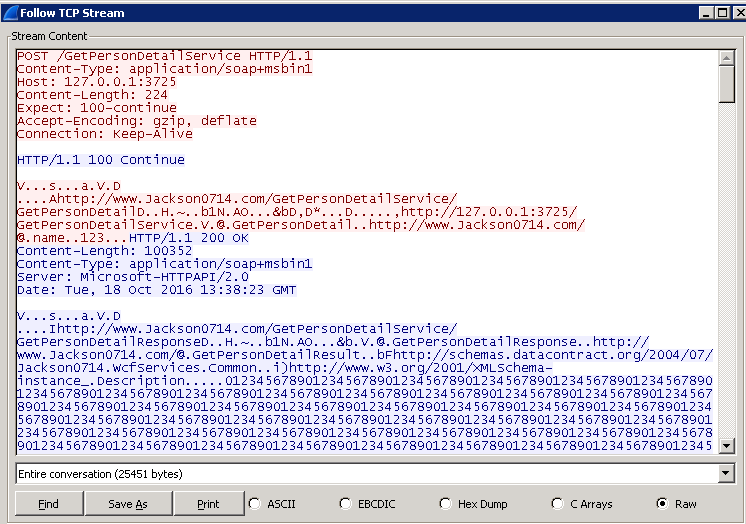
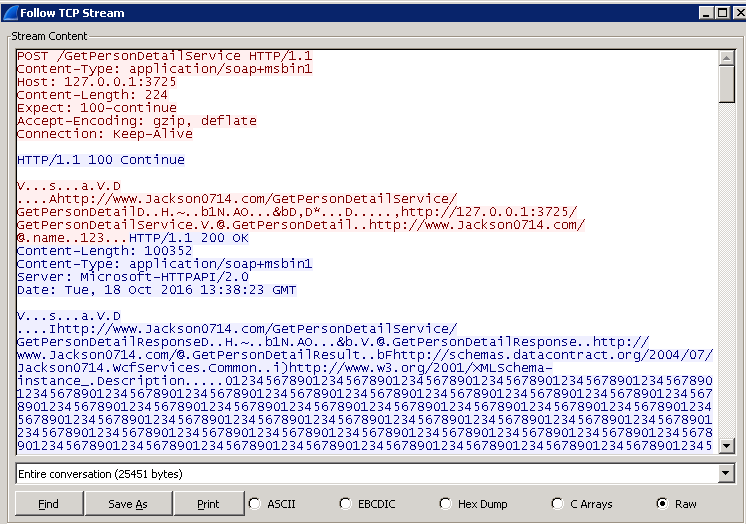
通过WireShare抓包,可以得知Response的数据大小为Content-Length: 100352 bytes。
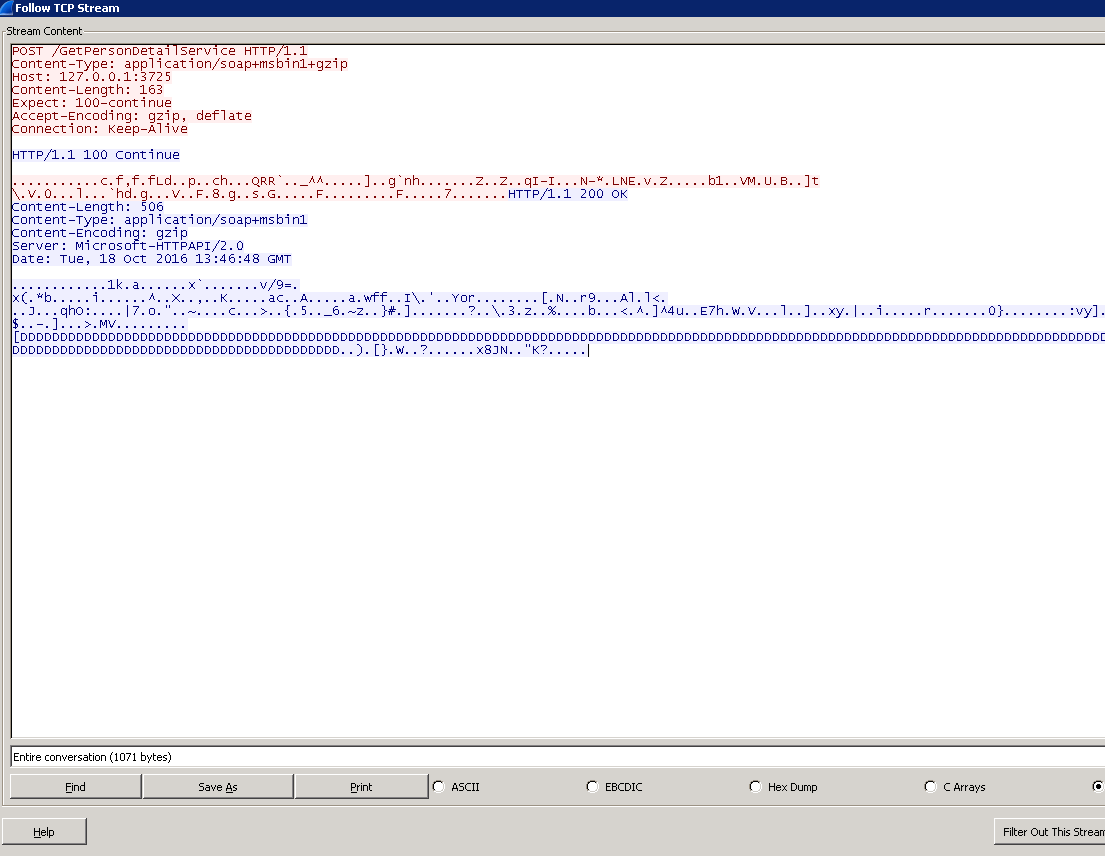
经过压缩后,Response的数据大小为Content-Length: 506 bytes。,远小于未压缩的数据量。
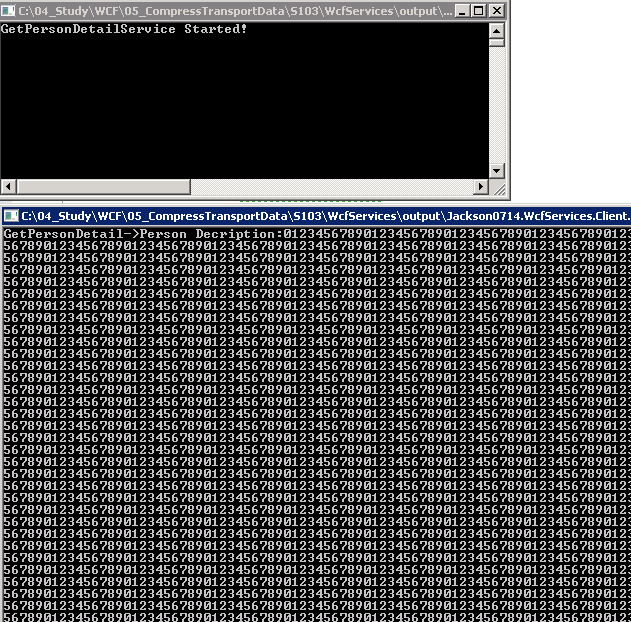
1.3 打印窗口
2.使用JSON格式的数据进行传输
Server端首先将数据序列化为Json格式的数据,String类型,Client端接收到Json格式的数据后,反序列化为Json格式的数据。
需要引入Newtonsoft.Json.dll
下载地址:http://www.newtonsoft.com/json
2.1 Code的实现:
(1)定义接口
GetPersonDetailWithJson
using Jackson0714.WcfServices.Common;

using System.ServiceModel;

namespace Jackson0714.WcfServices.Service.Interface

{

    [ServiceContract(Name = "GetPersonDetailService", Namespace = "http://www.Jackson0714.com/")]

    public interface IGetPersonDetailService

    {

        [OperationContract]

        string GetPersonDetailWithJson(string name);

    }

}
(2)实现接口
GetPersonDetailWithJson
使用JsonConvert.SerializeObject(person)将person序列化为Json格式的数据。
public string GetPersonDetailWithJson(string name)

{

     Person person = DataAccess.MockQueryPersonDetail(name);

     return JsonConvert.SerializeObject(person);

}
(3)客户端调用GetPersonDetailWithJson
使用JsonConvert.DeserializeObject<Person>(proxy.GetPersonDetailWithJson("123"))方法反序列化Json格式的数据,将Json格式的数据转换为Person对象。
using (ChannelFactory<IGetPersonDetailService> channelFactory = new ChannelFactory<IGetPersonDetailService>("GetPersonDetailService"))

{

      IGetPersonDetailService proxy = channelFactory.CreateChannel();

      Person person = JsonConvert.DeserializeObject<Person>(proxy.GetPersonDetailWithJson("123"));

      Console.WriteLine("GetPersonDetailWithJson->Person Decription:{0}", person.Description);

 }
2.2 分析结果
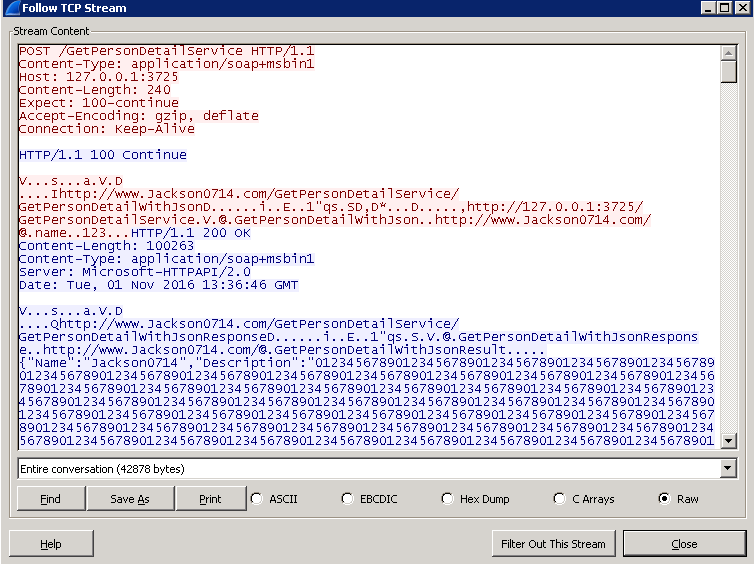
通过WireShare抓包,可以得知Response的数据大小为Content-Length: 100263bytes。比未经过序列化的数据减少了89 bytes的数据。
这里有个问题,为什么Json格式的数据比原WCF基于XML传输的数据小???
原因是WCF的传输的数据是将对象序列化为xml格式,需要用很多标签来记录各个字段的内容。而用JSON格式的数据,已经将对象转化为键值对形式的数据,不包含标签,所以数据量减少了。
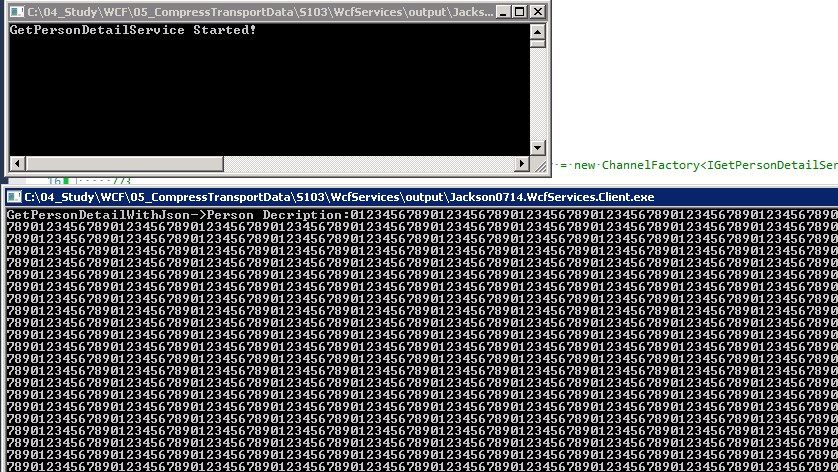
2.3 打印窗口
3.通过Json+压缩的方式传输
3.1 Code的实现
(1) 定义WCF压缩方式
<binaryMessageEncoding compressionFormat="GZip">
(2) 将对象序列化为Json格式的数据
JsonConvert.SerializeObject(person);
(3) 将Json格式的数据反序列化为对象
Person person = JsonConvert.DeserializeObject<Person>(proxy.GetPersonDetailWithJson("123"));
3.2 分析结果
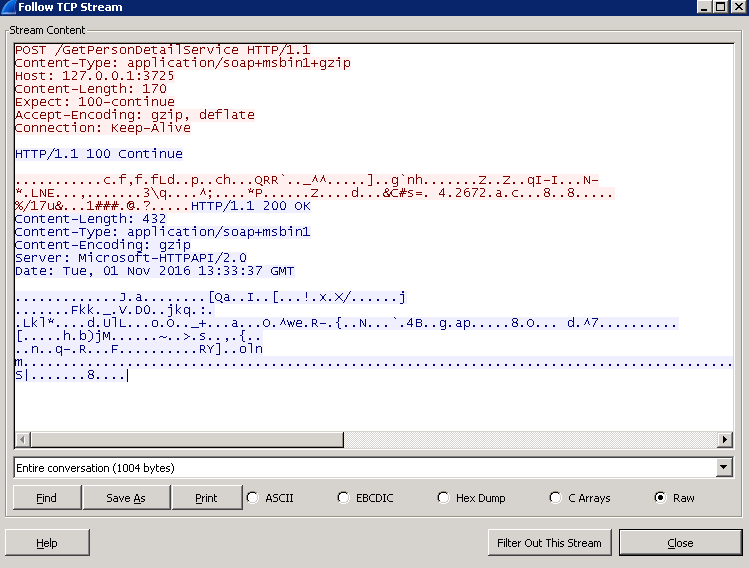
从下图可以看出经过Json格式化然后压缩的数据为1004 bytes,未用Json格式化的数据为1071 bytes,减少了67个bytes。
4.通过压缩或Json格式化需要注意什么?
(1) 压缩或Json格式化需要消耗一定的资源,如果CPU和内存不足时,慎用压缩或Json格式化。
(2) 压缩或Json格式化需要消耗一定的时间,如果数据量很大,那么压缩或Json格式化的时间也很大,对于需要快速响应的系统,慎用压缩或Json格式化。
5.参考资料
https://msdn.microsoft.com/en-us/library/system.servicemodel.channels.compressionformat.aspx
https://msdn.microsoft.com/en-us/library/ms751458(v=vs.110).aspx
我的其他WCF文章:
作 者:
Jackson0714
出 处:http://www.cnblogs.com/jackson0714/
关于作者:专注于微软平台的项目开发。如有问题或建议,请多多赐教!
版权声明:本文版权归作者和博客园共有,欢迎转载,但未经作者同意必须保留此段声明,且在文章页面明显位置给出原文链接。
特此声明:所有评论和私信都会在第一时间回复。也欢迎园子的大大们指正错误,共同进步。或者直接私信我
声援博主:如果您觉得文章对您有帮助,可以点击文章右下角【推荐】一下。您的鼓励是作者坚持原创和持续写作的最大动力!
WCF传输1-你是否使用过压缩或Json序列化?的更多相关文章
- 重温WCF之WCF传输安全(十三)(4)基于SSL的WCF对客户端采用证书验证(转)
转载地址:http://www.cnblogs.com/lxblog/archive/2012/09/20/2695397.html 前一篇我们演示了基于SSL的WCF 对客户端进行用户名和密码方式的 ...
- wcf传输Dataset大数据量 -压缩(一)
wcf传输Dataset大数据量 -压缩(一) 由于WCF不能传输DataTable(不能序列化),所以更多项目中都会使用DataSet作为查询集合的首选返回类型,但是由于DataSet会生成很多的状 ...
- WCF传输过大的数据导致失败的解决办法
WCF传输过大的数据导致失败的解决办法 WCF服务默认是不配置数据传输的限制大小的,那么默认的大小好像是65535B,这才65KB左右,如果希望传输更大一些的数据呢,就需要手动指定一下缓冲区的大小 ...
- 基于SSL的WCF传输安全
[实践]WCF传输安全1:前期准备之证书制作 [实践]WCF传输安全2:基于SSL的WCF匿名客户端 [实践]WCF传输安全3:基于SSL的WCF对客户端验证 [实践]WCF传输安全4:基 ...
- 使用WCF传输DataTable:DataTable和Xml格式的字符串相互转换(C#)
背景:项目中要用到客户端向服务端传数据,使用WCF,绑定webHttpBinding,做了一个小例子. 业务逻辑简介:客户端在a表中添加了几条数据,从SQL Server数据库直接取出新添加的数据(D ...
- WCF传输大数据的设置
在从客户端向WCF服务端传送较大数据(>65535B)的时候,发现程序直接从Reference的BeginInvoke跳到EndInvoke,没有进入服务端的Service实际逻辑中,怀疑是由于 ...
- 重温WCF之WCF传输安全(十三)(3)基于SSL的WCF对客户端验证(转)
转载地址:http://www.cnblogs.com/lxblog/archive/2012/09/18/2690719.html 上文我们演示了,客户端对服务器端身份的验证,这一篇来简单演示一下对 ...
- 重温WCF之WCF传输安全(十三)(1)前期准备之证书制作(转)
转载地址:http://www.cnblogs.com/lxblog/archive/2012/09/12/2682372.html 一.WCF中的安全方式 说到安全就会涉及到认证,消息一致性和机密性 ...
- WCF 传输和接受大数据
向wcf传入大数据暂时还没找到什么好方案,大概测了一下传输2M还是可以的,有待以后解决. 接受wcf传回的大数据,要进行web.config的配置,刚开是从网上搜自己写进行配置,折磨了好长时间. 用以 ...
随机推荐
- xshell传输文件到Centos
Reference: [1] http://www.myhack58.com/Article/sort099/sort0102/2015/61154.htm [2] http://www.cnblog ...
- tableindex
在写代码的时候,失焦的第一反应便是ng-blur,没想到在一个标签上其作用了,多加了几个标签没反应,于是发现了tableindex,写的代码列子如下,希望可以帮助你: <img src='{{a ...
- ASP.Net MVC跳转,分为form的submit提交跳转和ajax跳转
1,用jquery ajax跳转的话,需要在前台用window.location("跳转网址")来跳转,在success后使用 2,用原声的form的submit来跳转,如下图 3 ...
- [ASE][Daily Scrum]11.28
昨天基本上已经完成了sprint2的task, 现在剩下一些bug还需要来修正, 然后我正式加入码代码的大军啦~ Shilin Liu 显示聊天框 Zhao Li 搭建聊天服务器 Yimin ...
- 让.NET xml序列化支持Nullable
.NET的序列化,关于契约类的生成我们都是通过xsd.exe,对于值类型的可空判断是通过声明同名+Specified的bool属性来判断,比如: public class Person { publi ...
- 【Win10】UAP/UWP/通用 开发之 x:DeferLoadStrategy
[Some information relates to pre-released product which may be substantially modified before it's co ...
- Web Essentials之Markdown和自定义编辑器(Web Essentials完结)
返回Web Essentials功能目录 本篇目录 功能 自定义编辑器 开源项目都会在项目的根目录放一个Readme.md文件来告诉读者一些重要的说明,那么就可以在VS中直接编辑Markdown文件. ...
- InnoSetup 如何获取安装程序的路径?
两个常量可以使用: {srcexe} 安装程序执行文件的路径. {src} 安装程序所在路径. path := ExpandConstant('{srcexe}');
- 详解SQL集合运算
以前总是追求新东西,发现基础才是最重要的,今年主要的目标是精通SQL查询和SQL性能优化. 本系列[T-SQL基础]主要是针对T-SQL基础的总结. [T-SQL基础]01.单表查询-几道sql查询题 ...
- JavaScript函数柯里化
函数式 JavaScript是以函数为一等公民的函数式语言.函数在JavaScript中也是一个对象(继承制Function),函数也可以作为参数传递成函数变量.最近几年函数式也因为其无副作用的特性. ...