
自学Zabbix3.10.2-事件通知Notifications upon events-Actions报警配置
自学Zabbix3.10.2-事件通知Notifications upon events-Actions报警配置
- 触发器事件 - 触发器状态在OK和PROBLEM之间变化(本节内容)
- 发现事件
- 自动注册时间 - 新的客户端注册进来
- 内部事件 - item转变为unsupported状态,触发器转变为unknown状态

配置action
1. Action创建
点击configuration(配置)->Actions(报警)->选择事件来源
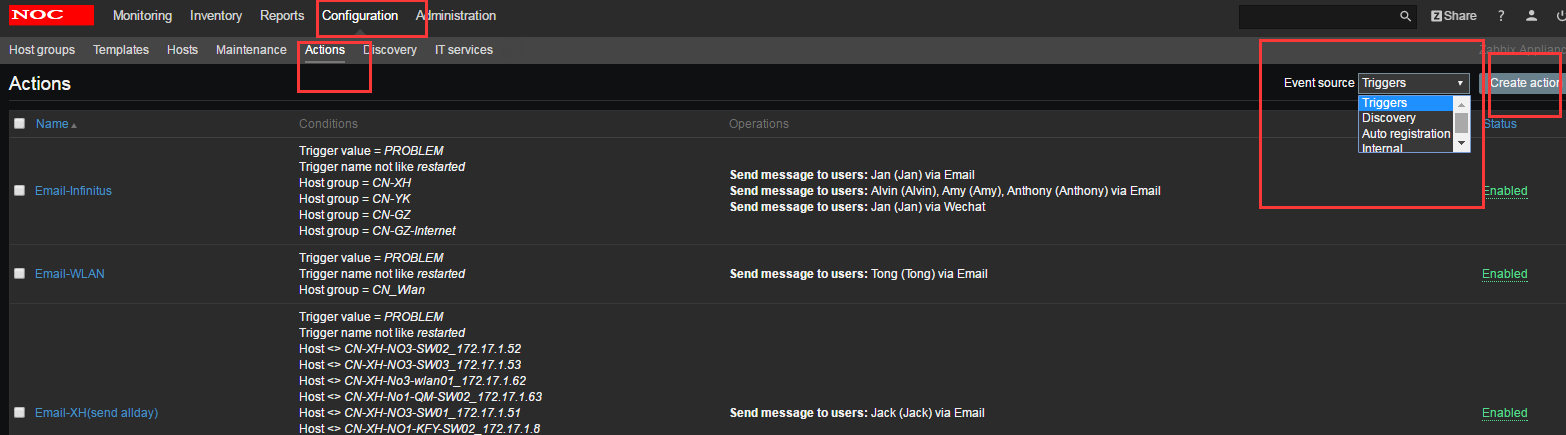
2. Action配置
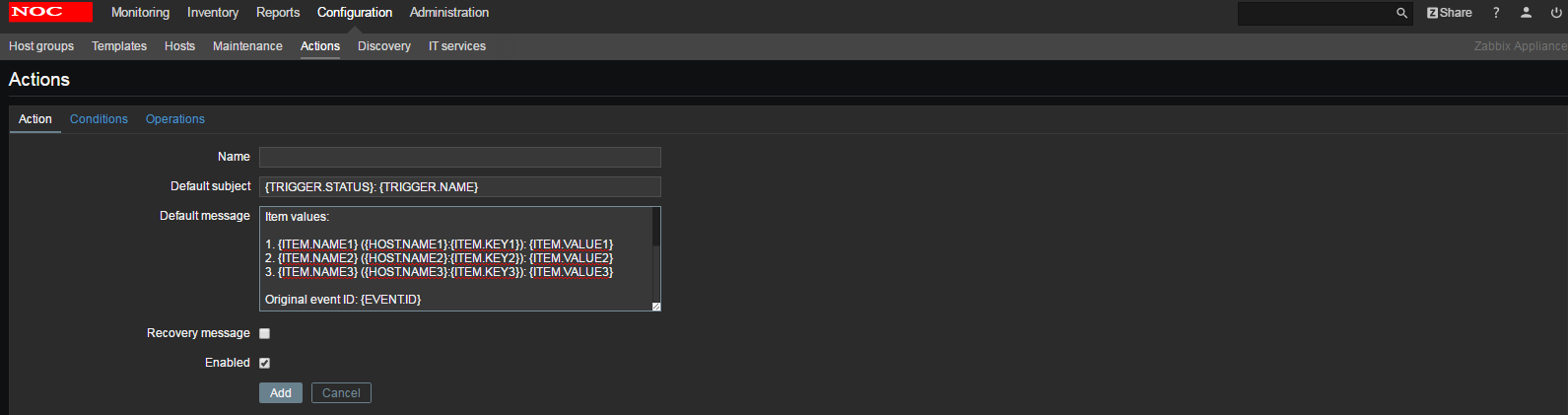
参数:
- Name : 唯一的action名字
- Default subject: 报警的默认标题
- Default message: 报警的默认内容
- Recovery message:是否在问题解决后发送消息。恢复消息,是否在报警恢复正常后发送消息。 Zabbix将“OK”状态的Trigger认为是一个恢复recovery event。
注意:如果使用了Escalation机制,Recovery event只会触发一次。对已Recovery的报警,可以像发出报警的邮件一样,设置报警标题和内容。 - Enabled:是够启用这个action
以下几点需要注意:
- 自定义的恢复信息,只针对Condition,是“Trigger value is PROBLEM”的生效。
- 恢复信息只会发送给那些之前收到过关于这个Action报警信息的人。
- 恢复信息和Action 依赖PROBLEM生成的Evnet维护同一份ACK状态。
- 在Recovery信息中,EVENT.*Macro中的数据,都是基于出问题的Event,而不是Recovery。
- 在Recovery信息中,EVENT.RECOVERY.* 表示的是出自Recovery event的数据。
Default message详细内容:
Trigger: {TRIGGER.NAME}

Trigger status: {TRIGGER.STATUS}

Trigger severity: {TRIGGER.SEVERITY}

Trigger URL: {TRIGGER.URL}

Item values:

1. {ITEM.NAME1} ({HOST.NAME1}:{ITEM.KEY1}): {ITEM.VALUE1}

2. {ITEM.NAME2} ({HOST.NAME2}:{ITEM.KEY2}): {ITEM.VALUE2}

3. {ITEM.NAME3} ({HOST.NAME3}:{ITEM.KEY3}): {ITEM.VALUE3}

Original event ID: {EVENT.ID}
3. 条件conditions配置
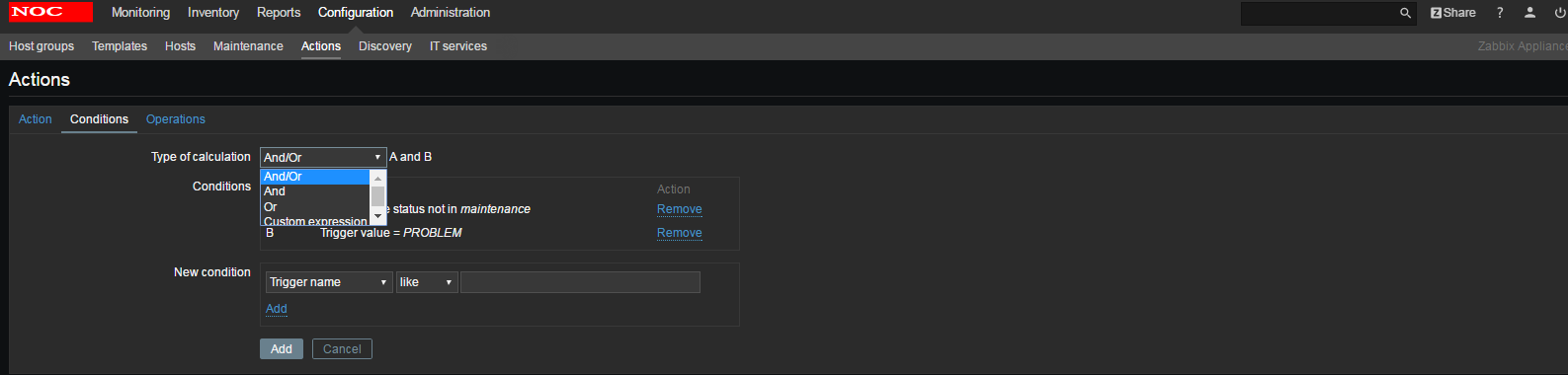
Type Of calculation:各种条件之间的关系,包含AND、OR 以及AND/OR,如上图是AND关系,同时要满足以上机器不在维护状态以及触发器值为PROBLEM才会触发报警的动作。
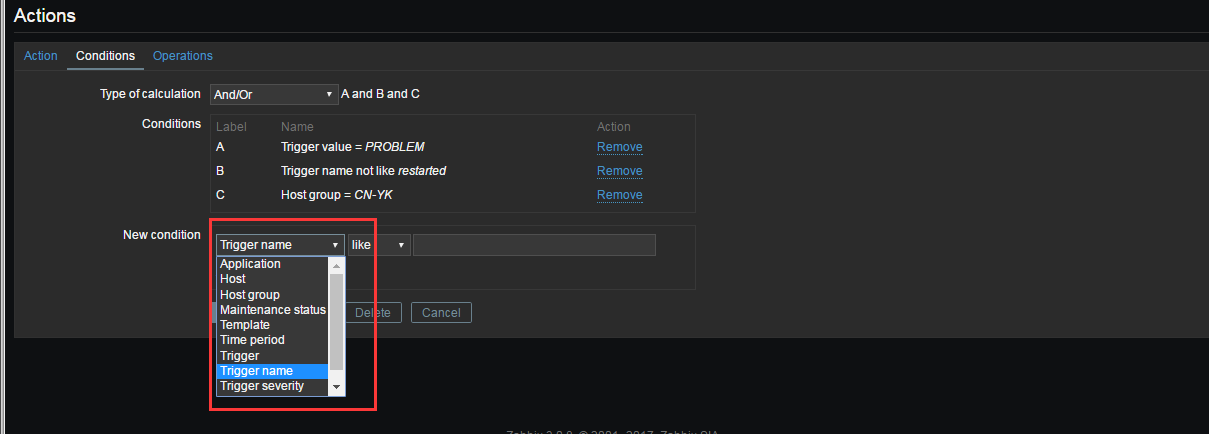
| Condition type | Supported operators | Description |
|---|---|---|
| Application | = like not like |
限定application = 名字与application中的名字完全一致 like - 名字包含 not like - 名字不包含 |
| Host group | = <> |
Host是否属于一个Host group = - event belongs to this host group. <> - event does not belong to this host group. |
| Template | = <> |
Trigger是否属于一个Template = - event belongs to a trigger inherited from this template. <> - event does not belong to a trigger inherited from this template. |
| Host | = <> |
Host是否是某一个Template = - event belongs to this host. <> - event does not belong to this host. |
| Trigger | = <> |
触发的trigger是否是某一个Trigger = - event is generated by this trigger. <> - event is generated by any other trigger, except this one. |
| Trigger name | like not like |
Trigger名字是否和一个字符串匹配 like - event is generated by a trigger, containing this string in the name. Case sensitive. not like - this string cannot be found in the trigger name. Case sensitive. Note: Entered value will be compared to trigger name with all macros expanded. |
| Trigger severity | = <> >= <= |
Trigger的严重等级范围 = - equal to trigger severity <> - not equal to trigger severity >= - more or equal to trigger severity <= - less or equal to trigger severity |
| Trigger value | = | Trigger是OK还是PROBLEM = - equal to trigger value (OK or PROBLEM) |
| Time period | in not in |
Event生成的时间是否属于某一个范围 in - event time is within the time period. not in - event time is not within the time period. See Time period specification page for description of the format. |
| Maintenance status | in not in |
Host是否在Maintenance状态,如果Trigger中有多个Host,至少其中一个是(或者不是)Maintenace状态 in - host is in maintenance mode. not in - host is not in maintenance mode. Note: If several hosts are involved in the trigger expression, the condition matches if at least one of the hosts is/is not in maintenance mode. |
4. operations配置

此处没有报警的动作,当你满足了报警条件也没有任何意义,因为你不执行任何报警的操作,那还要action做什么,对吧?话说回来,每个action都必须配置operations。
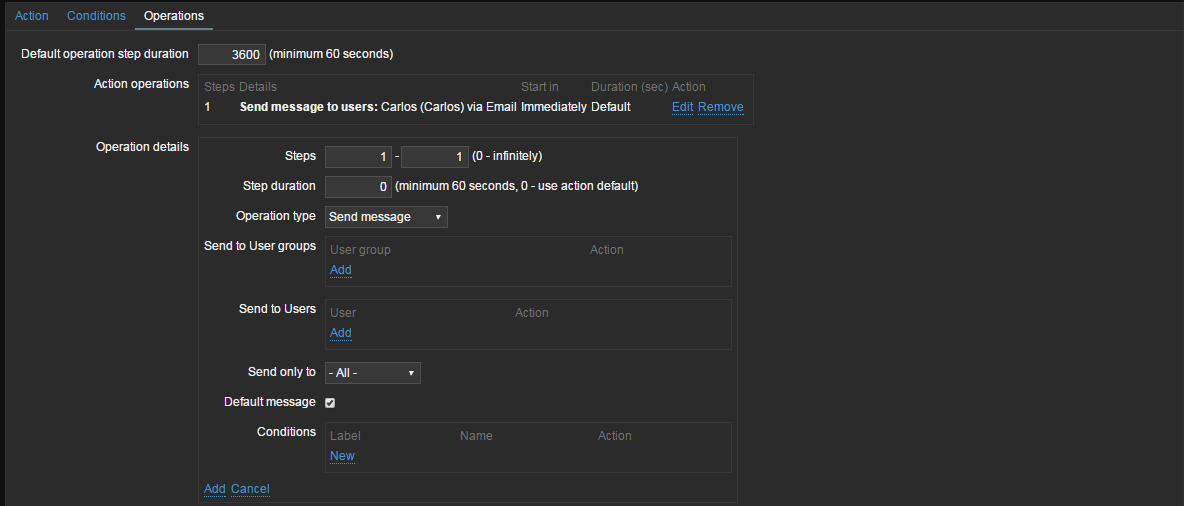
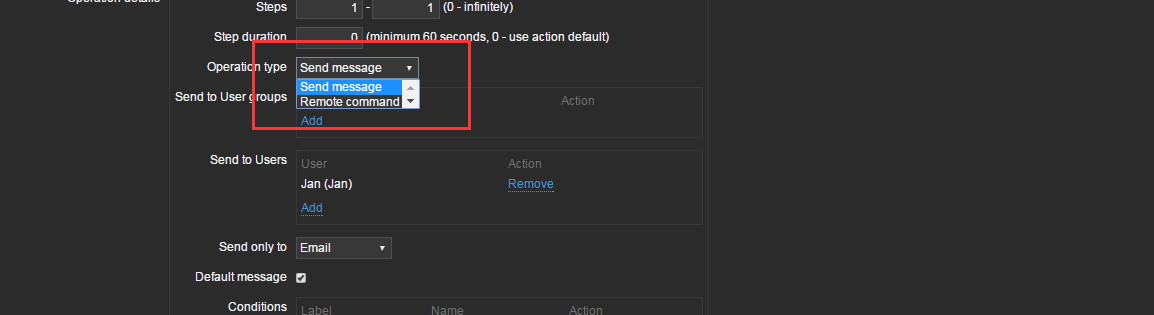
| Parameter | Description | |
|---|---|---|
| Default operation step duration | 最小60秒,例如,设置了1小时,则表明执行了一个操作,要等待一个小时,才会执行下一个操作 | |
| Action operations | Steps - 报警升级的时候,会按照step的顺序来执行 Details - 操作类型和目标。从zabbix2.2开始,会显示在发送信息时的medial type(e-mail,SMS,Jabber,etc)用户的名字也会显示。 Start in - 在event发生后多久执行 Duration (sec) - 显示的是step的持续时间,如果step使用了默认的'持续时间',那么显示default Action - 显示的是两个标签"edit","remove",用来编辑和移除operation的操作 |
|
| Operation details | ||
|
step |
在escalation的过程中的执行计划 From - 从哪一步执行开始 To - 到哪一步执行结束 (0=无穷, 执行将不被限制) Step duration - 每一步持续时间 (0=使用上面默认的). 可以在同一个步骤中,进行多个操作,如果这些操作有多个duration,那么会选择最短的那个生效 |
|
| Operation type | 有如下2种: Send message - 给用户发送信息 Remote command - 执行远程命令 对于discovery事件和auto-registration事件,可以在这里选择更多的操作 |
| Operation type: send message | |
|---|---|
| Send to user groups | 可以添加选择User groups |
| Send to users | 添加选择用户 |
| Send only to | 发送的消息是定义好的media type |
| Default message | 如果选择,默认消息格式将被使用 |
| Subject | Subject of the custom message. The subject may contain macros. |
| Message | The custom message. The message may contain macros. |
| Operation type: remote command | |
| Target list | Select current host, other hosts or host groups as targets to execute the command on. |
| Type | Select the command type: IPMI - execute an IPMI command Custom script - execute a custom set of commands. You can select to execute the command on Zabbix agent or Zabbix server. SSH - execute an SSH command Telnet - execute a Telnet command Global script - execute one of the global scripts defined in Administration→Scripts. |
| Commands | Enter the command(s). |
| Conditions | Condition for performing the operation: Not ack - only when the event is unacknowledged Ack - only when the event is acknowledged. |

图片上的step说的可能不是很明白,表示阶段,1表示第一次报警,如果2表示第二次报警。action operations可以添加多个,如下: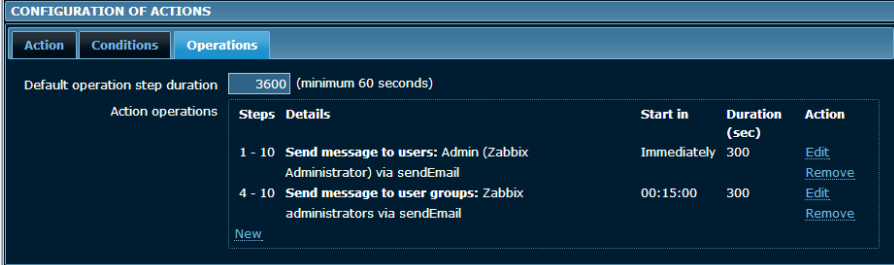
如上图,我们可以看出第1-10次报警都会发邮件给Admin这个用户,每次邮件间隔为300秒,第4-10次开始(故障发生15分钟后)便会发送邮件给administrators这个组。这边可以实现故障开始时发送邮件给值班运维,多少分钟还没处理好发送邮件给主管或者经理。
5. 保存
自学Zabbix3.10.2-事件通知Notifications upon events-Actions报警配置的更多相关文章
- 自学Zabbix3.10.1-事件通知Notifications upon events-媒介类型
自学Zabbix3.10-事件通知Notifications upon events-媒介类型 zabbix触发器到了要发送通知的情况下,需要一个中间介质来接收并传递它的消息给运维们,以往用nagio ...
- 自学Zabbix3.10.1.5-事件通知Notifications upon events-媒介类型Script
点击返回:自学Zabbix之路 点击返回:自学Zabbix4.0之路 点击返回:自学zabbix集锦 自学Zabbix3.10.1.5-事件通知Notifications upon events-媒介 ...
- 自学Zabbix3.10.1.4-事件通知Notifications upon events-媒介类型Ez Texting
自学Zabbix3.10.1.4-事件通知Notifications upon events-媒介类型Ez Texting Ez Texting是zabbix的技术合作伙伴,主要提供短信服务,用手机注 ...
- 自学Zabbix3.10.1.5-事件通知Notifications upon events-媒介类型自定义脚本
自学Zabbix3.10.1.5-事件通知Notifications upon events-媒介类型自定义脚本
- 自学Zabbix3.10.1.3-事件通知Notifications upon events-媒介类型Jabber
自学Zabbix3.10.1.3-事件通知Notifications upon events-媒介类型Jabber Jabber有第三方插件,能让Jabber用户和MSN.YahooMessager. ...
- 自学Zabbix3.10.1.2-事件通知Notifications upon events-媒介类型SMS
自学Zabbix3.10.1.2-事件通知Notifications upon events-媒介类型SMS 服务器安装串口GSM短信猫之后,zabbix可以使用它来发送短信通知给管理员,如下注意事项 ...
- 自学Zabbix3.10.1.1-事件通知Notifications upon events-媒介类型email
自学Zabbix3.10.1.1-事件通知Notifications upon events-媒介类型email 配置媒介Email Administration→Media types->Cl ...
- 自学Zabbix3.10.2.1 linux如何配置使用sendEmail发送邮件
点击返回:自学Zabbix之路 点击返回:自学Zabbix4.0之路 点击返回:自学zabbix集锦 自学Zabbix3.10.2.1 linux如何配置使用sendEmail发送邮件 sendEma ...
- SQL Server 事件通知(Event notifications)
一.本文所涉及的内容(Contents) 本文所涉及的内容(Contents) 背景(Contexts) 基础知识(Rudimentary Knowledge) 事件通知监控DDL(NotifyQue ...
随机推荐
- SPOJ Qtree系列 5/7
Qtree1 树剖裸题 注意把边权移到深度较深的点上,树剖跳的时候不要将LCA的答案统计上就行了 #include<stdio.h> #include<string.h> #d ...
- Ionic2 播放mp3功能实现
在开发app的过程中有需要播放mp3的功能,一直想实现,但苦于具体的困难一直未能实现,经过一段时间的资料查询和测试,最终摸索出来,现记录如下: 1.最重要的是安装第三方插件ionic-audio,开源 ...
- 案例学python——案例三:豆瓣电影信息入库
闲扯皮 昨晚给高中的妹妹微信讲题,函数题,小姑娘都十二点了还迷迷糊糊.今天凌晨三点多,被连续的警报声给惊醒了,以为上海拉了防空警报,难不成地震,空袭?难道是楼下那个车主车子被堵了,长按喇叭?开窗看看, ...
- Spring Cloud 路由网关服务端
修改application.properties配置文件:服务端口号.本机名称: 启动注册中心:java -jar uap-register-server-1.0.jar --spring.confi ...
- STL数据结构
priority_queue "C++ reference"上如此解释priority queue:"This context is similar to a heap, ...
- SQLSERVER 导出表数据为insert 语句
1. 打开sqlserver的查询分析器,在图示的位置右键以及处理 选择生成对象 重要的是 选择 脚本编写选项 很快就能完成 4 转出的SQL文件就为 5. 但是记得 曾经出过问题, 字符集 还有 ...
- Oracle Gateways 方式创建dblink 连接 SQLSERVER数据库
1. 安装多次 发现在同一个机器上面总出问题,所以建议找一个没有安装oracle的机器上面进行安装gateways 2. 下载oracle gateways 并且解压缩, 下载地址详情见官网. 下载的 ...
- Oracle18c Exadata 版本安装介质安装失败。
下载下来的介质安装失败 白费一早上的功夫.. 一会儿问问云和恩墨的人呢.. INFO: [-- ::] Skipping line: 复制数据库文件 INFO: [-- ::] Skipping li ...
- Excel 使用AutoFill提示“类Range的AutoFill方法无效”
今天遇到一个神奇的问题,之前一直使用很好的代码突然报错:“类Range的AutoFill方法无效”,在网上搜索了一番,感觉没有一个与我遇到的情况相同的.debug,查看一下代码,发现程序里,AutoF ...
- Android控件第6类——杂项控件
1.Toast Toast用于显示提示信息. Toast不会获得焦点,没法关闭,过段时间会自动消失. 使用方法:Toast.makeText获得Toast,并设置相关属性.调用Toast对象的show ...