
iOS开发--QQ音乐练习,歌词的展示,歌词的滚动,歌词的颜色变化
一.歌词的展示 -- 首先歌词是在scrollView上,scrollView的大小是两个屏幕的宽度

- scrollView滚动修改透明度的代码

- 自定义展示歌词的view,继承自UIScrollView,向外界提供一个歌词文件名的属性
/** 歌词文件的名字 */
@property(nonatomic,copy) NSString *lrcFileName;
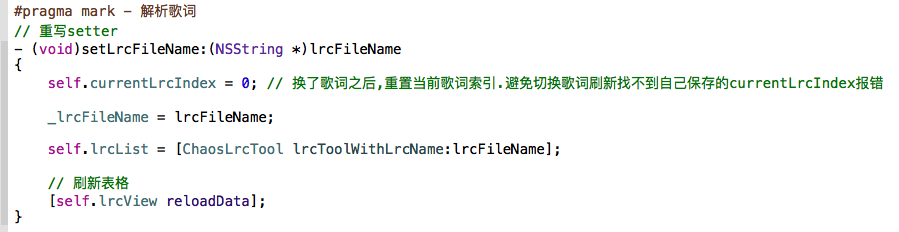
重写setter,解析歌词,通过歌词的工具类获得模型集合
- 歌词工具类的实现
 #import "ChaosLrcTool.h"

 #import "ChaosLrc.h"

 @implementation ChaosLrcTool

 + (NSArray *)lrcToolWithLrcName:(NSString *)lrcname

 {

     // 1.获取文件路径

     NSString *lrcPath = [[NSBundle mainBundle] pathForResource:lrcname ofType:nil];

     // 2.加载文件内容

     NSString *lrcString = [NSString stringWithContentsOfFile:lrcPath encoding:NSUTF8StringEncoding error:nil];

     // 3.切割字符串

     NSArray *lrcLines = [lrcString componentsSeparatedByString:@"\n"];

     // 4.遍历集合,转换成歌词模型

     NSMutableArray *arr = [NSMutableArray array];

     for (NSString *lrcLineString in lrcLines) {

         /*

          [ti:简单爱]

          [ar:周杰伦]

          [al:范特西]

          */

         // 5.跳过指定行

         if ([lrcLineString hasPrefix:@"[ti"] || [lrcLineString hasPrefix:@"[ar"] || [lrcLineString hasPrefix:@"[al"] || ![lrcLineString hasPrefix:@"["]) {

             continue;

         }

         ChaosLrc *lrc = [ChaosLrc lrcWithLrcLine:lrcLineString];

         [arr addObject:lrc];

     }

     return arr;

 }

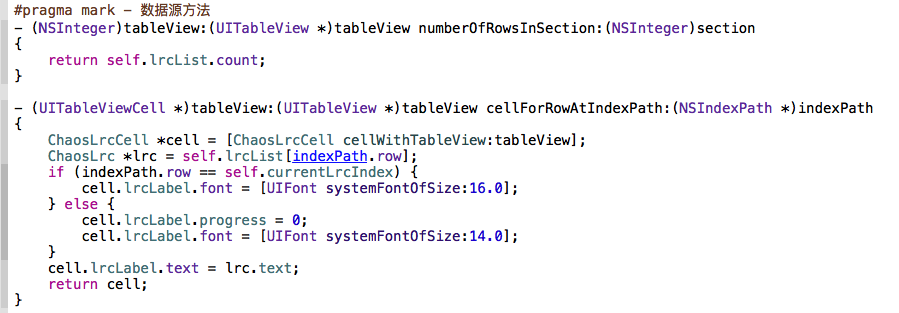
@end - 歌词解析完毕后,根据歌词模型集合来实现tableView(歌词用tableView来显示)的数据源方法
二.歌词的滚动
- 歌词的滚动由每一句的时间来决定,自定义的歌词的view需要外界不停的提供歌曲播放的时间,自己来判断并滚动显示对应的歌词.所以自定义的歌词View需要向外界提供一个时间属性,重写时间属性来实现歌词滚动
 #pragma mark - 歌词滚动

 // 重写time的setter

 - (void)setCurrentTime:(NSTimeInterval)currentTime

 {

     _currentTime = currentTime;

     // 遍历歌词,找到对应时间应该显示的歌词模型

     for (int i = ; i < self.lrcList.count; i++) {

         // 当前的歌词

         ChaosLrc *lrc = self.lrcList[i];

         NSInteger next = i + ;

         // 下一句歌词

         ChaosLrc *nextLrc;

         if (next < self.lrcList.count) {

             nextLrc = self.lrcList[next];

         }

         if (self.currentLrcIndex != i && currentTime >= lrc.time && currentTime < nextLrc.time) {

             NSIndexPath *indexPath = [NSIndexPath indexPathForRow:i inSection:];

             NSIndexPath *previousIndexPath = [NSIndexPath indexPathForRow:self.currentLrcIndex inSection:];

             // 记录当前行

             self.currentLrcIndex = i;

             // 满足条件,tableview滚动

             [self.lrcView scrollToRowAtIndexPath:indexPath atScrollPosition:UITableViewScrollPositionTop animated:YES];

             // 刷新上一行,字体还原

             [self.lrcView reloadRowsAtIndexPaths:@[previousIndexPath] withRowAnimation:UITableViewRowAnimationNone];

             // 刷新当前行,字体变大

             [self.lrcView reloadRowsAtIndexPaths:@[indexPath] withRowAnimation:UITableViewRowAnimationNone];

         }

         // 当前歌词的label的进度

         if (self.currentLrcIndex == i) {

             // 获取当前的cell

             NSIndexPath *currentIndexPath = [NSIndexPath indexPathForRow:i inSection:];

             ChaosLrcCell *currentCell = [self.lrcView cellForRowAtIndexPath:currentIndexPath];

             CGFloat totalTime = nextLrc.time - lrc.time; // 当前歌词总时间

             CGFloat progressTime = currentTime - lrc.time; // 当前歌词已经走过了多长时间

             currentCell.lrcLabel.progress = progressTime / totalTime;

             // 主页的label

             self.mainLabel.text = lrc.text;

             self.mainLabel.progress = currentCell.lrcLabel.progress;

         }

     }

} - 外界给歌词的View提供时间就不是每一秒提供一次那么简单了,外界需要更牛逼的定时器

- 播放的时候添加定时器

- 定时器的方法中实现给歌词的view提供的时间属性赋值

- 播放的时候添加定时器
三.歌词的颜色变化 -- 画上去的(自定义cell中的显示歌词的label,label需要外界提供一个进度值,自己内部根据进度值来画)

- 自定义label的实现
 #import "ChaosLabel.h"

 @implementation ChaosLabel

 - (void)setProgress:(CGFloat)progress

 {

     _progress = progress;

     // 重绘

     [self setNeedsDisplay];

 }

 - (void)drawRect:(CGRect)rect {

     [super drawRect:rect];

     // 1.获取需要画的区域

     CGRect fillRect = CGRectMake(, , self.bounds.size.width * self.progress, self.bounds.size.height);

     // 2.选择颜色

     [[UIColor yellowColor] set];

     // 3.添加区域开始画图

 //    UIRectFill(fillRect);

     UIRectFillUsingBlendMode(fillRect, kCGBlendModeSourceIn);

 }

 @end
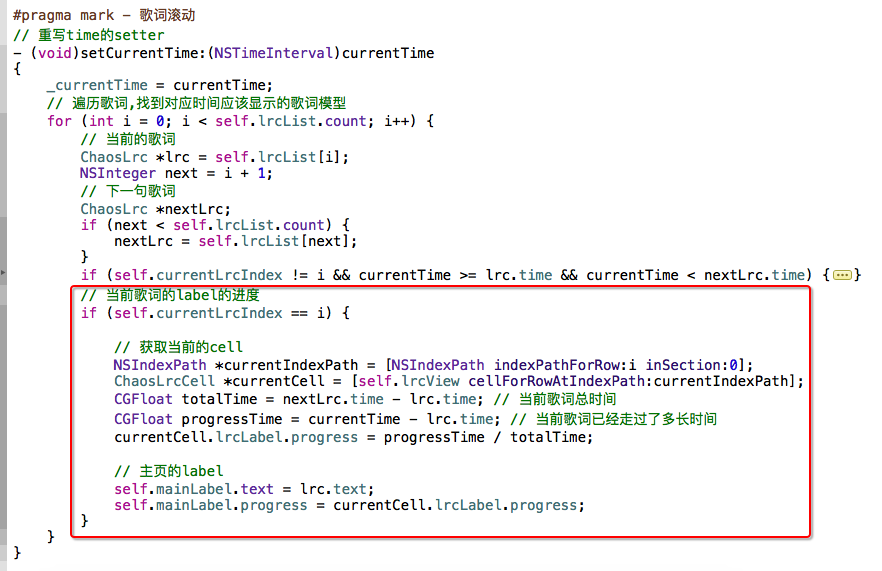
外部进度值的计算
iOS开发--QQ音乐练习,歌词的展示,歌词的滚动,歌词的颜色变化的更多相关文章
- iOS开发--QQ音乐练习,后台播放和锁屏界面
一.设置后台播放 首先允许程序后台播放 代码实现 - (BOOL)application:(UIApplication *)application didFinishLaunchingWithOpti ...
- iOS开发--QQ音乐练习,旋转动画的实现,音乐工具类的封装,定时器的使用技巧,SliderBar的事件处理
一.旋转动画的实现 二.音乐工具类的封装 -- 返回所有歌曲,返回当前播放歌曲,设置当前播放歌曲,返回下一首歌曲,返回上一首歌曲方法的实现 头文件 .m文件 #import "ChaosMu ...
- 10、 在QQ音乐中爬取某首歌曲的歌词
需求就是把关卡内的代码稍作修改,将周杰伦前五页歌曲的歌词都爬取下来,结果就是全部展示打印出来. URL https://y.qq.com/portal/search.html#p ...
- iOS开发 QQ粘性动画效果
QQ(iOS)客户端的粘性动画效果 时间 2016-02-17 16:50:00 博客园精华区 原文 http://www.cnblogs.com/ziyi--caolu/p/5195615.ht ...
- IOS 开发qq登陆界面
// // ViewController.m // QQUI_bydfg // // Created by Kevin_dfg on 16/4/15. // Copyright © 2016年 ...
- iOS开发QQ空间半透明效果的实现
//1.首先我们可以确定的是cell的半透明, /* white The grayscale value of the color object, specified as a value from ...
- iOS开发所有KeyboardType与图片对应展示
1.UIKeyboardTypeAlphabet 2.UIKeyboardTypeASCIICapable 3.UIKeyboardTypeDecimalPad 4.UIKeyboardTypeDe ...
- iOS开发-- 如何让 UITableView 的 headerView跟随 cell一起滚动
在我们利用 UITableView 展示我们的内容的时候,我需要在顶部放一个不同于一般的cell的 界面,这个界面比较独特. 1. 所以我就把它 作为一个section的 headerView. 也就 ...
- iOS开发技巧(系列十八:扩展UIColor,支持十六进制颜色设置)
新建一个Category,命名为UIColor+Hex,表示UIColor支持十六进制Hex颜色设置. UIColor+Hex.h文件, #import <UIKit/UIKit.h> # ...
随机推荐
- Manacher's algorithm: 最长回文子串算法
Manacher 算法是时间.空间复杂度都为 O(n) 的解决 Longest palindromic substring(最长回文子串)的算法.回文串是中心对称的串,比如 'abcba'.'abcc ...
- webdriver的工作原理
selenium1的原理就是使用js来驱动浏览器,因为现在基本不用,所以不做过多讨论,下面是我整理的webdriver的工作原理,大致就是通过命令请求webdriver,然后webdriver通过浏览 ...
- CF 672C Recycling Bottles[最优次优 贪心]
C. Recycling Bottles time limit per test 2 seconds memory limit per test 256 megabytes input standar ...
- 第27章 结构型模式大PK
27.1 代理模式 VS 装饰模式 27.1.1 代理模式 (1)场景:客人找运动员代理要求安排运动员参加比赛 (2)说明:代理人有控制权,可以拒绝客人的要求,也可以答应安排,甚至自己下去跑(因为有些 ...
- sql 盲注之正则表达式攻击
-----------------------------------------MYSQL 5+----------------------------------------- 我们都已经知道,在 ...
- git push时错误提示的解决办法 By default, updating the current branch in a non-bare repository error: is denied,
在使用git将客户端的修改push到服务器上的时候,出现无法push,提示和stackoverflow上的http://stackoverflow.com/questions/2816369/git- ...
- php的一些小细节
1.今天看见 $arr3 = array_filter($arr, create_function('$v', 'return strlen($v);')); 作用就是去掉为空的元素,其实当callb ...
- 利用scp 远程上传下载文件/文件夹和ssh远程执行命令
利用scp传输文件 1.从服务器下载文件scp username@servername:/path/filename /tmp/local_destination例如scp codinglog@192 ...
- 001淘淘商城项目:项目的Maven工程搭建
开始一个新的项目,特此记录,资料全部来源于传智播客,感谢. 我们要做一个类似电商的项目.用maven做管理. maven里面主要分为三种工程: 1:pom工程:用在父级工程,聚合工程中 2:war工程 ...
- DWZ中Tree树形菜单的treeCheck如何获取返回值解决方案
最近在对DWZ和asp.net MVC3进行整合,其中遇到了很多问题,总算一一解决了,今天就说说题目所示的问题解决方案. 想做一个基于角色的权限管理,要对每一个Action进行权限控制.就想用DWZ的 ...