
发展简史jQuery时间轴特效
发展简史jQuery时间轴特效。这是一款鼠标滚动到一定的高度动画显示企业发展时间轴特效。效果图如下:
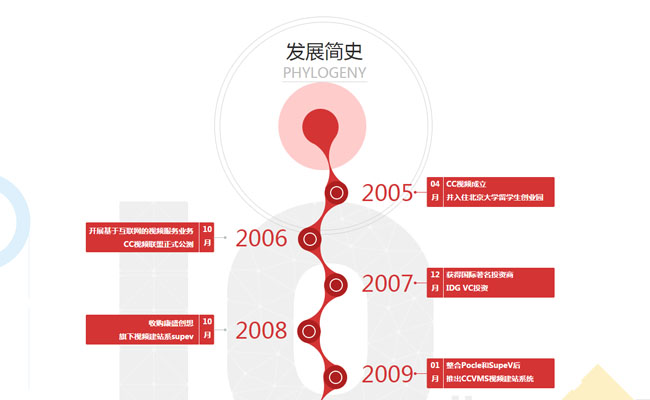
实现的代码。
html代码:
<div class="wrapper">

        <div class="history">

            <div class="start-history">

                <p class="cc_history">发展简史</p>

                <p class="next_history">PHYLOGENY</p>

                <div class="history_left">

                    <p class="history_L year2006">

                        <span class="history_2006_span">2006</span>

                        <b class="history_2006_b">

                            <span class="history_l_month">10<br />月</span>

                            <span class="history_l_text">开展基于互联网的视频服务业务<br />CC视频联盟正式公测</span>

                        </b>

                    </p>

                    <p class="history_L yearalmost">

                        <span class="history_2006_span">2008</span>

                        <b class="history_2006_b">

                            <span class="history_l_month">10<br />月</span>

                            <span class="history_l_text">收购康盛创想<br />旗下视频建站系supev</span>

                        </b>

                    </p>

                    <p class="history_L year2009">

                        <span class="history_2006_span">2009</span>

                        <b class="history_2006_b">

                            <span class="history_l_month">04<br />月</span>

                            <span class="history_l_text">推出CMedia视频广告平台,<br />对旗下视频媒体进行整合营销</span>

                        </b>

                    </p>

                    <p class="history_L yearalmost">

                        <span class="history_2006_span blue">2010</span>

                        <b class="history_2006_b blue">

                            <span class="history_l_month">01<br />月</span>

                            <span class="history_l_text">CC视频获得广电总局颁发的<br />音视频许可证</span>

                        </b>

                    </p>

                    <p class="history_L yearalmost">

                        <span class="history_2006_span blue">2011</span>

                        <b class="history_2006_b blue">

                            <span class="history_l_month">08<br />月</span>

                            <span class="history_l_text smalltext">CC视频获得由迪士尼旗下思伟投资、IDG、江苏高科技投资集团的<br />B轮融资2000万美元</span>

                        </b>

                    </p>

                    <p class="history_L year2011">

                        <span class="history_2006_span blue">2011</span>

                        <b class="history_2006_b blue">

                            <span class="history_l_month">09<br />月</span>

                            <span class="history_l_text">CC视频荣获“2011年<br />中国云计算最佳应用实践奖”</span>

                        </b>

                    </p>

                    <p class="history_L year2011">

                        <span class="history_2006_span blue">2012</span>

                        <b class="history_2006_b blue">

                            <span class="history_l_month">03<br />月</span>

                            <span class="history_l_text">CC视频成功举办2012中国<br />远程教育技术创新与应用论坛</span>

                        </b>

                    </p>

                    <p class="history_L year2011">

                        <span class="history_2006_span yellow">2012</span>

                        <b class="history_2006_b yellow">

                            <span class="history_l_month">09<br />月</span>

                            <span class="history_l_text">CC视频发布视频云<br />开放战略及API2.0</span>

                        </b>

                    </p>

                    <p class="history_L year2013">

                        <span class="history_2006_span yellow">2013</span>

                        <b class="history_2006_b yellow">

                            <span class="history_l_month">04<br />月</span>

                            <span class="history_l_text smalltxt">CC视频成功举办2013(第二届)中国<br />远程教育技术创新与应用论坛</span>

                        </b>

                    </p>

                    <p class="history_L yearalmost">

                        <span class="history_2006_span yellow">2015</span>

                        <b class="history_2006_b yellow">

                            <span class="history_l_month">01<br />月</span>

                            <span class="history_l_text full">视频直播CC Live发布</span>

                        </b>

                    </p>

                </div>

                <div class="history-img">

                    <img class="history_img" src="data:images/history.png" alt="">

                </div>

                <div class="history_right">

                    <p class="history_R history_r_2005">

                        <span class="history_2005_span">2005</span>

                        <b class="history_2005_b">

                            <span class="history_r_month">04<br />月</span>

                            <span class="history_r_text">CC视频成立<br />并入住北京大学留学生创业园</span>

                        </b>

                    </p>

                    <p class="history_R yearalmostr">

                        <span class="history_2005_span">2007</span>

                        <b class="history_2005_b">

                            <span class="history_r_month">12<br />月</span>

                            <span class="history_r_text">获得国际著名投资商<br />IDG VC投资 </span>

                        </b>

                    </p>

                    <p class="history_R yearalmostr">

                        <span class="history_2005_span">2009</span>

                        <b class="history_2005_b">

                            <span class="history_r_month">01<br />月</span>

                            <span class="history_r_text">整合Pocle和SupeV后<br />推出CCVMS视频建站系统</span>

                        </b>

                    </p>

                    <p class="history_R yearalmostr">

                        <span class="history_2005_span">2009</span>

                        <b class="history_2005_b">

                            <span class="history_r_month">12<br />月</span>

                            <span class="history_r_text">CC视频成为Google在大陆地<br />区第一家视频广告合作伙伴</span>

                        </b>

                    </p>

                    <p class="history_R yearalmostr">

                        <span class="history_2005_span blue">2010</span>

                        <b class="history_2005_b blue_R">

                            <span class="history_r_month">10<br />月</span>

                            <span class="history_r_text">CC视频推出基于视频云计算的<br />第三方服务平台</span>

                        </b>

                    </p>

                    <p class="history_R yearalmostr">

                        <span class="history_2005_span blue">2011</span>

                        <b class="history_2005_b blue_R">

                            <span class="history_r_month">08<br />月</span>

                            <span class="history_r_text">CC视频参展2011年(第十届)<br />中国互联网大会</span>

                        </b>

                    </p>

                    <p class="history_R year211">

                        <span class="history_2005_span blue">2011</span>

                        <b class="history_2005_b blue_R">

                            <span class="history_r_month">11<br />月</span>

                            <span class="history_r_text">CC视频荣获<br />“最佳云服务模式奖”</span>

                        </b>

                    </p>

                    <p class="history_R yearalmostr">

                        <span class="history_2005_span yellow">2012</span>

                        <b class="history_2005_b yellow_R">

                            <span class="history_r_month">04<br />月</span>

                            <span class="history_r_text">CC视频荣获<br />“最佳视频服务提供商”</span>

                        </b>

                    </p>

                    <p class="history_R year211">

                        <span class="history_2005_span yellow">2012</span>

                        <b class="history_2005_b yellow_R">

                            <span class="history_r_month">10<br />月</span>

                            <span class="history_r_text">CC视频荣获“清科集团中国<br />最具投资价值50强”荣誉</span>

                        </b>

                    </p>

                    <p class="history_R yearalmostr">

                        <span class="history_2005_span yellow">2014</span>

                        <b class="history_2005_b yellow_R">

                            <span class="history_r_month">10<br />月</span>

                            <span class="history_r_text">CC视频荣获<br />“最佳教育技术提供商”荣誉</span>

                        </b>

                    </p>

                </div>

                <div class="clear"></div>

            </div>

            <div class="clear"></div>

        </div>

    </div>
js代码:
$(window).scroll(function () {

            var msg = $(".history-img");

            var item = $(".history_L");

            var items = $(".history_R");

            var windowHeight = $(window).height();

            var Scroll = $(document).scrollTop();

            if ((msg.offset().top - Scroll - windowHeight) <= 0) {

                msg.fadeIn(1500);

            }

            for (var i = 0; i < item.length; i++) {

                if (($(item[i]).offset().top - Scroll - windowHeight) <= -100) {

                    $(item[i]).animate({ marginRight: '0px' }, '50', 'swing');

                }

            }

            for (var i = 0; i < items.length; i++) {

                if (($(items[i]).offset().top - Scroll - windowHeight) <= -100) {

                    $(items[i]).animate({ marginLeft: '0px' }, '50', 'swing');

                }

            }

        });
via:http://www.w2bc.com/article/49706
发展简史jQuery时间轴特效的更多相关文章
- 基于jQuery发展历程时间轴特效代码
分享一款基于jQuery发展历程时间轴特效代码,带左右箭头,数字时间轴选项卡切换特效下载.效果图如下: 在线预览 源码下载 实现的代码. html代码: <div id="time ...
- Jquery实现超酷的时间轴特效
Timeline时间轴Jquery特效是一款现在互联网上非常流行的一种布局结构,结合了瀑布流布局,最近很多网友问到这种特效,网站上有网友们分享过一款,功能虽然实现,但样式不太好看,今天就把它整理出来分 ...
- jquery时间轴幻灯展示源代码
查看效果:http://hovertree.com/texiao/jquery/75/ 源代码下载:http://hovertree.com/h/bjaf/8jlpc2wu.htm 效果图如下: 代码 ...
- 推荐5款实用的jQuery时间轴插件
1.使用CSS3和jQuery制作的水平时间轴 这是一个可以在PC和移动端表现非常棒的水平时间轴,它由上部水平滑块和下部时间点对应的内容区块,点击时间轴上的时间点,下部内容会滑动到对应的内容区块.使用 ...
- jQuery时间轴插件timeline.js
http://www.jq22.com/jquery-info13695 http://www.jq22.com/jquery-info13357 简要教程 timeline.js是一款jQuery时 ...
- jQuery时间轴插件:jQuery Timelinr
前言 这是一款可用于展示历史和计划的时间轴插件,尤其比较适合一些网站展示发展历程.大事件等场景.该插件基于jQuery,可以滑动切换.水平和垂直滚动.支持键盘方向键.经过扩展后可以支持鼠标滚轮事件. ...
- jQ效果:jQuery时间轴插件jQuery Timelinr
前言 这是一款可用于展示历史和计划的时间轴插件,尤其比较适合一些网站展示发展历程.大事件等场景.该插件基于jQuery,可以滑动切换.水平和垂直滚动.支持键盘方向键.经过扩展后可以支持鼠标滚轮事件. ...
- jquery时间轴tab切换效果实现结合swiper实现滑动显示效果
需求:根据时间轴进行tab页面内容切换(时间轴需要滑动查看并选择) 实现思路: 结合swiper插件实现滑动显示效果 根据transform: translateX进行左侧切换效果的实现(具体实现cs ...
- jQuery时间轴
常见的时间轴导航 横向时间轴
随机推荐
- AM335x启动
参考文件: 1.TI.Reference_Manual_1.pdf http://pan.baidu.com/s/1c1BJNtm 2.TI_AM335X.pdf http://pan.baidu.c ...
- Luogu2570 [ZJOI2010]贪吃的老鼠 ---- 网络流
Luogu2570 [ZJOI2010]贪吃的老鼠 题面描述 https://www.luogu.org/problemnew/show/P2570 然后题意大概就是m只老鼠,然后吃n个奶酪,已知 ...
- bzoj 4767: 两双手 组合 容斥
题目链接 bzoj4767: 两双手 题解 不共线向量构成一组基底 对于每个点\((X,Y)\)构成的向量拆分 也就是对于方程组 $Ax * x + Bx * y = X $ \(Ay * x + B ...
- 洛谷.1251.餐巾计划问题(费用流SPFA)
题目链接 /* 每一天的餐巾需求相当于必须遍历某些点若干次 设q[i]为Dayi需求量 (x,y)表示边x容y费 将每个点i拆成i,i',由i'->T连(q[i],0)的边,表示求最大流的话一定 ...
- memcached 数据库
安装 [root@node2 ~]# yum install memcached 启动 [root@node2 ~]# systemctl start memcached 连接 [root@node2 ...
- js常用事件
为了便于使读者更好地运用js事件,就把常用事件大致分为以下几种: a. 表单元素事件,在表单元素中生效 onfocus ------获取焦点 onblur -------失去焦点 onsubmit ...
- Raspberry Pi GPIO Protection
After damaging the GPIO port on our raspberry pi while designing a new solar monitoring system we de ...
- 利用Delphi编写IE扩展
就是如何使IE扩展组件可以响应事件. 在自己的程序中使用过WebBrowser控件的朋友都知道,WebBrowser控件定义了诸如BeforeNavigate.DownloadComplete ...
- request.getParameter(“xxx”)的参数的取值
request.getParameter(“xxx”)的参数的取值的几种可能: 1. Html中form表单中标签的name属性: <form name="form" met ...
- softmax,softmax loss和cross entropy的区别
版权声明:本文为博主原创文章,未经博主允许不得转载. https://blog.csdn.net/u014380165/article/details/77284921 我们知道卷积神经网络(CNN ...