
Azure Messaging-ServiceBus Messaging消息队列技术系列2-编程SDK入门
各位,上一篇基本概念和架构中,我们介绍了Window Azure ServiceBus的消息队列技术的概览。接下来,我们进入编程模式和详细功能介绍模式,一点一点把ServiceBus技术研究出来。
本章我们主要介绍ServiceBus的编程SDK编程入门。
首先,微软提供了两个主要的Nuget Packages:
Microsoft Azure Service Bus 3.4.0
主要的NameSpace有以下几个:
1. Microsoft.ServiceBus,这个下面有两个主要的类:TokenProvider(用于创建Azure ServiceBus连接Token)NamespaceManager(管理ServiceBus的命名空间)。
2. Microsoft.ServiceBus.Messaging,这个命名空间下面主要提供了:MessageSession、BrokeredMessage、QueueClient、TopicClient、TopicDescription、QueueDescription、SubscriptionClient、SubscriptionDescription等核心类。
在正式编码之前,需要我们在Windows Azure的Portal上建立ServiceBus的NameSpace:
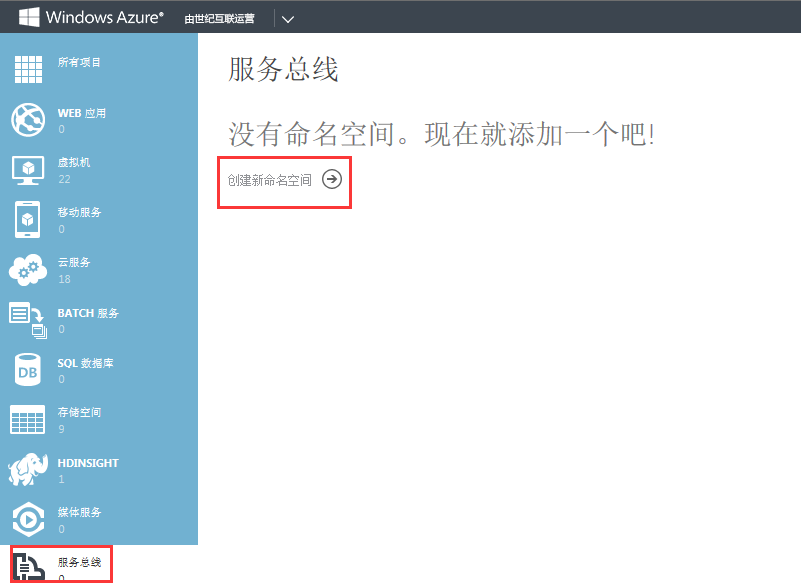
我们新建一个命名空间:servicebustest,选择的类型是:消息

新建完成后处于活动(可用)的状态:

接下来,我们要获取两个重要的配置:连接串和主秘钥


请将连接字符串拷贝下来,备用。

请将主秘钥拷贝下来,备用。
启动我们的ServiceBus的连接编码,首先需要在应用程序配置文件中增加ServiceBus的连接信息:
<appSettings>

    <!-- Service Bus specific app setings for messaging connections -->

    <add key="Microsoft.ServiceBus.ConnectionString" value="Endpoint=sb://servicebustest.servicebus.chinacloudapi.cn/;SharedAccessKeyName=RootManageSharedAccessKey;SharedAccessKey=主秘钥"/>

  </appSettings>
后续,所有的ServiceBus的连接操作,都会读取这个配置节。我们通过case by case的方式,show 给大家:
首先:ServiceBus的命名空间管理器:Microsoft.ServiceBus.NamespaceManager
这里,我们主要用以下两个方法来实例化:
public static NamespaceManager Create(); 例如:
var namespaceClient = NamespaceManager.Create();
通过NamespaceManager这个类,我们可以创建、删除、获取、重命名、更新、判断是否存在:队列、主题、订阅、规则等
1. 消息队列的创建、是否存在判断、删除操作
  private void CreateQueue(string queueName, bool isRequiresSession = true)

        {

            var nm = NamespaceManager.Create();

            if (nm.QueueExists(queueName))

            {

                nm.DeleteQueue(queueName);

            }

            var queue = new QueueDescription(queueName) { RequiresSession = isRequiresSession };

            nm.CreateQueue(queue);

            nm.DeleteQueue(queueName);

        }
2. 创建QueueClient,用于发送、接收消息
        /// <summary>

        /// 创建队列客户端

        /// </summary>

        /// <returns>队列客户端</returns>

        public QueueClient CreateQueueClient(string queueName, ReceiveMode mode = ReceiveMode.ReceiveAndDelete)

        {

            var namespaceClient = NamespaceManager.Create();

            return QueueClient.Create(queueName,mode);

        }
3. 主题的创建、删除、是否存在判断
 private void CreateTopic(string topicName)

        {

            var nm = NamespaceManager.Create();

            if (nm.TopicExists(topicName))

            {

                nm.DeleteTopic(topicName);

            }

            var topic = new TopicDescription(topicName);

            nm.CreateTopic(topic);

            nm.DeleteTopic(topicName);

        }
4. 创建TopicClient,用于主题的发送和订阅接收消息
 /// <summary>

        /// 创建主题客户端

        /// </summary>

        /// <returns>主题客户端</returns>

        public TopicClient GetTopicClient(string topicName)

        {

            var namespaceClient = NamespaceManager.Create();

            return TopicClient.Create(topicName);

        }
5. 创建消息BrokeredMessage,设置消息的属性
   /// <summary>

        /// 构造消息

        /// </summary>

        /// <param name="serializableObject">可序列化的对象</param>

        /// <returns>消息</returns>

        public static BrokeredMessage Create(Object serializableObject)

        {

            var serializer = new DataContractSerializer(serializableObject.GetType(),new DataContractSerializerSettings(){ IgnoreExtensionDataObject = true, PreserveObjectReferences = false});

            var message = new BrokeredMessage(serializableObject);

            message.Properties.Add("Type", serializableObject.GetType().ToString());

            return message;

        }
6.发送消息
        /// <summary>

        /// 发送多条消息

        /// </summary>

        /// <param name="receivePayBills">收发货订单集合</param>

        public void Send(List<ReceivePayBill> receivePayBills)

        {

            var queueClient = GetQueueClient(queueName);

            foreach (var receivePayBill in receivePayBills)

            {

                var message = this.Create(receivePayBill);

                queueClient.Send(message);

            }

            queueClient.Close();

        }
7. 接收消息
        /// <summary>

        /// 接收消息

        /// </summary>

        /// <returns>收付款订单</returns>

        public List<ReceivePayBill> Receive()

        {

            var bills = new List<ReceivePayBill>();

            var queueClient = GetReceiveQueueClient(queueName, ReceiveMode.ReceiveAndDelete);

            BrokeredMessage message;

            while ((message = queueClient.Receive()) != null)

            {

                bills.Add(message.GetBody<ReceivePayBill>());

            }

            return bills;

        }
还有很多其他的示例代码。本文只是一个简单的入门级教程,接下来我们将按MQ场景逐个展示ServiceBus Messaging的特性。
Azure Messaging-ServiceBus Messaging消息队列技术系列2-编程SDK入门的更多相关文章
- Window Azure ServiceBus Messaging消息队列技术系列2-编程SDK入门
各位,上一篇基本概念和架构中,我们介绍了Window Azure ServiceBus的消息队列技术的概览.接下来,我们进入编程模式和详细功能介绍模式,一点一点把ServiceBus技术研究出来. 本 ...
- Azure Messaging-ServiceBus Messaging消息队列技术系列3-消息顺序保证
上一篇:Window Azure ServiceBus Messaging消息队列技术系列2-编程SDK入门 http://www.cnblogs.com/tianqing/p/5944573.ht ...
- Azure Messaging-ServiceBus Messaging消息队列技术系列-索引篇
Azure Messaging ServiceBus Messaging相关的技术系列,最近已经整理了不少了,统一做一个索引链接,置顶. 方便查找,并后续陆陆续续再增加. 学习消息队列技术,可以先看第 ...
- Azure Messaging-ServiceBus Messaging消息队列技术系列4-复杂对象消息是否需要支持序列化和消息持久化
在上一篇中,我们介绍了消息的顺序收发保证: Azure Messaging-ServiceBus Messaging消息队列技术系列3-消息顺序保证 在本文中我们主要介绍下复杂对象消息是否需要支持序列 ...
- Azure Messaging-ServiceBus Messaging消息队列技术系列8-服务总线配额
上篇博文中我们介绍了Azure ServiceBus Messaging的消息事务机制: Azure Messaging-ServiceBus Messaging消息队列技术系列7-消息事务(2017 ...
- Azure Messaging-ServiceBus Messaging消息队列技术系列5-重复消息:at-least-once at-most-once
上篇博客中,我们用实际的业务场景和代码示例了Azure Messaging-ServiceBus Messaging对复杂对象消息的支持和消息的持久化: Azure Messaging-Service ...
- Azure Messaging-ServiceBus Messaging消息队列技术系列6-消息回执
上篇博文中我们介绍了Azure Messaging的重复消息机制.At most once 和At least once. Azure Messaging-ServiceBus Messaging消息 ...
- Window Azure ServiceBus Messaging消息队列技术系列1-基本概念和架构
前段时间研究了Window Azure ServiceBus Messaging消息队列技术,搞了很多技术研究和代码验证,最近准备总结一下,分享给大家. 首先,Windows Azure提供了两种类型 ...
- Azure Messaging-ServiceBus Messaging消息队列技术系列1-基本概念和架构
前段时间研究了Window Azure ServiceBus Messaging消息队列技术,搞了很多技术研究和代码验证,最近准备总结一下,分享给大家. 首先,Windows Azure提供了两种类型 ...
随机推荐
- LeetCode 872 Leaf-Similar Trees 解题报告
题目要求 Consider all the leaves of a binary tree. From left to right order, the values of those leaves ...
- MUI框架a链接href跳转失效解决方法,解决MUI页面不会滚动的方法
//解决 所有a标签 导航不能跳转页面 mui('body').on('tap','a',function(){document.location.href=this.href;}); //解决MUI ...
- 注解之@PathVariable
@PathVariable只支持一个属性value,类型是为String,代表绑定的属性名称.默认不传递时,绑定为同名的形参. 用来便捷地提取URL中的动态参数.其英文注释如下: Annotation ...
- java 并发包runnable 与 callable
1.runnable 与 callable区别 2.避免callable执行完任务,获取返回结果时,阻塞其他子线程 下面固定线程池,设置4个,表明同时只有4个线程在执行任务,当某个线程执行完一个任务, ...
- JDK源代码学习系列04----ArrayList
JDK源代码学习系列04----ArrayList 1 ...
- jenkins+maven+gitlab触发构建
1.安装插件 安装gitlab插件 回到项目配置在“构建触发器”那里有一个Build when a change is pushed to GitLab. GitLab webhook选项复制选项里的 ...
- 前端框架之Vue(3)-计算属性
计算属性 模板内的表达式非常便利,但是设计它们的初衷是用于简单运算的.在模板中放入太多的逻辑会让模板过重且难以维护.例如: <div id="example"> {{ ...
- 将常用的T-CODE收藏进 文件夹
1:选中文件夹,右键>insert transaction>输入相应的t-code.
- 【LeetCode每天一题】Longest Valid Parentheses(最长有效括弧)
Given a string containing just the characters '(' and ')', find the length of the longest valid (wel ...
- centos 打包报错License for package Android SDK Build-Tools 25.0.3 not accepted
报错如下: 提示没有25.0.3的安卓环境,那么,接下来就需要安装这个环境 1.android list sdk -a 会显示需要更新 类似如下(截图只是一部分,前后还有一部分): 2.android ...