
Prometheus 安装部署
Prometheus 安装部署
- 安装版本:prometheus-2.6.1
- 百度云下载:https://pan.baidu.com/s/1w16lQZKw8PCHqlRuSK2i7A
- 提取码:lw1q
二进制安装部署
1、下载二进制包:prometheus-2.6.1.linux-amd64.tar.gz
2、解压包:tar xvzf prometheus-2.6.1.linux-amd64.tar.gz
3、移动到安装目录:mv prometheus-2.6.1.linux-amd64 /usr/local/prometheus
4、进入目录:cd /usr/local/prometheus
5、修改配置文件底部监控本机:vim prometheus.yml
scrape_configs:

  - job_name: 'prometheus'

    static_configs:

    # 监控本地及端口

    - targets: ['xiangsikai:9090']
注:Prometheus从目标机上通过http方式拉取采样点数据, 它也可以拉取自身服务数据并监控自身的健康状况。
注:当然Prometheus服务拉取自身服务采样数据,并没有多大的用处,但是它是一个好的DEMO。
global:

  # 默认情况下,每15s拉取一次目标采样点数据。

  scrape_interval:     15s

  # 我们可以附加一些指定标签到采样点度量标签列表中, 用于和第三方系统进行通信, 包括:federation, remote storage, Alertmanager

  external_labels:

    # 下面就是拉取自身服务采样点数据配置

    monitor: 'codelab-monitor'

scrape_configs:

  # job名称会增加到拉取到的所有采样点上,同时还有一个instance目标服务的host:port标签也会增加到采样点上

  - job_name: 'prometheus'

    # 覆盖global的采样点,拉取时间间隔5s

    scrape_interval: 5s

    static_configs:

      - targets: ['localhost:9090']
配置文件注解
6、启动服务
./prometheus --config.file=prometheus.yml
# 指定配置文件

--config.file="prometheus.yml"

# 指定监听地址端口

--web.listen-address="0.0.0.0:9090"

# 最大连接数

--web.max-connections=512

# tsdb数据存储的目录,默认当前data/

--storage.tsdb.path="data/"

# premetheus 存储数据的时间,默认保存15天

--storage.tsdb.retention=15d
启动选项了解:./prometheus --help
7、测试访问:http://localhost:9090

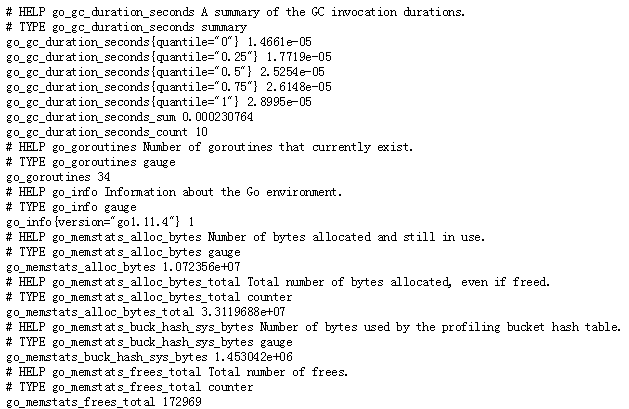
8、查看暴露指标:http://localhost.com:9090/metrics
9、将Prometheus配置为系统服务
1、进入systemd目录下:cd /usr/lib/systemd/system
2、创建文件:vim prometheus.service
  [Unit]

  Description=https://prometheus.io

  [Service]

  Restart=on-failure

  ExecStart=/usr/local/prometheus/prometheus --config.file=/usr/local/prometheus/prometheus.yml

  [Install]

  WantedBy=multi-user.target
4、生效系统system文件
systemctl daemon-reload
5、启动服务
systemctl stop prometheus.service

systemctl start prometheus.service
Docker 容器安装部署
- 官方地址:https://prometheus.io/docs/prometheus/latest/installation/
一、prometheus.yml通过运行以下命令将您从主机绑定:
docker run -p 9090:9090 -v /tmp/prometheus.yml:/etc/prometheus/prometheus.yml \

       prom/prometheus
二、或者为配置使用额外的卷:
docker run -p 9090:9090 -v /prometheus-data \

       prom/prometheus --config.file=/prometheus-data/prometheus.yml
注:普罗米修斯的配置文件的需要指定对。
Prometheus 安装部署的更多相关文章
- Prometheus入门到放弃(1)之Prometheus安装部署
规划: IP 角色 版本 10.10.0.13 prometheus-server 2.10 10.10.0.11 node_exporter 0.18.1 10.10.0.12 node_expor ...
- Prometheus安装部署说明
本文主要介绍了如何二进制安装Prometheus.使用 Node Exporter 采集主机信息并使用Grafana来进行图形化的展示. 1. 安装Prometheus Server Promethe ...
- 2.Prometheus安装部署
环境准备 2台Linux操作系统(基于centos7) docker环境 配置 IP 角色 版本 192.168.229.139 prometheus-server 2.10 192.168.229. ...
- 微服务监控神器Prometheus的安装部署
本文涉及:如何在k8s下搭建Prometheus+grafana的监控环境 基本概念 Prometheus提供了容器和云原生领域数据搜集.存储.处理.可视化和告警一套完整的解决方案,最初时是由Soun ...
- Prometheus 和 Grafana 安装部署
Prometheus 是一套开源的系统监控报警框架.Prometheus 作为生态圈 Cloud Native Computing Foundation(简称:CNCF)中的重要一员,其活跃度仅次于 ...
- prometheus学习系列三:node_exporter安装部署
node_exporter简介 node_exporter安装部署 [root@node00 ~]# cd /usr/src/ [root@node00 src]# wget https://gith ...
- Prometheus + Grafana 部署说明之「安装」
说明 在前面的Prometheus学习系列文章里,大致介绍说明了Prometheus和Grafana的一些使用,现在开始介绍如何从头开始部署Prometheus+Grafana,来监控各个相关的指标数 ...
- Kubernetes+Prometheus+Grafana部署笔记
一.基础概念 1.1 基础概念 Kubernetes(通常写成“k8s”)Kubernetes是Google开源的容器集群管理系统.其设计目标是在主机集群之间提供一个能够自动化部署.可拓展.应用容器可 ...
- Prometheus 安装
目录 简介 安装部署 环境准备 安装 配置环境变量 配置 启动 简介 prometheus存储的是时序数据,即按相同时序(相同名称和标签),以时间维度存储连续的数据的集合. 时序(time serie ...
随机推荐
- Risc-V简要概括
1.Risc-V硬件平台术语 一个RiscV硬件平台可以包含一个或多个RiscV兼容的核心.其它非RiscV兼容的核心.固定功能的加速器.各种物理存储器结构.I/O设备以及允许这些部件相互连通的互联结 ...
- Vue日历组件的功能
本来呢,开开心心的写完了这个功能,然后发现elemeng更新了,增加了日历组件这个功能 我的内心机器奔溃,但是,element的日历组件太简单了,我感觉还是手撸一个吧,毕竟也不是很难 实现了显示农历, ...
- Kubernetes概念之mater、node
很久没写博客了,终于把重心找回来了,不过没有以前有斗志.有理想.有目标了.慢慢来.你若问我我最近几年的规划是什么,还真不知道.突然发现摧毁一个人真的很简单.k8s也是一遍一遍的从入门到放弃,还是要好好 ...
- 160--Intersection Of Two Linked List
public class IntersectionOfTwoLinkedList { /* 解法一:暴力遍历求交点. 时间复杂度:O(m*n) 空间复杂度:O(1) */ public ListNod ...
- CPU使用率与负载的爱恨情仇
今天有一个电话面试,面试官问我:CentOS怎么查看CPU负载?我说:看top的第一行有load average.面试官又问:为什么从这就判定是负载高呢?依据是什么呢?然后... 然后我就尴尬了,挂了 ...
- Nginx 核心配置-自定义日志路径及清空日志注意事项
Nginx 核心配置-自定义日志路径及清空日志注意事项 作者:尹正杰 版权声明:原创作品,谢绝转载!否则将追究法律责任. 一.关于日志清空注意事项 1>.nginx服务写访问日志是基于acces ...
- 在windows下安装Superset
前言 最近想用一下Superset,这个是一个开源项目,可以直接通过写sql来生成图表,有时候对一些图表需求比较多的时候,可以用的上. Superset是由Airbnb(知名在线房屋短租公司)开源BI ...
- 201871010101-陈来弟《面向对象程序设计(java)》第二周学习总结
201871010101-陈来弟<面向对象程序设计(java)>第二周学习总结 项目 内容 这个作业属于哪个课程 <任课教师博客主页链接>https://www.cnblogs ...
- centos7编译安装pgbouncer
1.下载pgbouncer程序包和libevent依赖包 wget https://github.com/libevent/libevent/releases/download/release-2.1 ...
- 01-C#笔记-hello_world
/* * 主文件是 xxx.cs * 基本的 hello world 程序如下: */ using System; using System.Collections.Generic; using Sy ...