
ELK实时日志分析平台环境部署,以及可视化展示
ELK是三个开源软件的缩写,分别表示:Elasticsearch , Logstash, Kibana , 它们都是开源软件。新增了一个FileBeat,它是一个轻量级的日志收集处理工具(Agent),Filebeat占用资源少,适合于在各个服务器上搜集日志后传输给Logstash,官方也推荐此工具。
Elasticsearch是个开源分布式搜索引擎,提供搜集、分析、存储数据三大功能。它的特点有:分布式,零配置,自动发现,索引自动分片,索引副本机制,restful风格接口,多数据源,自动搜索负载等。
Logstash 主要是用来日志的搜集、分析、过滤日志的工具,支持大量的数据获取方式。一般工作方式为c/s架构,client端安装在需要收集日志的主机上,server端负责将收到的各节点日志进行过滤、修改等操作在一并发往elasticsearch上去。
Kibana 也是一个开源和免费的工具,Kibana可以为 Logstash 和 ElasticSearch 提供的日志分析友好的 Web 界面,可以帮助汇总、分析和搜索重要数据日志。
系统环境(rhel7.3):
elasticsearch:6.6.1
logstash:6.6.1
kibana:6.6.1
1.elasticsearch的搭建
[root@base1 ~]# ls
elasticsearch-6.6.1.rpm
jdk-8u181-linux-x64.rpm
[root@base1 ~]# rpm -ivh jdk-8u181-linux-x64.rpm
[root@base1 ~]# rpm -ivh elasticsearch-6.6.1.rpm
[root@base1 ~]# cd /etc/elasticsearch/
[root@base1 elasticsearch]# vim elasticsearch.yml
17 cluster.name: my-es
23 node.name: base1
43 bootstrap.memory_lock: true # 内存锁定,不会交互到swap
55 network.host: 172.25.78.11
59 http.port: 9200
[root@base1 elasticsearch]# vim /etc/security/limits.conf
elasticsearch soft memlock unlimited # 内存资源限制
elasticsearch hard memlock unlimited
elasticsearch - nofile 65536
elasticsearch - nproc 4096
[root@base1 elasticsearch]# vim /usr/lib/systemd/system/elasticsearch.service
36 LimitMEMLOCK=infinity
[root@base1 elasticsearch]# systemctl daemon-reload
[root@base1 elasticsearch]# systemctl start elasticsearch
[root@base1 elasticsearch]# systemctl status elasticsearch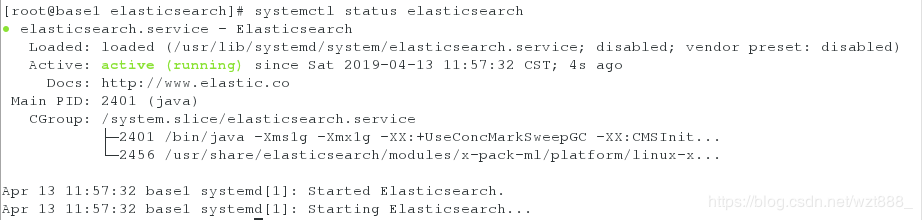
[root@base1 elasticsearch]# netstat -antlp | grep :9200 # 出现端口,说明服务开启成功
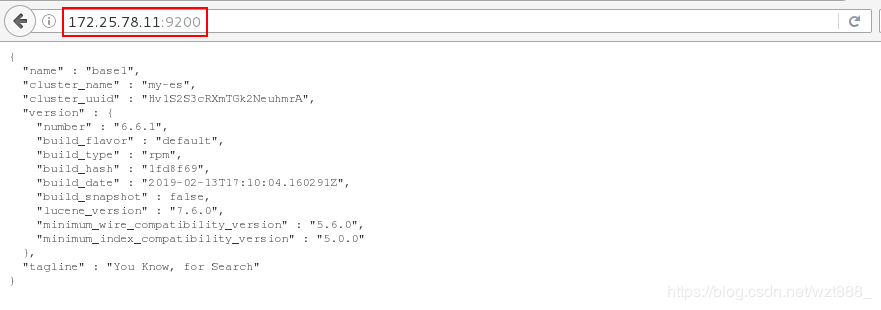
[root@base1 elasticsearch]# curl -s -XGET http://172.25.78.11:9200/_cat/health?v # 查看健康状态,green代表健康
[root@base1 elasticsearch]# curl -s -XGET http://172.25.78.11:9200/_cat/nodes
172.25.78.11 10 95 0 0.00 0.01 0.05 mdi * base1
[root@base1 elasticsearch]# cd
[root@base1 ~]# ls # nodejs是JavaScript 运行环境,因为elashstack是用java语言编写的
nodejs-9.11.2-1nodesource.x86_64.rpm
[root@base1 ~]# rpm -ivh nodejs-9.11.2-1nodesource.x86_64.rpm
[root@base1 ~]# node -v # 查看版本号
v9.11.2
[root@base1 ~]# npm -v
5.6.0
[root@foundation78 ~]# iptables -t nat -I POSTROUTING -s 172.25.78.0/24 -j MASQUERADE # 让虚拟机上网
[root@base1 ~]# route add default gw 172.25.78.250 # 添加临时网关
[root@base1 ~]# route -n # 查看网关
[root@base1 ~]# ping www.baidu.com # 保证可以上网
[root@base1 ~]# yum install -y bzip2
[root@base1 ~]# tar jxf phantomjs-2.1.1-linux-x86_64.tar.bz2
[root@base1 ~]# ls
phantomjs-2.1.1-linux-x86_64
phantomjs-2.1.1-linux-x86_64.tar.bz2
[root@base1 ~]# yum install -y unzip
[root@base1 ~]# unzip elasticsearch-head-master.zip
[root@base1 ~]# cd elasticsearch-head-master
[root@base1 elasticsearch-head-master]# npm install --registry=https://registry.npm.taobao.org
[root@base1 elasticsearch-head-master]# vim _site/app.js
4360 this.base_uri = this.config.base_uri || this.prefs.get("app-base_uri") || "http://172.25.78.11:9200";
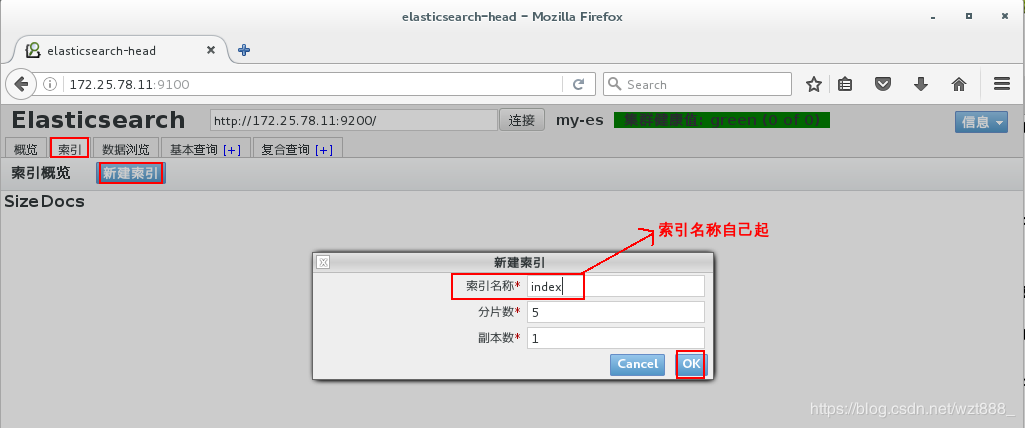
[root@base1 elasticsearch-head-master]# npm run start & # 打入后台运行
[root@base1 elasticsearch-head-master]# netstat -antlp |grep :9100
[root@base1 elasticsearch-head-master]# vim /etc/elasticsearch/elasticsearch.yml # 使用head等插件监控集群信息,需要打开以下配置项
61 http.cors.enabled: true
62 http.cors.allow-origin: '*'
[root@base1 elasticsearch-head-master]# systemctl restart elasticsearch # 重启的过程可能有点慢,请耐心等待

2.开始搭建集群
base1 172.25.78.11 master
base2 172.25.78.12 data节点
base3 172.25.78.13 data节点
[root@base1 ~]# id elasticsearch # 这是master中elasticsearch的id
uid=997(elasticsearch) gid=995(elasticsearch) groups=995(elasticsearch)
[root@base2 ~]# ls
elasticsearch-6.6.1.rpm
jdk-8u181-linux-x64.rpm
[root@base2 ~]# rpm -ivh elasticsearch-6.6.1.rpm
[root@base2 ~]# rpm -ivh elasticsearch-6.6.1.rpm
[root@base2 ~]# id elasticsearch # 集群中的用户必须要保证一致
uid=997(elasticsearch) gid=995(elasticsearch) groups=995(elasticsearch)
[root@base2 ~]# vim /usr/lib/systemd/system/elasticsearch.service
36 LimitMEMLOCK=infinity
[root@base2 ~]# systemctl daemon-reload
[root@base2 ~]# vim /etc/elasticsearch/elasticsearch.yml
17 cluster.name: my-es # 集群名称
23 node.name: base2 # 节点名称
33 path.data: /var/lib/elasticsearch # 数据存放位置
37 path.logs: /var/log/elasticsearch # 日志存放位置
43 bootstrap.memory_lock: true # 锁定内存
55 network.host: 172.25.78.12
59 http.port: 9200 # 网络的监听端口
60
61 http.cors.enabled: true
62 http.cors.allow-origin: '*'
71 discovery.zen.ping.unicast.hosts: ["base1", "base2","base3"] # 设置集群的节点个数
[root@base2 ~]# systemctl start elasticsearch
[root@base3 ~]# ls
elasticsearch-6.6.1.rpm
jdk-8u181-linux-x64.rpm
[root@base3 ~]# rpm -ivh elasticsearch-6.6.1.rpm
[root@base3 ~]# rpm -ivh elasticsearch-6.6.1.rpm
[root@base3 ~]# id elasticsearch
uid=997(elasticsearch) gid=995(elasticsearch) groups=995(elasticsearch)
[root@base3 ~]# vim /usr/lib/systemd/system/elasticsearch.service
36 LimitMEMLOCK=infinity
[root@base3 ~]# systemctl daemon-reload
[root@base3 ~]# vim /etc/elasticsearch/elasticsearch.yml
17 cluster.name: my-es
23 node.name: base3
33 path.data: /var/lib/elasticsearch
37 path.logs: /var/log/elasticsearch
43 bootstrap.memory_lock: true
55 network.host: 172.25.78.13
59 http.port: 9200
60
61 http.cors.enabled: true
62 http.cors.allow-origin: '*'
71 discovery.zen.ping.unicast.hosts: ["base1", "base2","base3"]
[root@base3 ~]# systemctl start elasticsearch
[root@base1 ~]# vim /etc/elasticsearch/elasticsearch.yml
71 discovery.zen.ping.unicast.hosts: ["base1", "base2","base3"]
[root@base1 ~]# systemctl restart elasticsearch
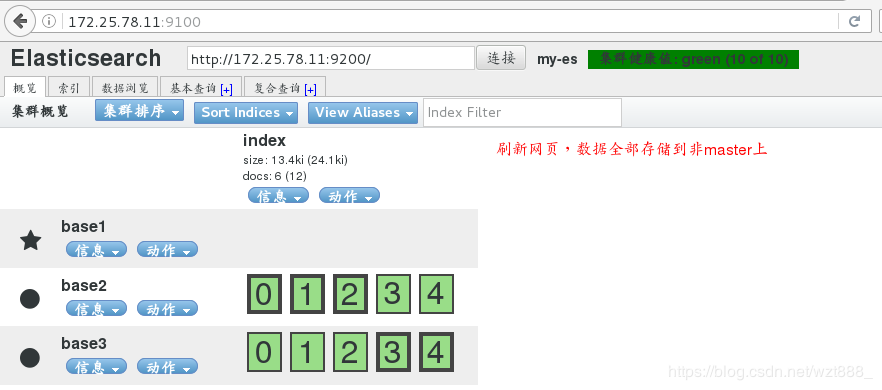
浏览器刷新,因为集群中三个服务器都可以竞选master,也都可以存储数据,所以数据会分布式存储在三台服务器上

[root@base1 ~]# vim /etc/elasticsearch/elasticsearch.yml
25 node.master : true
26 node.data: false # 不做数据节点,即不存储数据
[root@base1 ~]# systemctl restart elasticsearch
[root@base2 ~]# vim /etc/elasticsearch/elasticsearch.yml
24 node.master: false # 不竞选master
25 node.data: true # 只做数据存储
[root@base2 ~]# systemctl restart elasticsearch
[root@base3 ~]# vim /etc/elasticsearch/elasticsearch.yml
24 node.master: false
25 node.data: true
[root@base3 ~]# systemctl restart elasticsearch
3.数据采集(logstash)
base1 172.25.78.11 master
base2 172.25.78.12 data节点,logstash
base3 172.25.78.13 data节点

(1)终端采集数据
[root@base2 ~]# ls
logstash-6.6.1.rpm
[root@base2 ~]# rpm -ivh logstash-6.6.1.rpm
[root@base2 ~]# cd /usr/share/logstash
[root@base2 logstash]# bin/logstash -e 'input { stdin {} } output{ stdout{} }' #调用input模块,stdin 是终端目录,stdout是终端输出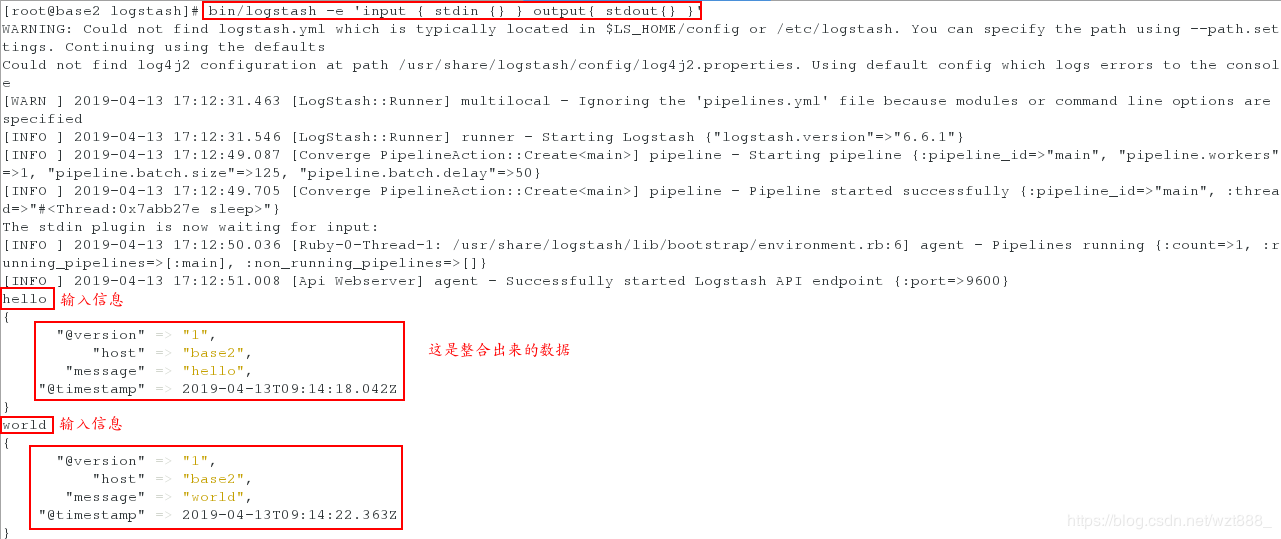
(2)以文件形式采集数据
[root@base2 logstash]# cd /etc/logstash/conf.d/
[root@base2 conf.d]# vim ex.conf
input {
stdin {}
}
output {
elasticsearch {
hosts => "172.25.78.11:9200"
index => "logstash-%{+YYYY.MM.dd}" # 索引,唯一
}
}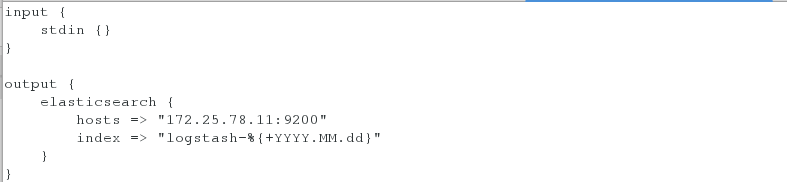
[root@base2 conf.d]# /usr/share/logstash/bin/logstash -f /etc/logstash/conf.d/ex.conf 
在浏览器查看是否采集到数据
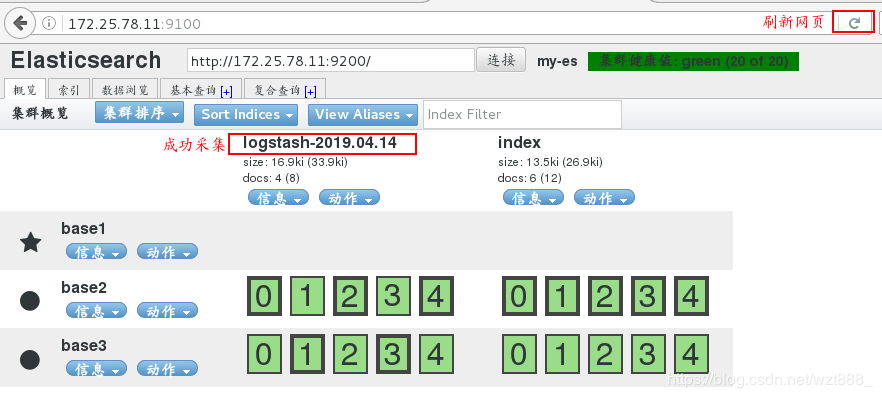
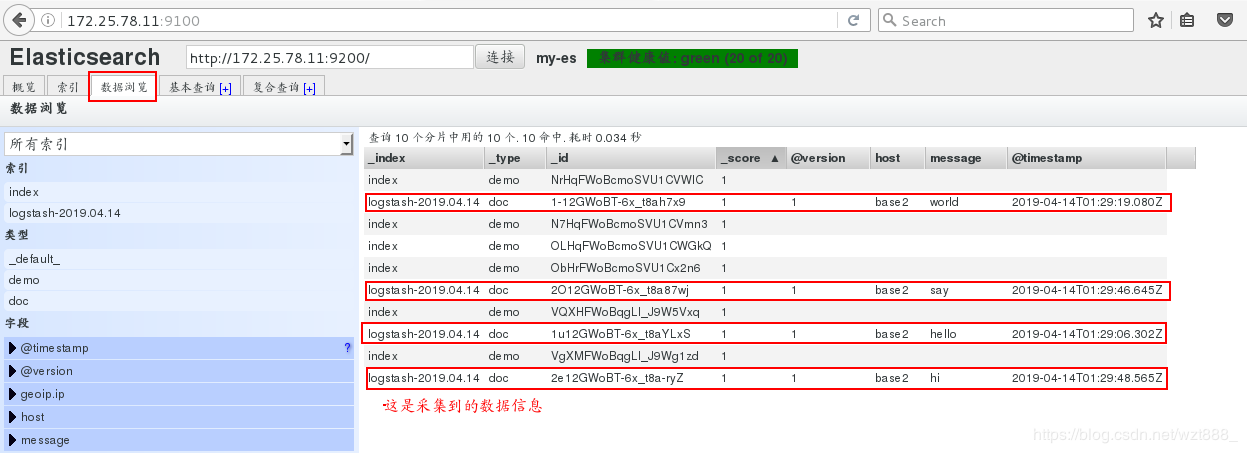
4.文件模块的使用
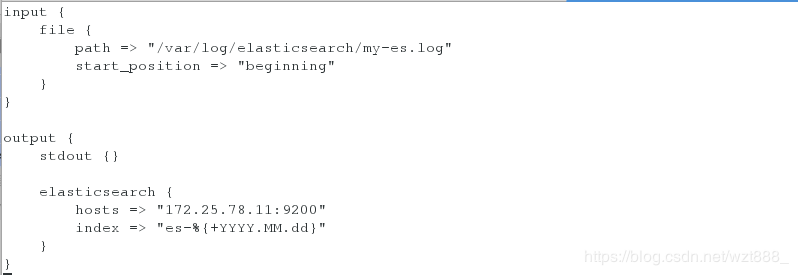
(1)控制日志的输出格式
[root@base2 conf.d]# vim ex.conf
input {
file {
path => "/var/log/elasticsearch/my-es.log" # 这是存放日志的文件路径
start_position => "beginning"
}
}
output {
stdout {}
elasticsearch {
hosts => "172.25.78.11:9200"
index => "es-%{+YYYY.MM.dd}"
}
}
[root@base2 conf.d]# /usr/share/logstash/bin/logstash -f /etc/logstash/conf.d/ex.conf
1
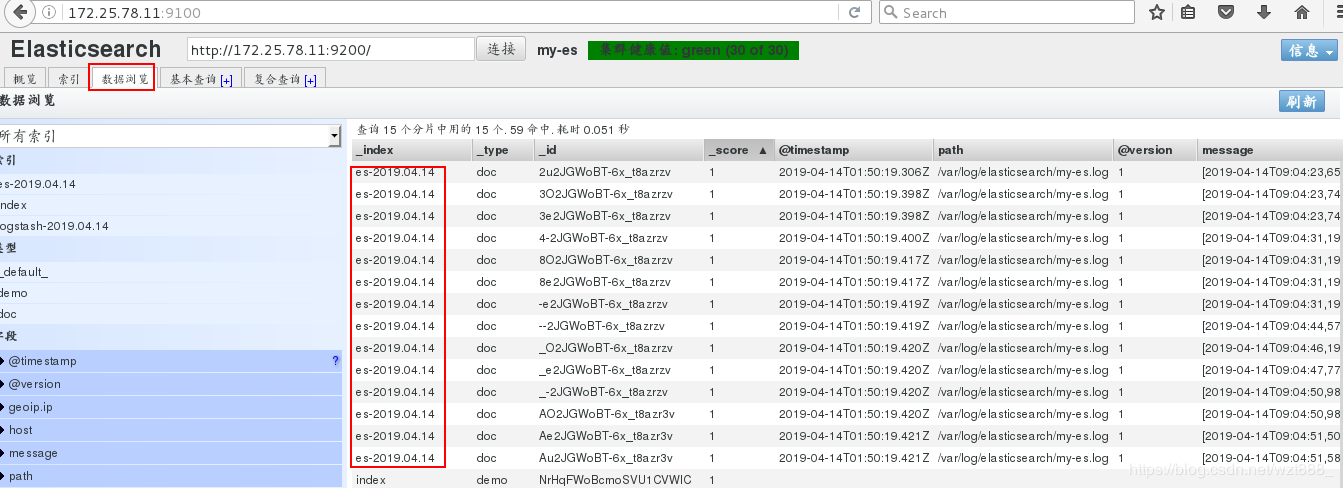
浏览器查看

(2)rsylog日志的数据收集
[root@base2 conf.d]# vim ex.conf
input {
syslog {
port => 514
}
}
output {
stdout {}
elasticsearch {
hosts => "172.25.78.11:9200"
index => "syslog-%{+YYYY.MM.dd}"
}
}
[root@base2 conf.d]# /usr/share/logstash/bin/logstash -f /etc/logstash/conf.d/ex.conf # 不能终止服务
重新打开一个shell
[root@base2 ~]# netstat -antlp | grep :514
[root@base2 ~]# vim /etc/rsyslog.conf
*.* @@172.25.78.12:514
[root@base2 ~]# systemctl restart rsyslog
[root@base2 ~]# netstat -antlp | grep :514
[root@base2 ~]# logger hello
[root@base2 ~]# logger world
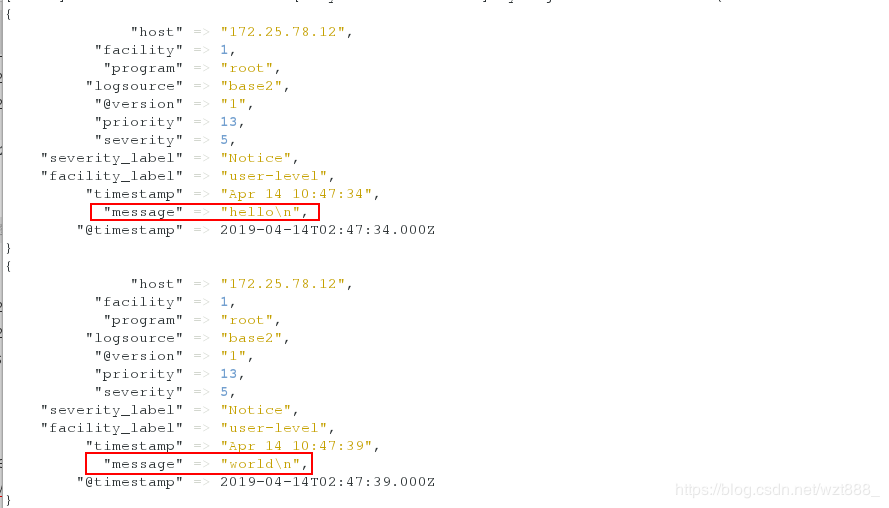
在另外一个shell查看,有数据输出
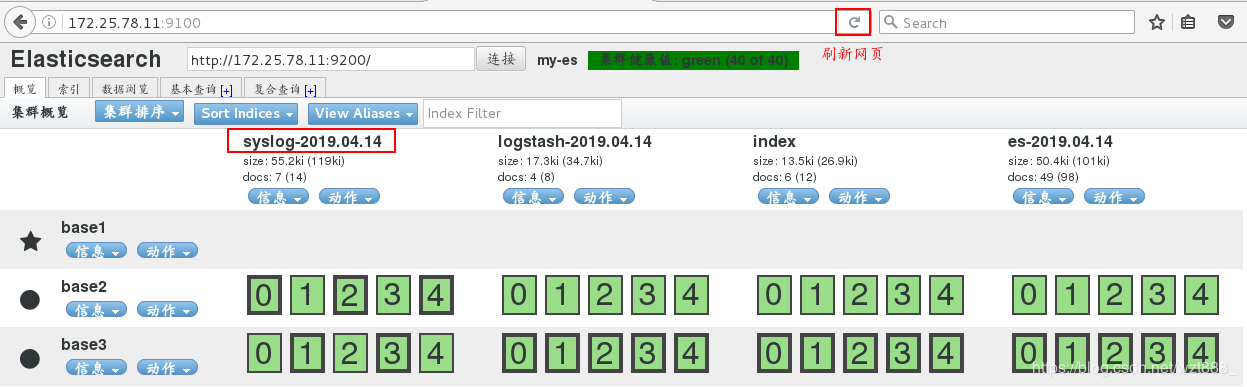
浏览器查看
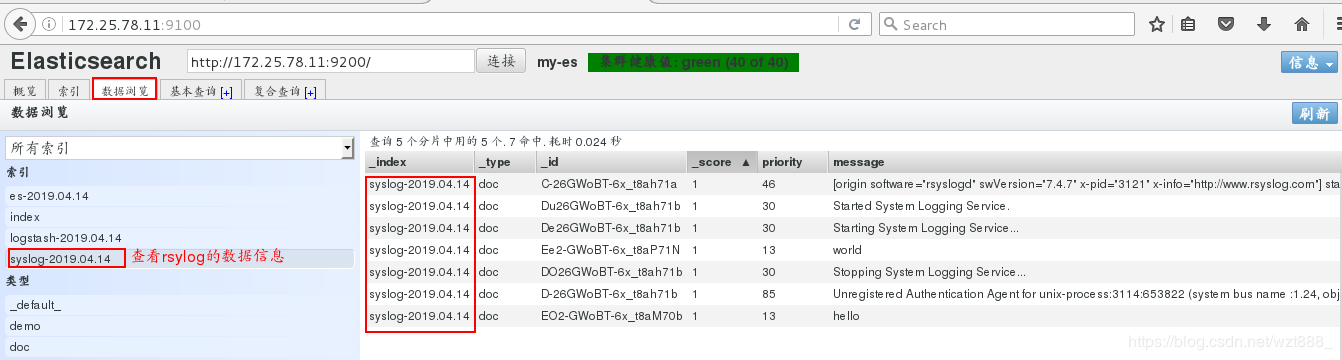
(3)多行整合数据
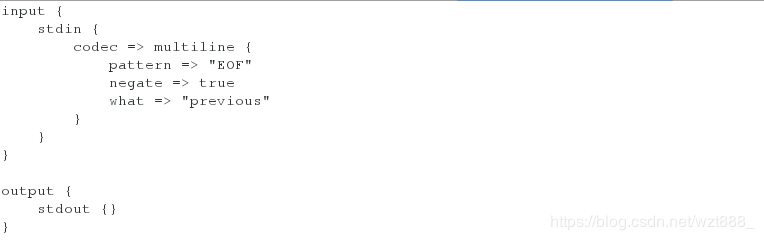
当匹配到EOF关键字时,整合上面所有的数据到一行
[root@base2 conf.d]# vim test.conf
input {
stdin {
codec => multiline {
pattern => "EOF" # 设定匹配字符
negate => true # 当你匹配到设定字符时
what => "previous" # 向前显示信息
}
}
}
output {
stdout {}
}
[root@base2 conf.d]# /usr/share/logstash/bin/logstash -f /etc/logstash/conf.d/test.conf 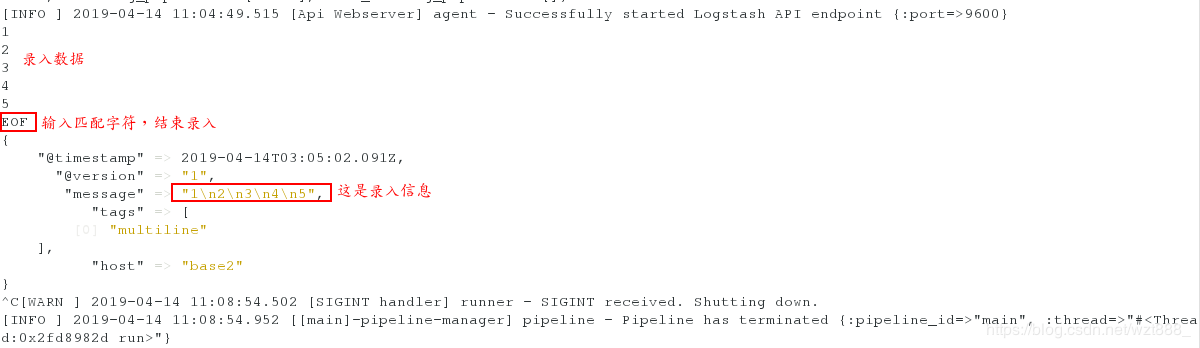
当匹配到文件中的[]时,把之前的数据整合到一行
我们就输出到es索引中,但是因为之前es索引被使用过,所以我们要先删除,重新生成索引
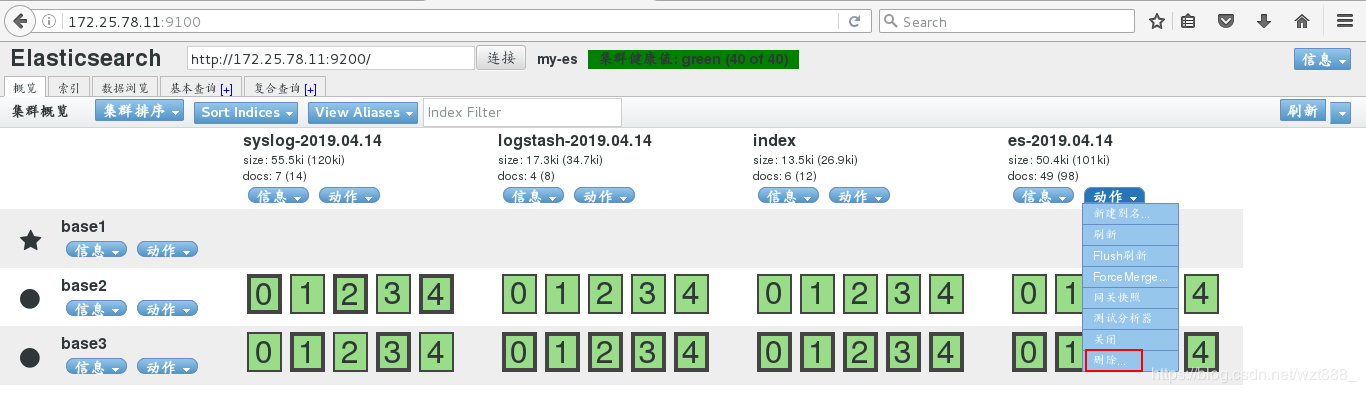
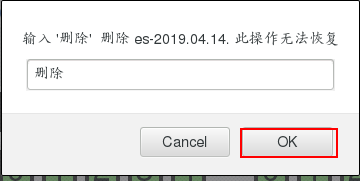

[root@base2 conf.d]# cd /usr/share/logstash/data/plugins/inputs/file/ # 只要索引创建,就会有隐藏文件来记录文件信息
[root@base2 file]# l. # 查看隐藏文件
. .. .sincedb_d5a86a03368aaadc80f9eeaddba3a9f5
[root@base2 file]# rm -fr .sincedb_d5a86a03368aaadc80f9eeaddba3a9f5 # 删除隐藏文件,即删除之前es索引创建的信息
[root@base2 file]# cd /etc/logstash/conf.d
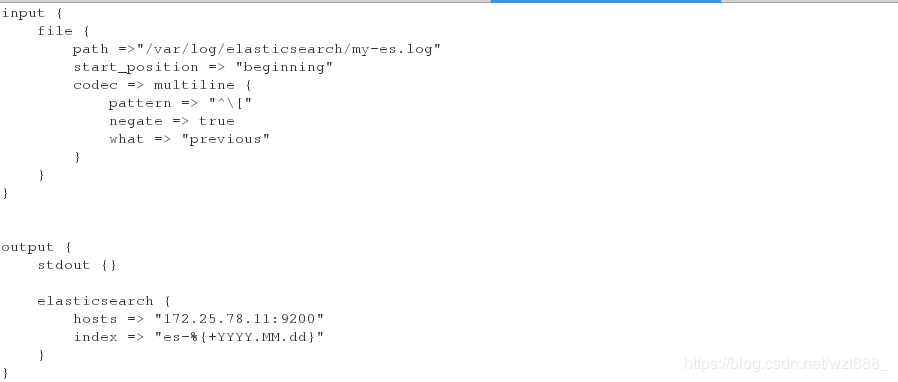
[root@base2 conf.d]# vim ex.conf # 重新编辑文件
input {
file {
path =>"/var/log/elasticsearch/my-es.log"
start_position => "beginning"
codec => multiline {
pattern => "^\["
negate => true
what => "previous"
}
}
}
output {
stdout {}
elasticsearch {
hosts => "172.25.78.11:9200"
index => "es-%{+YYYY.MM.dd}"
}
} 
[root@base2 conf.d]# /usr/share/logstash/bin/logstash -f /etc/logstash/conf.d/ex.conf 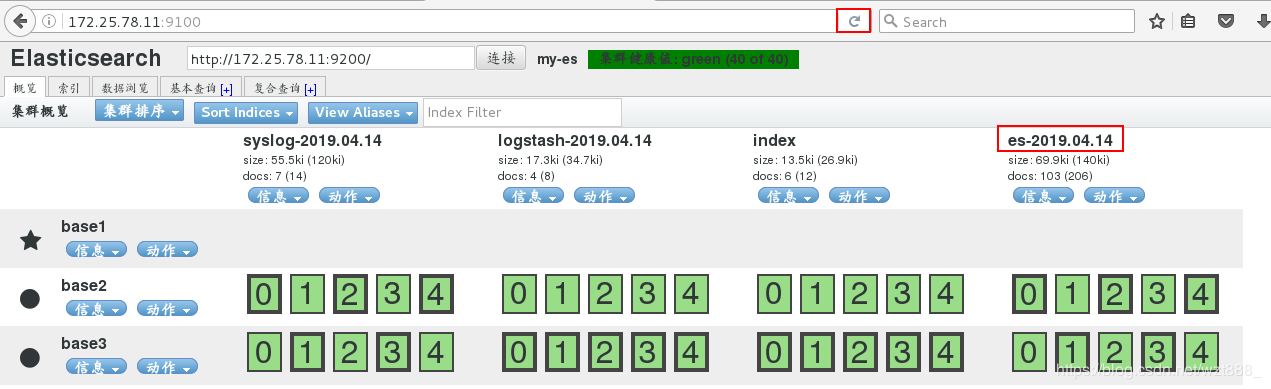

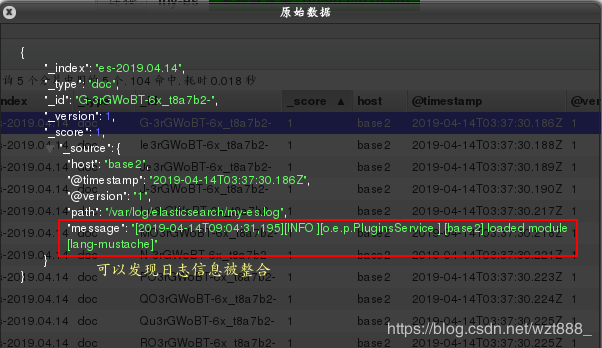
(4)数据格式化
我们先简单的部署以下,在终端看一下效果
[root@base2 conf.d]# vim test.conf
input {
stdin {}
}
filter {
grok {
match => { "message" => "%{IP:client} %{WORD:method} %{URIPATHPARAM:request} %{NUMBER:bytes} %{NUMBER:duration}"}
}
}
output {
stdout {}
} 
[root@base2 conf.d]# /usr/share/logstash/bin/logstash -f /etc/logstash/conf.d/test.conf 
以 httpd为例,格式化httpd的日志
[root@base2 conf.d]# yum install -y httpd
[root@base2 conf.d]# systemctl start httpd
[root@base2 conf.d]# vim /var/www/html/index.html
www.westos.org - httpd
[root@base2 conf.d]# ll /var/log/httpd/access_log
-rw-r--r-- 1 root root 10300 Apr 14 12:51 /var/log/httpd/access_log
[root@base2 conf.d]# ll -d /var/log/httpd/
drwx------ 2 root root 41 Apr 14 12:48 /var/log/httpd/
[root@base2 conf.d]# chmod 755 /var/log/httpd/
[root@base2 conf.d]# ll -d /var/log/httpd/
drwxr-xr-x 2 root root 41 Apr 14 12:48 /var/log/httpd/
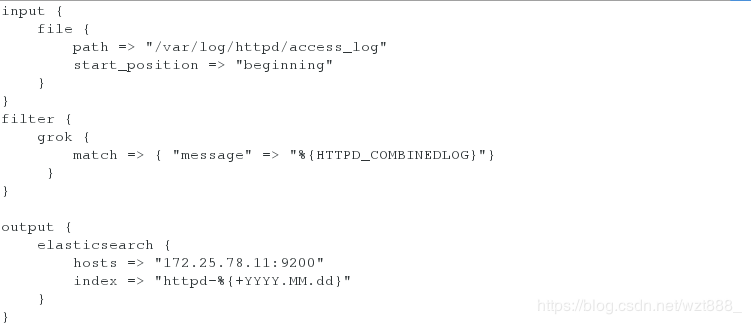
[root@base2 conf.d]# vim ex.conf
input {
file {
path => "/var/log/httpd/access_log" # 日志文件路径
start_position => "beginning"
}
}
filter {
grok {
match => { "message" => "%{HTTPD_COMBINEDLOG}"} # 这是httpd日志的输出格式
}
}
output {
elasticsearch {
hosts => "172.25.78.11:9200"
index => "httpd-%{+YYYY.MM.dd}" # 索引名称
}
}
[root@base2 conf.d]# /usr/share/logstash/bin/logstash -f /etc/logstash/conf.d/ex.conf
1
浏览器查看
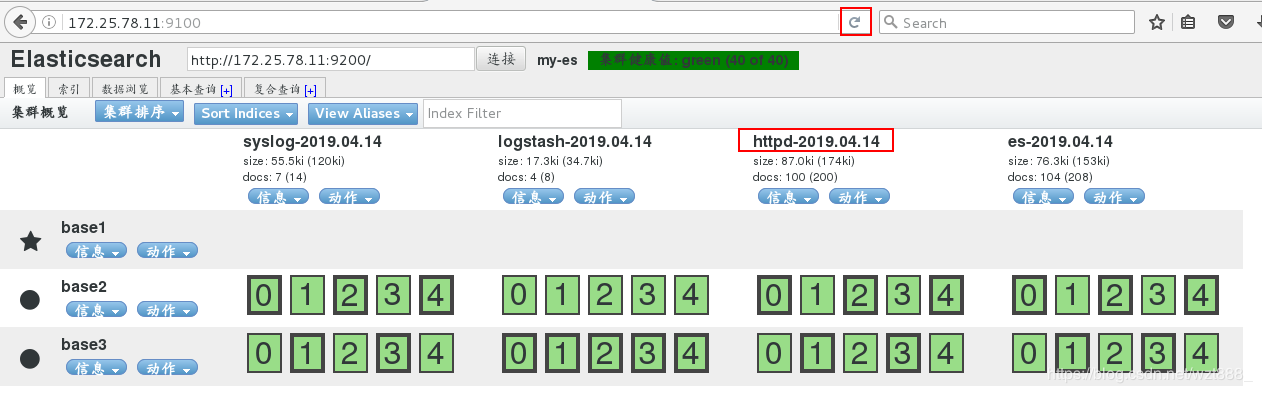
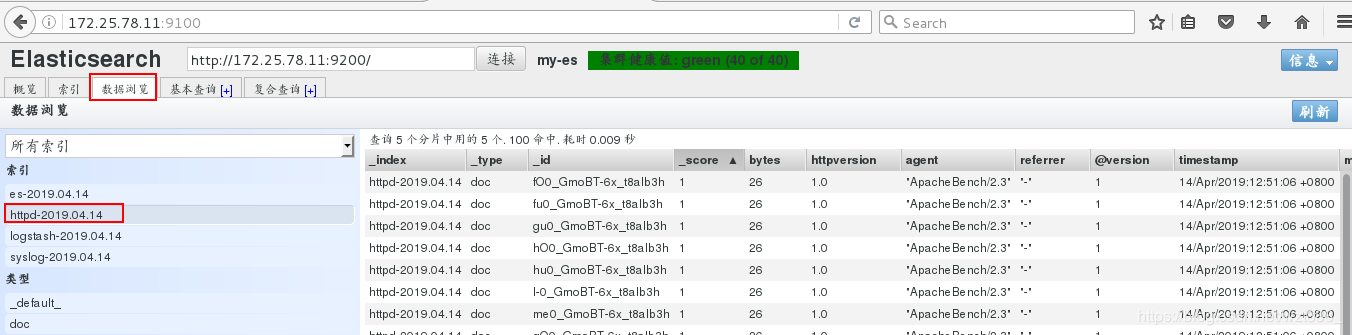
5.数据可视化
base1 172.25.78.11 master
base2 172.25.78.12 data节点
base3 172.25.78.13 data节点, kibana
[root@base3 ~]# ls
elasticsearch-6.6.1.rpm
jdk-8u181-linux-x64.rpm
kibana-6.6.1-x86_64.rpm
[root@base3 ~]# rpm -ivh kibana-6.6.1-x86_64.rpm
[root@base3 ~]# cd /etc/kibana/
[root@base3 kibana]# ls
kibana.yml
[root@base3 kibana]# vim kibana.yml
2 server.port: 5601
7 server.host: "172.25.78.13"
28 elasticsearch.hosts: ["http://172.25.78.11:9200"]
37 kibana.index: ".kibana"
[root@base3 kibana]# netstat -antlp | grep :5601 # 5601是kibana的端口号
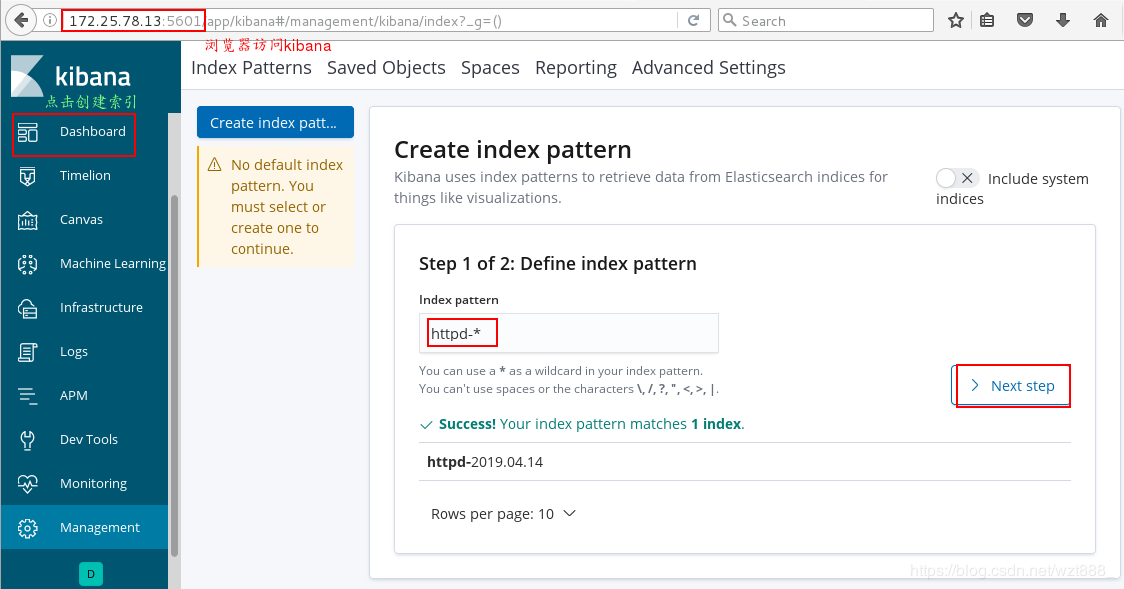
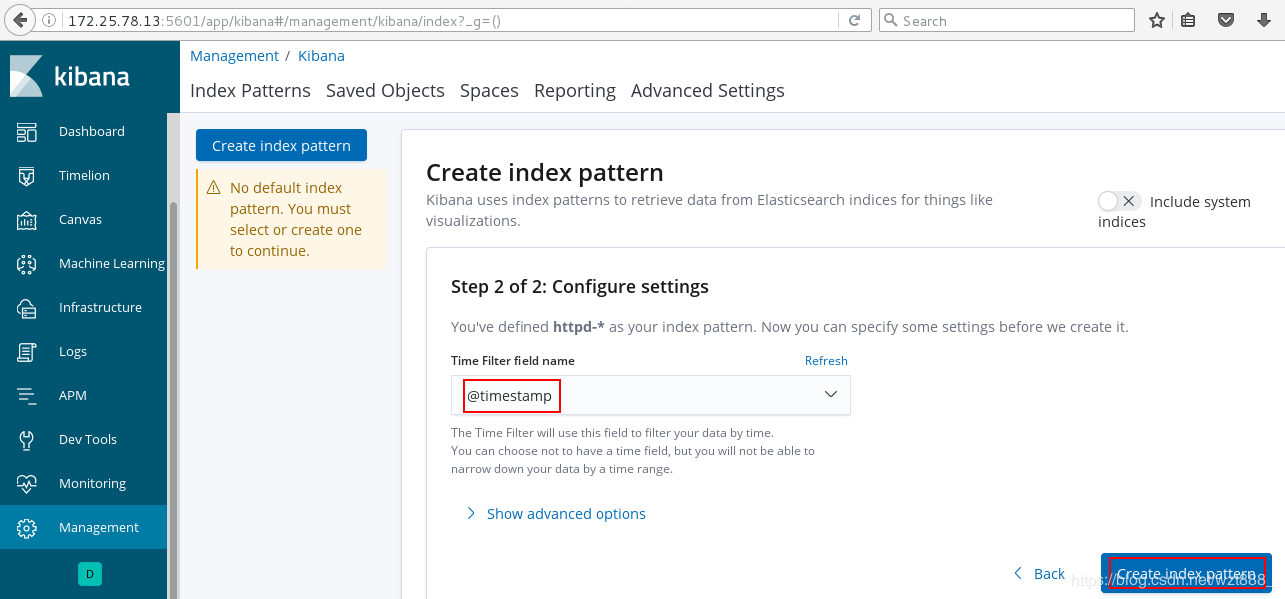
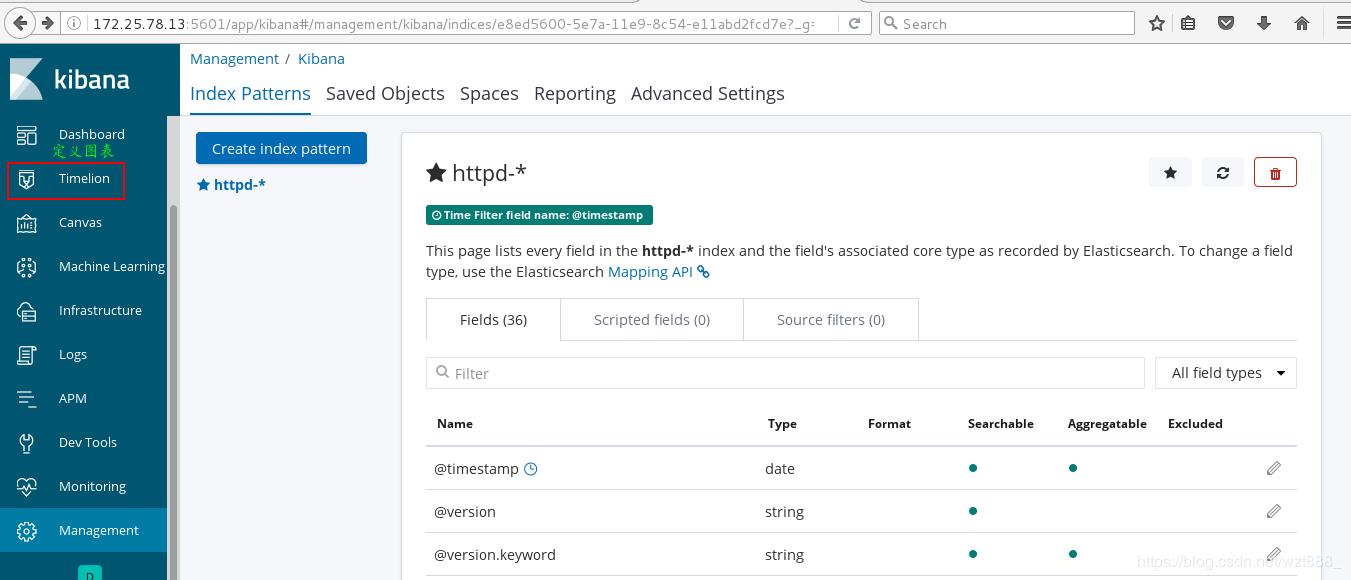
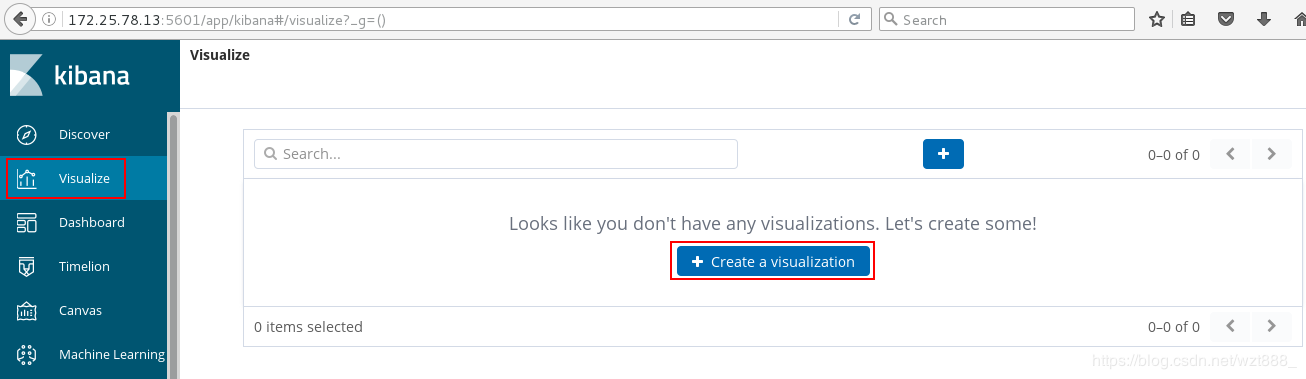


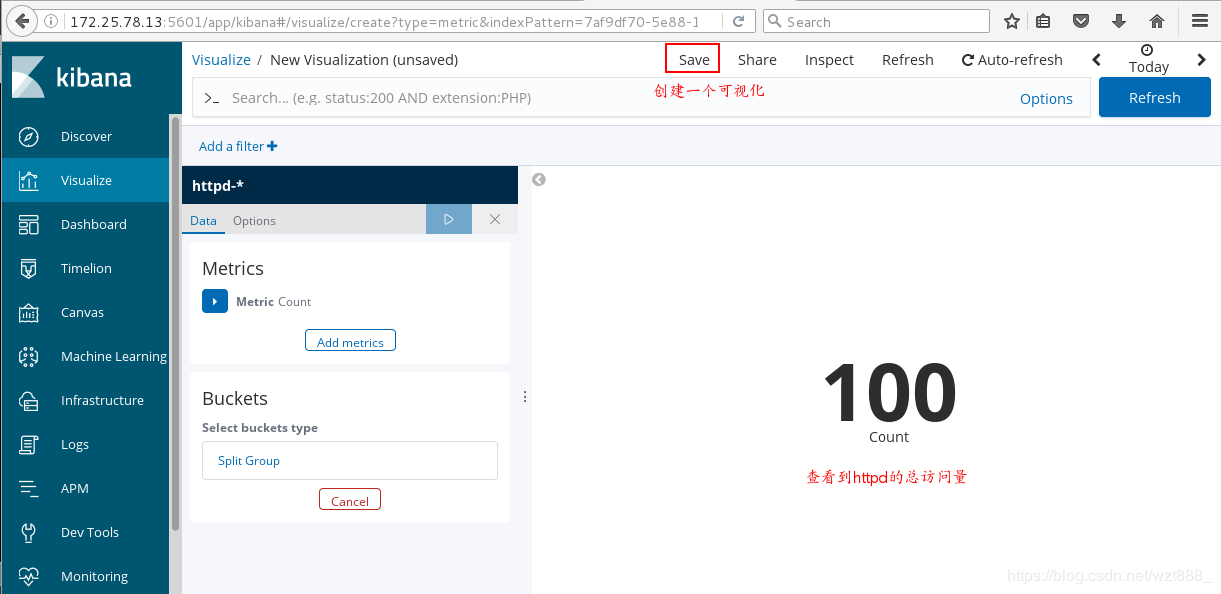
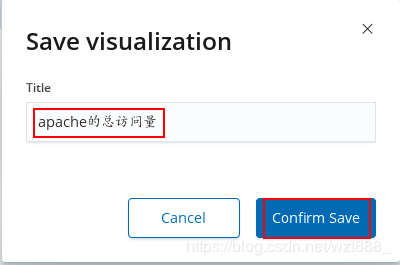
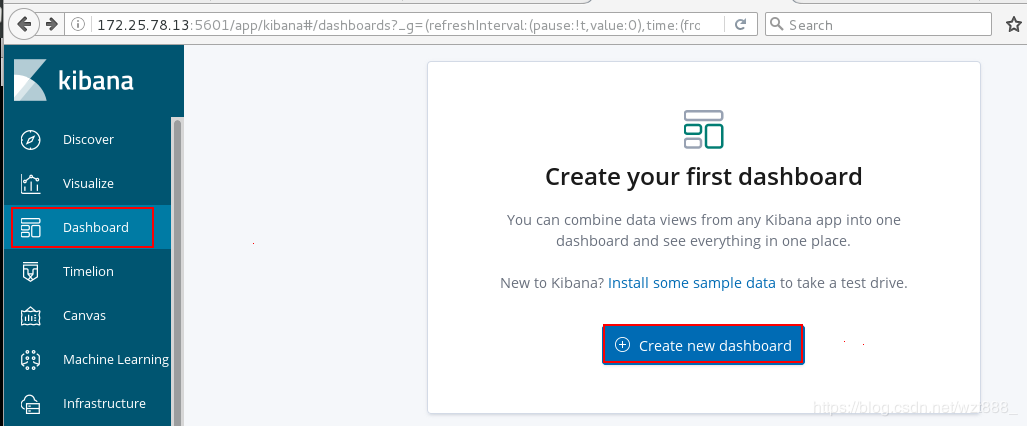

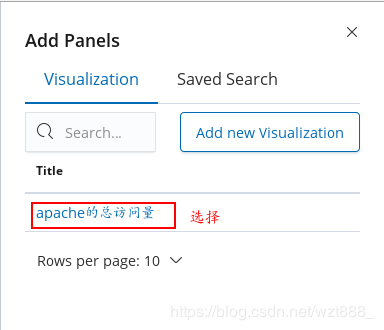
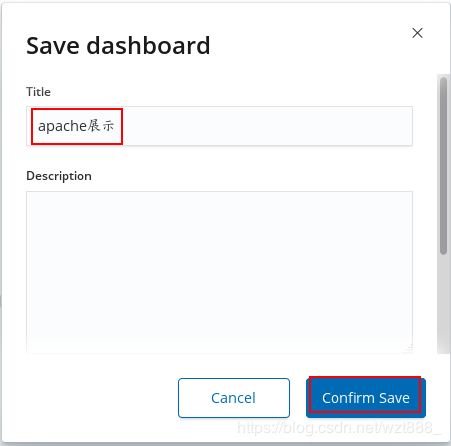
[root@base1 ~]# yum install -y httpd-tools
[root@base1 ~]# ab -c 1 -n 100 http://172.25.78.12/index.html
[root@base3 kibana]# yum install -y httpd-tools
[root@base3 kibana]# ab -c 1 -n 100 http://172.25.78.12/index.html
[root@base2 conf.d]# /usr/share/logstash/bin/logstash -f /etc/logstash/conf.d/ex.conf 


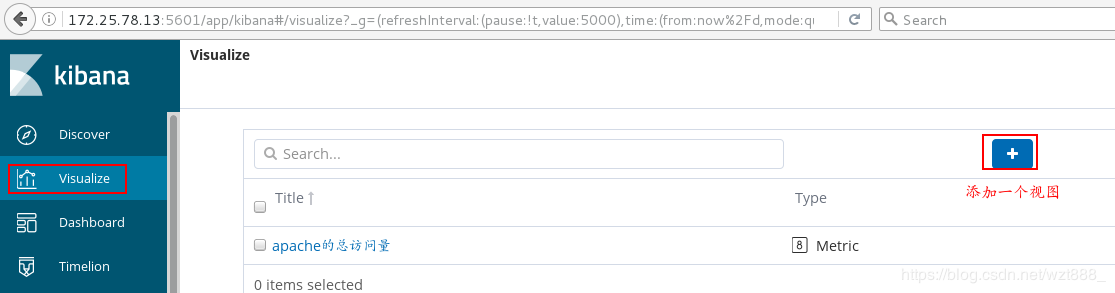
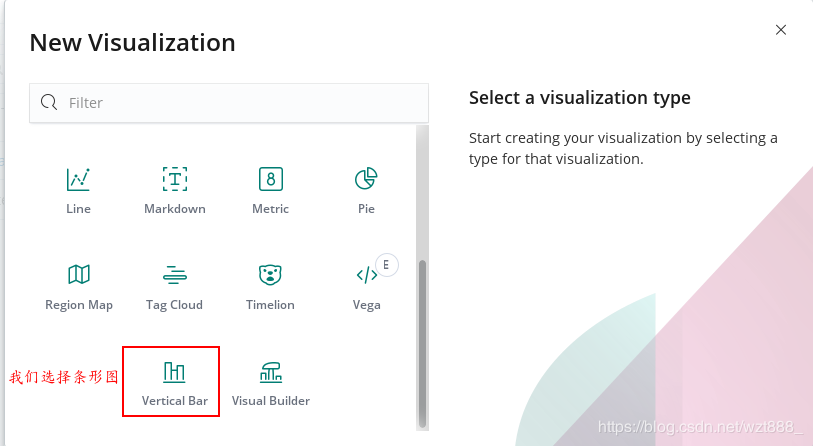
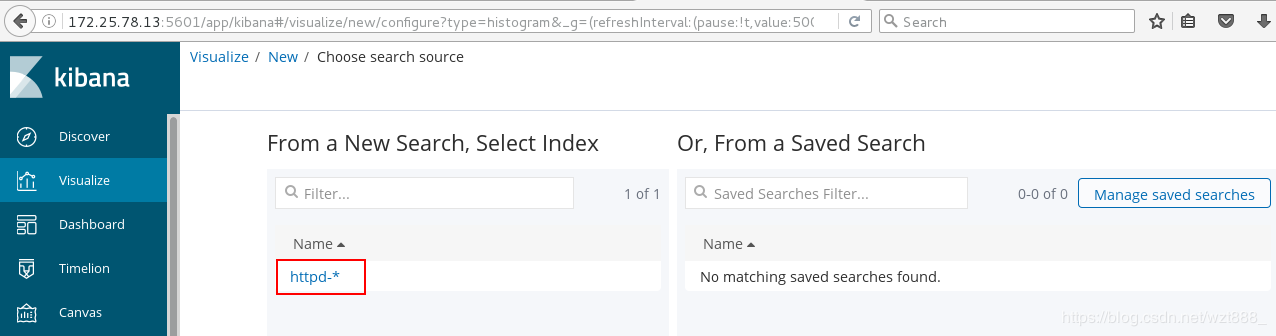
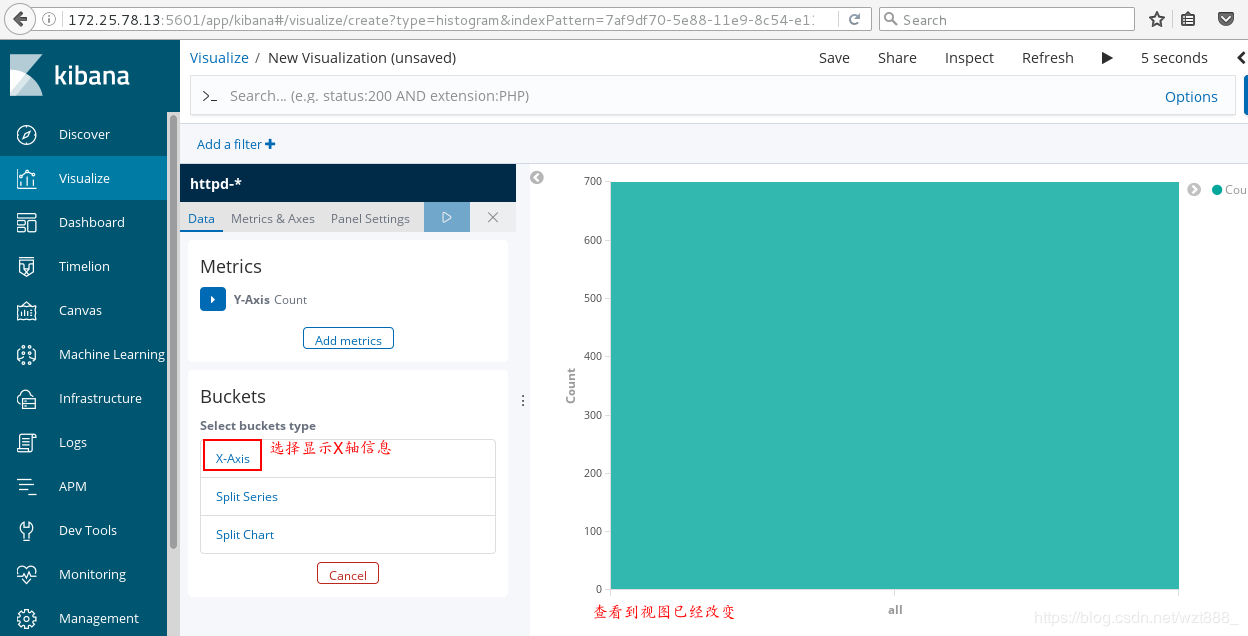
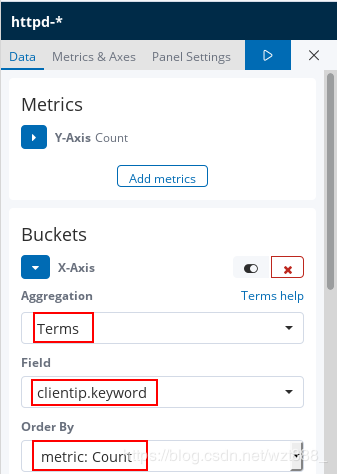
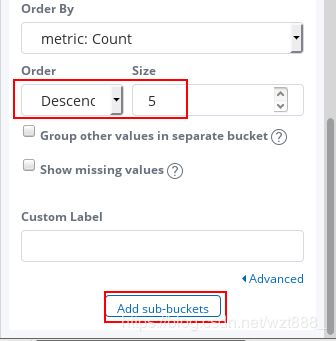
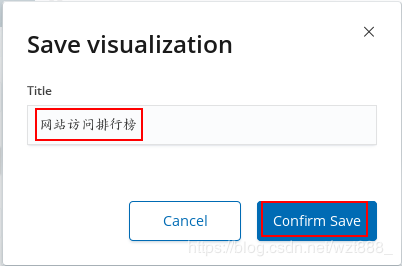
查看具体的访问来源



ELK实时日志分析平台环境部署,以及可视化展示的更多相关文章
- ELK实时日志分析平台环境部署--完整记录
在日常运维工作中,对于系统和业务日志的处理尤为重要.今天,在这里分享一下自己部署的ELK(+Redis)-开源实时日志分析平台的记录过程(仅依据本人的实际操作为例说明,如有误述,敬请指出)~ ==== ...
- ELK实时日志分析平台环境部署--完整记录(转)
在日常运维工作中,对于系统和业务日志的处理尤为重要.今天,在这里分享一下自己部署的ELK(+Redis)-开源实时日志分析平台的记录过程(仅依据本人的实际操作为例说明,如有误述,敬请指出)~ ==== ...
- ELK实时日志分析平台环境部署
为什么要用到ELK一般我们需要进行日志分析场景是:直接在日志文件中 grep.awk 就可以获得自己想要的信息.但在规模较大的场景中,此方法效率低下,面临问题包括日志量太大如何归档.文本搜索太慢怎么办 ...
- ELK实时日志分析平台环境部署--完整记录(ElasticSearch+Logstash+Kibana )
https://blog.csdn.net/oLevin/article/details/81020794
- asp.net core结合NLog搭建ELK实时日志分析平台
0.整体架构 整体架构目录:ASP.NET Core分布式项目实战-目录 一.介绍ELK 1.说明(此篇ELK采用rpm的方式安装在服务器上)-牛刀小试 承接上一篇文章的内容准备部署ELK来展示asp ...
- 手把手教你搭建 ELK 实时日志分析平台
本篇文章主要是手把手教你搭建 ELK 实时日志分析平台,那么,ELK 到底是什么呢? ELK 是三个开源项目的首字母缩写,这三个项目分别是:Elasticsearch.Logstash 和 Kiban ...
- elk实时日志分析平台部署搭建详细实现过程
原文:http://blog.csdn.net/mchdba/article/details/52132663 1.ELK平台介绍 在搜索ELK资料的时候,发现这篇文章比较好,于是摘抄一小段:以下内容 ...
- ELK日志分析平台环境部署 (yum安装)
前言:通常体质被分散存储在不同的设备上面,在庞大的服务器集群中,我们需要集中化的管理,日志的统计和检索,一般我们使用grep和awk,wc等linux命令虽然能够实现检索和统计,但是呢,对于要求更高的 ...
- ELK搭建实时日志分析平台之一ElasticSearch搭建
文:铁乐与猫 系统:CentOS Linux release 7.3.1611 (Core) 注:我这里为测试和实验方便,ELK整套都装在同一台服务器环境中了,生产环境的话,可以分开搭建在不同的服务器 ...
随机推荐
- VS2017 注册
Visual Studio 2017 序列号 Key 激活码 VS2017 注册码 Visual Studio 2017(VS2017) 企业版 Enterprise 注册码 序列号:NJVYC-BM ...
- EnumSet详细讲解
https://blog.csdn.net/tugangkai/article/details/89631886 之前介绍的Set接口的实现类HashSet/TreeSet,它们内部都是用对应的Has ...
- 干货分享 | 3个开发IoT项目的开源物联网平台
物联网(IoT)是帮助人工智能(AI)以更好的方式控制和理解事物的未来技术. 艾艺收集了一些最有名的物联网平台,帮助您以受控方式开发物联网项目.物联网平台是帮助设置和管理互联网连接设备的组件套件. 一 ...
- JVM 源码解读之 CMS 何时会进行 Full GC
t点击上方"涤生的博客",关注我 转载请注明原创出处,谢谢!如果读完觉得有收获的话,欢迎点赞加关注. 前言 本文内容是基于 JDK 8 在文章 JVM 源码解读之 CMS GC 触 ...
- 一、DES加密和解密
一.DES加密和解密 原文:http://www.jb51.net/article/51879.htm 还有其他文章 1 2 3 4 5 6 7 8 9 10 11 12 13 14 15 16 1 ...
- Hibernate 5.x 生成 SessionFactory 源码跟踪分析
我们要使用 Hibernate 的功能,首先需要读取 Hibernate 的配置文件,根据配置启动 Hibernate ,然后创建 SessionFactory. 创建 SessionFactory ...
- NumPy 之 存储文件和线性代数
import numpy as np File Input and Output NumPy is able to save and load data to and from disk either ...
- 【Spring Cloud】Spring Cloud之Spring Cloud Sleuth,分布式服务跟踪(1)
一.Spring Cloud Sleuth组件的作用 为微服务架构增加分布式服务跟踪的能力,对于每个请求,进行全链路调用的跟踪,可以帮助我们快速发现错误根源以及监控分析每条请求链路上的性能瓶颈等. 二 ...
- crontab 定时任务简单备份数据库
备份数据库/usr/local/mysql5.5/bin/mysqldump -uroot -p1234abcd wordpress >~/wordpress_20151206.sql 59 2 ...
- 图论篇2——最小生成树算法(kurskal算法&prim算法)
基本概念 树(Tree) 如果一个无向连通图中不存在回路,则这种图称为树. 生成树 (Spanning Tree) 无向连通图G的一个子图如果是一颗包含G的所有顶点的树,则该子图称为G的生成树. 生成 ...