
下载文件时HttpServletResponse设置响应头的Content-Disposition属性
Content-Disposition属性有两种类型
- inline :将文件内容直接显示在页面
- attachment:弹出对话框让用户下载
弹出对话框下载文件
resp.setHeader("Content-Disposition", "attachment; filename="+fileName);
web.xml
 <?xml version="1.0" encoding="UTF-8"?>

 <web-app xmlns:xsi="http://www.w3.org/2001/XMLSchema-instance"

     xmlns="http://java.sun.com/xml/ns/javaee"

     xsi:schemaLocation="http://java.sun.com/xml/ns/javaee

         http://java.sun.com/xml/ns/javaee/web-app_3_0.xsd"

     id="WebApp_ID" version="3.0">

   <display-name>DownloadDemo</display-name>

   <welcome-file-list>

     <welcome-file>index.jsp</welcome-file>

   </welcome-file-list>

   <servlet>

       <servlet-name>download</servlet-name>

       <servlet-class>com.qf.servlet.DownloadServlet2</servlet-class>

   </servlet>

   <servlet-mapping>

       <servlet-name>download</servlet-name>

       <url-pattern>/download</url-pattern>

   </servlet-mapping>

 </web-app>
servlet类
 public class DownloadServlet2 extends HttpServlet {

     @Override

     protected void doGet(HttpServletRequest req, HttpServletResponse resp) throws ServletException, IOException {

         //获取文件在tomcat下的路径

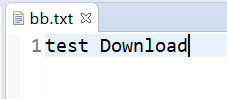
         String path = getServletContext().getRealPath("download/bb.txt");

         //让浏览器收到这份资源的时候, 以下载的方式提醒用户,而不是直接展示

         resp.setHeader("Content-Disposition", "attachment; filename=bb.txt");

         //转化成输入流

         InputStream is = new FileInputStream(path);

         OutputStream os = resp.getOutputStream();

         int len = 0;

         byte[] bts = new byte[1024];

         while ((len = is.read(bts)) != -1) {

             os.write(bts, 0, len);

         }

         os.close();

         is.close();

     }

     @Override

     protected void doPost(HttpServletRequest req, HttpServletResponse resp) throws ServletException, IOException {

         doGet(req, resp);

     }

 }
url:http://localhost:8080/DownloadDemo/download

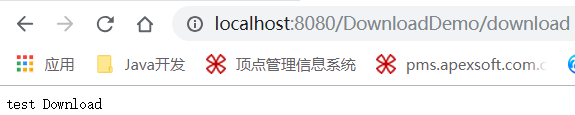
直接在浏览器页面打开文件
resp.setHeader("Content-Disposition", "inline; filename="+fileName);
修改servlet类
 public class DownloadServlet2 extends HttpServlet {

     @Override

     protected void doGet(HttpServletRequest req, HttpServletResponse resp) throws ServletException, IOException {

         //获取文件在tomcat下的路径

         String path = getServletContext().getRealPath("download/bb.txt");

         //让浏览器收到这份资源的时候, 以下载的方式提醒用户,而不是直接展示

         resp.setHeader("Content-Disposition", "inline; filename=bb.txt");

         //转化成输入流

         InputStream is = new FileInputStream(path);

         OutputStream os = resp.getOutputStream();

         int len = 0;

         byte[] bts = new byte[1024];

         while ((len = is.read(bts)) != -1) {

             os.write(bts, 0, len);

         }

         os.close();

         is.close();

     }

     @Override

     protected void doPost(HttpServletRequest req, HttpServletResponse resp) throws ServletException, IOException {

         doGet(req, resp);

     }

 }
下载文件时HttpServletResponse设置响应头的Content-Disposition属性的更多相关文章
- PHP 下载文件时自动添加bom头的方法
首先弄清楚,什么是bom头?在Windows下用记事本之类的程序将文本文件保存为UTF-8格式时,记事本会在文件头前面加上几个不可见的字符(EF BB BF),就是所谓的BOM(Byte order ...
- HttpServletResponse ServletResponse 返回响应 设置响应头设置响应正文体 重定向 常用方法 如何重定向 响应编码 响应乱码
HttpServletResponse 和 ServletResponse 都是接口 具体的类型对象是由Servlet容器传递过来 ServletResponse对象的功能分为以下四种: ...
- HttpServletResponse ServletResponse 返回响应 设置响应头设置响应正文体 重定向 常用方法 如何重定向 响应编码 响应乱码
原文地址:HttpServletResponse ServletResponse 返回响应 设置响应头设置响应正文体 重定向 常用方法 如何重定向 响应编码 响应乱码 HttpServletRespo ...
- 转载: 正确处理浏览器在下载文件时HTTP头的编码问题(Content-Disposition)
最近在做一个下载工具时,发现CSDN上的资源下载时竟然没有被拦截到,经过分析,终于有了一个发现,解决了我之前做文件下载时的乱码问题,所以转载这篇释疑文章,希望有人可以看到,可以从中得到帮助,也用来备忘 ...
- 正确处理下载文件时HTTP头的编码问题(Content-Disposition)
留坑 参考: 正确处理下载文件时HTTP头的编码问题(Content-Disposition) HTTP协议header中Content-Disposition中文文件名乱码 文件下载,content ...
- 下载文件时-修改文件名字 Redis在Windows中安装方法 SVN安装和使用(简单版) WinForm-SQL查询避免UI卡死 Asp.Net MVC Https设置
下载文件时-修改文件名字 1后台代码 /// <summary> /// 文件下载2 /// </summary> /// <param name="Fil ...
- Servlet:浏览器下载文件时文件名为乱码问题
1 protected void doGet(HttpServletRequest request, HttpServletResponse response) throws ServletExcep ...
- Firefox下载文件时中文名乱码问题
为了形象化,先看几张不同浏览器下下载文件时的效果图: 1:Firefox 36.0.1 2:IE8 3:Chrome 40.0.2214.93 m 4:360 7.1.1.322 很明显在Firefo ...
- 使用HttpURLConnection下载文件时出现 java.io.FileNotFoundException彻底解决办法
使用HttpURLConnection下载文件时经常会出现 java.io.FileNotFoundException文件找不到异常,下面介绍下解决办法 首先设置tomcat对get数据的编码:con ...
随机推荐
- 多线性方程组迭代算法——Jacobi迭代算法的Python实现
多线性方程(张量)组迭代算法的原理请看这里:若想看原理部分请留言,不方便公开分享 Gauss-Seidel迭代算法:多线性方程组迭代算法——Gauss-Seidel迭代算法的Python实现 impo ...
- rabbitmq-5-案例1-简单的案例
最简单的案例: https://gitee.com/n_zhe/rabbitmq-demo 通过简单的例子分析mq是怎样发送和拉取消息的: quickStart中的简单案例 通过简单的案例来 ...
- Python基础篇(初始函数)
Python初始函数: 一.什么是函数 1.我们到目前为止, 已经可以完成一些软件的基础功能了. 那么我们来完成这样一个功 能: 约x: print("拿出手机") print(& ...
- js非数值的比较
/** * 非数值的比较: * 1.对于非数值的比较时,会将其转换成数字然后再比较 * 2.如果符号两端是字符串的值进行比较时,不会将其转换为数字进行比较,而是 * 分别比较字符串中的字符的 unic ...
- 二、bootstrap缩略图幅
一.bootstrap缩略图幅
- 【转】SQLSERVER磁盘原理
[声明:本篇博客转载自http://www.cnblogs.com/ljhdo/p/5149401.html] 最近一段时间的工作主要是与SQLSERVER数据库打交道,需要对SQLSERVER有一个 ...
- Python3.5-20190516-廖老师-自我笔记-匿名函数-装饰器
当函数很简单的时候采用匿名函数很方便.
- idea spring boot搭建笔记
如何建立spring boot项目 首先建一个empty Probject,Modules导入新创建的Project new modules选择Spring lnitializr ->next( ...
- Qt QSS图片样式切割,三种状态normal,hover,pressed
要切割的样式图片如下: pix_Button->setStyleSheet("QPushButton{ border-image:url(:/image/MyButtonimage/m ...
- Linux eth0, eth1, ..., eth%d 的生成【转】
转自:https://blog.csdn.net/xiruanliuwei/article/details/78765255 一直很好奇,Linux下的eth0, eth1,eth2等是如何生成的~ ...