
Oracle 口令文件:即 oracle密码文件
一:文件路径位置
[oracle@localhost db_1]$ cd $ORACLE_HOME/dbs

[oracle@localhost dbs]$ ls

dbsorapwPROD1   hc_orcl.dat   initneworcl.ora  initorcl.ora   lkNEWORCL  lkPROD1  orapwneworcl  spfileorcl.ora   tem.dbf

hc_neworcl.dat  hc_PROD1.dat  init.ora         initPROD1.ora  lkORCL     my.dbf   orapworcl     spfilePROD1.ora

[oracle@localhost dbs]$ pwd

/u01/app/oracle/product/11.2.0/db_1/dbs

[oracle@localhost dbs]$

二、口令文件的命名规则
orapw+sid

如:

orapworcl

三、口令文件存放的是sys
主要是存放管理用户的密码信息的
四:实验操作
注: remote_login_passwordfile 是静态参数。修改了该值之后,数据库需要重启。
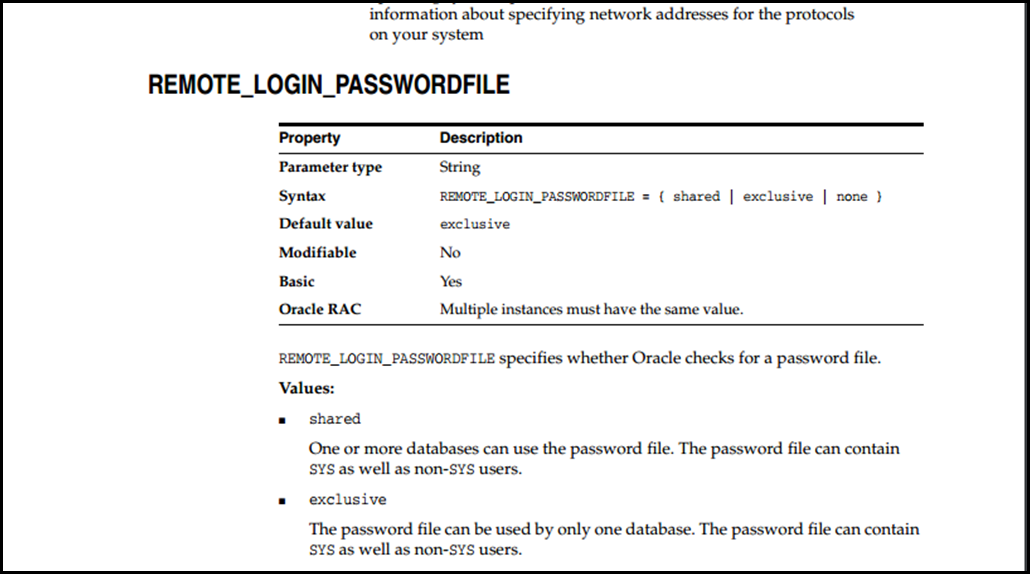

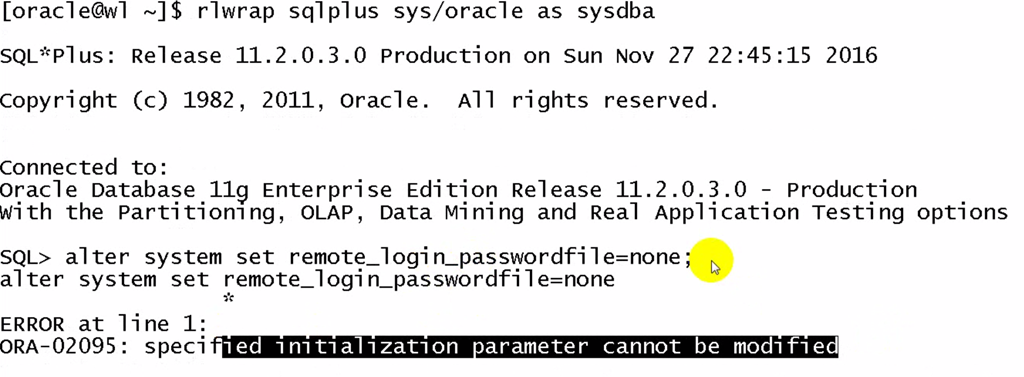

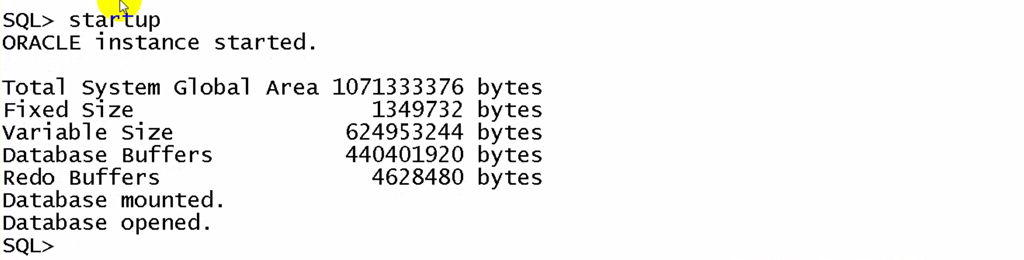
1)当remote_login_passwordfile 是 EXCLUSIVE
2)当remote_login_passwordfile是 EXCLUSIVE
    sqlnet.ora文件参数     SQLNET.AUTHENTICATION_SERVICES=none

    sqlplus sys/oracle as sysdba  成功

   sqlplus / as sysdba           不成功

   sqlplus sys/oracle@togogo as sysdba   成功
[oracle@localhost dbs]$ clear [oracle@localhost dbs]$ ls
dbsorapwPROD1 hc_orcl.dat initneworcl.ora initorcl.ora lkNEWORCL lkPROD1 orapwneworcl spfileorcl.ora tem.dbf
hc_neworcl.dat hc_PROD1.dat init.ora initPROD1.ora lkORCL my.dbf orapworcl spfilePROD1.ora
[oracle@localhost dbs]$ cd ../network/
[oracle@localhost network]$ ls
admin doc install jlib lib log mesg tools trace
[oracle@localhost network]$ ca admin/
-bash: ca: command not found
[oracle@localhost network]$ ls
admin doc install jlib lib log mesg tools trace
[oracle@localhost network]$ cd admin/
[oracle@localhost admin]$ ls
listener.ora samples shrept.lst sqlnet.ora tnsnames.ora
[oracle@localhost admin]$ cat sqlnet.ora
ENCRYPTION_WALLET_LOCATION=(SOURCE=(METHOD=FILE)(METHOD_DATA=(DIRECTORY=$ORACLE_BASE/admin/$ORACLE_SID/wallet/)))
[oracle@localhost admin]$ vi sqlnet.ora ENCRYPTION_WALLET_LOCATION=(SOURCE=(METHOD=FILE)(METHOD_DATA=(DIRECTORY=$ORACLE_BASE/admin/$ORACLE_SID/wallet/)))
SQLNET.AUTHENTICATION_SERVICES=none ~
~
~
~
~
~
~
~
~
~
~
~
~
~
~
~
~
~
~
~
~
~
"sqlnet.ora" 4L, 152C written
[oracle@localhost admin]$ cat sqlnet.ora
ENCRYPTION_WALLET_LOCATION=(SOURCE=(METHOD=FILE)(METHOD_DATA=(DIRECTORY=$ORACLE_BASE/admin/$ORACLE_SID/wallet/)))
SQLNET.AUTHENTICATION_SERVICES=none [oracle@localhost admin]$ pwd
/u01/app/oracle/product/11.2.0/db_1/network/admin
[oracle@localhost admin]$[oracle@localhost admin]$ rlwrap sqlplus / as sysdba; SQL*Plus: Release 11.2.0.3.0 Production on Sat Jun 23 16:01:36 2018 Copyright (c) 1982, 2011, Oracle. All rights reserved. ERROR:
ORA-01031: insufficient privileges Enter user-name:
ERROR:
ORA-01017: invalid username/password; logon denied Enter user-name:
ERROR:
ORA-01017: invalid username/password; logon denied SP2-0157: unable to CONNECT to ORACLE after 3 attempts, exiting SQL*Plus
[oracle@localhost admin]$ rlwrap sqlplus sys/oracle as sysdba; SQL*Plus: Release 11.2.0.3.0 Production on Sat Jun 23 16:02:40 2018 Copyright (c) 1982, 2011, Oracle. All rights reserved. Connected to:
Oracle Database 11g Enterprise Edition Release 11.2.0.3.0 - Production
With the Partitioning, OLAP, Data Mining and Real Application Testing options SYS@orcl>
3)当remote_login_passwordfile是 EXCLUSIVE
4)当remote_login_passwordfile是 none 没有sqlnet.ora文件
5)当remote_login_passwordfile是 none
6)当remote_login_passwordfile是 none
五、创建口令文件
orapwd file=口令文件名称 password=用户密码Creating a Password File with ORAPWD
The syntax of the
ORAPWDcommand is as follows:ORAPWD FILE=filename [ENTRIES=numusers] [FORCE={Y|N}] [IGNORECASE={Y|N}]Command arguments are summarized in the following
table.
Argument Description FILEName to assign to the
password file. You must supply a complete path. If you supply only a file name,
the file is written to the current directory.ENTRIES(Optional) Maximum
number of entries (user accounts) to permit in the file.FORCE(Optional)
Ify, permits
overwriting an existing password file.IGNORECASE(Optional)
Ify,
passwords are treated as
case-insensitive.There are no spaces permitted around the equal-to (=)
character.The command prompts for the
SYSpassword and stores the password in the created
password file.Example
The following command creates a password file
namedorapworclthat
allows up to 30 privileged users with different passwords.orapwd FILE=orapworcl ENTRIES=30Sharing and Disabling the Password File
You use the
initialization parameterREMOTE_LOGIN_PASSWORDFILEto
control whether a password file is shared among multiple Oracle Database
instances. You can also use this parameter to disable password file
authentication. The values recognized forREMOTE_LOGIN_PASSWORDFILEare:
NONE:
Setting this parameter toNONEcauses Oracle Database to behave as if the password
file does not exist. That is, no privileged connections are allowed over
nonsecure connections.
EXCLUSIVE:
(The default) AnEXCLUSIVEpassword file can be used with only one instance of one
database. Only anEXCLUSIVEfile
can be modified. Using anEXCLUSIVEpassword file enables you to add, modify, and delete
users. It also enables you to change theSYSpassword with theALTER USERcommand.
SHARED:
ASHAREDpassword file can be used by multiple databases running
on the same server, or multiple instances of an Oracle Real Application Clusters
(Oracle RAC) database. ASHAREDpassword file cannot be modified. Therefore, you cannot
add users to aSHAREDpassword file. Any attempt to do so or to change the
password ofSYSor
other users with theSYSDBAorSYSOPERprivileges generates an error. All users
needingSYSDBAorSYSOPERsystem privileges must be added to the password file
whenREMOTE_LOGIN_PASSWORDFILEis
set toEXCLUSIVE.
After all users are added, you can changeREMOTE_LOGIN_PASSWORDFILEtoSHARED, and
then share the file.This option is useful if you are administering multiple
databases or an Oracle RAC database.If
REMOTE_LOGIN_PASSWORDFILEis
set toEXCLUSIVEorSHAREDand
the password file is missing, this is equivalent to settingREMOTE_LOGIN_PASSWORDFILEtoNONE.Note:
You cannot change the password for
SYSifREMOTE_LOGIN_PASSWORDFILEis
set toSHARED. An
error message is issued if you attempt to do so.Keeping
Administrator Passwords Synchronized with the Data DictionaryIf you change the
REMOTE_LOGIN_PASSWORDFILEinitialization parameter fromNONEtoEXCLUSIVEorSHARED, or
if you re-create the password file with a differentSYSpassword, then you must ensure that the passwords in
the data dictionary and password file for theSYSuser
are the same.To synchronize the
SYSpasswords, use theALTER USERstatement to change theSYSpassword. TheALTER USERstatement updates and synchronizes both the dictionary
and password file passwords.To synchronize the passwords for non-
SYSusers who log in using theSYSDBAorSYSOPERprivilege, you must revoke and then regrant the
privilege to the user, as follows:
Find
all users who have been granted theSYSDBAprivilege.SELECT USERNAME FROM V$PWFILE_USERS WHERE USERNAME != 'SYS' AND SYSDBA='TRUE';Revoke
and then re-grant theSYSDBAprivilege to these users.REVOKE SYSDBA FROM non-SYS-user;
GRANT SYSDBA TO non-SYS-user;Find
all users who have been granted theSYSOPERprivilege.SELECT USERNAME FROM V$PWFILE_USERS WHERE USERNAME != 'SYS' AND SYSOPER='TRUE';Revoke
and regrant theSYSOPERprivilege to these users.REVOKE SYSOPER FROM non-SYS-user;
GRANT SYSOPER TO non-SYS-user;Adding Users to a Password File
When you grant
SYSDBAorSYSOPERprivileges to a user, that user's name and privilege
information are added to the password file. If the server does not have
anEXCLUSIVEpassword file (that is, if the initialization
parameterREMOTE_LOGIN_PASSWORDFILEisNONEorSHARED, or
the password file is missing), Oracle Database issues an error if you attempt to
grant these privileges.A user's name remains in the password file only as long
as that user has at least one of these two privileges. If you revoke both of
these privileges, Oracle Database removes the user from the password
file.Creating a
Password File and Adding New Users to ItUse the following procedure to create a password and
add new users to it:
Follow the instructions for creating a password file as
explained in "Creating a Password File with ORAPWD".Set the
REMOTE_LOGIN_PASSWORDFILEinitialization parameter toEXCLUSIVE.
(This is the default.)Note:
REMOTE_LOGIN_PASSWORDFILEis a
static initialization parameter and therefore cannot be changed without
restarting the database.Connect with
SYSDBAprivileges as shown in the following example, and enter
theSYSpassword when prompted:CONNECT SYS AS SYSDBAStart up the instance and create the database if
necessary, or mount and open an existing database.Create users as necessary. Grant
SYSDBAorSYSOPERprivileges to yourself and other users as appropriate.
See "Granting and Revoking SYSDBA and SYSOPER Privileges",
later in this section.
——————————————————————————————————————————————————————————————————
Oracle 口令文件:即 oracle密码文件的更多相关文章
- Oracle登录操作系统验证和密码文件验证
1.确认数据库版本 2.查看当前配置文件 ORALCE数据库不同的登录验证方式是和SQLNET.ORA配置文件有关系的,在配置文件中有一个参数sqlnet.authentication_service ...
- oracle 密码文件文件
密码文件作用: 密码文件用于dba用户的登录认证. dba用户:具备sysdba和sysoper权限的用户,即oracle的sys和system用户. 本地登录: 1)操作系统认证: [oracle@ ...
- Oracle 密码文件
一.密码文件 作用:主要进行DBA权限的身份认证 DBA用户:具有sysdba,sysoper权限的用户被称为dba用户.默认情况下sysdba角色中存在sys用户,sysoper角色中存在syste ...
- 创建oracle 密码文件
orapwd file='$ORACLE_HOME/dbs/oratest' password=oracle entries=5 force=y; 说明:●FILE参数指定口令文件存放的全路径及文件名 ...
- 【Oracle】密码文件相关
Oracle数据库的orapwd命令,主要用来建立密码(口令)文件. 一.查看帮助信息 [oracle@oracle11g dbs]$ orapwd Usage: orapwd file=<fn ...
- oracle ORA-01991错误--重建密码文件问题
问题现象描述: 统计服务器测试没问题,刚好上次配置系统的时候有点问题,故重装一次,配置好安全策略(最近在研究如何新配置一台服务器的时候,第一时间配置好相关的安全设置,有空再写下来). 为了省事,直接冷 ...
- oracle口令文件在windows和linux系统下的命名和位置
分类: Oracle 1.windows系统下 oracle口令文件在:$ORACLE_HOME/database目录下: 命名规则为:PWD$SID.ora 2.linux系统下 oracl ...
- Oracle 无备份情况下的恢复--密码文件/参数文件
13.1 恢复密码文件 密码文件(linux 为例)在$ORACLE_HOME/dbs目录下,文件名的前缀是orapw,后接数据库实例名. [oracle@DSI backup]$ cd /u01/a ...
- Oracle 12C 密码文件问题 ORA-01017: invalid username/password; logon denied
新安装的Oracle 12.1.0.2.0,NBU在测试备份的时候报ORA-01017 --alter user sys identified by "Wwjd!23";sqlpl ...
随机推荐
- 【python小练】0000
第 0000 题:将你的 QQ 头像(或者微博头像)右上角加上红色的数字,类似于微信未读信息数量那种提示效果. 类似于图中效果 from PIL import Image, ImageDraw, Im ...
- Session 快速开始 通过session的attribute通信
[web.xml] <session-config> <session-timeout>30</session-timeout> <cookie-config ...
- 【bzoj 2049】Cave 洞穴勘测
Description 辉辉热衷于洞穴勘测.某天,他按照地图来到了一片被标记为JSZX的洞穴群地区.经过初步勘测,辉辉发现这片区域由n个洞穴(分别编号为1到n)以及若干通道组成,并且每条通道连接了恰好 ...
- 使用PHP+MySql+Ajax+jQuery实现省市区三级联动功能
使用PHP+MySql+Ajax+jQuery实现省市区三级联动功能 要求:写一个省市区(或者年月日)的三级联动,实现地区或时间的下拉选择. 实现技术:php ajax 实现:省级下拉变化时市下拉区下 ...
- cuda、cuDNN的相关内容
1.nvidia与cuda需要满足关系: https://docs.nvidia.com/cuda/cuda-toolkit-release-notes/index.html/ 2.cuda与cudn ...
- VM4061 layui.js:2 Layui hint: form is not a valid module
报错:VM4061 layui.js:2 Layui hint: form is not a valid module 解决办法:当你遇到类似这样报错,说某某某不是一个有效的模块时,不防在layui. ...
- Python之线程 1 - 线程基本概念
一 背景知识 1.进程 2.有了进程为什么还要线程 3.线程的出现 二 线程和进程的关系 三 线程的特点 四 线程的实际应用场景 五 内存中的线程 六 用户级线程和内核级线程(了解) 1.用户级线程 ...
- 自定义函数hello,并注册到hive源码中并重新编译
1 编写自己的udf方法hello package cn.zhangjin.hive.udf; import org.apache.hadoop.hive.ql.exec.Description; i ...
- 前端向服务器请求数据并渲染的方式(ajax/jQuery/axios/vue)
原理: jQuery的ajax请求:complete函数一般无论服务器有无数据返回都会显示(成功或者失败都显示数据): return result
- python 的基础学习 第九天 文件的操作
1,文件操作 参数:1,文件路径 2,编码方式,3,执行动作(打开方式),只读,只写,,读写,追加和读写. 1 打开文件,得到文件句柄并赋值给一个变量.2. 通过句柄对文件进行操作.3. 关闭文件 ...