
excel 中怎么让两列姓名相同排序(转)
如图,A列B列不动,C列和D列行值不变,以A列姓名为主让C列姓名和A列相同姓名的对齐(行),D行跟着C行不变。
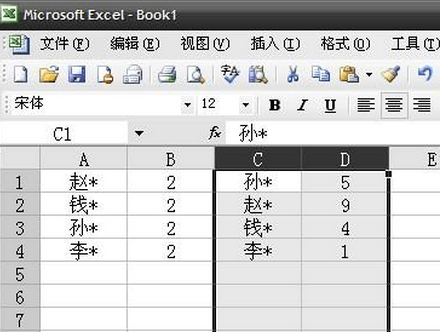
在E1输入公式=MATCH(C1,A:A,0)然后下拉,接著选中C,D,E列,以E列为标准升序排列即可
转自:https://wenku.baidu.com/view/b7f6198058fb770bf68a5559.html
pandas实现方法:
 #! /usr/bin/env python

 #-*- coding:utf8 -*-

 import pandas as pd

 from pandas import DataFrame

 import  numpy as np

 pd.set_option('display.height',10000)

 pd.set_option('display.max_rows',5000)

 pd.set_option('display.max_columns',5000)

 pd.set_option('display.width',10000)

 df = pd.read_excel(r"F:\test.xlsx")

 col_n = ['C','D']

 col_A = ['A','B']

 CD = pd.DataFrame(df,columns = col_n)

 AB = pd.DataFrame(df,columns = col_A)

 # print(CD)

 # print(AB)

 fi =pd.merge(AB,CD,left_on='A',right_on='C',how='left')

 print(fi)

 zn=fi[fi.isnull().values==True]

 print(zn.fillna(0))
改进版
 #! /usr/bin/env python

 #-*- coding:utf8 -*-

 import pandas as pd

 from locale import *

 from pandas import DataFrame

 import  numpy as np

 writer = pd.ExcelWriter('output.xlsx')

 pd.set_option('display.height',10000)

 pd.set_option('display.max_rows',5000)

 pd.set_option('display.max_columns',5000)

 pd.set_option('display.width',10000)

 df = pd.read_excel(r"F:\test.xlsx", thousands=',')

 print(df.info())

 # df = pd.read_excel(r"F:\test.xlsx")

 col_A = ['A','B']

 col_n = ['C','D']

 print(df)

 AB = pd.DataFrame(df,columns = col_A)

 CD = pd.DataFrame(df,columns = col_n)

 fi =pd.merge(AB,CD,left_on='A',right_on='C',how='left')

 # fi['E']=fi.apply(lambda x: (x['D'] - x['B'])/x['D']*100, axis=1).round(2)

 # fi['E']=fi.apply(lambda x: format((x['D'] - x['B'])/x['D'],'.2%'), axis=1)

 # fi['E']=(fi.D-fi.B)

 # fi['F']=((fi.D-fi.B)/fi.D*100)

 fi=fi.assign(E=fi.B-fi.D,F=((fi.B-fi.D)/fi.B)*100).round(2)

 # fi=fi.assign(E=fi.B-fi.D,F=((fi.B-fi.D)/fi.B))

 def number_to_flag(number):

     if number > 0:

         return '↑'

     elif number == 0:

         return '='

     else:

         return '↓'

 fi =fi.sort_values(by=['F'],ascending=False) #升序

 fi['G'] =fi['F'].map(number_to_flag)

 fi['E'] = fi['E'].astype('str').str.replace("-","")

 fi['F'] = fi['F'].astype('str').str.replace("-","")

 fi['F'] = fi.F + '%'

 fi=fi.dropna(axis=0)

 fi=fi[ ~ fi['F'].str.contains('0.0') ]

 fi['E'] = fi['E'].astype('float64')

 print(fi)

 print(fi.dtypes)

 fi.to_excel(writer)

 writer.save()
最终版
 #! /usr/bin/env python

 #-*- coding:utf8 -*-

 import sys

 reload(sys)

 sys.setdefaultencoding('gbk')

 from locale import *

 from pandas import DataFrame

 import pandas as pd

 import  numpy as np

 writer = pd.ExcelWriter('output.xlsx')

 pd.set_option('display.height',10000)

 pd.set_option('display.max_rows',5000)

 pd.set_option('display.max_columns',5000)

 pd.set_option('display.width',10000)

 df = pd.read_excel(r"F:\test.xlsx")

 pd.options.display.float_format = '{:,}'.format

 print(df.info())

 # df = pd.read_excel(r"F:\test.xlsx")

 col_A = ['A','B']

 col_n = ['C','D']

 AB = pd.DataFrame(df,columns = col_A)

 CD = pd.DataFrame(df,columns = col_n)

 fi =pd.merge(AB,CD,left_on='A',right_on='C',how='left')

 # fi['E']=fi.apply(lambda x: (x['D'] - x['B'])/x['D']*100, axis=1).round(2)

 # fi['E']=fi.apply(lambda x: format((x['D'] - x['B'])/x['D'],'.2%'), axis=1)

 # fi['E']=(fi.D-fi.B)

 # fi['F']=((fi.D-fi.B)/fi.D*100)

 fi=fi.assign(E=fi.B-fi.D,F=((fi.B-fi.D)/fi.B)*100).round(2)

 # fi=fi.assign(E=fi.B-fi.D,F=((fi.B-fi.D)/fi.B))

 def number_to_flag(number):

     if number > 0:

         return '↓'

     elif number == 0:

         return '='

     else:

         return '↑'

 fi =fi.sort_values(by=['F'],ascending=False) #升序

 fi['G'] =fi['F'].map(number_to_flag)

 fi['E'] = fi['E'].astype('str').str.replace("-","")

 fi['F'] = fi['F'].astype('str').str.replace("-","")

 fi['F'] = fi.F + '%'

 fi=fi.dropna(axis=0)

 fi=fi[ ~ fi['F'].str.contains('0.0') ]

 fi['E'] = fi['E'].astype('float64')

 fi['B'] = fi['B'].astype('float64')

 print(fi)

 # print(fi.dtypes)

 fi.to_excel(writer)

 writer.save()

 # fi.to_html('files.html',escape=False,index=False,sparsify=True,border=1,index_names=False,header=True)
excel 中怎么让两列姓名相同排序(转)的更多相关文章
- excel 快速比对两列数据差异
excel 快速比对两列数据差异 CreateTime--2018年5月31日11:19:35 Author:Marydon 1.情景展示 找出两列数据的差异 2.具体操作 方式一:使用条件格式 ...
- 在EXCEL中如何让一列数字变成文本格式?就是想让单元格的左上角变一个绿绿的?
如何在EXCEL中如何让一列数字变成文本格式?就是想让单元格的左上角变一个绿绿的? 解决方案:将整列单元格格式设为文本,然后,选中该列,数据--分列--完成 详细步骤: (1)选中1行或者1列,再单击 ...
- excel中快捷计算单一列中的所有的值
excel中快捷计算单一列中的所有的值 比如B列中所有的值 =SUM(B1:B100) 计算B列第一行到第100行的值 又学了一招 如果想统计B列所有的值 可以用 =SUM(B:B)
- excel中在某一列上的所有单元格的前后增加
excel中在某一列上的所有单元格的前后增加数字汉字字符等东西的函数这样写 “东西”&哪一列&“东西” 例如 “1111”&E1&“3333”
- 使用Eclipse在Excel中找出两张表中相同证件号而姓名或工号却出现不同的的项
1:首先把Excel中的文本复制到txt中,复制如下: A表: 证件号 工号 姓名 310110xxxx220130004 101 傅家宜3101 ...
- freeMarker中list的两列展示
前台界面中我使用freeMarker的机会有很多,自然也就会接触下<List>标签,我想大家应该都不陌生.<#list attrList as attr>${a.name}&l ...
- EXCELL中怎么将两列数据对比,找出相同的和不同的数据?
假设你要从B列中找出A列里没有的数据,那你就在C1单元格里输入“=IF(ISNA(VLOOKUP(B1,A:A,1,0)),"F","T")”显示T就表示有,F ...
- Excel两行交换及两列交换,快速互换相邻表格数据的方法
经常使用办公软件的人可能有遇到过需要将Excel相邻两行数据相互交换的情况,需要怎么弄才最方便呢?您还是像大家通常所做的那样先在Excel文件相应位置插入一个新的空白行然后在复制粘贴数据然后删除原来那 ...
- Excel中如何在两个工作表中查找重复数据
有时我们可能会在两种工作表中查找重复记录,当数据记录很多时,就必须通过简单的方法来实现.下面小编就与大家一起分享一下查看重复记录数据的方法,希望对大家有所帮助. 方法/步骤 为了讲解的需要,小编特 ...
随机推荐
- Learning Spread-out Local Feature Descriptors
论文Learning Spread-out Local Feature Descriptors 为什么介绍此文:引入了一种正则化手段,结合其他网络的损失函数,尤其是最新cvpr 2018的hardne ...
- Python 编程核心知识体系(REF)
Python 编程核心知识体系: https://woaielf.github.io/2017/06/13/python3-all/ https://woaielf.github.io/page2/
- Python运维开发基础07-文件基础【转】
一,文件的基础操作 对文件操作的流程 [x] :打开文件,得到文件句柄并赋值给一个变量 [x] :通过句柄对文件进行操作 [x] :关闭文件 创建初始操作模板文件 [root@localhost sc ...
- 学习awk命令的使用
作者:邓聪聪 awk是行处理器: 相比较屏幕处理的优点,在处理庞大文件时不会出现内存溢出或是处理缓慢的问题,通常用来格式化文本信息 awk处理过程: 依次对每一行进行处理,然后输出 awk命令形式: ...
- Web QQ 协议 登录加密算法 —— VC++实现
BOOL ToHexStr(const CHAR * lpStr, int nSrcLen, CHAR * lpHex, int nDestLen) { const CHAR cHexTable[] ...
- Linux将公网ip映射到局域网ip
测试环境如下: monitor: msc1:公网IP:103.6.164.128 eth0 内网IP:192.168.0.57 eth0内网IP:192.168.0.16 eth1 通过访问monit ...
- EF 常见异常总结
问题:System.Reflection.TargetInvocationException: Exception has been thrown by the target of an invoca ...
- js声明引入和变量声明和变量类型、变量
问题: 在网页的发展历程中,发现网页不能对用户的数据进行自动校验,和提供一些特效. 解决: 使用javascript. 作用 可以让网页和用户进行直接简单的交互. 可以让网页制作特效和动画. 声明js ...
- centos中释放缓存的方法
释放缓存区内存的方法 a)清理pagecache(页面缓存) # > /proc/sys/vm/drop_caches 或者 # sysctl - b)清理dentries(目录缓存)和inod ...
- 构造函数中base与this的区别
base是对父类的引用,而this是对类本身的引用. namespace ConsoleApplication1 { public class BaseClass { private string n ...