
【六】Hystrix Dashboard
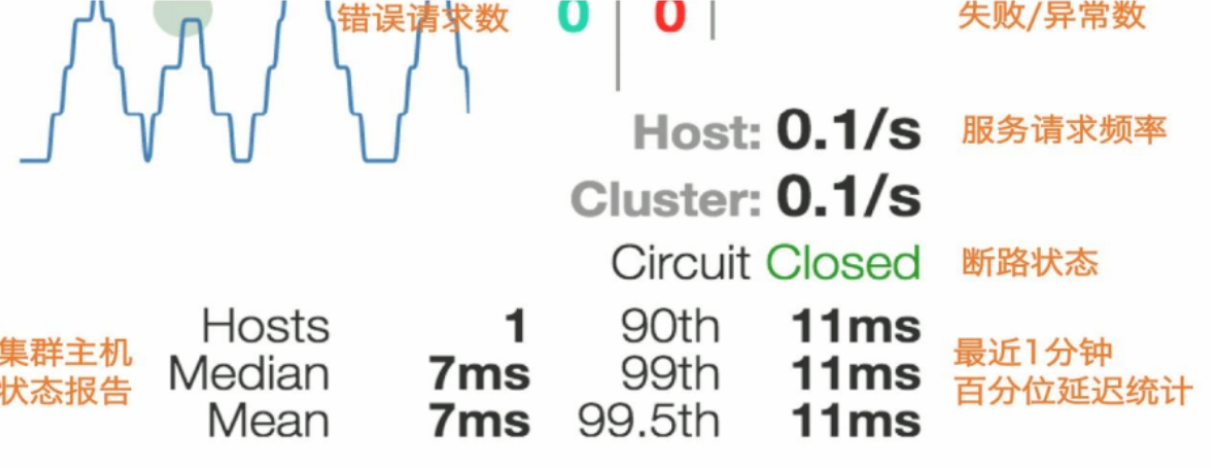
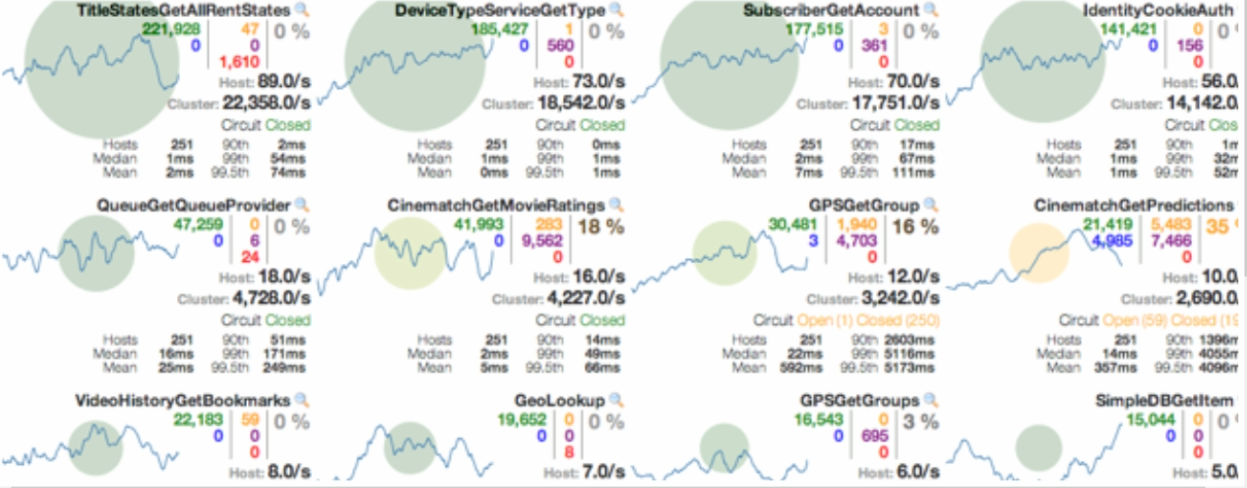
除了隔离依赖服务的调用以外,Hystrix还提供了准实时的调用监控(Hystrix Dashboard) , Hystrix会持续地记录所有通过 Hystrix发起的请求的执行信息,并以统计报表和图形的形式展示给用户,包括每秒执行多少请求多少成功,多少失败等。 Netflix通过hystrix-metrics-event-stream项目实现了对以上指标的监控。Spring Cloud也提供了Hystrix Dashboard的整合, 对监控内容转化成可视化界面。
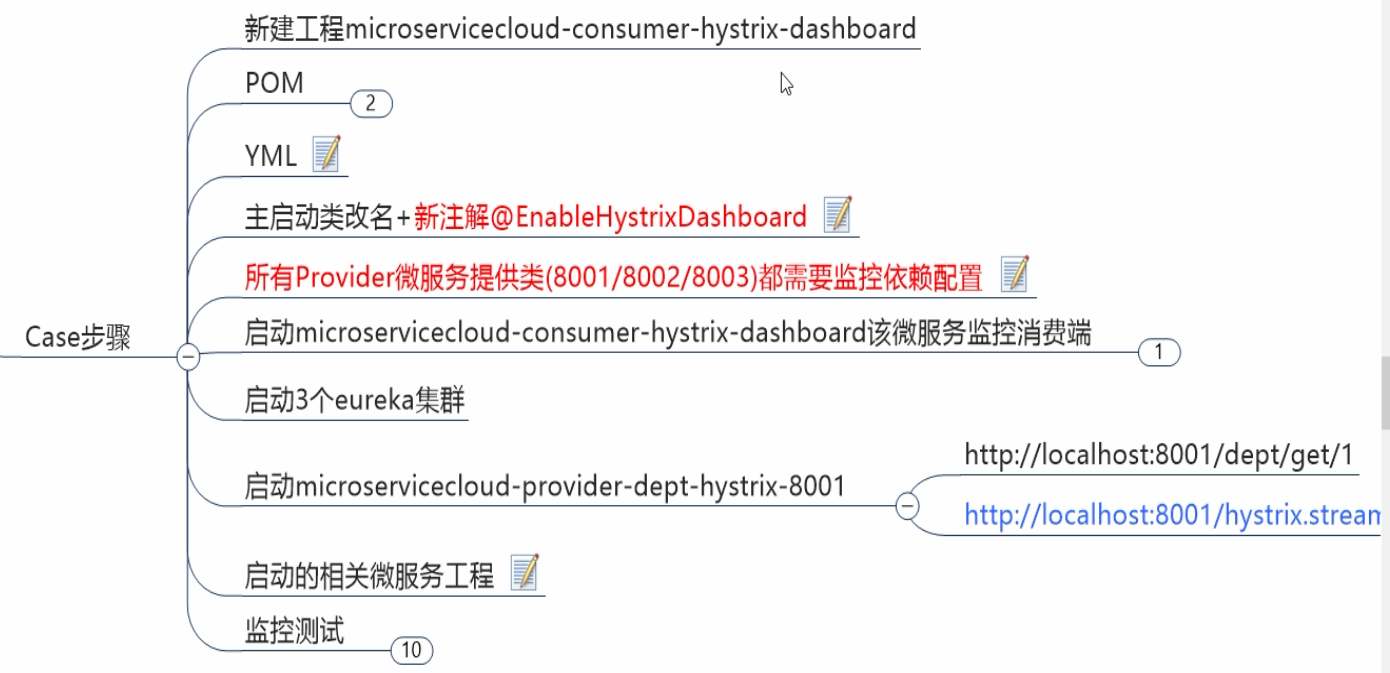
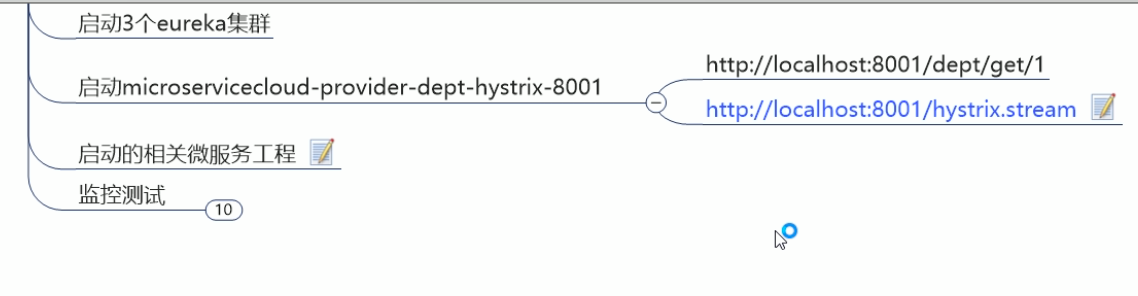
1.pom.xml
<project xmlns="http://maven.apache.org/POM/4.0.0" xmlns:xsi="http://www.w3.org/2001/XMLSchema-instance"

    xsi:schemaLocation="http://maven.apache.org/POM/4.0.0 http://maven.apache.org/xsd/maven-4.0.0.xsd">

    <modelVersion>4.0.0</modelVersion>

    <parent>

        <groupId>com.atguigu.springcloud</groupId>

        <artifactId>microservicecloud</artifactId>

        <version>0.0.1-SNAPSHOT</version>

    </parent>

    <artifactId>microservicecloud-consumer-hystrix-dashboard</artifactId>

    <dependencies>

        <!-- 自己定义的api -->

        <dependency>

            <groupId>com.everjiankang.springcloud</groupId>

            <artifactId>microservicecloud-api</artifactId>

            <version>${project.version}</version>

        </dependency>

        <dependency>

            <groupId>org.springframework.boot</groupId>

            <artifactId>spring-boot-starter-web</artifactId>

        </dependency>

        <!-- 修改后立即生效,热部署 -->

        <dependency>

            <groupId>org.springframework</groupId>

            <artifactId>springloaded</artifactId>

        </dependency>

        <dependency>

            <groupId>org.springframework.boot</groupId>

            <artifactId>spring-boot-devtools</artifactId>

        </dependency>

        <!-- Ribbon相关 -->

        <dependency>

            <groupId>org.springframework.cloud</groupId>

            <artifactId>spring-cloud-starter-eureka</artifactId>

        </dependency>

        <dependency>

            <groupId>org.springframework.cloud</groupId>

            <artifactId>spring-cloud-starter-ribbon</artifactId>

        </dependency>

        <dependency>

            <groupId>org.springframework.cloud</groupId>

            <artifactId>spring-cloud-starter-config</artifactId>

        </dependency>

        <!-- feign相关 -->

        <dependency>

            <groupId>org.springframework.cloud</groupId>

            <artifactId>spring-cloud-starter-feign</artifactId>

        </dependency>

        <!-- hystrix和 hystrix-dashboard相关 -->

        <dependency>

            <groupId>org.springframework.cloud</groupId>

            <artifactId>spring-cloud-starter-hystrix</artifactId>

        </dependency>

        <dependency>

            <groupId>org.springframework.cloud</groupId>

            <artifactId>spring-cloud-starter-hystrix-dashboard</artifactId>

        </dependency>

    </dependencies>

</project>
2. application.yml
server:
port: 9001
3.启动类
import org.springframework.boot.SpringApplication;

import org.springframework.boot.autoconfigure.SpringBootApplication;

import org.springframework.cloud.netflix.hystrix.dashboard.EnableHystrixDashboard;

@SpringBootApplication

@EnableHystrixDashboard

public class DeptConsumer_DashBoard_App

{

    public static void main(String[] args)

    {

        SpringApplication.run(DeptConsumer_DashBoard_App.class, args);

    }

}
4.在被监控(有方法调用的)微服务项目的Pom.xml文件中添加: (8001,8002,8003集群项目中)
<!-- actuator监控信息完善 -->

<dependency>

    <groupId>org.springframework.boot</groupId>

    <artifactId>spring-boot-starter-actuator</artifactId>

</dependency>
5.启动启动类
6.访问http://localhost:9001/hystrix
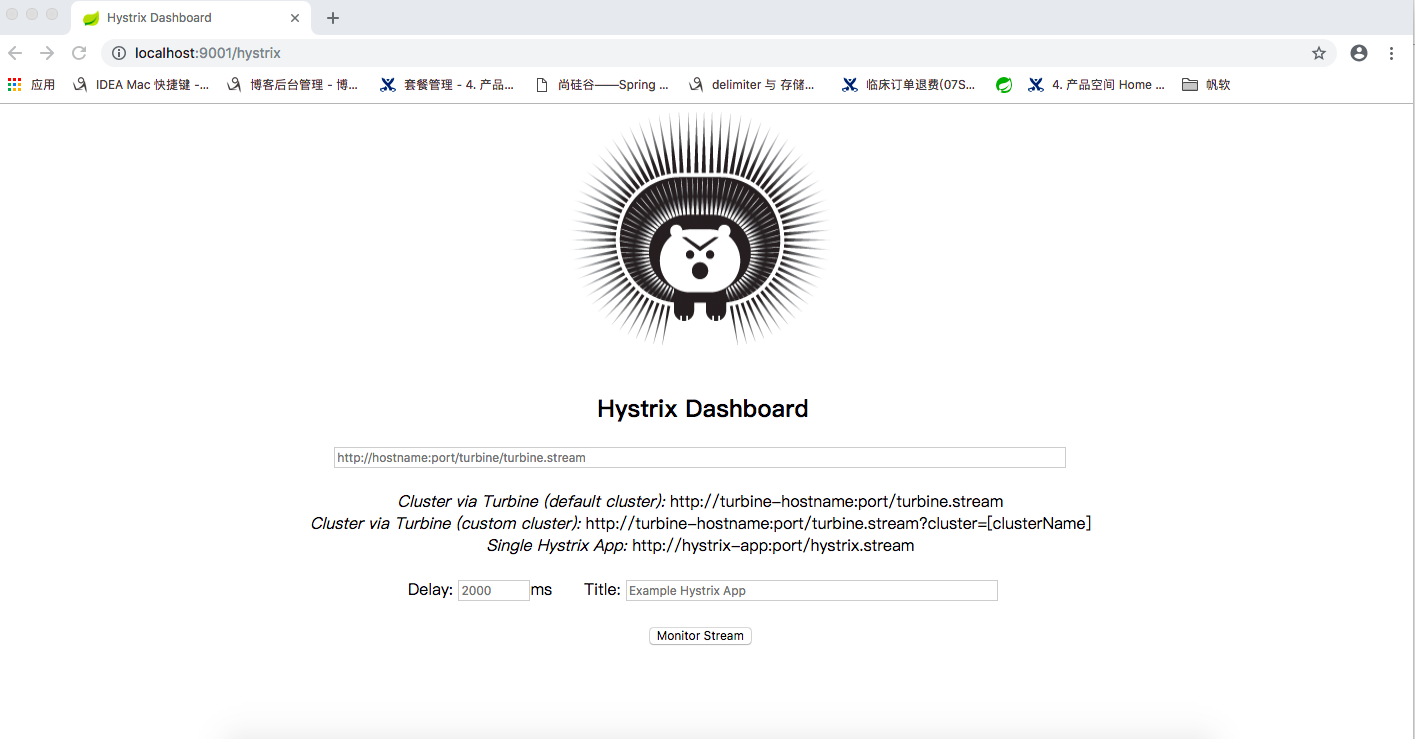
按图解启动三个euraka集群服务
microservicecloud-eureka-7001
microservicecloud-eureka-7002
microservicecloud-eureka-7003
然后启动项目:
microservicecloud-provider-dept-8001-hystrix
(带有熔断功能的微服务注册到了eureka集群,且被豪猪仪表盘项目【microservicecloud-consumer-hystrix-dashboard】监控)
访问:
http://localhost:8001/dept/get/1
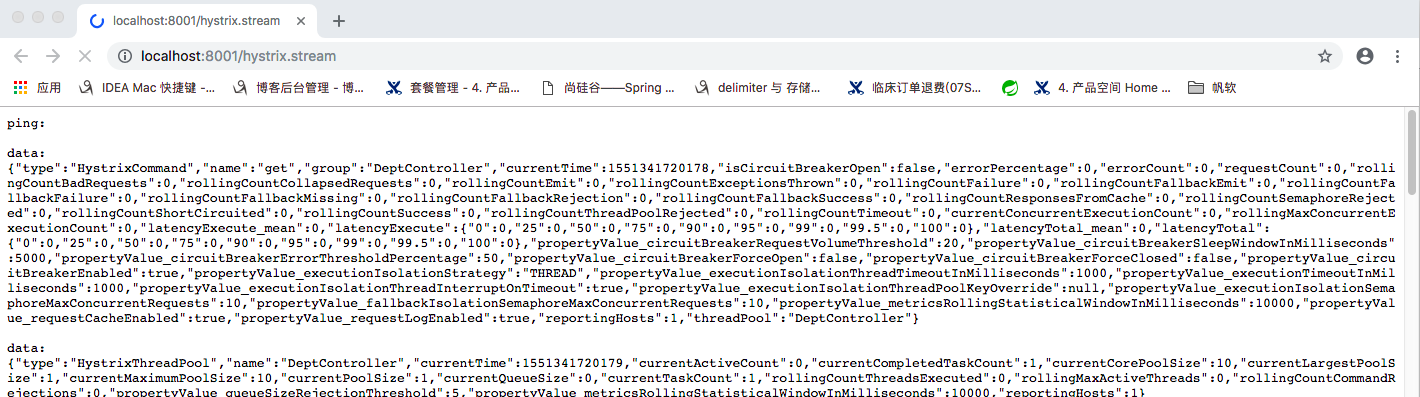
http://localhost:8001/hystrix.stream
ping 监控的仪表盘 json数据
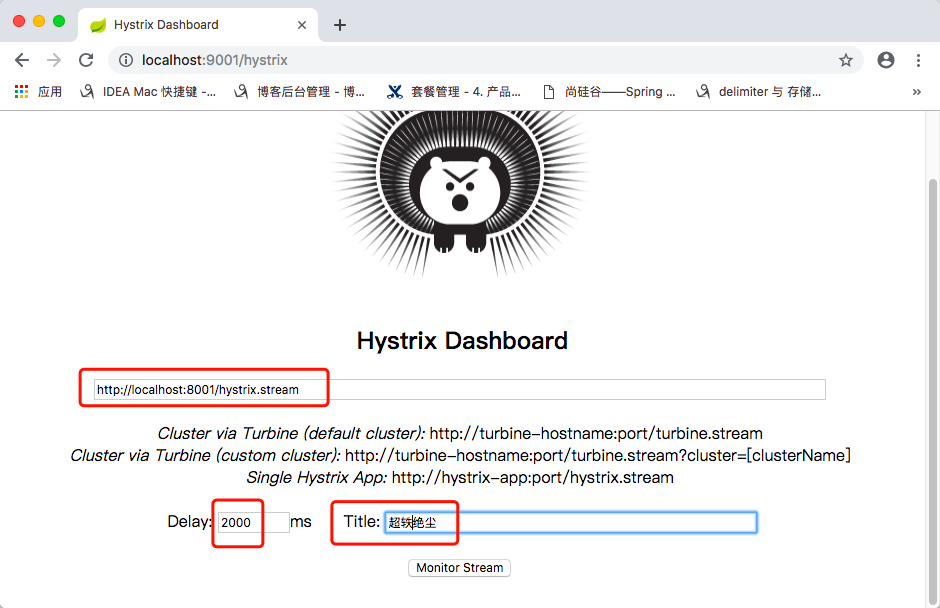
1 : Delay :该参数用来控制服务器上轮询监控信息的延迟时间,默认为 2000毫秒,可以通过配置该属性来降低客户端的网络和 CPU 消耗。
2 : Title :该参数对应了头部标题Hystrixstream 之后的内容,默认会使用具体监控实例的 URL ,可以通过配置该信息来展示更合适的标题。
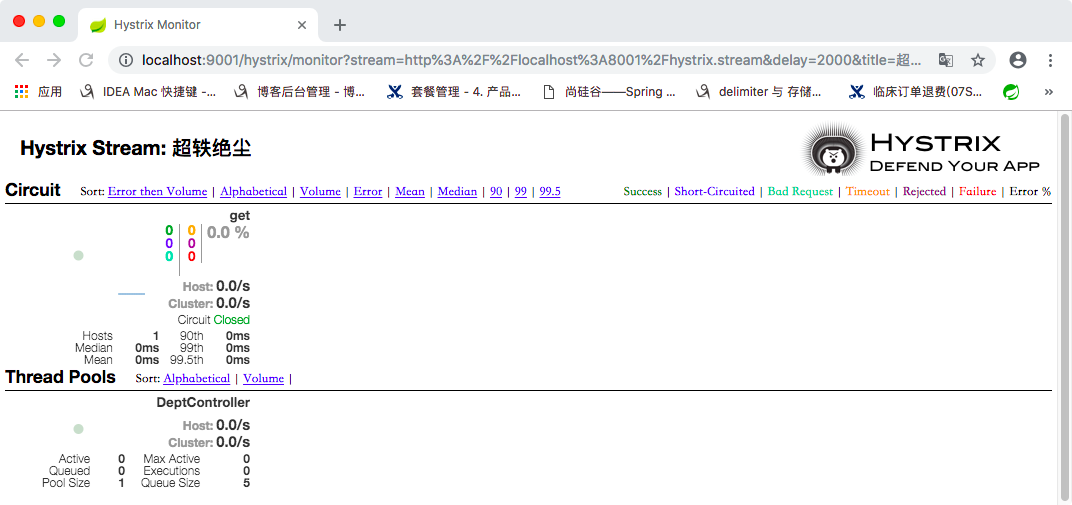
多次刷8001的功能接口: http://localhost:8001/dept/get/1,会看到仪表盘图形页面有如下变化:
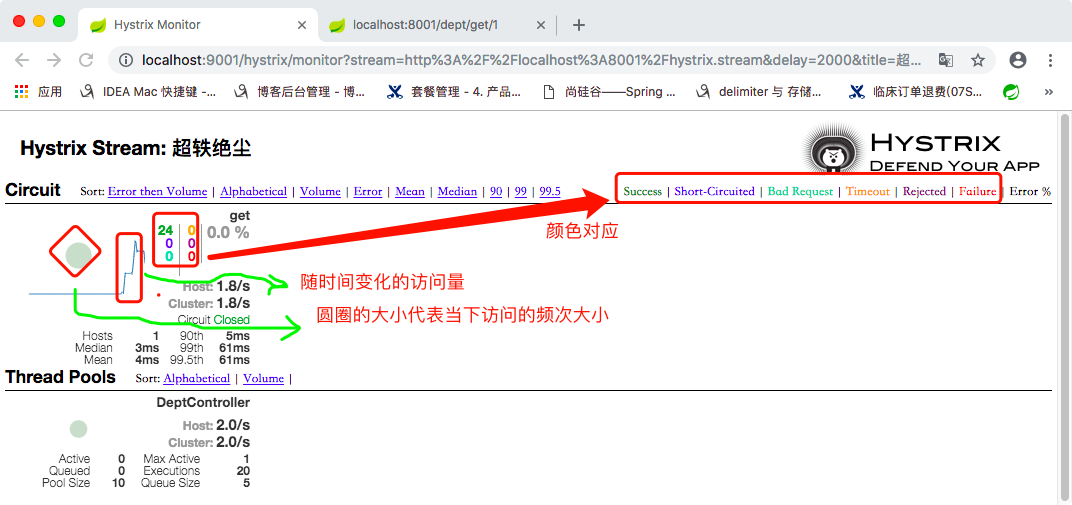
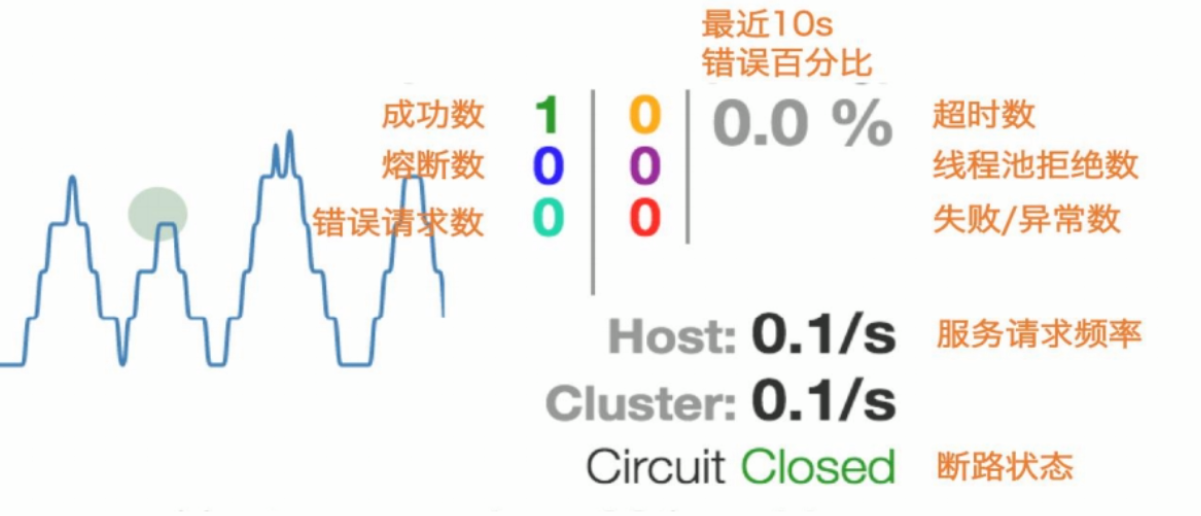
实心圆:共有两种含义。它通过颜色的变化代表了实例的健康程度,它的健康度从绿色<黄色<橙色<红色递减。
该实心圆除了颜色的变化之外,它的大小也会根据实例的请求流量发生变化,流量越大该实心圆就越大。
所以通过该实心圆的展示,就可以在大量的实例中快速的发现故障实例和高压力实例。
【六】Hystrix Dashboard的更多相关文章
- Spring Cloud第六篇 | Hystrix仪表盘监控Hystrix Dashboard
本文是Spring Cloud专栏的第六篇文章,了解前五篇文章内容有助于更好的理解本文: Spring Cloud第一篇 | Spring Cloud前言及其常用组件介绍概览 Spring Cloud ...
- Spring Cloud Hystrix Dashboard熔断器-Turbine集群监控(六)
序言 上一篇说啦hystrix的使用方法与配置还有工作流程及为何存在,我去,上一篇这么屌,去看看吧,没这么屌的话,我贴的有官方文档,好好仔细看看 hystrix除啦基本的熔断器功能之外,还可以对接口的 ...
- spring cloud深入学习(六)-----熔断监控Hystrix Dashboard和Turbine
Hystrix-dashboard是一款针对Hystrix进行实时监控的工具,通过Hystrix Dashboard我们可以在直观地看到各Hystrix Command的请求响应时间, 请求成功率等数 ...
- 服务容错保护断路器Hystrix之三:断路器监控(Hystrix Dashboard)-单体监控
turbine:英 [ˈtɜ:baɪn] 美 [ˈtɜ:rbaɪn] n.汽轮机;涡轮机;透平机 一.Hystrix Dashboard简介 在微服务架构中为了保证程序的可用性,防止程序出错导致网络阻 ...
- SpringCloud (十) Hystrix Dashboard单体监控、集群监控、与消息代理结合
一.前言 Dashboard又称为仪表盘,是用来监控项目的执行情况的,本文旨在Dashboard的使用 分别为单体监控.集群监控.与消息代理结合. 代码请戳我的github 二.快速入门 新建一个Sp ...
- 【SpringCloud】第十一篇: 断路器监控(Hystrix Dashboard)
前言: 必需学会SpringBoot基础知识 简介: spring cloud 为开发人员提供了快速构建分布式系统的一些工具,包括配置管理.服务发现.断路器.路由.微代理.事件总线.全局锁.决策竞选. ...
- springcloud(五):熔断监控Hystrix Dashboard和Turbine
Hystrix-dashboard是一款针对Hystrix进行实时监控的工具,通过Hystrix Dashboard我们可以在直观地看到各Hystrix Command的请求响应时间, 请求成功率等数 ...
- spring cloud熔断监控Hystrix Dashboard和Turbine
参考: http://blog.csdn.net/ityouknow/article/details/72625646 完整pom <?xml version="1.0" e ...
- 解决Hystrix Dashboard 一直是Loading ...的情况
Hystrix是什么 Hystrix 能使你的系统在出现依赖服务失效的时候,通过隔离系统所依赖的服务,防止服务级联失败,同时提供失败回退机制,更优雅地应对失效,并使你的系统能更快地从异常中恢复. Hy ...
随机推荐
- [luogu5253]丢番图【数学】
传送门 [传送门] 题目大意 求\(\frac{1}{x}+\frac{1}{y}=\frac{1}{n}\)有多少组不同的解. 分析 将式子转化成\((n-x)(n-y)=n^2\)的形式. 那么很 ...
- POJ-3687 Labeling Balls(拓扑)
不一样的拓扑排序 给定一些标记为1到n的数, 求出满足a < b 的序列, 如果有多个输出, 按先标签1往前的位置, 然后按标签2往前的位置, 对于每个标签, 位置都尽量往前. 因为位置要往前, ...
- go语言通道详解
https://www.ardanlabs.com/blog/2017/10/the-behavior-of-channels.html Introduction When I started to ...
- wildfly tomcat 服务器不响应 不返回 死住了 查看tcp CLOSE_WAIT 暴多
I'm also having the same issue with a very latest Tomcat server (7.0.40). It goes non-responsive onc ...
- CF670C cinema
想必是个半水题,div2的C嘛 仔细观察,发现排序可做. 怎么排序呢?排啥呢?拿啥离散化,拿啥结构体呢? 仔细思考热静分析,便可得出结论: 以每个人会的语言离散化,把每个电影建结构体后不排序,而是枚举 ...
- 洛谷P1173 [NOI2016]网格
这个码量绝对是业界大毒瘤...... 300行,6.5k,烦的要死...... 题意:给你一个网格图,里面有0或1.你需要把一些0换成1使得存在某两个0不四联通.输出最小的换的数量.无解-1. n,m ...
- 构建flutter环境并实现属于我们的hello world
我们知道flutter和react-native一样,都是既可以运行在andorid也可以运行在iOS环境下的. 我之前是react-native开发者,我的电脑环境中已经安装好了jdk,sdk,以及 ...
- ThymeLeaf的eclipse插件安装
“Help”----“Install New Software...” 输入: http://www.thymeleaf.org/eclipse-plugin-update-site/ 一路Next, ...
- 计算机基础:计算机网络-chapter2
因为计算机网络是的传输从物理到数据端的过程到端是自下而上的,所以大多数的教材都是从五层协议结构的底部开始向上延申. 物理层: = = 好复杂哦.看不懂,反正就是讲一些通信的线,信号传输的实现原理,和信 ...
- 数据库工具类 JdbcUtils
什么时候自己创建工具类 如果一个功能经常用到 我们建议把这个功能做成工具类 创建JdbcUtils包含三个方法 1: 把几个字符串 定义为常量 2:得到数据库连接getConnection(); 3 ...