
MongoDB C Driver Building on Windows
一、编译mongodb c driver:
需要先安装OpenSSL:(参见:http://bbs.aircheng.com/read-2222-1)
步骤:(MongoDB不需要授权登陆的话,就不需要OpenSSL,直接跳到第步)
1.下载ActivePerl 5.24.0.2400
http://www.activestate.com/activeperl/downloads
2.安装ActivePerl软件
没什么好说的,一步一步安装即可。安装成功后,设置环境变量。
例如我将ActivePerl安装在C:\Perl64\目录下,则选中Path,单击编辑按钮,
将C:\Perl64\site\bin;C:\Perl64\bin;加入其中,确认即可。
运行”CMD“命令,使用cd命令将运行目录指向perl安装目录的eg文件夹,
执行“perl example.pl”若显示“Hello from ActivePerl!”,则说明Perl安装成功,
可以开始使用Perl的相关命令来进行OpenSSL的安装了。
3.安装Microsoft Visual Studio 2010
将C:\Program Files (x86)\Microsoft Visual Studio 10.0\VC\bin\amd64;
加入系统环境变量,具体以你安装的路径为准,
注意(64位)是 bin\amd64; 不是 bin; 多么痛的领悟。
4.安装NASM
http://www.nasm.us/
当前稳定版本为:2.12.02
http://www.nasm.us/pub/nasm/releasebuilds/2.12.02/win64/

将nasm的路径添加至环境变量
例如我的nasm安装在 C:\Users\lenovo\AppData\Local\NASM 目录
5.下载OpenSSL
https://www.openssl.org/source/
下载后,将其解压缩至C:\openssl目录下,这样做便于后续操作
注意目录结构,不要出现openssl-1.1.0c子目录,
而是将openssl-1.1.0c目录下的文件拷贝至C:\openssl目录下
6.初始化编译环境
因为Visual Studio 2010安装在目录中C:\Program Files (x86)\Microsoft Visual Studio 10.0\
这里使用的是在Visual Studio Tools文件夹下的Visual Studio x64 Win64命令提示(2010)工具。
然后右键:以管理员身份运行

进入Visual Studio 2010安装目录 C:\Program Files (x86)\Microsoft Visual Studio 10.0\中
执行命令:cd C:\Program Files (x86)\Microsoft Visual Studio 10.0\VC\bin\amd64
执行命令:vcvars64.bat
7.openssl的源文件已解压至C:\openssl的目录中,下面开始执行Configure
进入openssl 目录下执行 perl Configure VC-WIN64A

执行结束后,如下图所示

8.执行命令:nmake

如果执行成功,则等待输入下一个命令

9.执行命令:nmake test

很顺利的情况下:

10.执行命令:nmake install

当出现下面页面的时候,证明你已成功:

11.编译驱动:
http://mongoc.org/libmongoc/(api 官方文档)
https://github.com/mongodb/mongo-c-driver(GitHub驱动源码,这个 src/libbson 文件夹里面是空的)
驱动源码下载:https://github.com/mongodb/mongo-c-driver/releases
build前需下载个最新的cmake安装。
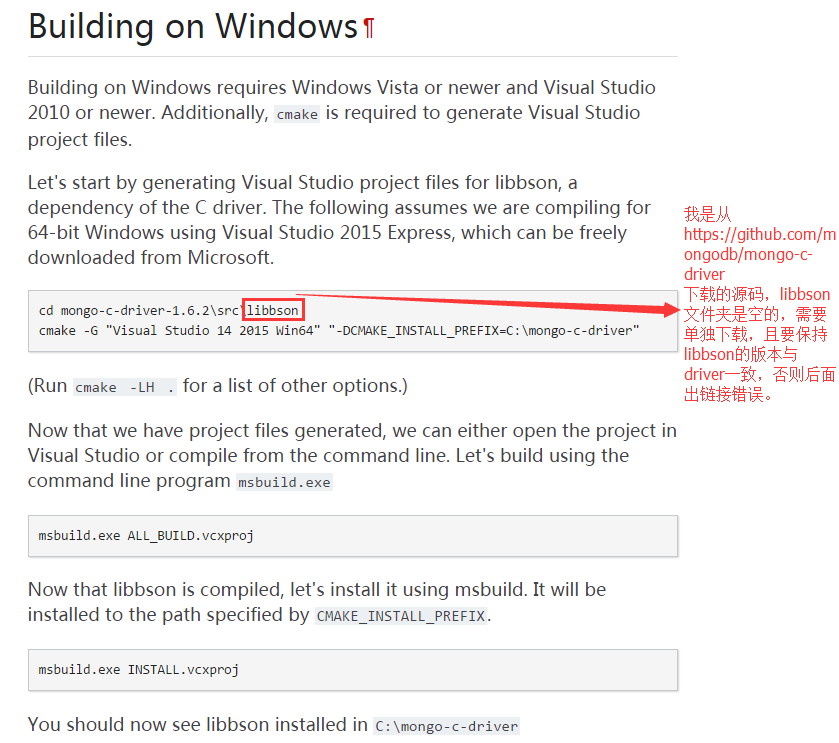
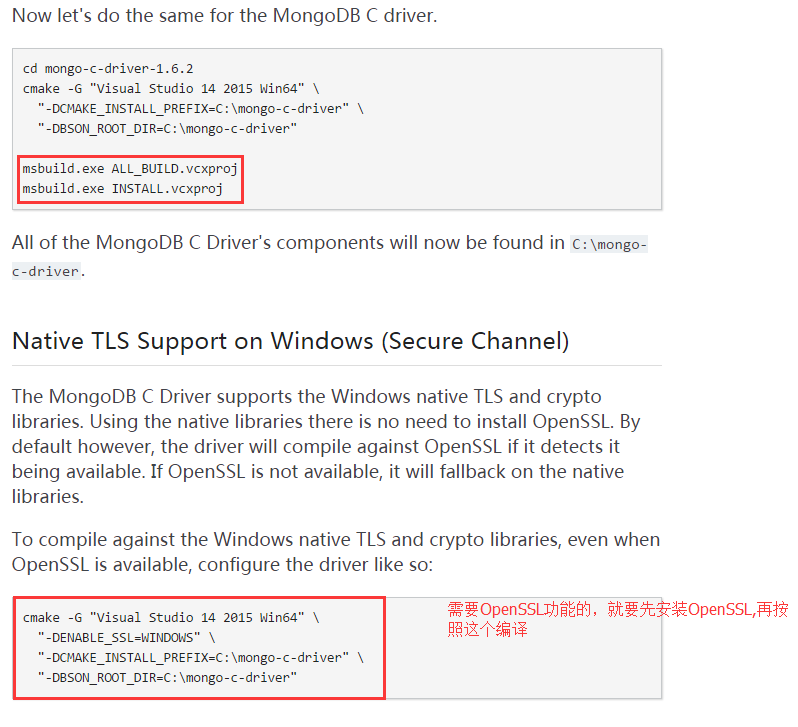
编译完成之后在c:\mongo-c-driver目录下有bin、include、lib三个文件夹,分别包含所需的dll、.h文件、lib。
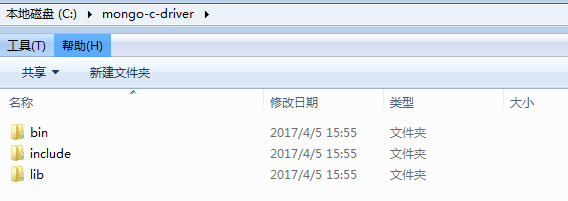
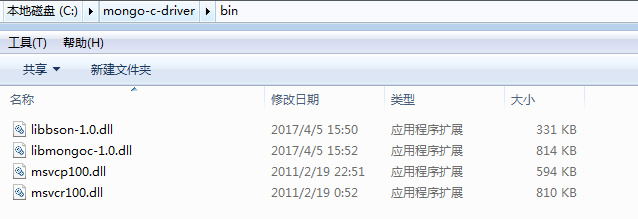
在自己的项目中引入这些.h文件、lib、dll就可以使用 C API 了。
二、C API 的使用
1.连接MongoDB:
//只能调用一次mongoc_init

mongoc_init();

const char *uristr = "mongodb://user:pwd@host:port/";

//MongoDB不需要登录认证的话,连接字符串中的用户名:密码@可以省略。

//connection to MongoDB.

m_client = mongoc_client_new (uristr);

if (!m_client)

{

	return false;

}

m_pCollection = mongoc_client_get_collection(m_client, "myDatabase", "mycollection");

return true;
2.Insert操作:
bson_t query;

bson_init(&query);

BSON_APPEND_UTF8(&query,"name","chunxiao");

BSON_APPEND_INT32(&query,"age",NULL);

BSON_APPEND_DOUBLE(&query,"Price",66.0);

if (!mongoc_collection_insert(m_pCollection,MONGOC_INSERT_NONE,&query,NULL,&error))

{

  AfxMessageBox(error.message);

}

bson_destroy(&query);

return true;
3.Find操作:
double age1 = 20;

double age2 = 22;

char	name[10] = "chunxiao";

int sex = 0;

bson_init(&query);

bson_append_document_begin(&query,"age",3,&child);

bson_append_double(&child,"$gt",3,age1);

bson_append_document_end(&query,&child);

bson_append_document_begin(&query,"age",3,&child1);

bson_append_double(&child1,"$lte",4,age2);

bson_append_document_end(&query,&child1);

cursor = mongoc_collection_find(m_pCollection,MONGOC_QUERY_NONE,0,0,0,&query,NULL,NULL);

vector<string> vData;

while (mongoc_cursor_next(cursor,&docFind))

{

	//方法一

	bson_iter_t iter;

	bson_iter_init(&iter,docFind);

	if (bson_iter_find(&iter,"name"))

	{

	  strcpy(str,bson_iter_utf8(&iter,NULL));

	  strtest = bson_iter_utf8(&iter,NULL);

	  if (strcmp(strtest.c_str(),"xiaochun")==0)

	  {

		  AfxMessageBox(str);

		  continue;

	  }

	  strtest = strtest.substr(strtest.find_first_of("x"),2);

	  AfxMessageBox(str);

	}

	bson_iter_init(&iter,docFind);//顺序不一致的话,要重新初始化一下 iter,否则find不到

	if (bson_iter_find(&iter,"age"))

	{

	  int f = bson_iter_int32(&iter);

	  sprintf(str,"%d",f);

	  AfxMessageBox(str);

	}

	//方法二

	char *str;

    str = bson_as_json(docFind, NULL);

    vData.push_back(str);

}

if (mongoc_cursor_error(cursor, &error))//mongoc_cursor_error 要在 mongoc_cursor_next 之后调用,否则获取不到 error.message

{

	cout << "An error occurred:" << error.message << endl;

  mongoc_cursor_destroy(cursor);

  bson_destroy(&query);

  return false;

}

mongoc_cursor_destroy(cursor);

bson_destroy(&query);

return true;
4.Delete操作:
double age = 21;

bson_init(&query);

bson_append_document_begin(&query,"age",3,&child);

bson_append_double(&child,"$gt",3,age);

bson_append_document_end(&query,&child);

BSON_APPEND_UTF8(&query,"name","chun.xiao");

if (!mongoc_collection_remove(m_pCollection,MONGOC_REMOVE_NONE,&query,NULL,&error))

{

  AfxMessageBox(error.message);

}

bson_destroy(&query);

return true;
5.UpDate操作:
bson_init(&query);

BSON_APPEND_UTF8(&query,"name","chunxiao");

bson_t *docUpDate = bson_new();

bson_append_document_begin(docUpDate,"$set",-1,&child);

BSON_APPEND_UTF8(&child,"name","xiaochun");

bson_append_document_end(docUpDate,&child);

bson_init(&child);

bson_append_document_begin(docUpDate,"$set",-1,&child);

BSON_APPEND_UTF8(&child,"age","21");

bson_append_document_end(docUpDate,&child);

if (!mongoc_collection_update(m_pCollection,MONGOC_UPDATE_NONE,&query,docUpDate,NULL,&error))

{

  AfxMessageBox(error.message);

}

bson_destroy(&query);

bson_destroy(docUpDate);

return true;
百度云(13207134391):
编译 C driver:
MongoDB\C API\安装MongoDB以及编译 C driver
Demo:
MongoDB\C API\C API 操作MongoDB
MongoDB C Driver Building on Windows的更多相关文章
- mongodb c++ driver(2.53)windows编译
编译环境: (1) 下载python2.7, 使用x86_32位,因为scons只有32位安装包可用: (2) 下载scons2.3.0,The current production release ...
- MongoDB C Driver Building on CentOS
Building on Unix Prerequisites OpenSSL is required for authentication or for SSL connections to Mong ...
- windows平台下安装、编译、使用mongodb C++ driver
本博客将记录在Win8.1 ,VS2013环境下编译.配置mongodb C++ driver的流程. 1.下载预备 下载Boost:http://sourceforge.net/projects/b ...
- MongoDB C Driver使用教程
MongoDB C Driver使用教程 转载请注明出处http://www.cnblogs.com/oloroso/ 本指南提供简介 MongoDB C 驱动程序. 在 C API 的详细信息,请参 ...
- MongoDB C Driver and APIinstances linux MongoDB安装配置
<一,linux平台MongoDB安装配置>在这我们使用的Centos6 yum部署的,你想搞编译,自个干!
- MongoDB Java Driver操作指南
MongoDB为Java提供了非常丰富的API操作,相比关系型数据库,这种NoSQL本身的数据也有点面向对象的意思,所以对于Java来说,Mongo的数据结构更加友好. MongoDB在今年做了一次重 ...
- Ignoring Extra Elements in mongoDB C# Driver
MongoDB删除字段后会报错: Element ... does not match any field or property of class Customer. 需要在实体类增加 [BsonI ...
- mongodb .net driver
1.介绍 The official MongoDB .NET Driver provides asynchronous interaction with MongoDB. Powering the d ...
- Mongodb Java Driver 参数配置解析
要正确使用Mongodb Java Driver,MongoClientOptions参数配置对数据库访问的并发性能影响极大. connectionsPerHost:与目标数据库能够建立的最大conn ...
随机推荐
- WinForm中变Enter键为Tab键实现焦点转移的方法
if (e.KeyCode == Keys.Enter) { //this.SelectNextControl(this.ActiveControl,true, true, true, true); ...
- Java并发之AQS同步器学习
AQS队列同步器学习 在学习并发的时候,我们一定会接触到 JUC 当中的工具,JUC 当中为我们准备了很多在并发中需要用到的东西,但是它们都是基于AQS(AbstractQueuedSynchroni ...
- [Jobdu] 题目1214:丑数
题目描述: 把只包含因子2.3和5的数称作丑数(Ugly Number).例如6.8都是丑数,但14不是,因为它包含因子7.习惯上我们把1当做是第一个丑数.求按从小到大的顺序的第N个丑数. 输入: 输 ...
- [svc]caffe安装笔记
以前是word排版,加上没有些技术博客经验,相当的糟心. 现在想改,发现博文太多,找不到对应在那一页了,所以老的博文留着吧. caffe,这是是数据组需要做一些大数据模型的训练(深度学习), 要求 服 ...
- [k8s]如何处理dockerfile无expose情况下在k8s里暴漏访问
做镜像时候忘记expose端口了, 或者要做一个通用的镜像, expose端口不固定, 又要在k8s环境里跑并暴漏服务访问,怎么破? 实际上: yaml的 ports: - containerPort ...
- 【Android】19.2 ShareActionProvider类—帮你把信息分享出去
分类:C#.Android.VS2015: 创建日期:2016-03-06 一.简介 共享操作提供程序类(ShareActionProvider)简化了你希望与其他人(或者其他应用程序)共享或分享出来 ...
- 在 Chrome 开发者工具中调试 node.js
命令行工具 devtool ,它可以在 Chrome 的开发者工具中运行 Node.js 程序. 下面的记录显示了在一个 HTTP 服务器中设置断点的情况. 该工具基于 Electron 将 Node ...
- 每日英语:Mooncake Austerity Hits China's Mid-Autumn Festival
First baijiu, then red carpets, and now mooncakes. For Chinese government officials, the list of tab ...
- cocos2d-x中几种存储数据的方式
说明:本文所论述内容均基于cocos2dx 3.0 版本. 1.UserDefault 它是cocos2d-x用来存取基本数据类型用的.保存为XML文件格式. 查看CCUserDefault文件,可以 ...
- How to merge Scala Lists
Scala List FAQ: How do I merge a List in Scala? NOTE: I wrote the solutions shown below a long time ...