
android 单选、多选弹出菜单
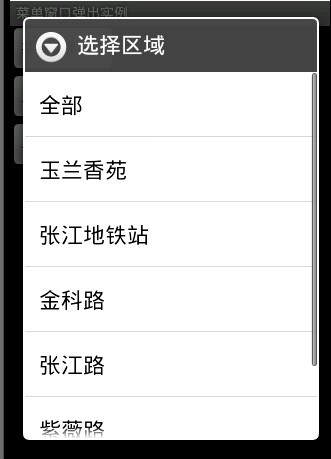
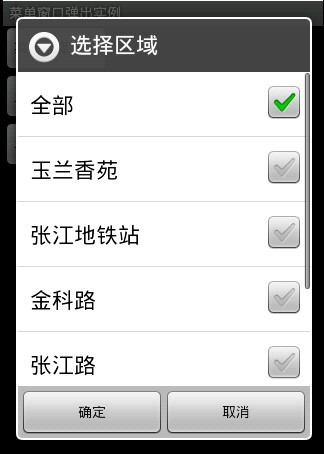
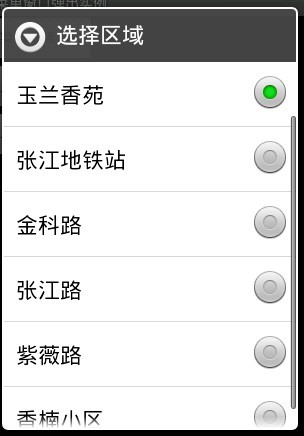
菜单单选窗口:
import android.app.Activity;
import android.app.AlertDialog;
import android.content.DialogInterface;
import android.os.Bundle;
import android.view.View;
import android.view.View.OnClickListener;
import android.widget.Button;
import android.widget.ListView;
import android.widget.Toast;
public class MainActivity extends Activity {
private String[] areas = new String[]{"全部","玉兰香苑", "张江地铁站", "金科路", "张江路", "紫薇路", "香楠小区" };
private boolean[] areaState=new boolean[]{true, false, false, false, false, false,false };
private RadioOnClick radioOnClick = new RadioOnClick(1);
private ListView areaCheckListView;
private ListView areaRadioListView;
private Button alertButton;
private Button checkBoxButton;
private Button radioButton;
@Override
public void onCreate(Bundle savedInstanceState) {
super.onCreate(savedInstanceState);
setContentView(R.layout.main);
alertButton=(Button)findViewById(R.id.alertButton);
checkBoxButton=(Button)findViewById(R.id.checkBoxButton);
radioButton=(Button)findViewById(R.id.radioButton);
alertButton.setOnClickListener(new AlertClickListener());
checkBoxButton.setOnClickListener(new CheckBoxClickListener());
radioButton.setOnClickListener(new RadioClickListener());
}
/**
* 菜单弹出窗口
* @author xmz
*
*/
class AlertClickListener implements OnClickListener{
@Override
public void onClick(View v) {
new AlertDialog.Builder(MainActivity.this).setTitle("选择区域").setItems(areas,new DialogInterface.OnClickListener(){
public void onClick(DialogInterface dialog, int which){
Toast.makeText(MainActivity.this, "您已经选择了: " + which + ":" + areas[which],Toast.LENGTH_LONG).show();
dialog.dismiss();
}
}).show();
}
}
/**
* 多选框弹出菜单窗口
* @author xmz
*
*/
class CheckBoxClickListener implements OnClickListener{
@Override
public void onClick(View v) {
AlertDialog ad = new AlertDialog.Builder(MainActivity.this)
.setTitle("选择区域")
.setMultiChoiceItems(areas,areaState,new DialogInterface.OnMultiChoiceClickListener(){
public void onClick(DialogInterface dialog,int whichButton, boolean isChecked){
//点击某个区域
}
}).setPositiveButton("确定",new DialogInterface.OnClickListener(){
public void onClick(DialogInterface dialog,int whichButton){
String s = "您选择了:";
for (int i = 0; i < areas.length; i++){
if (areaCheckListView.getCheckedItemPositions().get(i)){
s += i + ":"+ areaCheckListView.getAdapter().getItem(i)+ " ";
}else{
areaCheckListView.getCheckedItemPositions().get(i,false);
}
}
if (areaCheckListView.getCheckedItemPositions().size() > 0){
Toast.makeText(MainActivity.this, s, Toast.LENGTH_LONG).show();
}else{
//没有选择
}
dialog.dismiss();
}
}).setNegativeButton("取消", null).create();
areaCheckListView = ad.getListView();
ad.show();
}
}
/**
* 单选弹出菜单窗口
* @author xmz
*
*/
class RadioClickListener implements OnClickListener {
@Override
public void onClick(View v) {
AlertDialog ad =new AlertDialog.Builder(MainActivity.this).setTitle("选择区域")
.setSingleChoiceItems(areas,radioOnClick.getIndex(),radioOnClick).create();
areaRadioListView=ad.getListView();
ad.show();
}
}
/**
* 点击单选框事件
* @author xmz
*
*/
class RadioOnClick implements DialogInterface.OnClickListener{
private int index;
public RadioOnClick(int index){
this.index = index;
}
public void setIndex(int index){
this.index=index;
}
public int getIndex(){
return index;
}
public void onClick(DialogInterface dialog, int whichButton){
setIndex(whichButton);
Toast.makeText(MainActivity.this, "您已经选择了: " + index + ":" + areas[index], Toast.LENGTH_LONG).show();
dialog.dismiss();
}
}
}
<?xml version="1.0" encoding="utf-8"?>
<LinearLayout xmlns:android="http://schemas.android.com/apk/res/android"
android:orientation="vertical"
android:layout_width="fill_parent"
android:layout_height="fill_parent"
>
<Button
android:id="@+id/alertButton"
android:layout_width="wrap_content"
android:layout_height="wrap_content"
android:text="菜单选择窗口"
/>
<Button
android:id="@+id/checkBoxButton"
android:layout_width="wrap_content"
android:layout_height="wrap_content"
android:text="多选菜单选择窗口"
/>
<Button
android:id="@+id/radioButton"
android:layout_width="wrap_content"
android:layout_height="wrap_content"
android:text="单选菜单选择窗口-1"
/>
</LinearLayout>
android 单选、多选弹出菜单的更多相关文章
- Android 使用PopupWindow实现弹出菜单
在本文当中,我将会与大家分享一个封装了PopupWindow实现弹出菜单的类,并说明它的实现与使用. 因对界面的需求,android原生的弹出菜单已不能满足我们的需求,自定义菜单成了我们的唯一选择,在 ...
- 【Android】创建Popwindow弹出菜单的两种方式
方法一的Activity package com.app.test02; import android.app.Activity; import android.os.Bundle; import a ...
- 【Android】5.6 弹出菜单(PopUp Menus)
分类:C#.Android.VS2015: 创建日期:2016-02-07 一.简介 功能描述:用户单击按钮弹出菜单.当用户选择一个菜单项,会触发MenuItemClick事件并让弹出的菜单消失:如果 ...
- Android于popWindow写弹出菜单
1.什么是popWindow? popWindow这是对话的方式!文字解说android的方式来使用对话框,这就是所谓的popWindow. 2.popWindow特征 Android的对话框有两种: ...
- android 长按弹出菜单,复制,粘贴,全选
<!-- 定义基础布局LinearLayout --> <LinearLayout xmlns:android="http://schemas.android.com/ap ...
- Android ListView两种长按弹出菜单方式
转自:http://www.cnblogs.com/yejiurui/p/3247527.html package com.wyl.download_demo; import java.util.Ar ...
- 【转】 教你如何创建类似QQ的android弹出菜单
原文地址:http://www.apkbus.com/android-18034-1-1.html 大家可能看到android的自带的系统菜单比较难看,如图: 2011-12-4 23:13 上传 下 ...
- 【转】android创建Popwindow弹出菜单的两种方式
方法一的Activity package com.app.test02; import android.app.Activity; import android.os.Bundle; import a ...
- Android开发技巧——使用PopupWindow实现弹出菜单
在本文当中,我将会与大家分享一个封装了PopupWindow实现弹出菜单的类,并说明它的实现与使用. 因对界面的需求,android原生的弹出菜单已不能满足我们的需求,自定义菜单成了我们的唯一选择,在 ...
随机推荐
- 谈谈HttpUrlConnection与DefaultHttpClient一些区别
HttpClient封装的很庞大,很复杂,你必须按照,他封装的思想去使用它,导致它很不灵活. 相比之下,HttpUrlConnection很轻巧,很方便,很灵活. HttpClient对于数据上面的封 ...
- parent,parents和closest
1.parent parent() 获得当前匹配元素集合中每个元素的父元素,使用选择器进行筛选是可选的. <ul id="menu" style="width:10 ...
- 《javascript高级程序设计》第五章 reference types
第5 章 引用类型5.1 Object 类型5.2 Array 类型 5.2.1 检测数组 5.2.2 转换方法 5.2.3 栈方法 5.2.4 队列方法 5.2.5 重排序方法 5.2.6 操作方法 ...
- struts2在web.xml中的配置
<filter> <filter-name>struts2</filter-name> <filter-class>org.apache.struts2 ...
- wxpython颜色选择
Color Code Color Name Color #000000 BLACK #0000FF BLUE #007FFF SLATE BLUE #00FF00 GREEN #00F ...
- Javascript 中的false、0、null、undefined和空字符串对象
在Javascript中,我们经常会接触到题目中提到的这5个比较特别的对象——false.0.空字符串.null和undefined.这几个对象很容易用错,因此在使用时必须得小心. 类型检测 我们下来 ...
- Java多线程-新特性-有返回值的线程
在Java5之前,线程是没有返回值的,常常为了“有”返回值,破费周折,而且代码很不好写.或者干脆绕过这道坎,走别的路了. 现在Java终于有可返回值的任务(也可以叫做线程)了. 可返回值的任务必须实现 ...
- JavaScript prototype 属性
prototype 属性使开发人员有能力向对象添加属性和方法. 语法 object.prototype.name=value 实例 在本例中,我们将展示如何使用 prototype 属性来向对象添加属 ...
- netty4 断线重连
转载:http://www.tuicool.com/articles/B7RzMbY 一 实现心跳检测 原理:当服务端每隔一段时间就会向客户端发送心跳包,客户端收到心跳包后同样也会回一个心跳包给服务端 ...
- BZOJ2708 [Violet 1]木偶
首先想到的是贪心...肯定不对嘛...T T 然后发现其实是可以DP的...不过我们要先排序 令f[i]表示前i个木偶最坏要丢掉几个,则 f[i] = max(f[j] + calc(j + 1, i ...