
ZedGraph控件生成饼图、拆线图和柱状图例程
这几天做了个自己觉得还蛮NB的功能,在GRID中选中一块数据,然后右键菜单即可生成三种图形,还可以互相切换,对了,饼图还添加了鼠标点击分离的处理,大致如图:
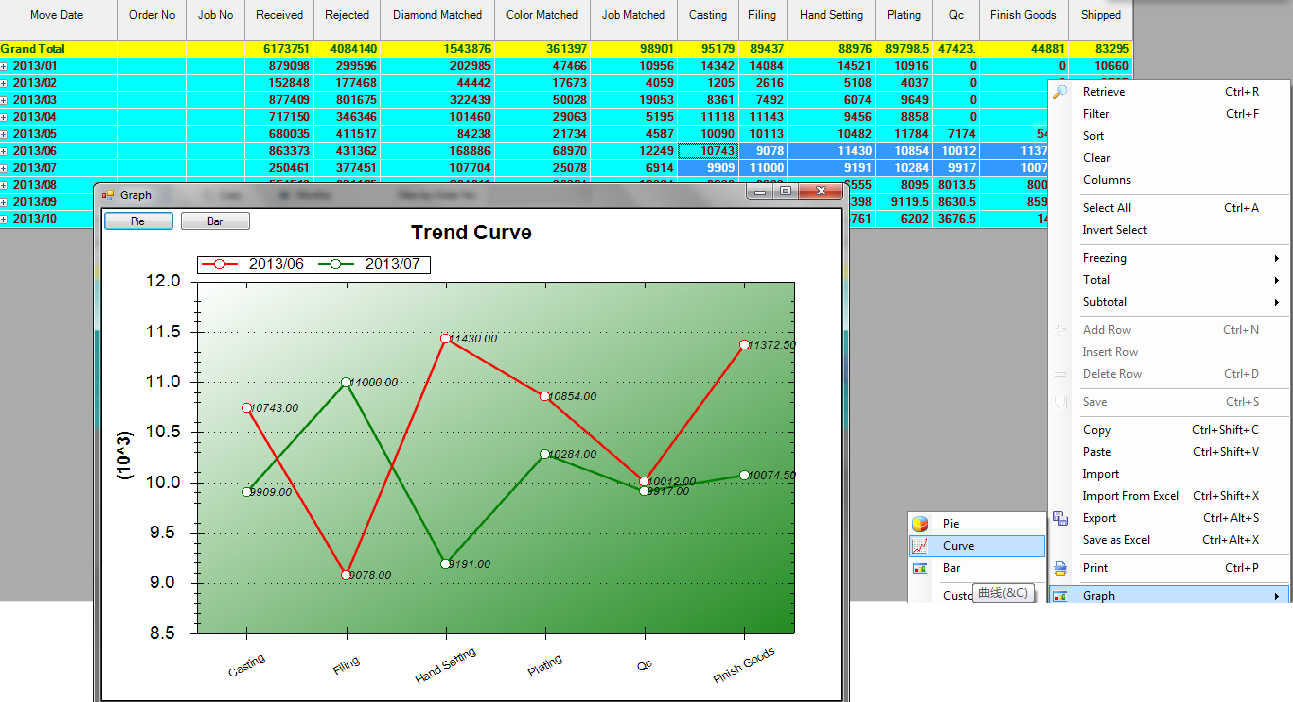
用的控件就是ZedGraph,我把它继承封装了一下,方便调用:
 Imports ZedGraph

 Public Class MyGraph

     '用于切换图型的

     Private dtSource As DataTable

     Private Function MyGraph_MouseDownEvent(ByVal sender As ZedGraph.ZedGraphControl, ByVal e As System.Windows.Forms.MouseEventArgs) As System.Boolean Handles MyBase.MouseDownEvent

         If e.Button = Windows.Forms.MouseButtons.Left Then

             Dim pane As GraphPane = sender.GraphPane

             Dim pt As New PointF(e.X, e.Y)

             Dim curve As CurveItem = Nothing

             Dim i%

             If pane.FindNearestPoint(pt, curve, i) Then

                 If curve.IsPie Then

                     Dim pi As PieItem = CType(curve, PieItem)

                     If pi.Displacement >  Then

                         pi.Displacement =

                     Else

                         pi.Displacement = 0.3

                     End If

                     sender.Refresh()

                 End If

             End If

         End If

         Return True

     End Function

     Public Sub SetTitle(ByVal title As String)

         '' Set the pane title

         GraphPane.Title.Text = title

     End Sub

     Public Sub SetPieDataB(ByVal dt As DataTable, ByVal title As String)

         '为多列一行的数据,按列分块,不支持切换,不推荐使用

         Dim ds As New DataSet

         Dim i, j As Integer

         Dim cc, rc As Integer

         rc = dt.Rows.Count

         cc = dt.Columns.Count

         If rc =  Or cc =  Then Return

         GraphPane.CurveList.Clear()

         GraphPane.GraphObjList.Clear()

         GraphPane.Legend.IsVisible = True

         GraphPane.Legend.Position = LegendPos.Right

         GraphPane.Legend.FontSpec.Size =

         If String.IsNullOrEmpty(title) = False Then

             GraphPane.Title.Text = title

         End If

         Dim labels(cc - ) As String

         Dim values(cc - ) As Double

         For i =  To cc -

             labels(i) = dt.Columns(i).ColumnName

             values(i) = dt.Rows().Item(i)

         Next

         'Dim colors() As Color = {Color.Red, Color.Blue, Color.Green, Color.Yellow, Color.Purple, Color.Brown, Color.Coral, Color.ForestGreen}

         Dim slices() As PieItem = GraphPane.AddPieSlices(values, labels)

         GraphPane.Fill = New Fill(Color.Cornsilk)

         GraphPane.Chart.Fill = New Fill(Color.Cornsilk)

         'GraphPane.Fill = New Fill(Color.White, Color.Goldenrod, 45.0F)

         For i =  To cc -

             slices(i).LabelType = PieLabelType.Name_Value_Percent

         Next

         GraphPane.AxisChange()

         Refresh()

         dtSource = Nothing

         FlowLayoutPanel1.Controls.Clear()

     End Sub

     Public Sub SetPieData(ByVal dt As DataTable, ByVal title As String)

         'TABLE内容应为第一列为各块名称,第二列为各块的值,不能只有一列

         Dim ds As New DataSet

         Dim i, j As Integer

         Dim cc, rc As Integer

         rc = dt.Rows.Count

         cc = dt.Columns.Count

         If rc =  Or cc <=  Then Return

         GraphPane.CurveList.Clear()

         GraphPane.GraphObjList.Clear()

         GraphPane.Legend.IsVisible = True

         GraphPane.Legend.Position = LegendPos.Right

         GraphPane.Legend.FontSpec.Size =

         If String.IsNullOrEmpty(title) = False Then

             GraphPane.Title.Text = title

         End If

         Dim labels(rc - ) As String

         Dim values(rc - ) As Double

         For j =  To cc -

             For i =  To rc -

                 labels(i) = dt.Rows(i).Item()

                 values(i) = dt.Rows(i).Item(j)

             Next

             'Dim colors() As Color = {Color.Red, Color.Blue, Color.Green, Color.Yellow, Color.Purple, Color.Brown, Color.Coral, Color.ForestGreen}

             Dim slices() As PieItem = GraphPane.AddPieSlices(values, labels)

             GraphPane.Fill = New Fill(Color.Cornsilk)

             GraphPane.Chart.Fill = New Fill(Color.Cornsilk)

             'GraphPane.Fill = New Fill(Color.White, Color.Goldenrod, 45.0F)

             For i =  To rc -

                 slices(i).LabelType = PieLabelType.Name_Value_Percent

             Next

         Next

         GraphPane.AxisChange()

         Refresh()

         dtSource = dt

         FlowLayoutPanel1.Controls.Clear()

         AddButton("Curve", AddressOf btnCurve_Click)

         AddButton("Bar", AddressOf btnBar_Click)

     End Sub

     Public Sub SetPieData(ByVal dt As DataTable)

         SetPieData(dt, "")

     End Sub

     Public Sub SetCurveData(ByVal dt As DataTable)

         SetCurveData(dt, "", "", "")

     End Sub

     Public Sub SetCurveData(ByVal dt As DataTable, ByVal title As String)

         SetCurveData(dt, title, "", "")

     End Sub

     Public Sub SetCurveData(ByVal dt As DataTable, ByVal title As String, ByVal xAxisTitle As String, ByVal yAxisTitle As String)

         'TABLE内容应为第一列为X轴值,第二列开始为Y轴数值,除非只有一列

         If dt Is Nothing Then Return

         Dim cc As Integer = dt.Columns.Count

         Dim rc As Integer = dt.Rows.Count

         If rc =  Or cc =  Then Return

         GraphPane.CurveList.Clear()

         GraphPane.GraphObjList.Clear()

         If String.IsNullOrEmpty(title) = False Then

             GraphPane.Title.Text = title

         End If

         If String.IsNullOrEmpty(xAxisTitle) Then

             GraphPane.XAxis.Title.Text = xAxisTitle

         End If

         If String.IsNullOrEmpty(yAxisTitle) Then

             GraphPane.YAxis.Title.Text = yAxisTitle

         End If

         GraphPane.Legend.IsVisible = cc >

         GraphPane.Legend.Position = LegendPos.Top

         Dim values(rc - ) As Double

         Dim labels(rc - ) As String

         Dim i%, j%, k%, b%

         Dim alone As Boolean = cc =

         '只有一列的情况下,X轴为序号

         For i =  To rc -

             If alone Then

                 labels(i) = i +

             Else

                 labels(i) = dt.Rows(i).Item()

             End If

         Next

         Dim colors() As Color = {Color.Red, Color.Green, Color.Blue, Color.Orange, Color.Purple, Color.Pink}

         Dim curve As LineItem

         b = IIf(alone, , )

         For j = b To dt.Columns.Count -

             For i =  To dt.Rows.Count -

                 values(i) = dt.Rows(i).Item(j)

             Next

             k = j - b

             If k >= colors.Length Then

                 k = j - b - colors.Length

             End If

             curve = GraphPane.AddCurve(dt.Columns(j).ColumnName, Nothing, values, colors(k), SymbolType.Circle)

             curve.Line.Width = 2.5

             curve.Line.IsAntiAlias = True

             curve.Symbol.Fill = New Fill(Color.White)

             curve.Symbol.Size =

             For i =  To curve.Points.Count -

                 Dim pt As PointPair = curve.Points(i)

                 Dim text As New TextObj(pt.Y.ToString("f2"), pt.X, pt.Y + GraphPane.YAxis.Scale.Max * 0.02, CoordType.AxisXYScale, AlignH.Left, AlignV.Center)

                 text.ZOrder = ZOrder.A_InFront

                 text.FontSpec.Size =

                 text.FontSpec.Border.IsVisible = False

                 text.FontSpec.Fill.IsVisible = False

                 'text.FontSpec.Fill = new Fill( Color.FromArgb( 100, Color.White ) )

                 text.FontSpec.IsItalic = True

                 'text.FontSpec.Angle = 30  '字体倾斜度

                 GraphPane.GraphObjList.Add(text)

             Next

         Next

         GraphPane.Chart.Fill = New Fill(Color.White, Color.FromArgb(, Color.ForestGreen), .0F)

         GraphPane.XAxis.Scale.TextLabels = labels

         GraphPane.XAxis.Type = AxisType.Text

         GraphPane.XAxis.Scale.FontSpec.Size =

         If labels.Length >  And labels().Length >  Then

             GraphPane.XAxis.Scale.FontSpec.Angle =

         End If

         GraphPane.XAxis.IsVisible = True

         GraphPane.YAxis.IsVisible = True

         GraphPane.YAxis.MajorGrid.IsVisible = True

         GraphPane.AxisChange()

         Refresh()

         dtSource = dt

         FlowLayoutPanel1.Controls.Clear()

         AddButton("Pie", AddressOf btnPie_Click)

         AddButton("Bar", AddressOf btnBar_Click)

     End Sub

     Public Sub SetBarData(ByVal dt As DataTable)

         SetBarData(dt, Nothing, Nothing, Nothing)

     End Sub

     Public Sub SetBarData(ByVal dt As DataTable, ByVal title As String)

         SetBarData(dt, title, Nothing, Nothing)

     End Sub

     Public Sub SetBarData(ByVal dt As DataTable, ByVal title As String, ByVal xAxisTitle As String, ByVal yAxisTitle As String)

         'TABLE内容应为第一列为X轴值,第二列开始为Y轴数值,除非只有一列

         Dim cc As Integer = dt.Columns.Count

         Dim rc As Integer = dt.Rows.Count

         If cc =  Or rc =  Then Return

         Dim x(rc - ) As Double

         Dim values(rc - ) As Double

         Dim labels(rc - ) As String

         GraphPane.CurveList.Clear()

         GraphPane.GraphObjList.Clear()

         If String.IsNullOrEmpty(title) = False Then

             GraphPane.Title.Text = title

         End If

         If String.IsNullOrEmpty(xAxisTitle) Then

             GraphPane.XAxis.Title.Text = xAxisTitle

         End If

         If String.IsNullOrEmpty(yAxisTitle) Then

             GraphPane.YAxis.Title.Text = yAxisTitle

         End If

         GraphPane.Legend.IsVisible = cc >

         GraphPane.Legend.Position = LegendPos.Top

         Dim i%, j%, k%, b%

         Dim alone As Boolean = cc =

         Dim bi As BarItem

         '只有一列的情况下,X轴为序号

         For i =  To rc -

             If alone Then

                 labels(i) = i +

             Else

                 labels(i) = dt.Rows(i).Item()

             End If

         Next

         If alone Then

             For i =  To rc -

                 x(i) = i +

                 values(i) = dt.Rows(i).Item()

             Next

             bi = GraphPane.AddBar(dt.Columns().ColumnName, x, values, Color.Blue)

             bi.Bar.Fill = New Fill(Color.Blue, Color.White, Color.Green)

         Else

             Dim colors() As Color = {Color.Red, Color.Green, Color.Blue, Color.Orange, Color.Purple, Color.Pink}

             For j =  To dt.Columns.Count -

                 For i =  To rc -

                     values(i) = dt.Rows(i).Item(j)

                 Next

                 k = j -

                 If k >= colors.Length Then

                     k = j -  - colors.Length

                 End If

                 bi = GraphPane.AddBar(dt.Columns(j).ColumnName, Nothing, values, colors(k))

                 bi.Bar.Fill = New Fill(colors(k), Color.White, colors(k))

             Next

             For i =  To bi.Points.Count -

                 Dim pt As PointPair = bi.Points(i)

                 Dim text As New TextObj(pt.Y.ToString("f2"), pt.X, pt.Y + GraphPane.YAxis.Scale.Max * 0.02, CoordType.AxisXYScale, AlignH.Left, AlignV.Center)

                 text.ZOrder = ZOrder.A_InFront

                 text.FontSpec.Size =

                 text.FontSpec.Border.IsVisible = False

                 text.FontSpec.Fill.IsVisible = False

                 text.FontSpec.IsItalic = True

                 GraphPane.GraphObjList.Add(text)

             Next

         End If

         GraphPane.Chart.Fill = New Fill(Color.White, Color.FromArgb(, Color.ForestGreen), .0F)

         'GraphPane.XAxis.Scale.TextLabels = labels

         GraphPane.XAxis.Type = AxisType.Text

         GraphPane.XAxis.Scale.FontSpec.Size =

         If labels.Length >  And labels().Length >  Then

             GraphPane.XAxis.Scale.FontSpec.Angle =

         End If

         GraphPane.XAxis.IsVisible = True

         GraphPane.YAxis.IsVisible = True

         GraphPane.YAxis.MajorGrid.IsVisible = True

         GraphPane.AxisChange()

         Refresh()

         dtSource = dt

         FlowLayoutPanel1.Controls.Clear()

         AddButton("Pie", AddressOf btnPie_Click)

         AddButton("Curve", AddressOf btnCurve_Click)

     End Sub

     Private Sub AddButton(ByVal text As String, ByVal clickEvent As EventHandler)

         Dim btn As New Button

         btn.Text = text

         AddHandler btn.Click, clickEvent

         FlowLayoutPanel1.Controls.Add(btn)

     End Sub

     Private Sub btnPie_Click(ByVal sender As Object, ByVal e As System.EventArgs)

         If dtSource Is Nothing Then Return

         SetPieData(dtSource, CType(sender, Button).Text)

     End Sub

     Private Sub btnCurve_Click(ByVal sender As Object, ByVal e As System.EventArgs)

         If dtSource Is Nothing Then Return

         SetCurveData(dtSource, CType(sender, Button).Text)

     End Sub

     Private Sub btnBar_Click(ByVal sender As Object, ByVal e As System.EventArgs)

         If dtSource Is Nothing Then Return

         SetBarData(dtSource, CType(sender, Button).Text)

     End Sub

     Private Sub FinexGraph_Resize(ByVal sender As System.Object, ByVal e As System.EventArgs) Handles MyBase.Resize

         GraphPane.AxisChange()

         Refresh()

     End Sub

 End Class
注意,我拖了个FlowLayoutPanel1放在控件最上面,放切换图型按钮的
调用方法很简单,把它拖到FORM上,然后准备好数据源(datatable),完了调用控件的setxxxdata()方法即可,当然我这里是在GRID的菜单点击后弹出个窗口来显示的
ZedGraph控件生成饼图、拆线图和柱状图例程的更多相关文章
- ZedGraph控件的使用 --归类(转帖)
在我们编写程序的时候,有时候是要做一些统计的,为了达到一目了然的效果,饼状图,曲线图,柱状图都是很好的表现统计的直观形式.这个时候,ZedGraph控件给我们带来了极大的方便. 1.下载ZedGrap ...
- ZedGraph控件的使用
http://blog.chinaunix.net/uid-20776117-id-1847015.html 在我们编写程序的时候,有时候是要做一些统计的,为了达到一目了然的效果,饼状图,曲线图,柱状 ...
- 用ZedGraph控件作图圆
转自原文 用ZedGraph控件作图圆 用ZedGraph控件绘制圆各位: 我想利用第三方控ZedGraph在WinForm窗体中绘制图形如,圆,填充圆,只是简单的圆图形,但一直没有找到相应的方 ...
- Windows高DPI系列控件(一) - 饼图
目录 一.醉一醉 二.效果展示 三.高DPI适配 1.高DPI框架运作 2.适配高DPI 3.适配饼图 四.相关文章 原文链接:Windos高DPI系列控件(一) - 饼图 一.醉一醉 眨眼功夫,20 ...
- c# 通过.net自带的chart控件绘制饼图pie chart
c# 通过.net自带的chart控件绘制饼图pie chart 需要实现的目标是: 1.将数据绑定到pie的后台数据中,自动生成饼图. 2.生成的饼图有详细文字的说明. 具体的实现步骤: > ...
- 双缓冲绘图和窗口控件的绘制——ATL ActiveX 窗口控件生成向导绘制代码OnDraw的一个错误 .
双缓冲绘图和窗口控件的绘制 ---ATL ActiveX 窗口控件生成向导绘制代码OnDraw的一个错误 cheungmine 我们通常使用ATL COM组件,生成一个带窗口的ActiveX控件,然后 ...
- zedgraph控件的一些比较有用的属性 转
(1)zedgraph控件属性具体解释: AxisChange()() ->> This performs an axis change command on the graphPane. ...
- zedgraph控件怎么取得鼠标位置的坐标值(转帖)
我想取得zedgraph控件上任意鼠标位置的坐标值,IsShowCursorValues可以显示鼠标位置的值但是不能提取赋值给其他的变量.用PointValueEvent这个事件又只能得到已经画出的点 ...
- zedgraph控件的一些比较有用的属性
(1)zedgraph控件属性具体解释: AxisChange()() ->> This performs an axis change command on the graphPane. ...
随机推荐
- BASH_SOURCE 用法
参考 bash少见的用法 http://blog.csdn.net/wonderisland/article/details/22892759. 原有项目里自带的启动脚本用到了bash_source获 ...
- maven建module子模块
在父工程中,点击new ->other ->maven -> maven module, 按照提示直到完成. module 可以是普通的工程也可以是web工程. 遇到的问题: 新 ...
- ASP.NET中生成rss.xml
本文转载:http://www.afuhao.com/article_articleId-177.shtml RSS格式的xml文件的格式,可以考虑用nvelocity模板引擎. 北风网rss视频:h ...
- [WebStrom] Change default cmd to Cygwin
GO to setting, search Terminal: Change shell path : C:\cygwin\bin\bash.exe --login -i (to the loc ...
- jboss7 Java API for RESTful Web Services (JAX-RS) 官方文档
原文:https://docs.jboss.org/author/display/AS7/Java+API+for+RESTful+Web+Services+(JAX-RS) Content Tuto ...
- 通过扩展RandomAccessFile类使之具备Buffer改善I/O性能--转载
主体: 目前最流行的J2SDK版本是1.3系列.使用该版本的开发人员需文件随机存取,就得使用RandomAccessFile类.其I/O性能较之其它常用开发语言的同类性能差距甚远,严重影响程序的运行效 ...
- 完美解决Android完全退出程序(转)
背景:假说有两个Activity, Activity1和Activity2, 1跳转到2,如果要在2退出程序,一般网上比较常见的说法是用 System.exit(0) 或是 android.os.Pr ...
- linux 之 yum 介绍 <转>
原文在这里 http://doophp.sinaapp.com/archives/linux/yum-setting-parameter.html 因为是程序员出身,平时虽然经常接触服务器,偶尔也会 ...
- 构建可比较的对象(IComparable)
IComparable接口 System.IComparable接口指定了一种允许一个对象可基于某些特定键值进行排序的行为. namespace System { [ComVisible(true)] ...
- 自定义鼠标Cursor转变成图片
今天无意做到项目遇到一个好玩的事情,就是当我鼠标移到一个链接上面,并不是像正常那样出现一个小手,而是变成一个小十字架, 下面看图当时第一眼看到总感觉哪里不对,噢噢噢噢 这样的 小手没了,居然是一个图片 ...