
Windows Phone开发(26):启动器与选择器之MediaPlayerLauncher和SearchTask
原文:Windows Phone开发(26):启动器与选择器之MediaPlayerLauncher和SearchTask
启动器与选择器简单的地方在于,它们的使用方法几乎一模一样,从前面几节中,我相信大家基本上都知道如何使用它们了。
这里还是哆嗦一下吧,使用启动器和选择器的步骤如下:
1、实例化,new一个;
2、准备各参数,对相关的属性赋值;
3、Show;
4、对于启动器,不需要这步,但选择器有返回数据,所以需要处理完成事件。
本节再举两例子,启动器和选择器就可以完成了,然后我们下一节开始,探讨新的知识点。
例一:媒体播放器。
这是一个启动器,用起来更方便。
主要属性有:
Controls——要显示控制按钮,如暂集,停止等,它是一个带了Flags特性标记的枚举,所以可以多个值合并,如MediaPlaybackControls.Pause | MediaPlaybackControls.Stop
Location——要播放媒体的位置,Data表示文件存放在独立存储中,Install表示项目中的媒体文件;
Media——要播放文件的URI;
Orientation——这个更好懂了,媒体播放器的方向, 是水平还是垂直,和页面方向一个概念。
<phone:PhoneApplicationPage

    x:Class="sampleApp.MainPage"

    xmlns="http://schemas.microsoft.com/winfx/2006/xaml/presentation"

    xmlns:x="http://schemas.microsoft.com/winfx/2006/xaml"

    xmlns:phone="clr-namespace:Microsoft.Phone.Controls;assembly=Microsoft.Phone"

    xmlns:shell="clr-namespace:Microsoft.Phone.Shell;assembly=Microsoft.Phone"

    xmlns:d="http://schemas.microsoft.com/expression/blend/2008"

    xmlns:mc="http://schemas.openxmlformats.org/markup-compatibility/2006"

    mc:Ignorable="d" d:DesignWidth="480" d:DesignHeight="768"

    FontFamily="{StaticResource PhoneFontFamilyNormal}"

    FontSize="{StaticResource PhoneFontSizeNormal}"

    Foreground="{StaticResource PhoneForegroundBrush}"

    SupportedOrientations="Portrait" Orientation="Portrait"

    shell:SystemTray.IsVisible="True">

    <!--LayoutRoot 是包含所有页面内容的根网格-->

    <Grid x:Name="LayoutRoot" Background="Transparent">

        <Grid.RowDefinitions>

            <RowDefinition Height="Auto"/>

            <RowDefinition Height="*"/>

        </Grid.RowDefinitions>

        <!--TitlePanel 包含应用程序的名称和页标题-->

        <StackPanel x:Name="TitlePanel" Grid.Row="0" Margin="12,17,0,28">

            <TextBlock x:Name="ApplicationTitle" Text="我的应用程序" Style="{StaticResource PhoneTextNormalStyle}"/>

            <TextBlock x:Name="PageTitle" Text="页面名称" Margin="9,-7,0,0" Style="{StaticResource PhoneTextTitle1Style}"/>

        </StackPanel>

        <!--ContentPanel - 在此处放置其他内容-->

        <Grid x:Name="ContentPanel" Grid.Row="1" Margin="12,0,12,0">

            <Button Content="启动媒体播放器" Height="126" HorizontalAlignment="Left" Margin="31,116,0,0" Name="button1" VerticalAlignment="Top" Width="381" Click="button1_Click" />

        </Grid>

    </Grid>

</phone:PhoneApplicationPage>
using System;

using System.Collections.Generic;

using System.Linq;

using System.Net;

using System.Windows;

using System.Windows.Controls;

using System.Windows.Documents;

using System.Windows.Input;

using System.Windows.Media;

using System.Windows.Media.Animation;

using System.Windows.Shapes;

using Microsoft.Phone.Controls;

using Microsoft.Phone.Tasks;

namespace sampleApp

{

    public partial class MainPage : PhoneApplicationPage

    {

        // 构造函数

        public MainPage()

        {

            InitializeComponent();

        }

        private void button1_Click(object sender, RoutedEventArgs e)

        {

            MediaPlayerLauncher player = new MediaPlayerLauncher();

            player.Controls = MediaPlaybackControls.All;

            player.Location = MediaLocationType.Install;

            player.Media = new Uri("分飞燕.mp3", UriKind.Relative);

            player.Orientation = MediaPlayerOrientation.Portrait;

            player.Show();

        }

    }

}

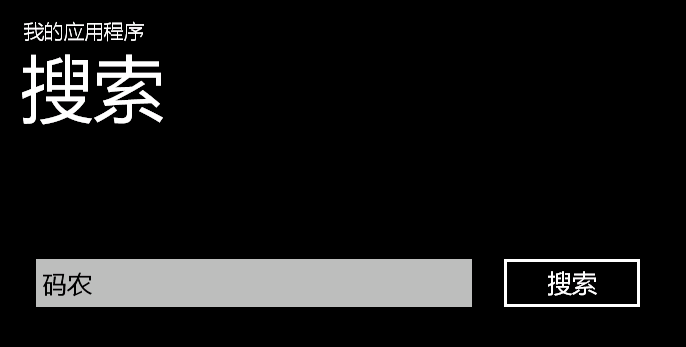
例二:搜索任务。
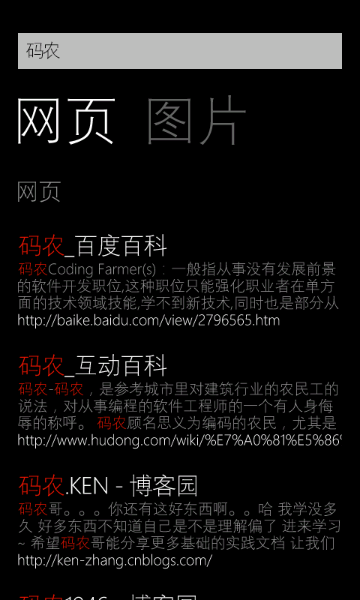
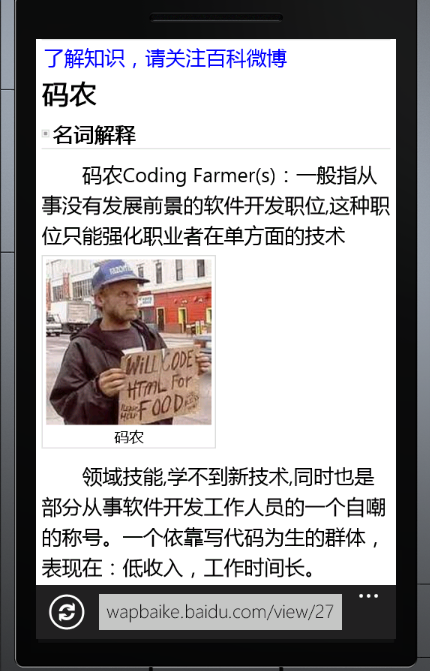
SearchTask类也是一个启动器,这个家伙更简单了,它只有一个属性要设置——SearchQuery,就是我们要搜索的关键字。
<phone:PhoneApplicationPage

    x:Class="sampleApp.Page1"

    xmlns="http://schemas.microsoft.com/winfx/2006/xaml/presentation"

    xmlns:x="http://schemas.microsoft.com/winfx/2006/xaml"

    xmlns:phone="clr-namespace:Microsoft.Phone.Controls;assembly=Microsoft.Phone"

    xmlns:shell="clr-namespace:Microsoft.Phone.Shell;assembly=Microsoft.Phone"

    xmlns:d="http://schemas.microsoft.com/expression/blend/2008"

    xmlns:mc="http://schemas.openxmlformats.org/markup-compatibility/2006"

    FontFamily="{StaticResource PhoneFontFamilyNormal}"

    FontSize="{StaticResource PhoneFontSizeNormal}"

    Foreground="{StaticResource PhoneForegroundBrush}"

    SupportedOrientations="Landscape" Orientation="Landscape"

    mc:Ignorable="d" d:DesignHeight="480" d:DesignWidth="728"

    shell:SystemTray.IsVisible="True">

    <!--LayoutRoot 是包含所有页面内容的根网格-->

    <Grid x:Name="LayoutRoot" Background="Transparent">

        <Grid.RowDefinitions>

            <RowDefinition Height="Auto"/>

            <RowDefinition Height="*"/>

        </Grid.RowDefinitions>

        <!--TitlePanel 包含应用程序的名称和页标题-->

        <StackPanel x:Name="TitlePanel" Grid.Row="0" Margin="12,17,0,28">

            <TextBlock x:Name="ApplicationTitle" Text="我的应用程序" Style="{StaticResource PhoneTextNormalStyle}"/>

            <TextBlock x:Name="PageTitle" Text="搜索" Margin="9,-7,0,0" Style="{StaticResource PhoneTextTitle1Style}"/>

        </StackPanel>

        <!--ContentPanel - 在此处放置其他内容-->

        <Grid x:Name="ContentPanel" Grid.Row="1" Margin="12,0,12,0">

            <TextBox Height="72" HorizontalAlignment="Left" Margin="12,86,0,0" Name="txtKey" VerticalAlignment="Top" Width="460" />

            <Button Content="搜索" Height="72" HorizontalAlignment="Left" Margin="480,86,0,0" Name="button1" VerticalAlignment="Top" Width="160" Click="button1_Click" />

        </Grid>

    </Grid>

</phone:PhoneApplicationPage>
using System;

using System.Collections.Generic;

using System.Linq;

using System.Net;

using System.Windows;

using System.Windows.Controls;

using System.Windows.Documents;

using System.Windows.Input;

using System.Windows.Media;

using System.Windows.Media.Animation;

using System.Windows.Shapes;

using Microsoft.Phone.Controls;

using Microsoft.Phone.Tasks;

namespace sampleApp

{

    public partial class Page1 : PhoneApplicationPage

    {

        public Page1()

        {

            InitializeComponent();

        }

        private void button1_Click(object sender, RoutedEventArgs e)

        {

            SearchTask searcher = new SearchTask();

            searcher.SearchQuery = txtKey.Text;

            searcher.Show();

        }

    }

}
下一节开始,我们讨论独立存储。
还有就是提一下建议,博客编辑器有问题,每次都这样,第一次自动保存草稿后,后面就不会保存了,编辑器内的文本无法选定。而点击发表时没有反应,非得刷新页面。
Windows Phone开发(26):启动器与选择器之MediaPlayerLauncher和SearchTask的更多相关文章
- Windows Phone开发(25):启动器与选择器之WebBrowserTask
原文:Windows Phone开发(25):启动器与选择器之WebBrowserTask 从名字上就看出来,这个家伙就是打开浏览并浏览到指定页面. 它有两个用途完全一样的属性:Uri属性是Syste ...
- Windows Phone开发(23):启动器与选择器之CameraCaptureTask和PhotoChooserTask
原文:Windows Phone开发(23):启动器与选择器之CameraCaptureTask和PhotoChooserTask 这两个组件都属于选择器,而且它们也有很多相似的地方,最明显的上一点, ...
- Windows Phone开发(24):启动器与选择器之发送短信
原文:Windows Phone开发(24):启动器与选择器之发送短信 本节我们通过一个简单的发送短信示例来演示一下如果配合使用PhoneNumberChooserTask和SmsComposeTas ...
- Windows Phone开发(22):启动器与选择器之BingMapsDirectionsTask
原文:Windows Phone开发(22):启动器与选择器之BingMapsDirectionsTask 从今天开发始,我们又开始新的征程,接下来的课程我们要熟悉一下启动器和选择器,其实二者是一样的 ...
- gcc和MinGW的异同(在cygwin/gcc做的东西可以无缝的用在linux下,没有任何问题,是在windows下开发linux程序的一个很好的选择)
cygwin/gcc和MinGW都是gcc在windows下的编译环境,但是它们有什么区别,在实际工作中如何选择这两种编译器. cygwin/gcc完全可以和在linux下的gcc化做等号,这个可以从 ...
- Windows 硬件开发人员怎样选择代码签名证书类型
在建立 Windows 开发人员中心硬件仪表板帐户之前,你需要获取代码签名证书以保护数字信息的安全.此证书是用于建立你的公司对你所提交代码的所有权的接受标准.它让你可以用数字形式签署 PE 二进制文件 ...
- Windows Service 开发,安装与调试
Visual Studio.net 2010 Windows Service 开发,安装与调试 本示例完成一个每隔一分钟向C:\log.txt文件写入一条记录为例,讲述一个Windows Servic ...
- Silverlight for Windows Phone开发系列课程
Silverlight for Windows Phone开发系列课程(1):Windows Phone平台概况 课程简介:本节开始介绍系列课程的概况,包括课程内容,先决条件,学习目的 ...
- 【万里征程——Windows App开发】控件大集合2
以下再来看看一些前面还没有讲过的控件,只是控件太多以至于无法所有列出来,大家仅仅好举一反三啦. Button 前面最经常使用的控件就是Button啦,Button另一个有意思的属性呢.当把鼠标指针放在 ...
随机推荐
- md5增加指定的加密规则,进行加密
import java.io.UnsupportedEncodingException; import java.security.MessageDigest; import java.securit ...
- C++中的常对象和常对象成员
常对象 常对象必须在定义对象时就指定对象为常对象. 常对象中的数据成员为常变量且必须要有初始值,如 Time const t1(12,34,36); //定义t1为常对象 这样的话,在所有的场合中,对 ...
- 第十七篇:实例分析(1)--初探WDDM驱动学习笔记(八)
第四篇(VidPN)中提到过MIRROR驱动. 在进入本篇的实际内容前, 带着好奇心, 想请教CSDN中的显卡驱动方面的大虾, 怎样才干把这个驱动玩起来, 这个驱动的作用是什么,等等, 敬请不吝赐教. ...
- [容斥原理] zoj 3556 How Many Sets I
主题链接: http://acm.zju.edu.cn/onlinejudge/showProblem.do? problemId=4535 How Many Sets I Time Limit: 2 ...
- 为什么Lisp语言如此先进?(译文) - 阮一峰的网络日志
为什么Lisp语言如此先进?(译文) - 阮一峰的网络日志 为什么Lisp语言如此先进?(译文)
- java web从零单排第十六期《struts2》控制标签(2)
1.s:subset标签概述: s:subset标签功能是从一个集合中取出部分元素合并成一个新的集合,新生成的这个集合是原来集合的子集.属性和意义如下: 属性名 是否必需 默认值 类型 说明介绍 co ...
- Spark中的Scheduler
Spark中的Scheduler scheduler分成两个类型.一个是TaskScheduler与事实上现,一个是DAGScheduler. TaskScheduler:主要负责各stage中传入的 ...
- RegisterHotKey注册热键,然后响应WM_HOTKEY消息
MSDN中的一个示例代码,步骤就是RegisterHotKey注册热键,然后响应WM_HOTKEY消息 @1:这个是系统热键 #include "stdafx.h" int _cd ...
- NYOJ 914 Yougth的最大化
Yougth的最大化 时间限制:1000 ms | 内存限制:65535 KB 难度:4 描写叙述 Yougth如今有n个物品的重量和价值各自是Wi和Vi,你能帮他从中选出k个物品使得单位重量的价 ...
- POJ 3696 神TM数论
鸣谢: http://blog.csdn.net/yhrun/article/details/6908470 http://blog.sina.com.cn/s/blog_6a46cc3f0100tv ...