
NET 5 Session、Cookie和Cache的使用
1.Cookie
public IConfiguration Configuration { get; }

    // This method gets called by the runtime. Use this method to add services to the container.

    public void ConfigureServices(IServiceCollection services)

    {

        services.AddHttpContextAccessor();//配置Cookie HttpContext

        services.AddTransient<ICookie, Cookie>();//IOC配置 方便项目中使用

        services.AddTransient(typeof(Config));//基础配置

    }

    // This method gets called by the runtime. Use this method to configure the HTTP request pipeline.

    public void Configure(IApplicationBuilder app, IWebHostEnvironment env)

    {

        if (env.IsDevelopment())

        {

            app.UseDeveloperExceptionPage();

        }

        else

        {

            app.UseExceptionHandler("/Home/Index");

            // The default HSTS value is 30 days. You may want to change this for production scenarios, see https://aka.ms/aspnetcore-hsts.

            app.UseHsts();

        }

        app.UseHttpsRedirection();

        app.UseStaticFiles();

        app.UseRouting();

        app.UseAuthorization();

        app.UseEndpoints(endpoints =>

        {

            endpoints.MapControllerRoute(

                name: "default",

                pattern: "{controller=Home}/{action=Index}/{id?}");

        });

    }

}
public interface ICookie

{

    void SetCookies(string key, string value, int minutes = 300);

    /// <summary>

    /// 删除指定的cookie

    /// </summary>

    /// <param name="key">键</param>

    void DeleteCookies(string key);

    /// <summary>

    /// 获取cookies

    /// </summary>

    /// <param name="key">键</param>

    /// <returns>返回对应的值</returns>

    string GetCookies(string key);

}
public class Cookie : ICookie

{

    private readonly IHttpContextAccessor _httpContextAccessor;

    public Cookie(IHttpContextAccessor httpContextAccessor)

    {

        _httpContextAccessor = httpContextAccessor;

    }

    /// <summary>

    /// 设置本地cookie

    /// </summary>

    /// <param name="key">键</param>

    /// <param name="value">值</param>

    /// <param name="minutes">过期时长,单位:分钟</param>

    public void SetCookies(string key, string value, int minutes = 300)

    {

        _httpContextAccessor.HttpContext.Response.Cookies.Append(key, value, new CookieOptions

        {

            Expires = DateTime.Now.AddMinutes(minutes)

        });

    }

    /// <summary>

    /// 删除指定的cookie

    /// </summary>

    /// <param name="key">键</param>

    public void DeleteCookies(string key)

    {

        _httpContextAccessor.HttpContext.Response.Cookies.Delete(key);

    }

    /// <summary>

    /// 获取cookies

    /// </summary>

    /// <param name="key">键</param>

    /// <returns>返回对应的值</returns>

    public string GetCookies(string key)

    {

        _httpContextAccessor.HttpContext.Request.Cookies.TryGetValue(key, out string value);

        if (string.IsNullOrEmpty(value))

            value = string.Empty;

        return value;

    }

}
public class HomeController : Controller

{

    private readonly ILogger _logger;

    private readonly ICookie _cookie;

    private readonly Config _config;

    public HomeController(ILogger<HomeController> logger, ICookie cookie, Config config)

    {

        _logger = logger;

        this._cookie = cookie;

        this._config = config;

    }

    public IActionResult Index()

    {

        _cookie.SetCookies(_config.CookieName(), "CookieValue");

        string CookieValue = _cookie.GetCookies(_config.CookieName());

        _cookie.DeleteCookies(_config.CookieName());

        return View();

    }

    public IActionResult Privacy()

    {

        return View();

    }

    [ResponseCache(Duration = 0, Location = ResponseCacheLocation.None, NoStore = true)]

    public IActionResult Error()

    {

        return View(new ErrorViewModel { RequestId = Activity.Current?.Id ?? HttpContext.TraceIdentifier });

    }

}
2.Session
在你的项目上基于NuGet添加
Microsoft.AspNetCore.Session
在startup.cs找到方法ConfigureServices(IServiceCollection services) 注入Session
services.AddSession();
app.UseSession();
在控制器中设置和使用session
//写入session

HttpContext.Session.SetInt32("userId", 10);
//获取session
3.Cache
1    public void ConfigureServices(IServiceCollection services)

2    {

3        services.AddMemoryCache();

4    }
1 public class LoginController : Controller

2 {

3     private IMemoryCache _cache;

4

5     public LoginController(IMemoryCache memoryCache)

6     {

7         _cache = memoryCache;

8     }
1 //检查用户名是否存在

 2 public JsonResult SelectUName(string uname)

 3 {

 4    //读取缓存

 5    var cache = _cache.Get("re_" + uname);

 6    if (cache == null)//如果没有该缓存

 7    {

 8       //查询用户名是否存在

 9       var re = _userdal.SelectUName(uname);

10       //将验证结果添加到缓存

11       _cache.Set("re_" + uname, re.Status, new MemoryCacheEntryOptions().SetSlidingExpiration(TimeSpan.FromMinutes(10)));

12       return Json(new { status = re.Status });

13    }

14    else//如果缓存不为空,则返回缓存内容

15    {

16       return Json(new { status = cache });

17    }

18 }
1         //删除

2         public int Delete(int uid)

3         {

4             var re = _maindal.Delete(uid);

5             //删除成功之后移除验证用户名缓存

6             _cache.Remove("re_" + HttpContext.Session.GetString("name"));

7             return re;

8         }
Session缓存和Cache缓存的区别如下:
(1)最大的区别是Cache提供缓存依赖来更新数据,而Session只能依靠定义的缓存时间来判断缓存数据是否有效。
(2)即使应用程序终止,只要Cache.Add方法中定义的缓存时间未过期,下次开启应用程序时,缓存的数据依然存在。而Session缓存只是存在于一次会话中,会话结束后,数据也就失效了。
(3)Session容易丢失,导致数据的不确定性,而Cache不会出现这种情况。
(4)由于Session是每次会话就被加载,所以不适宜存放大量信息,否则会导致服务器的性能降低。而Cache则主要用来保存大容量信息,如数据库中的多个表。
需要特别注意:为了提高Cache的有效利用率,建议对于不经常改动的数据使用Cache。
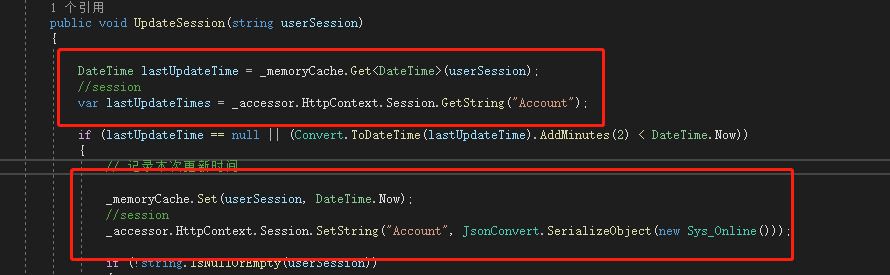
public void ConfigureServices(IServiceCollection services)

{

    //如何处理session

   services.AddSession();

    //memoryCache

   services.AddMemoryCache();

    //.......

}

 public void Configure(IApplicationBuilder app, IWebHostEnvironment env)

{

    //启用session

    app.UseSession();

    app.UseRouting();

    //......

}

NET 5 Session、Cookie和Cache的使用的更多相关文章
- Redis+Django(Session,Cookie、Cache)的用户系统
转自 http://www.cnblogs.com/BeginMan/p/3890761.html 一.Django authentication django authentication 提供了一 ...
- (转)Application, Session, Cookie, Viewstate, Cache对象用法和区别
================================================================================ 1.Applicati ...
- Application,Session,Cookie,ViewState,Cache对象用法、作用域的区别
1.Application:用于保存所有用户共用的数据信息.在Asp.Net中类似的配置数据最好保存在Web.config文件中.如果使用Application对象,一个需要考虑的问题是任何写操作都要 ...
- .NET Application,Session,Cookie,ViewState,Cache对象用法
作用域 保存地址 生命周期Application 应用程序 服务器内存 IIS启动Session 整个站点 服务器内存 Session到时 默认20分钟Cashe 应用程序 服务器内存 应用程序的周期 ...
- Asp.net 服务器Application,Session,Cookie,ViewState和Cache区别
2.8 Context 的使用Context 对象包含与当前页面相关的信息,提供对整个上下文的访问,包括请求.响应.以及上文中的Session 和Application 等信息.可以使用此对象在网页之 ...
- Application,Session,Cookie,ViewState和Cache区别
在ASP.NET中,有很多种保存信息的内置对象,如:Application,Session,Cookie,ViewState和Cache等.下面分别介绍它们的用法和区别. 方法 信息量大小 作用域和保 ...
- 关于session,cookie,Cache
昨天看了<ASP.NET 页面之间传值的几种方式>之后,对session,cookie,Cache有了更近一步的了解,以下是相关的内容 一.Session 1.Session基本操作 a. ...
- Session、Cookie、Cache、Token分别是什么及区别
一.Session 1 )Session 解释 Session 是单用户的会话状态.当用户访问网站时,产生一个 sessionid.并存在于 cookies中.每次向服务器请求时,发送这个 cooki ...
- [区别]APPlication,Session,Cookie,ViewState和Cache
原文发布时间为:2009-08-01 -- 来源于本人的百度文章 [由搬家工具导入] 在ASP.NET中,有很多种保存信息的对象.例如:APPlication,Session,Cookie,ViewS ...
- java基础之缓存:session、cookie和cache的区别
以前实现数据的缓存有很多种方法,有客户端的Cookie,有服务器端的Session和Application. 其中Cookie是保存在客户端的一组数据,主要用来保存用户名等个人信息. Session则 ...
随机推荐
- 宝塔Linux面板基础命令
安装宝塔Centos安装脚本 yum install -y wget && wget -O install.sh http://download.bt.cn/install/insta ...
- LaTeX中的参考文献BibTex
设置: BibTex代码及注释: 显示效果:
- 【NOIP2015模拟11.4】JZOJ2020年8月6日提高组T2 最优交换
[NOIP2015模拟11.4]JZOJ2020年8月6日提高组T2 最优交换 题目 题解 题意 有一个长度为\(n\)的正整数 最多可以进行\(k\)次操作 每次操作交换相邻两个位置上的数 问可以得 ...
- 20200428_在centos7.2上挂载ntfs和备份文件到移动硬盘
[root@localhost ~]# fdisk -l 磁盘 /dev/sda:2000.4 GB, 2000398934016 字节,3907029168 个扇区 - 设备 Boot Start ...
- spring + quartz 分布式自定义注解
相关技术 本文采用spring + quartz的方案.使用mysql作为任务的持久化,支持分布式. 自定义注解 1.启用定时任务 @Target(ElementType.TYPE) @Retenti ...
- C#数据结构-二叉树-链式存储结构
对比上一篇文章"顺序存储二叉树",链式存储二叉树的优点是节省空间. 二叉树的性质: 1.在二叉树的第i层上至多有2i-1个节点(i>=1). 2.深度为k的二叉树至多有2k- ...
- 第7.11节 案例详解:Python类实例变量
上节老猿介绍了实例变量的访问方法,本节结合一个具体案例详细介绍实例变量访问. 本节定义一个Vehicle类(车),它有三个实例变量self.wheelcount(轮子数).self.power(动力) ...
- IT人的5G网络架构视点:从网络架构演进的前世今生详解5G各NF网络功能体
一.引言 以前从来没关注电信无线上网网络的具体架构(也即PS域架构),现在开始学5G接触这些东西时,理解起来很痛苦,资料也少,于是一方面到处找人咨询,一方面到处查资料,最后发现应该从3G.4G时代的架 ...
- 第8.25节 Python风格的__getattribute__属性访问方法语法释义及使用
一. 引言 在<第8.13节 Python类中内置方法__repr__详解>老猿介绍了在命令行方式直接输入"对象"就可以调用repr内置函数或__repr__方法查看对 ...
- Python+Qt学习随笔:PyQt中常用的事件处理函数
在PyQt图形界面中,我们经常要捕获特定事件如鼠标按键按下.鼠标按下等事件以执行特定操作,可以通过重写组件对象的相关事件处理函数来实现相关处理,具体特定事件常用的包括如下: keyPressEvent ...