
springboot、Thymeleaf、国际化的简单使用
1、项目体系结构
(1)知识体系
springboot:省去了很多繁琐的配置,如:视图解析器、前端控制器等
thymeleaf:获取controller数据逼能够进行展示
集合:用于存储数据,此练习没有连接数据库
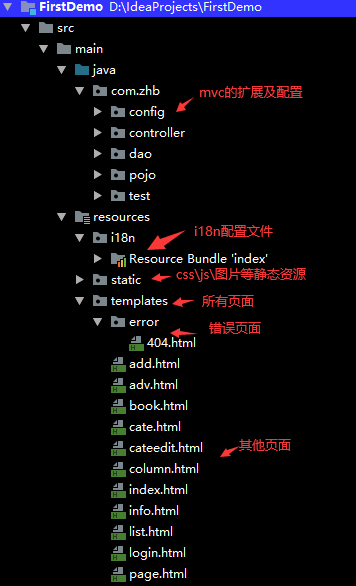
(2)项目结构
2、登录
(1)去登录页&登录
 @GetMapping("/user/login")

    public String toLogin(){

        return "login";

    }

    @PostMapping("/user/login")

    public String login(@RequestParam("username") String username,

                        @RequestParam("password") String password,

                        Model model,

                        HttpSession session){

        //业务

        if(!StringUtils.isEmpty(username)&&"1".equals(password)){

            session.setAttribute("loginUser",username);

            return "redirect:/index";

        }else {

            model.addAttribute("error","用户名或密码错误");

            return "login";

        }

    }
为了保证数据的安全在登录的时候采用的是post提交方式,由于没有与数据库连接,采用的是固定的密码。
(2)登录拦截器
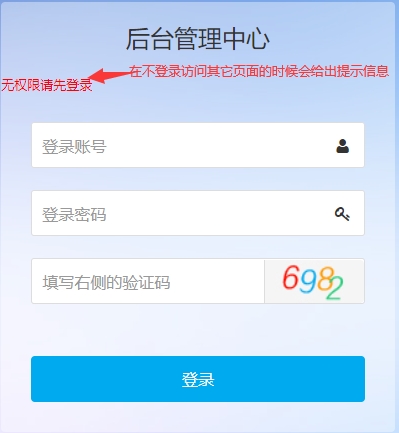
有些资源在没有登录的情况下是不允许访问的,因此,需要添加拦截器对用户的访问加以限制:
// 注册拦截器

    @Override

    public void addInterceptors(InterceptorRegistry registry) {

        // 添加拦截的请求,并排除几个不拦截的请求

        registry.addInterceptor(new LoginHandlerInterceptor()).addPathPatterns("/**")

                .excludePathPatterns("/user/login","/css/*","/js/*","/images/*","/toadd");

    }
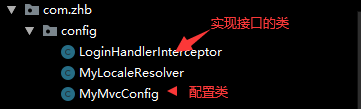
创建一个单独的类,实现HandlerInterceptor 接口:
public class LoginHandlerInterceptor implements HandlerInterceptor {

    // 目标方法执行之前

    @Override

    public boolean preHandle(HttpServletRequest request, HttpServletResponse response, Object handler) throws Exception {

        Object user = request.getSession().getAttribute("loginUser");

        // 如果获取的request的session中的loginUser参数为空(未登录),就返回登录页,否则放行访问

        if (user == null) {

            // 未登录,给出错误信息

            request.setAttribute("error","无权限请先登录");

            // 获取request返回页面到登录页

            request.getRequestDispatcher("/user/login").forward(request, response);

            return false;

        } else {

            // 已登录,放行

            return true;

        }

    }
(3)测试
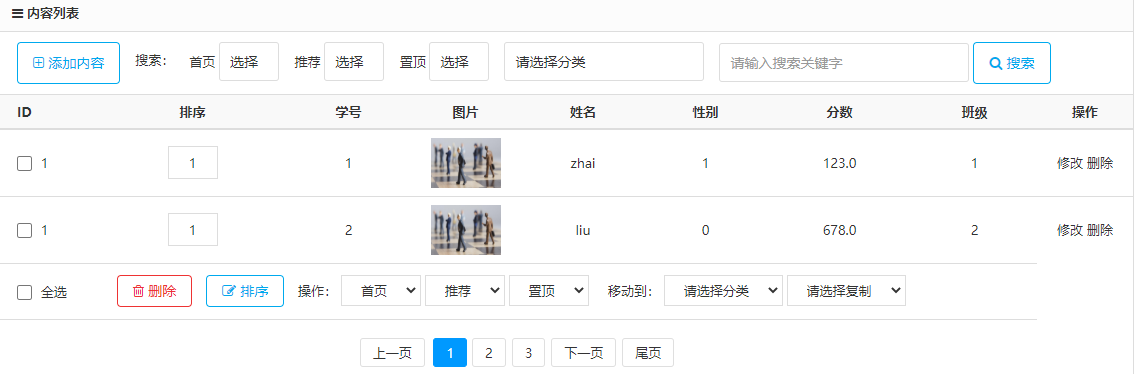
3、查询所有学生
(1)controller层代码:
    @RequestMapping("/studentslist")

    public String list(Model model){

        Collection<Student> students=studentDao.getAll();

        model.addAttribute("students",students);

        return "list";

    }
从dao层获取导数据以后将数据提供给list页面进行显示
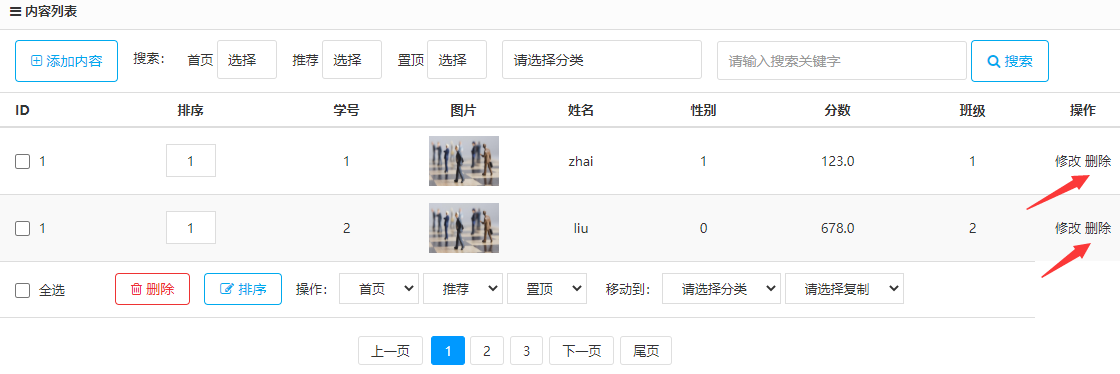
(2)页面核心代码:牵涉到多条学生信息,需要用到each对数据进行遍历
<volist name="list" id="vo">

                <tr th:each="student:${students}">

                    <td style="text-align:left; padding-left:20px;"><input type="checkbox" name="id[]" value=""/>

                        1

                    </td>

                    <td><input type="text" name="sort[1]" value="1"

                               style="width:50px; text-align:center; border:1px solid #ddd; padding:7px 0;"/></td>

                    <td th:text="${student.studentno}"></td>

                    <td width="10%"><img src="data:images/11.jpg" alt="" width="70" height="50"/></td>

                    <td th:text="${student.sname}"></td>

                    <td th:text="${student.sex}"></td>

                    <td th:text="${student.point}"></td>

                    <td th:text="${student.classno}"></td>

                    <td>

                        <a th:href="@{/student/update/}+${student.studentno}">修改</a>

                        <a th:href="@{/student/delete/}+${student.studentno}">删除</a>

                    </td>

                </tr>
4、添加学生
(1)controller层
 @RequestMapping("/toadd")

    public String toAdd(Model model){

        Collection<Clas> clas=classDao.getClas();

        model.addAttribute("clas",clas);

        return "add";

    }

    @PostMapping("/addStudent")

    public String add(Student student){

        studentDao.save(student);

        return "redirect:/studentslist";

    }
在去学生的添加页面的时候需要获取所有的班级名称,让用户从已有的班级中选择,避免出现添加一个学生而该学生所在的班级不存在的情况
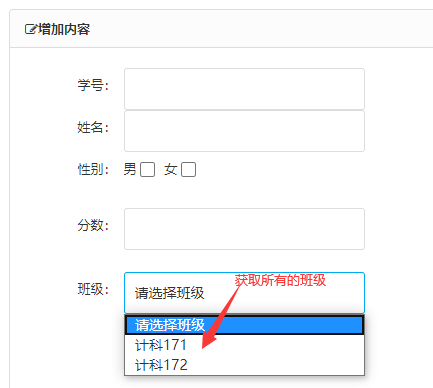
在用户输入相关信息后就可以点击提交按钮进行提交了,是将表单数据提交给了controller层的add
(2)页面核心代码
 <div class="panel-head" id="add"><strong><span class="icon-pencil-square-o"></span>增加内容</strong></div>

    <div class="body-content">

        <form method="post" class="form-x" action="/addStudent">

            <div class="form-group">

                <div class="label">

                    <label>学号:</label>

                </div>

                <div class="field">

                    <input type="text" class="input w50" value="" name="studentno" data-validate="member:只能为数字"/>

                    <div class="tips"></div>

                </div>

                <div class="label">

                    <label>姓名:</label>

                </div>

                <div class="field">

                    <input type="text" class="input w50"  name="sname"/>

                    <div class="tips"></div>

                </div>

                <div class="form-group">

                    <div class="label">

                        <label>性别:</label>

                    </div>

                    <div class="field" style="padding-top:8px;">

                        男 <input id="ishome" value="1" name="sex" type="checkbox" />

                        女 <input id="isvouch" value="0"  name="sex" type="checkbox" />

                    </div>

                </div>

                <div class="label">

                    <label>分数:</label>

                </div>

                <div class="field">

                    <input type="text" class="input w50" value="" name="point" data-validate="member:只能为数字"/>

                    <div class="tips"></div>

                </div>

            </div>

            <if condition="$iscid eq 1">

                <div class="form-group">

                    <div class="label">

                        <label>班级:</label>

                    </div>

                    <div class="field">

                        <select  class="input w50" name="classno" >

                            <option>请选择班级</option>

                            <option th:each="c:${clas}" th:value="${c.classno}">[[${c.classname}]]</option>

                        </select>

                        <div class="tips"></div>

                    </div>

                </div>

            </if>

            <div class="form-group">

                <div class="label">

                    <label></label>

                </div>

                <div class="field">

                    <button class="button bg-main icon-check-square-o" type="submit"> 提交</button>

                </div>

            </div>

        </form>
为了数据的安全性同样采用post方式进行提交
5、修改学生信息
(1)controller层
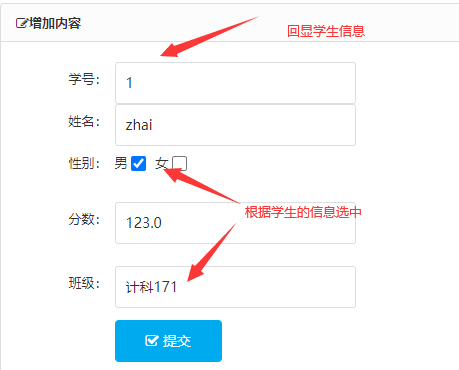
在去修改页面的时候需要进行数据的回显:被点击的学生的那一条信息以及所有的班级名称;班级名称和性别要根据被点击的学生的信息被选中
    @RequestMapping("/student/update/{studentno}")

    public String toupdate(@PathVariable("studentno") Integer studentno, Model model){

        Student student=studentDao.getStudentById(studentno);

        model.addAttribute("student",student);

        System.out.println(studentno);

        System.out.println(student);

        Collection<Clas> clas=classDao.getClas();

        model.addAttribute("clas",clas);

        return "update";

    }
(2)页面核心代码
<div class="body-content">

        <form method="post" class="form-x" action="/addStudent">

            <div class="form-group">

                <div class="label">

                    <label>学号:</label>

                </div>

                <div class="field">

                    <input type="text" class="input w50" th:value="${student.studentno}" name="studentno" data-validate="member:只能为数字"/>

                    <div class="tips"></div>

                </div>

                <div class="label">

                    <label>姓名:</label>

                </div>

                <div class="field">

                    <input type="text" class="input w50"  name="sname" th:value="${student.sname}"/>

                    <div class="tips"></div>

                </div>

                <div class="form-group">

                    <div class="label">

                        <label>性别:</label>

                    </div>

                    <div class="field" style="padding-top:8px;">

                        男 <input th:checked="${student.getSex()==1}" id="ishome" th:value="1" name="sex" type="checkbox" />

                        女 <input th:checked="${student.getSex()==0}" id="isvouch" th:value="0"  name="sex" type="checkbox" />

                    </div>

                </div>

                <div class="label">

                    <label>分数:</label>

                </div>

                <div class="field">

                    <input type="text" class="input w50" th:value="${student.point}" name="point" data-validate="member:只能为数字"/>

                    <div class="tips"></div>

                </div>

            </div>

            <if condition="$iscid eq 1">

                <div class="form-group">

                    <div class="label">

                        <label>班级:</label>

                    </div>

                    <div class="field">

                        <select  class="input w50" name="classno" >

                            <option>请选择班级</option>

                            <option th:each="c:${clas}" th:value="${c.classno}"

                                    th:selected="${student.classno==c.classno}">[[${c.classname}]]</option>

                        </select>

                        <div class="tips"></div>

                    </div>

                </div>

            </if>

            <div class="form-group">

                <div class="label">

                    <label></label>

                </div>

                <div class="field">

                    <button class="button bg-main icon-check-square-o" type="submit"> 提交</button>

                </div>

            </div>

        </form>

    </div>
6、删除学生信息
(1)controller层
 @RequestMapping("/student/delete/{studentno}")

    public String delete(@PathVariable("studentno") Integer studentno,Model model){

        studentDao.delete(studentno);

        return "redirect:/studentslist";

    }
(2)页面核心代码
   <td>

                        <a th:href="@{/student/update/}+${student.studentno}">修改</a>

                        <a th:href="@{/student/delete/}+${student.studentno}">删除</a>

                    </td>
根据学号删除学生信息
7、注销
(1)controller层
    @RequestMapping("/user/logout")

    public String logout(HttpSession session){

        session.invalidate();

        return "redirect:/index";

    }
(2)页面核心代码
     <a class="button button-little bg-red" th:href="@{/user/logout}">

        <span class="icon-power-off"></span> 退出登录</a>
8、错误页面
(1)新建目录并创建名称为404的html页面
<!DOCTYPE html>

<html lang="en">

<head>

    <meta charset="UTF-8">

    <title>Title</title>

</head>

<body>

<h2>404</h2>

</body>

</html>
(2)测试

9、国际化
(1)创建配置文件
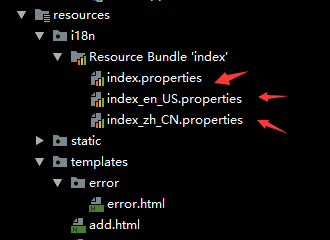
在配置文件中指定默认的i18n的配置文件:
#i18n

spring.messages.basename=i18n.index
在不进行文字切换的时候默认读取的是i18n的index配置文件
(2)扩展springmvc,实现接口覆盖默认的i18n的配置
//覆盖或改变默认的配置,扩展MVC

public class MyLocaleResolver implements LocaleResolver {

    //解析请求

    @Override

    public Locale resolveLocale(HttpServletRequest request) {

        String language = request.getParameter("language");

        //如果没有就是用默认的

        Locale locale = Locale.getDefault();

        if (!StringUtils.isEmpty(language)) {

            //分割为数组,国家和地区

            String[] split = language.split("_");

            locale = new Locale(split[0], split[1]);

        }

        return locale;

    }
接收来自页面的language的参数,根据参数来选择对应的i18n的配置文件
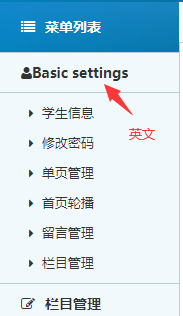
英文:
index.Basicsettings=Basic settings
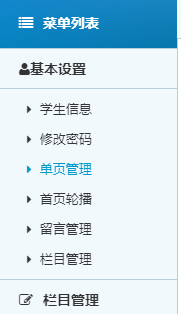
中文:
index.Basicsettings=基本设置
(3)页面核心代码
<a th:href="@{/index(language='zh_CN')}">中文</a>
<a th:href="@{/index(language='en_US')}">英文</a></li>
(4)显示效果
英文:
中文:
切换按钮:

10、其他
(1)扩展mvc
i18n:
//覆盖或改变默认的配置,扩展MVC

public class MyLocaleResolver implements LocaleResolver {

    //解析请求

    @Override

    public Locale resolveLocale(HttpServletRequest request) {

        String language = request.getParameter("language");

        //如果没有就是用默认的

        Locale locale = Locale.getDefault();

        if (!StringUtils.isEmpty(language)) {

            //分割为数组,国家和地区

            String[] split = language.split("_");

            locale = new Locale(split[0], split[1]);

        }

        return locale;

    }
拦截器:
public class LoginHandlerInterceptor implements HandlerInterceptor {

    // 目标方法执行之前

    @Override

    public boolean preHandle(HttpServletRequest request, HttpServletResponse response, Object handler) throws Exception {

        Object user = request.getSession().getAttribute("loginUser");

        // 如果获取的request的session中的loginUser参数为空(未登录),就返回登录页,否则放行访问

        if (user == null) {

            // 未登录,给出错误信息

            request.setAttribute("error","无权限请先登录");

            // 获取request返回页面到登录页

            request.getRequestDispatcher("/user/login").forward(request, response);

            return false;

        } else {

            // 已登录,放行

            return true;

        }

    }
(2)mvc配置
@Configuration//将类变成一个配置类

public class MyMvcConfig implements WebMvcConfigurer {

    @Bean//要注意方法名是固定的,Bean标记在方法上

    // 该方式将方法的返回值添加到容器中,容器中组件的ID默认是方法名

    public LocaleResolver localeResolver(){

        return new MyLocaleResolver();

    }

    // 注册拦截器

    @Override

    public void addInterceptors(InterceptorRegistry registry) {

        // 添加拦截的请求,并排除几个不拦截的请求

        registry.addInterceptor(new LoginHandlerInterceptor()).addPathPatterns("/**")

                .excludePathPatterns("/user/login","/css/*","/js/*","/images/*","/toadd");

    }

}
对i18n和拦截器进行配置
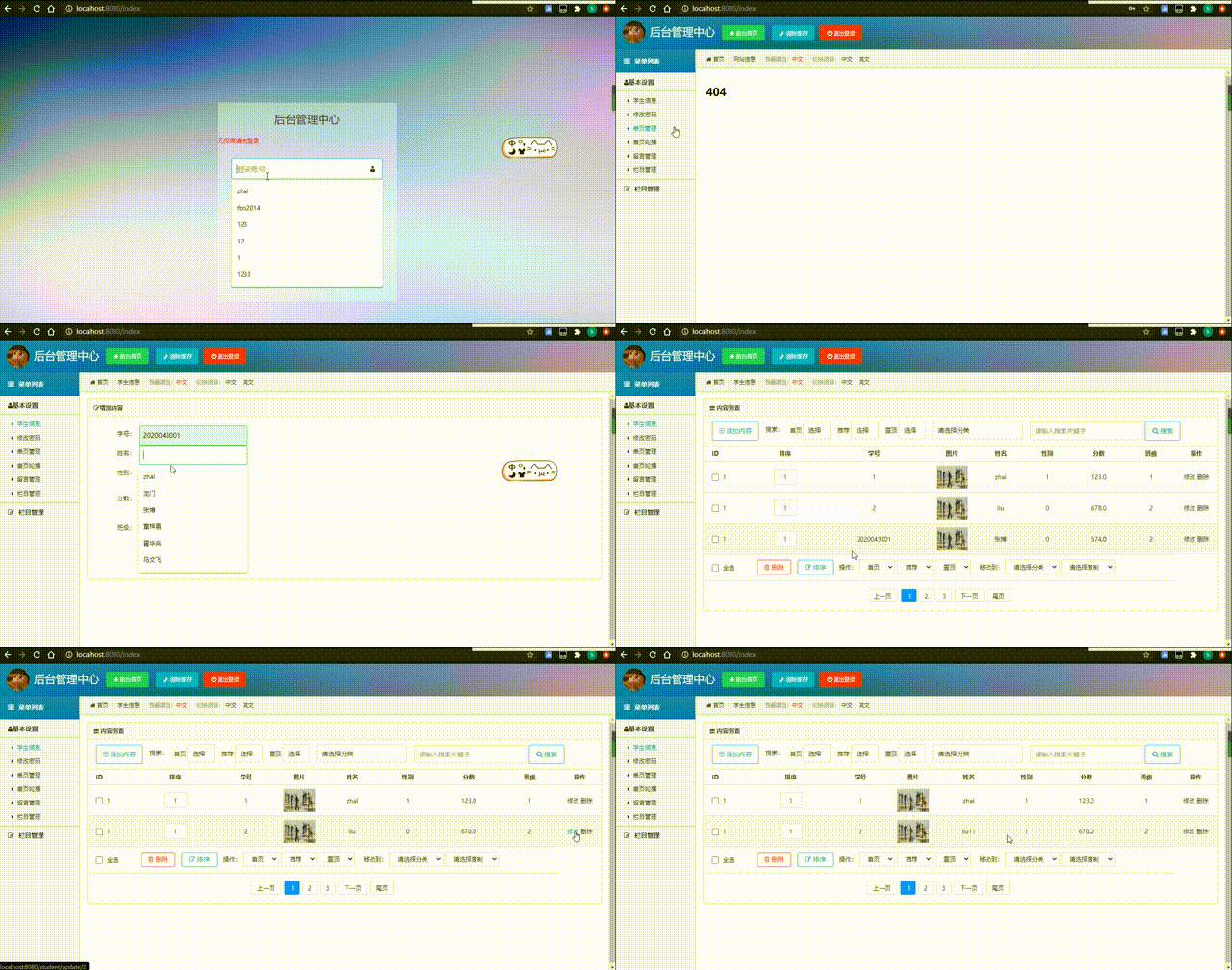
11、项目演示
springboot、Thymeleaf、国际化的简单使用的更多相关文章
- springboot+thymeleaf简单使用
关于springboot想必很多人都在使用,由于公司项目一直使用的是SpringMVC,所以自己抽空体验了一下springboot的简单使用. 环境搭建 springbooot的环境搭建可以说很灵活, ...
- org.springframework.expression.spel.SpelEvaluationException: EL1004E: Method call: Method service() cannot be found on com.my.blog.springboot.thymeleaf.util.MethodTest type
前言 本文中提到的解决方案,源码地址在:springboot-thymeleaf,希望可以帮你解决问题. 至于为什么已经写了一篇文章thymeleaf模板引擎调用java类中的方法,又多此一举的单独整 ...
- Java结合SpringBoot拦截器实现简单的登录认证模块
Java结合SpringBoot拦截器实现简单的登录认证模块 之前在做项目时需要实现一个简单的登录认证的功能,就寻思着使用Spring Boot的拦截器来实现,在此记录一下我的整个实现过程,源码见文章 ...
- SpringBoot 国际化配置,SpringBoot Locale 国际化
SpringBoot 国际化配置,SpringBoot Locale 国际化 ================================ ©Copyright 蕃薯耀 2018年3月27日 ht ...
- SpringBoot访问NoSQL和简单的Thymeleaf-Spring-Spring-boot整合
SpringBoot访问NoSQL SpringBoot访问Redis 在pom.xml添加boot-data-redis定义 <parent> <groupId>org.sp ...
- 配置和修改springboot默认国际化文件
SpringBoot默认国际化文件为:classpath:message.properties,如果放在其它文件夹中,则需要在application.properties配置属性spring.mess ...
- springboot+thymeleaf+pageHelper带条件分页查询
html层 <div> <a class="num"><b th:text="'共 '+ ${result.resultMap['pages ...
- SpringBoot thymeleaf使用方法,thymeleaf模板迭代
SpringBoot thymeleaf使用方法,thymeleaf模板迭代 SpringBoot thymeleaf 循环List.Map ============================= ...
- SpringBoot thymeleaf模板页面没提示,SpringBoot thymeleaf模板插件安装
SpringBoot thymeleaf模板插件安装 SpringBoot thymeleaf模板Html页面没提示 SpringBoot thymeleaf模板页面没提示 SpringBoot t ...
- SpringBoot thymeleaf模板版本,thymeleaf模板更换版本
SpringBoot thymeleaf模板版本 thymeleaf模板更换版本 修改thymeleaf模板版本 ================================ ©Copyright ...
随机推荐
- 非确定性有穷状态决策自动机练习题Vol.2 C. 奇袭
非确定性有穷状态决策自动机练习题Vol.2 C. 奇袭 题目描述 由于各种原因,桐人现在被困在\(Under World\)(以下简称\(UW\))中,而\(UW\)马上 要迎来最终的压力测试--魔界 ...
- 在win10的Linux子系统(WSL)上搭载python编程环境
为什么使用WSL进行python编程 WSL,全称Windows Subsystem for Linux.简言之,win10提供了一个子Linux系统,可以解决虚拟机和双系统的系统之间阻隔的问题而不影 ...
- paramiko 模块 ---- python2.7
模拟远程执行命令: ? 1 2 3 4 5 6 7 8 9 10 11 12 13 14 15 16 17 18 19 20 21 import paramiko #设置日志记录 paramiko ...
- Spring Security认证流程分析--练气后期
写在前面 在前一篇文章中,我们介绍了如何配置spring security的自定义认证页面,以及前后端分离场景下如何获取spring security的CSRF Token.在这一篇文章中我们将来分析 ...
- redis数据库基础篇
一.Redis介绍 Redis 是一个高性能的key-value数据格式的内存缓存,NoSQL数据库.NOSQL:not only sql,泛指非关系型数据库.关系型数据库: (mysql, orac ...
- 贝塞尔曲线(B-spline)的原理与应用
什么是贝塞尔曲线? 贝塞尔曲线(Bézier curve),又称贝兹曲线或贝济埃曲线,是应用于二维图形应用程序的数学曲线. 来源 贝塞尔曲线于1962,由法国工程师皮埃尔·贝塞尔(Pierre Béz ...
- 【Spring注解驱动开发】二狗子让我给他讲讲@EnableAspectJAutoProxy注解
写在前面 最近,二狗子入职了新公司,新入职的那几天确实有点飘.不过慢慢的,他发现他身边的人各个身怀绝技啊,有Spring源码的贡献者,有Dubbo源码的贡献者,有MyBatis源码的贡献者,还有研究A ...
- 开源流数据公司 StreamNative 推出 Pulsar 云服务,推进企业“流优先”进程
Apache 顶级项目 Pulsar 背后的开源流数据公司 StreamNative 宣布,推出基于 Apache Pulsar 的云端服务产品--StreamNative Cloud.该产品的发布, ...
- 【Android】Listview返回顶部,快速返回顶部的功能实现,详解代码。
作者:程序员小冰,GitHub主页:https://github.com/QQ986945193 新浪微博:http://weibo.com/mcxiaobing 首先给大家看一下我们今天这个最终实现 ...
- 避免nullpointer 空指针
来自知乎: 一般在服务器返回的数据上我们会做数据合法性检测,所以在api文档上需要注明字段的取值范围,然后客户端根据这个去做数据检测,缺段就直接走数据错误的流程,这个很大程度上避免了不少nullpoi ...