
Spring Cloud学习笔记【二】Eureka 服务提供者/服务消费者(ribbon)
Ribbon 是 Netflix 发布的开源项目,主要功能是为 REST 客户端实现负载均衡。它主要包括六个组件:
- ServerList,负载均衡使用的服务器列表。这个列表会缓存在负载均衡器中,并定期更新。当 Ribbon 与 Eureka 结合使用时,ServerList 的实现类就是 DiscoveryEnabledNIWSServerList,它会保存 Eureka Server 中注册的服务实例表。
- ServerListFilter,服务器列表过滤器。这是一个接口,主要用于对 Service Consumer 获取到的服务器列表进行预过滤,过滤的结果也是 ServerList。Ribbon 提供了多种过滤器的实现。
- IPing,探测服务实例是否存活的策略。
- IRule,负载均衡策略,其实现类表述的策略包括:轮询、随机、根据响应时间加权等,我们也可以自己定义负载均衡策略,比如我们就利用自己实现的策略,实现了服务的版本控制和直连配置。实现好之后,将实现类重新注入到 Ribbon 中即可。
- ILoadBalancer,负载均衡器。这也是一个接口,Ribbon 为其提供了多个实现,比如 ZoneAwareLoadBalancer。而上层代码通过调用其 API 进行服务调用的负载均衡选择。一般 ILoadBalancer 的实现类中会引用一个 IRule。
- RestClient,服务调用器。顾名思义,这就是负载均衡后,Ribbon 向 Service Provider 发起 REST 请求的工具。
Ribbon 工作时会做四件事情:
- 优先选择在同一个 Zone 且负载较少的 Eureka Server;
- 定期从 Eureka 更新并过滤服务实例列表;
- 根据用户指定的策略,在从 Server 取到的服务注册列表中选择一个实例的地址;
- 通过 RestClient 进行服务调用。
服务提供者
创建一个Spring Starter Project,命名service-producer,添加依赖
 <dependencies>

   <dependency>

     <groupId>org.springframework.boot</groupId>

     <artifactId>spring-boot-starter-web</artifactId>

   </dependency>

   <dependency>

     <groupId>org.springframework.cloud</groupId>

     <artifactId>spring-cloud-starter-netflix-eureka-client</artifactId>

   </dependency>

 </dependencies>
配置属性(application.yml)
server:

  port: 8080  #启动其他实例时需要修改端口号

spring:

  application:

    name: service-producer

eureka:

  client:

    serviceUrl:

      defaultZone: http://admin:123456@localhost:8761/eureka/
控制层创建一个controller,对外提供一个接口(这里比较简单就只返回服务的端口号)
 package com.carry.springcloud.controller;

 import org.springframework.beans.factory.annotation.Value;

 import org.springframework.web.bind.annotation.GetMapping;

 import org.springframework.web.bind.annotation.RestController;

 @RestController

 public class ProducerController {

     @Value("${server.port}")

     String serverPort;

     @GetMapping("/getPortInfo")

     public String produce() {

         return "调用服务的端口号为:" + serverPort;

     }

 }
启动类加上@EnableEurekaClient注解即可
 package com.carry.springcloud;

 import org.springframework.boot.SpringApplication;

 import org.springframework.boot.autoconfigure.SpringBootApplication;

 import org.springframework.cloud.netflix.eureka.EnableEurekaClient;

 @EnableEurekaClient

 @SpringBootApplication

 public class ServiceProducerApplication {

     public static void main(String[] args) {

         SpringApplication.run(ServiceProducerApplication.class, args);

     }

 }
测试
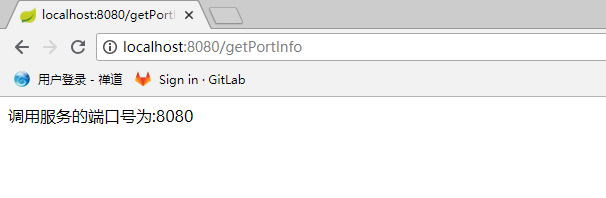
打开浏览器访问localhost:8080/getPortInfo,出现以下结果说明是OK的
服务消费者(Ribbon)
创建一个Spring Starter Project,命名service-consumer-ribbon,添加依赖
 <dependencies>

    <dependency>

       <groupId>org.springframework.boot</groupId>

       <artifactId>spring-boot-starter-web</artifactId>

    </dependency>

    <dependency>

       <groupId>org.springframework.cloud</groupId>

       <artifactId>spring-cloud-starter-netflix-eureka-client</artifactId>

    </dependency>

    <dependency>

       <groupId>org.springframework.cloud</groupId>

       <artifactId>spring-cloud-starter-netflix-ribbon</artifactId>

    </dependency>

 </dependencies>
配置属性(application.yml)
server:

  port: 8082

spring:

  application:

    name: service-consumer-ribbon

eureka:

  client:

    serviceUrl:

      defaultZone: http://admin:123456@localhost:8761/eureka/
在启动类中@Bean 将 restTemplate注入到ioc容器, 并使用@LoadBalanced 注解声明开启 负载均衡
 package com.carry.springcloud;

 import org.springframework.boot.SpringApplication;

 import org.springframework.boot.autoconfigure.SpringBootApplication;

 import org.springframework.cloud.client.loadbalancer.LoadBalanced;

 import org.springframework.cloud.netflix.eureka.EnableEurekaClient;

 import org.springframework.context.annotation.Bean;

 import org.springframework.web.client.RestTemplate;

 @EnableEurekaClient

 @SpringBootApplication

 public class ServiceConsumerRibbonApplication {

     public static void main(String[] args) {

         SpringApplication.run(ServiceConsumerRibbonApplication.class, args);

     }

     @Bean

     @LoadBalanced

     RestTemplate restTemplate() {

         return new RestTemplate();

     }

 }
编写一个controller,注入RestTemplate用其调用服务提供者接口
 package com.carry.springcloud.controller;

 import org.springframework.beans.factory.annotation.Autowired;

 import org.springframework.web.bind.annotation.GetMapping;

 import org.springframework.web.bind.annotation.RestController;

 import org.springframework.web.client.RestTemplate;

 @RestController

 public class RibbonController {

     @Autowired

     RestTemplate restTemplate;

     @GetMapping("/getPoducerInfo")

     public String getPoducerInfo() {

         String result = this.restTemplate.getForObject("http://service-producer/getPortInfo", String.class);

         return result;

     }

 }
注:上面代码中restTemplate.getForObject第一个参数url规则为:协议http+服务名(即application.yml配置spring.application.name的值)+接口值
测试
1、启动Eureka服务
2、启动两个服务提供者service-producer实例,端口分别为8080和8081
3、启动服务消费者service-consumer-ribbon
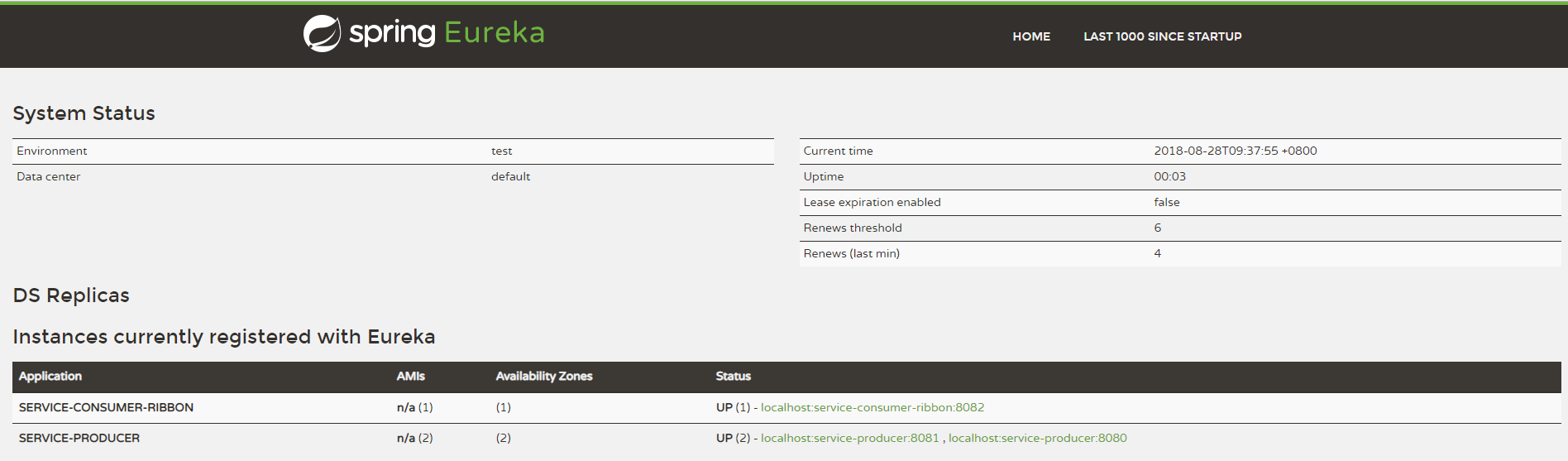
4、浏览器中访问 localhost:8761,注册成功
5、访问服务消费者localhost:8082/getPoducerInfo

再次访问
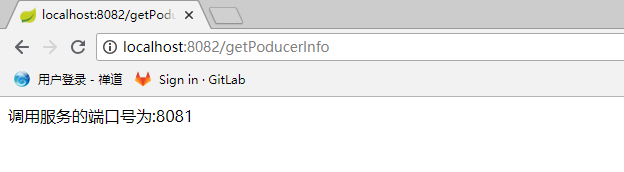
结果显示是轮询调用两个服务提供者实例,这是因为默认的负载均衡算法是轮询,也可自行修改负载均衡算法,例如:随机算法,权重,只需要在application.yml里配置即可。
Spring Cloud学习笔记【二】Eureka 服务提供者/服务消费者(ribbon)的更多相关文章
- Spring Cloud学习笔记【三】服务消费者Feign
Feign 是一个声明式的 Web Service 客户端,它的目的就是让 Web Service 调用更加简单.它整合了 Ribbon 和 Hystrix,从而让我们不再需要显式地使用这两个组件.F ...
- spring cloud学习笔记二 ribbon负载均衡
Ribbon是Netflix发布的负载均衡器,它有助于控制HTTP和TCP的客户端的行为.为Ribbon配置服务提供者地址后,Ribbon就可基于某种负载均衡算法,自动地帮助服务消费者去请求.Ribb ...
- Spring Cloud 学习笔记 (一)-- Eureka 服务器
开局一张图,截取了本人学习资料中的一张图,很好地展示了Eureka的架构. Eureka服务器 管理服务的作用.细分为服务注册,服务发现. 所有的客户端在Eureka服务器上注册服务,再从Eureka ...
- Spring Cloud学习笔记【七】服务网关 Zuul(路由)
Spring Cloud Zuul 路由是微服务架构的不可或缺的一部分,提供动态路由.监控.弹性.安全等的边缘服务.Zuul 是 Netflix 出品的一个基于 JVM 路由和服务端的负载均衡器. 准 ...
- Spring Cloud学习笔记【八】服务网关 Zuul(过滤器)
在上篇文章中我们了解了 Spring Cloud Zuul 作为网关所具备的最基本功能:路由(Router),下面我们将关注 Spring Cloud Zuul 的另一核心功能:过滤器(Filter) ...
- spring cloud 2.x版本 Eureka Server服务注册中心教程
本文采用Spring cloud本文为2.1.8RELEASE,version=Greenwich.SR3 1.创建服务注册中心 1.1 新建Spring boot工程:eureka-server 1 ...
- Spring Cloud 学习笔记一
一.spring cloud 搭建注册中心(Eureka server) 1.spring cloud中提供了多种分步式服务组件,其都依赖于注册中心(eureka),注册中心的服务者与发现者都通过Eu ...
- Spring Cloud学习笔记-002
搭建Spring Cloud注册中心:Eureka 服务注册:在服务治理框架中,通常都会构建一个注册中心,每个服务单元向注册中心登记自己提供的服务,将主机与端口号.版本号.通信协议等一些附加信息告诉注 ...
- Spring Cloud学习笔记-006
服务容错保护:Spring Cloud Hystrix 在微服务架构中,我们将系统拆分成了很多服务单元,各单元的应用间通过服务注册与订阅的方式互相依赖.由于每个单元都在不同的进程中运行,依赖通过远程调 ...
- Spring cloud 学习笔记
前奏 1. 什么是微服务? 微服务化的核心就是将传统的一站式应用,根据业务拆分成一个一个的服务,彻底地去耦合,==每一个微服务提供单个业务功能的服务==,一个服务做一件事,从技术角度看就是一种 ...
随机推荐
- hdu_5139 概率问题
#include<iostream> #include<cstdio> #include<cmath> using namespace std; int main( ...
- taglist安装
注意:taglist依赖于ctags,所以要先装ctags,否则taglist装了也没法用!1.首先安装ctags1)ubuntu安装sudo apt-get install exuberant-ct ...
- [转]Python UnicodeEncodeError: ‘ascii’ codec can’t encode characters in position 的解决办法
UnicodeEncodeError: ‘ascii’ codec can’t encode characters in position 的解决办法 python在安装时,默认的编码是ascii,当 ...
- rest_framework 视图
视图: a.过去 class PagerView(View): pass b.现在 class Pager1View(APIView): pass c.rest_framework 基本没用 from ...
- display的几种常用取值
display的取值有很多种,下面列出比较常用的几种取值,还有其它的少用的值没有列出来: 1.none 此元素不会被显示,并且不占据页面空间,这也是与visibility:hidden不同的地方,设置 ...
- MVC5 + EF6 入门完整教程(转载)--01
MVC5 + EF6 入门完整教程 第0课 从0开始 ASP.NET MVC开发模式和传统的WebForm开发模式相比,增加了很多"约定". 直接讲这些 "约定&qu ...
- 什么是Node.js?
Node.js是一个基于Chrome JavaScript运行时建立的平台, 用于方便地搭建响应速度快.易于扩展的网络应用.Node.js 使用事件驱动, 非阻塞I/O 模型而得以轻量和高效,非常适 ...
- NodeJS学习笔记 (18)基础调试-console(ok)
模块概览 console模块提供了基础的调试功能.使用很简单,常用的API主要有 console.log().console.error(). 此外,可以基于Console类,方便的扩展出自己的con ...
- 使用 swoole_process 实现 PHP 进程池
swoole_process 主要是用来代替 PHP 的 pcntl 扩展.我们知道 pcntl 是用来进行多进程编程的,而 pcntl 只提供了 fork 这样原始的接口,容易使用错误,并且没有提供 ...
- 紫书 习题 10-1UVa 111040(找规律)
通过观察可以得 图可以分成很多个上面一个,中间两个,下面三个的"模板" 这个时候最上面一个知道,最下面得左右知道 那么可以设下面中间为x,左边为a1, 右边为a2, a1a2已知 ...