
Java客户端访问HBase集群解决方案(优化)
测试环境:Idea+Windows10
准备工作:
<1>、打开本地 C:\Windows\System32\drivers\etc(系统默认)下名为hosts的系统文件,如果提示当前用户没有权限打开文件;第一种方法是将hosts文件拖到桌面进行配置后再拖回原处;第二种一劳永逸的方法是修改当前用户对该文件的权限为完全控制;
<2>、打开后hosts文件后,添加HBase集群服务器的用户名及IP地址如下:
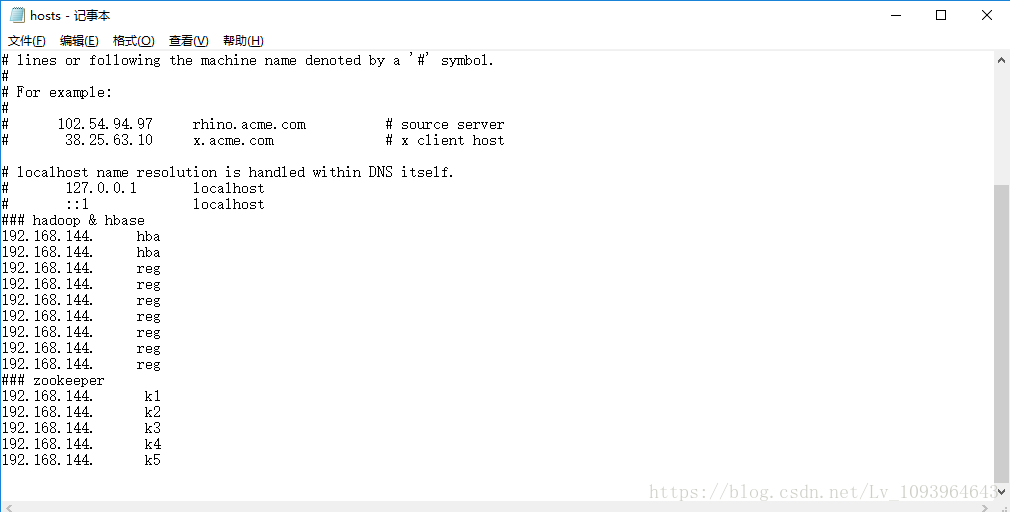

<3>、由于是windows系统下远程连接HBase,而HBase底层依赖Hadoop,所以需要下载hadoop二进制包存放到本地目录将来会在程序中引用该目录,否则会报错。你也可以理解为windows下需要模拟linux环境才能正常连接HBasehadoop;(注:windows下的版本需要和linux下一致,这里我仅仅提供的2.6.0hadoop版本解析包)
程序代码:
pom.xml:
<?xml version="1.0" encoding="UTF-8"?>

<project xmlns="http://maven.apache.org/POM/4.0.0" xmlns:xsi="http://www.w3.org/2001/XMLSchema-instance"

	xsi:schemaLocation="http://maven.apache.org/POM/4.0.0 http://maven.apache.org/xsd/maven-4.0.0.xsd">

	<modelVersion>4.0.0</modelVersion>

	<groupId>com.example</groupId>

	<artifactId>spring_hbase</artifactId>

	<version>0.0.1-SNAPSHOT</version>

	<packaging>jar</packaging>

	<name>spring_hbase</name>

	<description>Demo project for Spring Boot</description>

	<parent>

		<groupId>org.springframework.boot</groupId>

		<artifactId>spring-boot-starter-parent</artifactId>

		<version>2.0.4.RELEASE</version>

		<relativePath/> <!-- lookup parent from repository -->

	</parent>

	<properties>

		<project.build.sourceEncoding>UTF-8</project.build.sourceEncoding>

		<project.reporting.outputEncoding>UTF-8</project.reporting.outputEncoding>

		<java.version>1.8</java.version>

	</properties>

	<dependencies>

		<dependency>

			<groupId>org.springframework.boot</groupId>

			<artifactId>spring-boot-starter-web</artifactId>

		</dependency>

		<dependency>

			<groupId>org.springframework.boot</groupId>

			<artifactId>spring-boot-starter-test</artifactId>

			<scope>test</scope>

		</dependency>

		<!--HBase依赖-->

		<dependency>

			<groupId>org.apache.hbase</groupId>

			<artifactId>hbase-client</artifactId>

			<version>1.2.0</version>

			<exclusions>

				<exclusion>

					<groupId>org.slf4j</groupId>

					<artifactId>slf4j-log4j12</artifactId>

				</exclusion>

			</exclusions>

		</dependency>

		<dependency>

			<groupId>org.springframework.data</groupId>

			<artifactId>spring-data-hadoop</artifactId>

			<version>2.5.0.RELEASE</version>

		</dependency>

		<dependency>

			<groupId>org.apache.hadoop</groupId>

			<artifactId>hadoop-hdfs</artifactId>

			<version>2.5.1</version>

		</dependency>

		<dependency>

			<groupId>org.springframework.data</groupId>

			<artifactId>spring-data-hadoop-core</artifactId>

			<version>2.4.0.RELEASE</version>

		</dependency>

		<dependency>

			<groupId>org.apache.hbase</groupId>

			<artifactId>hbase</artifactId>

			<version>1.2.1</version>

			<type>pom</type>

		</dependency>

		<!--HBase依赖-->

	</dependencies>

	<build>

		<plugins>

			<plugin>

				<groupId>org.springframework.boot</groupId>

				<artifactId>spring-boot-maven-plugin</artifactId>

			</plugin>

		</plugins>

	</build>

</project>
HBaseUtils.class:
package com.example.spring_hbase;

import org.apache.hadoop.conf.Configuration;

import org.apache.hadoop.hbase.HBaseConfiguration;

import org.apache.hadoop.hbase.TableName;

import org.apache.hadoop.hbase.client.*;

import org.springframework.data.hadoop.hbase.HbaseTemplate;

import java.io.IOException;

import java.util.ArrayList;

import java.util.List;

import java.util.Map;

import java.util.Properties;

/**

 * HBase工具类

 * Author JiaPeng_lv

 */

public class HBaseUtils {

    private static Connection connection;

    private static Configuration configuration;

    private static HBaseUtils hBaseUtils;

    private static Properties properties;

    /**

     * 创建连接池并初始化环境配置

     */

    public void init(){

        properties = System.getProperties();

        //实例化HBase配置类

        if (configuration==null){

            configuration = HBaseConfiguration.create();

        }

        try {

            //加载本地hadoop二进制包

            properties.setProperty("hadoop.home.dir", "D:\\hadoop-common-2.6.0-bin-master");

            //zookeeper集群的URL配置信息

            configuration.set("hbase.zookeeper.quorum","k1,k2,k3,k4,k5");

            //HBase的Master

            configuration.set("hbase.master","hba:60000");

            //客户端连接zookeeper端口

            configuration.set("hbase.zookeeper.property.clientPort","2181");

            //HBase RPC请求超时时间,默认60s(60000)

            configuration.setInt("hbase.rpc.timeout",20000);

            //客户端重试最大次数,默认35

            configuration.setInt("hbase.client.retries.number",10);

            //客户端发起一次操作数据请求直至得到响应之间的总超时时间,可能包含多个RPC请求,默认为2min

            configuration.setInt("hbase.client.operation.timeout",30000);

            //客户端发起一次scan操作的rpc调用至得到响应之间的总超时时间

            configuration.setInt("hbase.client.scanner.timeout.period",200000);

            //获取hbase连接对象

            if (connection==null||connection.isClosed()){

                connection = ConnectionFactory.createConnection(configuration);

            }

        } catch (IOException e) {

            e.printStackTrace();

        }

    }

    /**

     * 关闭连接池

     */

    public static void close(){

        try {

            if (connection!=null)connection.close();

        } catch (IOException e) {

            e.printStackTrace();

        }

    }

    /**

     * 私有无参构造方法

     */

    private HBaseUtils(){}

    /**

     * 唯一实例,线程安全,保证连接池唯一

     * @return

     */

    public static HBaseUtils getInstance(){

        if (hBaseUtils == null){

            synchronized (HBaseUtils.class){

                if (hBaseUtils == null){

                    hBaseUtils = new HBaseUtils();

                    hBaseUtils.init();

                }

            }

        }

        return hBaseUtils;

    }

    /**

     * 获取单条数据

     * @param tablename

     * @param row

     * @return

     * @throws IOException

     */

    public static Result getRow(String tablename, byte[] row) throws IOException{

        Table table = null;

        Result result = null;

        try {

            table = connection.getTable(TableName.valueOf(tablename));

            Get get = new Get(row);

            result = table.get(get);

        }finally {

            table.close();

        }

        return result;

    }

    /**

     * 查询多行信息

     * @param tablename

     * @param rows

     * @return

     * @throws IOException

     */

    public static Result[] getRows(String tablename,List<byte[]> rows) throws  IOException{

        Table table = null;

        List<Get> gets = null;

        Result[] results = null;

        try {

            table = connection.getTable(TableName.valueOf(tablename));

            gets = new ArrayList<Get>();

            for (byte[] row : rows){

                if(row!=null){

                    gets.add(new Get(row));

                }

            }

            if (gets.size() > 0) {

                results = table.get(gets);

            }

        } catch (IOException e) {

            e.printStackTrace();

        }finally {

            table.close();

        }

        return results;

    }

    /**

     * 获取整表数据

     * @param tablename

     * @return

     */

    public static ResultScanner get(String tablename) throws IOException{

        Table table = null;

        ResultScanner results = null;

        try {

            table = connection.getTable(TableName.valueOf(tablename));

            Scan scan = new Scan();

            scan.setCaching(1000);

            results = table.getScanner(scan);

        } catch (IOException e) {

            e.printStackTrace();

        }finally {

            table.close();

        }

        return results;

    }

    /**

     * 单行插入数据

     * @param tablename

     * @param rowkey

     * @param family

     * @param cloumns

     * @throws IOException

     */

    public static void put(String tablename, String rowkey, String family, Map<String,String> cloumns) throws IOException{

        Table table = null;

        try {

            table = connection.getTable(TableName.valueOf(tablename));

            Put put = new Put(rowkey.getBytes());

            for (Map.Entry<String,String> entry : cloumns.entrySet()){

                put.addColumn(family.getBytes(),entry.getKey().getBytes(),entry.getValue().getBytes());

            }

            table.put(put);

        } catch (IOException e) {

            e.printStackTrace();

        }finally {

            table.close();

            close();

        }

    }

}
①、保证该工具类唯一实例
②、全局共享重量级类Connection,该类为线程安全,使用完毕后关闭连接池
③、每次执行内部CRUD方法会创建唯一对象Table,该类为非线程安全,使用完毕后关闭
由于时间原因,内部功能方法及测试较少,有其他需求的可以自行百度添加更多方法,这里主要以类结构及配置为主。
Test.class:
package com.example.spring_hbase;

import org.apache.hadoop.hbase.client.Result;

import org.apache.hadoop.hbase.client.ResultScanner;

import org.apache.hadoop.hbase.util.Bytes;

import org.junit.Test;

import org.junit.runner.RunWith;

import org.springframework.boot.test.context.SpringBootTest;

import org.springframework.test.context.junit4.SpringRunner;

import java.io.IOException;

import java.util.*;

@RunWith(SpringRunner.class)

@SpringBootTest

public class SpringHbaseApplicationTests {

	@Test

	public void contextLoads() {

	}

	@Test

	public void test01(){

		HBaseUtils.getInstance();

		try {

			Long time = System.currentTimeMillis();

			Result result = HBaseUtils.getRow("GPS_MAP", Bytes.toBytes(1));

			System.out.println("本次查询耗时:"+(System.currentTimeMillis()-time)*1.0/1000+"s");

			NavigableMap<byte[],NavigableMap<byte[],NavigableMap<Long,byte[]>>> navigableMap = result.getMap();

			for (byte[] family:navigableMap.keySet()){

				System.out.println("columnFamily:"+ new String(family));

				for (byte[] column : navigableMap.get(family).keySet()){

					System.out.println("column:"+new String(column));

					for (Long t : navigableMap.get(family).get(column).keySet()){

						System.out.println("value:"+new String(navigableMap.get(family).get(column).get(t)));

					}

				}

			}

		} catch (IOException e) {

			e.printStackTrace();

		}finally {

			HBaseUtils.close();

		}

	}

	@Test

	public void test02(){

		HBaseUtils.getInstance();

		ResultScanner results = null;

		try {

			Long time = System.currentTimeMillis();

			results = HBaseUtils.get("GPS_MAP");

			System.out.println("本次查询耗时:"+(System.currentTimeMillis()-time)*1.0/1000+"s");

			for (Result result : results){

				NavigableMap<byte[],NavigableMap<byte[],NavigableMap<Long,byte[]>>> navigableMap = result.getMap();

				for (byte[] family:navigableMap.keySet()){

					System.out.println("columnFamily:"+ new String(family));

					for (byte[] column : navigableMap.get(family).keySet()){

						System.out.println("column:"+new String(column));

						for (Long t : navigableMap.get(family).get(column).keySet()){

							System.out.println("value:"+new String(navigableMap.get(family).get(column).get(t)));

						}

					}

				}

			}

		} catch (IOException e) {

			e.printStackTrace();

		}finally {

			results.close();

			HBaseUtils.close();

		}

	}

	@Test

	public void test03(){

		HBaseUtils.getInstance();

		Result[] results = null;

		List<byte[]> list = null;

		try {

			list = new ArrayList<byte[]>();

			list.add(Bytes.toBytes(1));

			list.add(Bytes.toBytes(2));

			Long time = System.currentTimeMillis();

			results = HBaseUtils.getRows("GPS_MAP",list);

			System.out.println("本次查询耗时:"+(System.currentTimeMillis()-time)*1.0/1000+"s");

			for (Result result : results){

				NavigableMap<byte[],NavigableMap<byte[],NavigableMap<Long,byte[]>>> navigableMap = result.getMap();

				for (byte[] family:navigableMap.keySet()){

					System.out.println("columnFamily:"+ new String(family));

					for (byte[] column : navigableMap.get(family).keySet()){

						System.out.println("column:"+new String(column));

						for (Long t : navigableMap.get(family).get(column).keySet()){

							System.out.println("value:"+new String(navigableMap.get(family).get(column).get(t)));

						}

					}

				}

			}

		} catch (IOException e) {

			e.printStackTrace();

		}finally {

			HBaseUtils.close();

		}

	}

	@Test

	public void test04(){

		HBaseUtils.getInstance();

		try {

			Map<String,String> cloumns = new HashMap<String, String>();

			cloumns.put("test01","test01");

			cloumns.put("test02","test02");

			Long time = System.currentTimeMillis();

			HBaseUtils.put("GPS_MAP","3","TEST",cloumns);

			System.out.println("本次插入耗时:"+(System.currentTimeMillis()-time)*1.0/1000+"s");

		} catch (IOException e) {

			e.printStackTrace();

		}finally {

			HBaseUtils.close();

		}

	}

}
测试后发现查询和插入效率相对于没有优化过的类耗时大大缩减;
Java客户端访问HBase集群解决方案(优化)的更多相关文章
- 模拟安装redis5.0集群并通过Java代码访问redis集群
在虚拟机上模拟redis5.0的集群,由于redis的投票机制,一个集群至少需要3个redis节点,如果每个节点设置一主一备,一共需要六台虚拟机来搭建集群,此处,在一台虚拟机上使用6个redis实例来 ...
- Hadoop HBase概念学习系列之HBase里的客户端和HBase集群建立连接(详细)(十四)
需要遵循以下步骤: 1.客户端和Zookeeper集群建立连接.在这之前客户端需要获得一些信息(可以从HBase配置文件中读取或是直接指定).客户端从Zookeeper集群中读取-ROOT-表的位置信 ...
- Hadoop(八)Java程序访问HDFS集群中数据块与查看文件系统
前言 我们知道HDFS集群中,所有的文件都是存放在DN的数据块中的.那我们该怎么去查看数据块的相关属性的呢?这就是我今天分享的内容了 一.HDFS中数据块概述 1.1.HDFS集群中数据块存放位置 我 ...
- Redis集群环境使用的是redis4.0.x的版本,在用java客户端jedisCluster启动集群做数据处理时报java.lang.NumberFormatException: For input string: "7003@17003"问题解决
java.lang.NumberFormatException: For input string: "7003@17003" at java.lang.NumberFormatE ...
- 【Redis学习之十一】Java客户端实现redis集群操作
客户端:jedis-2.7.2.jar 配置文件两种方式: properties: redis.cluster.nodes1=192.168.1.117 redis.cluster.port1=700 ...
- HBase集群出现NotServingRegionException问题的排查及解决方法
HBase集群在读写过程中,可能由于Region Split或Region Blance等导致Region的短暂下线,此时客户端与HBase集群进行RPC操作时会抛出NotServingRegionE ...
- Phoenix连接安全模式下的HBase集群
Phoenix连接安全模式下的HBase集群 HBase集群开启安全模式(即启用kerberos认证)之后,用户无论是用HBase shell还是Phoenix去连接HBase都先需要通过kerber ...
- Hadoop(五)搭建Hadoop客户端与Java访问HDFS集群
阅读目录(Content) 一.Hadoop客户端配置 二.Java访问HDFS集群 2.1.HDFS的Java访问接口 2.2.Java访问HDFS主要编程步骤 2.3.使用FileSystem A ...
- Terrocotta - 基于JVM的Java应用集群解决方案
前言 越来越多的企业关键应用都必须采用集群技术,实现负载均衡(Load Balancing).容错(Fault Tolerance)和灾难恢复(Failover).以达到系统可用性(High Avai ...
随机推荐
- SQL Server ->> SQL Server 2016新特性之 -- AlwaysOn的增强改进
1)标准版也开始支持AlwaysOn了,只不过限制太多,比如副节点不能只读访问和只能有一个副节点. 2)副节点(只读节点)的负载均衡,这是我认为最有用的改进 3)自动failover的节点从2个增加到 ...
- Android已上线应用开源分享中(第一季)
这是我上线的第一个android应用,在百度.腾讯.豌豆荚等平台测试通过,也有了部分用户,还是可以的啊,哈哈.现在分享给大家,当然,源码我也会分享. 1.软件是一个管理wifi的小工具 (1)查询.连 ...
- 安装Access Database Engine后,提示未注册Microsoft.ACE.OLEDB.12.0
未注册Microsoft.ACE.OLEDB.12.0 ,下载安装 Microsoft Access Database Engine:https://www.microsoft.com/en-us/d ...
- 一句DOS命令搞定文件合并
用Dos的copy命令实现: copy a.js+b.js+c.js abc.js /b 将 a.js b.js c.js 合并为一个 abc.js,最后的 /b 表示文件为二进位文件,copy 命令 ...
- June 18th 2017 Week 25th Sunday
Life was like a box of chocolates, you never know what you're gonna get. 人生就像一盒巧克力,结果往往出人意料. Compare ...
- 使用BAPISDORDER_GETDETAILEDLIST创建S/4HANA的Outbound Delivery
要在S/4HANA里创建Outbound Delivery,首先要具有一个销售订单,ID为376,通过事务码VA03查看. 只用61行代码就能实现基于这个Sales Order去创建对应的outbou ...
- 一直在用的一个javascript网站
http://www.dottoro.com/ 很不错,例子丰富,解释详细,全面:非常好的参考资料站.
- poj2312 Battle City 【暴力 或 优先队列+BFS 或 BFS】
题意:M行N列的矩阵.Y:起点,T:终点.S.R不能走,走B花费2,走E花费1.求Y到T的最短时间. 三种解法.♪(^∇^*) //解法一:暴力 //157MS #include<cstdio& ...
- POJ-1061 青蛙的约会---扩展欧几里得算法
题目链接: https://cn.vjudge.net/problem/POJ-1061 题目大意: 两只青蛙在网上相识了,它们聊得很开心,于是觉得很有必要见一面.它们很高兴地发现它们住在同一条纬度线 ...
- WebSphere Studio Application Developer 5.0 优化设置
公司有一个项目需要用到WebSphere Studio Application Developer 5.0 的开发环境,这个环境比较老,而且只能用JDK1.4. 项目开发的时候 总是报错: JVM t ...