
react native 手势响应
参考地址:https://www.jianshu.com/p/935e5c6a5064
官方文档地址:https://facebook.github.io/react-native/docs/panresponder.html
官方翻译地址:https://reactnative.cn/docs/0.50/panresponder.html
首先,通过react native引入PanResponder
import {PanResponder} from 'react-native';

  //这里是当移动了超过20,才会进行隐藏或是显示
    _panResponder = PanResponder.create({
        onStartShouldSetPanResponder: () => true,

        onMoveShouldSetPanResponder: () => true,

        onPanResponderGrant: () => {

            console.log('开始移动:');

            this.setState({ moveBG: '#eeeeee' })

        },

        onPanResponderMove: (evt, gs) => {

            console.log('正在移动:X轴:' + gs.dx + ',Y轴:' + gs.dy);

        },

        onPanResponderRelease: (evt, gs) => {

            console.log('结束移动:X轴:' + gs.dx + ',Y轴:' + gs.dy);

            this.setState({

                moveBG: '#FFF'

            });

            if (gs.dy > 20) {

                this.setState({

                    IsShowOrderInfoFlag: true

                })

            } else if (gs.dy < -20) {

                this.setState({

                    IsShowOrderInfoFlag: false

                })

            }

        }

    });
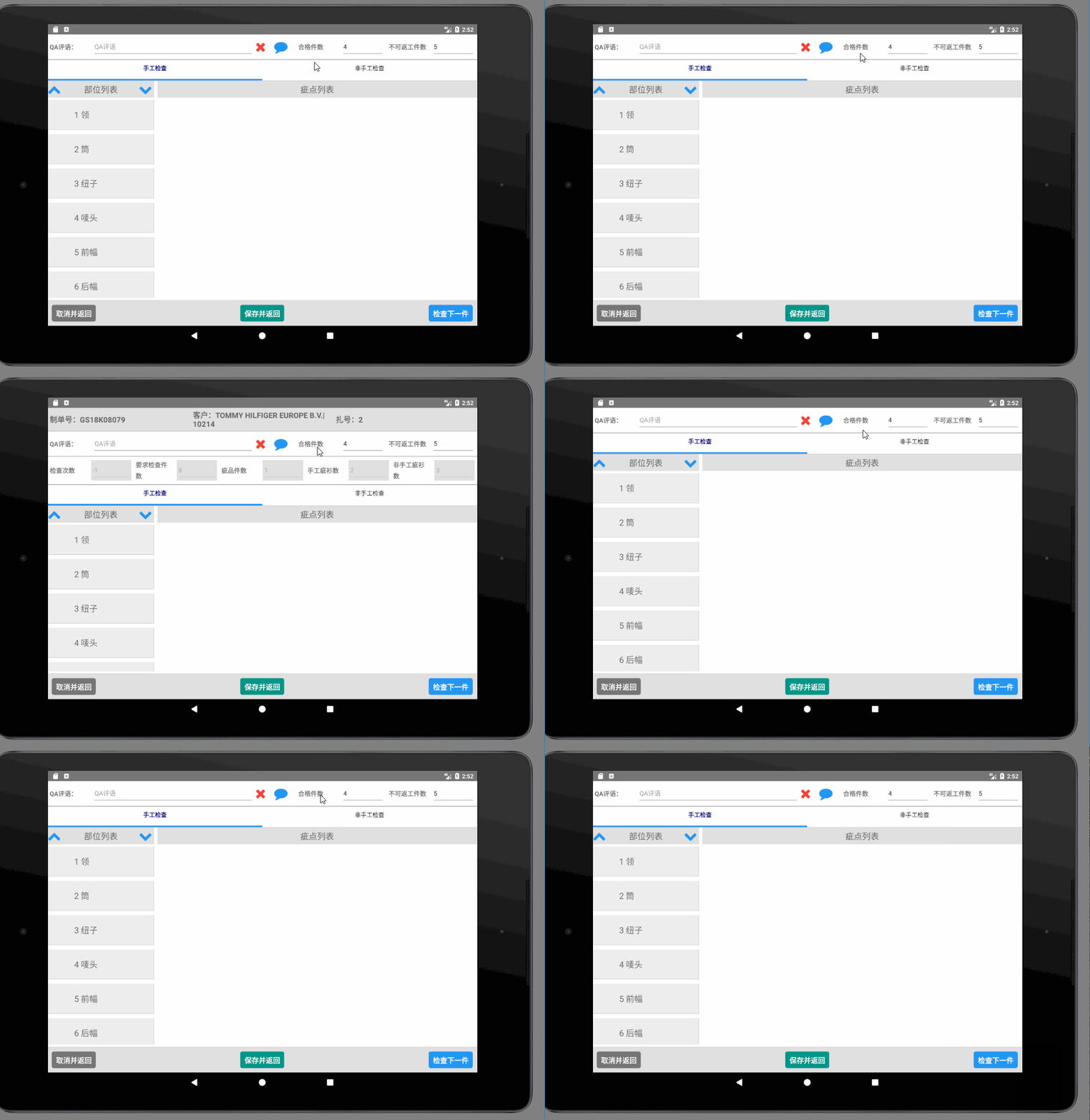
以上为声明手势响应,将手势响应方法放入至某一个View中
Render方法中

<View style={styles.container}>

                {

                    this.state.IsShowOrderInfoFlag ?

                        <View style={[styles.headerView, { backgroundColor: '#e0e0e0' }]}>

                            <Text style={styles.orderInfoLabel}>{I18n.t('Component.HandmadeCheck.ComponentValue.Order.zdCode_Text')}{this.props.bundleEntity.bundleInfo.zdCode}</Text>

                            <Text style={styles.orderInfoLabel}>{I18n.t('Component.HandmadeCheck.ComponentValue.Order.Customer_Text')}{this.props.bundleEntity.bundleInfo.custName}|{this.props.bundleEntity.bundleInfo.custCode}</Text>

                            <Text style={styles.orderInfoLabel}>{I18n.t('Component.HandmadeCheck.ComponentValue.Bundle.Bundle_Text')}{this.props.bundleEntity.bundleInfo.bundle.groupNo}</Text>

                        </View>

                        :

                        null

                }

                <View style={[styles.headerView, { backgroundColor: this.state.moveBG }]} {...this._panResponder.panHandlers}>

                    <Text style={styles.headerLabel}>{I18n.t('Component.HandmadeCheck.ComponentValue.QAComment_Text')}</Text>

                    <TextInput style={styles.qaCommentText}

                        placeholder={I18n.t('Component.HandmadeCheck.ComponentValue.QAComment_Placeholder')}

                        maxLength={10000}

                        multiline={true}

                        returnKeyType='done'

                        onChangeText={(text) => {

                            let oldHandmadeCheckData = this.state.HandmadeCheckData;

                            oldHandmadeCheckData.QAComment = text;

                            this.setState({ HandmadeCheckData: oldHandmadeCheckData })

                        }}

                        value={this.state.HandmadeCheckData.QAComment}

                    />

                    <Button onPress={() => {

                        this._removeQAComment();

                    }}>

                        <Icon style={styles.removeQACommentIcon} name="remove" size={32} />

                    </Button>

                    <Button onPress={() => {

                        this.refs.qaCommentModal.showQACommentModal(this.props.handmadeCheckEntity.AllQACommentList, this);

                    }}>

                        <Icon style={styles.qaCommentIcon} name="comment" size={32} />

                    </Button>

                    <Text style={styles.headerLabel}>{I18n.t('Component.HandmadeCheck.ComponentValue.Pass_Product_Count_Text')}</Text>

                    <TextInput style={styles.EditText}

                        placeholder={I18n.t('Component.HandmadeCheck.ComponentValue.Pass_Product_Count_Placeholder')}

                        editable={true}

                        keyboardType='numeric'

                        returnKeyType='done'

                        value={this.state.PassProductCount}

                        onBlur={() => {

                            this.props.onSetPassProduct(this.state.PassProductCount)

                        }}

                        onChangeText={(text) => {

                            this.setState({ PassProductCount: text })

                        }}

                    />

                    <Text style={styles.headerLabel}>{I18n.t('Component.HandmadeCheck.ComponentValue.Can_Not_Rework_Product_Count_Text')}</Text>

                    <TextInput style={styles.EditText}

                        placeholder={I18n.t('Component.HandmadeCheck.ComponentValue.Can_Not_Rework_Product_Count_Placeholder')}

                        editable={true}

                        keyboardType='numeric'

                        returnKeyType='done'

                        value={this.state.CanNotReworkProductCount}

                        onBlur={() => {

                            this.props.onSetCannotReworkProduct(this.state.CanNotReworkProductCount)

                        }}

                        onChangeText={(text) => {

                            this.setState({ CanNotReworkProductCount: text })

                        }}

                    />

                </View>

                {

                    this.state.IsShowOrderInfoFlag ?

                        <View style={styles.headerView}>

                            <Text style={styles.headerLabel}>{I18n.t('Component.HandmadeCheck.ComponentValue.CheckTime_Text')}</Text>

                            <TextInput style={styles.checkTimeText}

                                placeholder={I18n.t('Component.HandmadeCheck.ComponentValue.CheckTime_Placeholder')}

                                editable={false}

                                keyboardType='numeric'

                                returnKeyType='done'

                                value={this.state.HandmadeCheckData.CheckTime}

                            />

                            <Text style={styles.headerLabel}>{I18n.t('Component.HandmadeCheck.ComponentValue.Request_Check_Count_Text')}</Text>

                            <TextInput style={styles.checkTimeText}

                                placeholder={I18n.t('Component.HandmadeCheck.ComponentValue.Request_Check_Count_Placeholder')}

                                editable={false}

                                keyboardType='numeric'

                                returnKeyType='done'

                                value={this.state.RequestCheckCount}

                            />

                            <Text style={styles.headerLabel}>{I18n.t('Component.HandmadeCheck.ComponentValue.Issue_Product_Count_Text')}</Text>

                            <TextInput style={styles.checkTimeText}

                                placeholder={I18n.t('Component.HandmadeCheck.ComponentValue.Issue_Product_Count_Placeholder')}

                                editable={false}

                                keyboardType='numeric'

                                returnKeyType='done'

                                value={this.state.IssueProductCount}

                            />

                            <Text style={styles.headerLabel}>{I18n.t('Component.HandmadeCheck.ComponentValue.Handmade_Issue_Product_Count_Text')}</Text>

                            <TextInput style={styles.checkTimeText}

                                placeholder={I18n.t('Component.HandmadeCheck.ComponentValue.Handmade_Issue_Product_Count_Placeholder')}

                                editable={false}

                                keyboardType='numeric'

                                returnKeyType='done'

                                value={this.state.HandmadeIssueProductCount}

                            />

                            <Text style={styles.headerLabel}>{I18n.t('Component.HandmadeCheck.ComponentValue.Non_Handmade_Issue_Product_Count_Text')}</Text>

                            <TextInput style={styles.checkTimeText}

                                placeholder={I18n.t('Component.HandmadeCheck.ComponentValue.Non_Handmade_Issue_Product_Count_Placeholder')}

                                editable={false}

                                keyboardType='numeric'

                                returnKeyType='done'

                                value={this.state.NonHandmadeIssueProductCount}

                            />

                        </View>

                        : null

                }
效果
react native 手势响应的更多相关文章
- 混合开发的大趋势之一React Native手势行为那些事
转载请注明出处:王亟亟的大牛之路 最近项目部分模块重构,事情有点多,学习进度有所延缓,外加一直在吸毒(wow你懂的),导致好多天没发问了,其实这部分知识月头就想写了,一直没补. 话不多说先安利:htt ...
- [转] 「指尖上的魔法」 - 谈谈 React Native 中的手势
http://gold.xitu.io/entry/55fa202960b28497519db23f React-Native是一款由Facebook开发并开源的框架,主要卖点是使用JavaScrip ...
- 【React Native】进阶指南之二(手势响应系统)
移动设备上的手势识别要比在 web 上复杂得多.用户的一次触摸操作的真实意图是什么,App 要经过好几个阶段才能判断.比如 App 需要判断用户的触摸到底是在滚动页面,还是滑动一个 widget,或者 ...
- [技术博客]react native事件监听、与原生通信——实现对通知消息的响应
在react native中会涉及到很多页面之间的参数传递问题.静态的参数传递通常利用组件的Props属性,在初始化组件时即可从父组件中将参数传递到子组件中.对于非父子关系的组件来说,无法直接传递参数 ...
- 如何让你的 React Native 应用在键盘弹出时优雅地响应
原文地址:How to make your React Native app respond gracefully when the keyboard pops up 原文作者:Spencer Car ...
- React Native之 Navigator与NavigatorIOS使用
前言 学习本系列内容需要具备一定 HTML 开发基础,没有基础的朋友可以先转至 HTML快速入门(一) 学习 本人接触 React Native 时间并不是特别长,所以对其中的内容和性质了解可能会有所 ...
- React Native之 ScrollView介绍和使用
前言 学习本系列内容需要具备一定 HTML 开发基础,没有基础的朋友可以先转至 HTML快速入门(一) 学习 本人接触 React Native 时间并不是特别长,所以对其中的内容和性质了解可能会有所 ...
- React Native 之 Touchable 介绍与使用
前言 学习本系列内容需要具备一定 HTML 开发基础,没有基础的朋友可以先转至 HTML快速入门(一) 学习 本人接触 React Native 时间并不是特别长,所以对其中的内容和性质了解可能会有所 ...
- React Native APP结构探索
APP结构探索 我在Github上找到了一个有登陆界面,能从网上获取新闻信息的开源APP,想来研究一下APP的结构. 附上原网址:我的第一个React Native App 具体来讲,就是研究一个复杂 ...
随机推荐
- 不要在linux上启用net.ipv4.tcp_tw_recycle参数
不要在linux上启用net.ipv4.tcp_tw_recycle参数 发布于 2015/07/27 莿鸟栖草堂 本文为翻译英文BLOG<Coping with the TCP TIME-WA ...
- git merge与git rebase
文章源:https://blog.csdn.net/wh_19910525/article/details/7554489 git merge是用来合并两个分支的. git merge b # 将b分 ...
- 在浏览器输入网址,Enter之后发生的事情
简介: 1. 浏览器接收域名 2. 发送域名给DNS,中文名字是域名系统服务器,一般位于ISP(互联网服务提供商,比如我们熟知的联通.移动.电信等) 中.浏览器会首先发给离自己最近的DNS,DNS收到 ...
- String和StringBuffer的一点研究
转载自:http://www.cnblogs.com/heshan664754022/archive/2013/03/15/2961463.html 首先请看下下面的这几个输出的结果,请仔细考虑,不要 ...
- centos6.8+openvpn实现账户密码连接(通过端口映射的方式)
#搭建openvpn(编译安装) 初始化环境 #update epel mirror yum install wget -y cd /etc/yum.repos.d && rm -rf ...
- 几分钟内学习 Clojure
1.基本例子 ; 分号作为注释的开始 ; Clojure 用一种把元素用括号括起来的像列表一样的方式来书写,元素之间用空格隔开 ; clojure 解释器会把第一个元素当做是函数或者宏调用,其他的都作 ...
- bzoj 4034: [HAOI2015]树上操作——树链剖分
Description 有一棵点数为 N 的树,以点 1 为根,且树点有边权.然后有 M 个 操作,分为三种: 操作 1 :把某个节点 x 的点权增加 a . 操作 2 :把某个节点 x 为根的子树中 ...
- 【BZOJ】1607: [Usaco2008 Dec]Patting Heads 轻拍牛头
[算法]模拟 #include<cstdio> #include<algorithm> using namespace std; ,maxm=; int a[maxn],A[m ...
- 20151024_002_C#基础知识(ArrayList,Hashtable,List,Dictionary)
1:ArrayList 和 Hashtable(哈希表) 1.1:ArrayList ArrayList list = new ArrayList(); list.Add(); list.AddRan ...
- javascript工厂模式、单例模式
//工厂模式 function createObject(name,age){ var obj = new Object(); obj.name = name; obj.age = age; obj. ...