
tcp连接的状态变迁以及如何调整tcp连接中处于time_wait的时间
一、状态变迁图
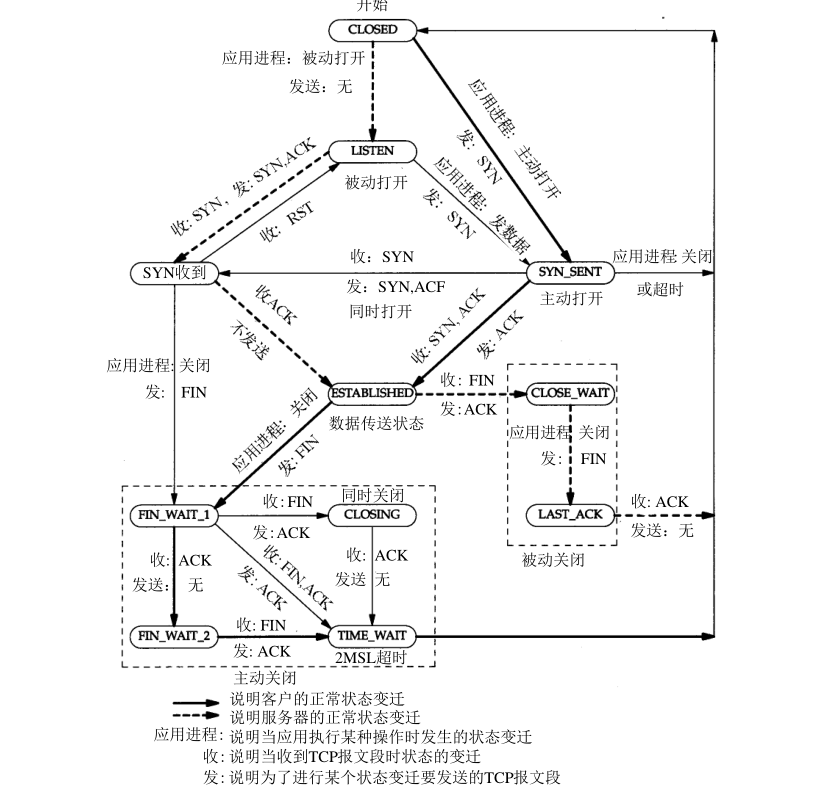
二、time_wait状态
针对time_wait和close_wait有个简单的描述帮助理解:
Due to the way TCP/IP works, connections can not be closed immediately. Packets may arrive out of order or be retransmitted after the connection has been closed. CLOSE_WAIT indicates that the remote endpoint (other side of the connection) has closed the connection. TIME_WAIT indicates that local endpoint (this side) has closed the connection. The connection is being kept around so that any delayed packets can be matched to the connection and handled appropriately. The connections will be removed when they time out within four minutes. See http://en.wikipedia.org/wiki/Transmission_Control_Protocol for more details.
发起socket主动关闭的一方 socket将进入TIME_WAIT状态,TIME_WAIT状态将持续2个MSL(Max Segment Lifetime),在Windows下默认为4分钟,即240秒,TIME_WAIT状态下的socket不能被回收使用. 具体现象是对于一个处理大量短连接的服务器,如果是由服务器主动关闭客户端的连接,将导致服务器端存在大量的处于TIME_WAIT状态的socket, 甚至比处于Established状态下的socket多的多,严重影响服务器的处理能力,甚至耗尽可用的socket,停止服务. TIME_WAIT是TCP协议用以保证被重新分配的socket不会受到之前残留的延迟重发报文影响的机制,是必要的逻辑保证.
三、windows下调整TIME_WAIT下等待的时间
On Windows platforms, the default timeout is 120 seconds, and the maximum number of ports is approximately 4,000
To avoid port exhaustion and support high connection rates, reduce the TIME_WAIT value and increase the port range.
Note: This problem does not usually appear on UNIX systems due to the higher default connection rate in those operating systems.
To set TcpTimedWaitDelay (TIME_WAIT):
Use the regedit command to access the
HKEY_LOCAL_MACHINE\SYSTEM\CurrentControlSet\ Services\TCPIP\Parametersregistry subkey.Create a new
REG_DWORDvalue named TcpTimedWaitDelay.Set the value to 60.
Stop and restart the system.
To set MaxUserPort (ephemeral port range):
Use the
regeditcommand to access theHKEY_LOCAL_MACHINE\SYSTEM\CurrentControlSet\ Services\TCPIP\Parametersregistry subkey.Create a new
REG_DWORDvalue named MaxUserPort.Set this value to 32768.
Stop and restart the system.
四、linux中进行时长调整
参考了:
http://blog.51cto.com/kerry/105233
net.ipv4.tcp_syncookies = 1
net.ipv4.tcp_tw_reuse = 1
net.ipv4.tcp_tw_recycle = 1
net.ipv4.tcp_fin_timeout = 30/sbin/sysctl -p 让参数生效。tcp连接的状态变迁以及如何调整tcp连接中处于time_wait的时间的更多相关文章
- 动手学习TCP:客户端状态变迁
上一篇文章中介绍了TCP连接的建立和终止. 通过实际操作了解到,在TCP协议工作过程中,客户端和服务端都会接收或者发送特定标志的TCP数据包,然后进入不同的状态. 也就是说,TCP协议就是一个包含多种 ...
- TCP建立连接和释放的过程,及TCP状态变迁图
一.TCP报文格式 下面是TCP报文格式图: 重要字段介绍: (1)序号:Seq序号,占32位,用来标识从TCP源端向目的端发送的字节流,发起方发送数据时对此进行标记. (2)确认序号:Ack序号,占 ...
- (转)TCP连接的11种状态变迁
自:http://blog.csdn.net/engrossment/article/details/8104482 http://blog.csdn.net/xiaofei0859/article/ ...
- TCP连接的状态与关闭方式及其对Server与Client的影响
TCP连接的状态与关闭方式及其对Server与Client的影响 1. TCP连接的状态 首先介绍一下TCP连接建立与关闭过程中的状态.TCP连接过程是状态的转换,促使状态发生转换的因素包括用户调用. ...
- TCP连接的状态与关闭方式,及其对Server与Client的影响
1. TCP连接的状态 首先介绍一下TCP连接建立与关闭过程中的状态.TCP连接过程是状态的转换,促使状态发生转换的因素包括用户调用.特定数据包以及超时等,具体状态如下所示: CLOSED:初始状态, ...
- TCP 连接中的TIME_WAIT
原文:http://blog.csdn.net/wangpengqi/article/details/17245349 这就有个细节,一次http请求,谁会先断开TCP连接?什么情况下客户端先断,什么 ...
- C#如何检测网络端口连接的状态
原文:C#如何检测网络端口连接的状态 C#如何检测/监控远程连接网络端口的情况(例如:3389端口是否处于监听状态,是否建立了连接等). using System; using System.Coll ...
- 谈谈TCP中的TIME_WAIT
所以,本文也来凑个热闹,来谈谈TIME_WAIT. 为什么要有TIME_WAIT? TIME_WAIT是TCP主动关闭连接一方的一个状态,TCP断开连接的时序图如下: 当主动断开连接的一方(Initi ...
- TCP协议中的TIME_WAIT详细说明
文章目录 4.3设置TIME_WAIT状态的目的 4.3.1 实现TCP全双工连接的关闭 4.3.2 使过时的重复报文段失效 4.3.3 TIME_WAIT状态的自结束 4.3.4 TIME_WAIT ...
随机推荐
- PHP获取MySql新增记录ID值的3种方法
From: http://www.jb51.net/article/51473.htm 这篇文章主要介绍了PHP获取MySql新增记录ID值的3种方法,一般使用PHP自带函数mysql_insert_ ...
- php判断所在的客户端
//判断是否是手机 function is_mobile() { $agent = strtolower($_SERVER['HTTP_USER_AGENT']); $is_pc = (strpos( ...
- AsmTools
前言 https://wiki.openjdk.java.net/display/CodeTools/asmtools 在OpenJDK里有一个AsmTools项目,用来生成正确的或者不正确的java ...
- middle
/** * Created by lkl on 2017/7/31. *//** * Created by lkl on 2017/6/26. *///spark-shell --driver-cla ...
- 通过tarball形式安装HBASE Cluster(CDH5.0.2)——配置分布式集群中的YARN ResourceManager 的HA
<?xml version="1.0"?> <!-- Licensed under the Apache License, Version 2.0 (the &q ...
- angular.extend深拷贝(deep copy)
在用到angular.extend的时候,正好碰到一个对象,是层层嵌套的Array, 结果发现只能extend第一层,查阅官文档,确实不支持deep copy: Note: Keep in mind ...
- 用pip批量更新所有包
p.s在先,事实证明,把电脑里所有的python包一次性更新是吃力不讨好的工作,不过,这是另一回事,如果你一定要这么做,根据http://stackoverflow.com/questions/272 ...
- windows下安装node.js
由于shopnc的im需要node.js 先安装下node.js 下载node.js 直接运行 安装完成后 win+R,出入cmd 安装时已经自动配置了环境变量(如果没设置环境变量,变量名:NODE_ ...
- Do you want a timeout?
Do you want a timeout? You’re feeling accomplished and excited; the new features for your applicat ...
- ios的单元測试OCUnit以及更新了之后的XCTestCase
1.像一般创建项目的步骤一样.创建一个用于測试的项目或者打开一个待測试的项目. (oc是5.0之前所使用的測试,如今用的是XCtestCase,默认会创建一个主的測试类.曾经版本号可能非常多步骤省去) ...