
ASP.NET MVC 路由进阶(之二)--自定义路由约束
3.自定义路由约束
什么叫自定义路由约束呢?假如路由格式为archive/{year}/{month}/{day},其中year,month,day是有约束条件的,必须是数字,而且有一定范围。
这时候,我们就可以设置约束类,进行自定义路由约束了。
第一步: 我们先添加年份限制类 YearRouteConstraint。请看代码:
using System;

using System.Collections.Generic;

using System.Linq;

using System.Web;

using System.Web.Routing;

using System.Globalization;

namespace MvcMobileDMS.App_Start

{

    public class YearRouteConstraint:IRouteConstraint

    {

        public bool Match(HttpContextBase httpContext, Route route, string parameterName, RouteValueDictionary values, RouteDirection routeDirection)

        {

            if (routeDirection == RouteDirection.IncomingRequest && parameterName.ToLower(CultureInfo.InvariantCulture) == "year")

            {

                try

                {

                    int year = Convert.ToInt32(values["year"]);

                    if ((year >= ) && (year <= )) return true;

                }

                catch

                {

                    return false;

                }

            }

            return false;

        }

    }

}
第二步:添加月份限制类 MonthRouteConstraint。请看代码:
using System;

using System.Collections.Generic;

using System.Linq;

using System.Web;

using System.Web.Routing;

using System.Globalization;

namespace MvcMobileDMS.App_Start

{

    public class MonthRouteConstraint : IRouteConstraint

    {

        public bool Match(HttpContextBase httpContext, Route route, string parameterName, RouteValueDictionary values, RouteDirection routeDirection)

        {

            if (routeDirection == RouteDirection.IncomingRequest && parameterName.ToLower(CultureInfo.InvariantCulture) == "month")

            {

                try

                {

                    int month = Convert.ToInt32(values["month"]);

                    if ((month >= ) && (month <= )) return true;

                }

                catch

                {

                    return false;

                }

            }

            return false;

        }

    }

}
第三步:添加日期限制类DayRouteConstraint。请看代码:
using System;

using System.Collections.Generic;

using System.Linq;

using System.Web;

using System.Web.Routing;

using System.Globalization;

namespace MvcMobileDMS.App_Start

{

    public class DayRouteConstraint : IRouteConstraint

    {

        public bool Match(HttpContextBase httpContext, Route route, string parameterName, RouteValueDictionary values, RouteDirection routeDirection)

        {

            if (routeDirection == RouteDirection.IncomingRequest && parameterName.ToLower(CultureInfo.InvariantCulture) == "day")

            {

                try

                {

                    int month = Convert.ToInt32(values["month"]);

                    int day = Convert.ToInt32(values["day"]);

                    if (day < ) return false;

                    switch (month)

                    {

                        case :

                        case :

                        case :

                        case :

                        case :

                        case :

                        case :

                            if (day <= ) return true;

                            break;

                        case :

                            if (day <= ) return true;

                            break;

                        case :

                        case :

                        case :

                        case :

                            if (day <= ) return true;

                            break;

                    }

                }

                catch

                {

                    return false;

                }

            }

            return false;

        }

    }

}
ok,三个限制类已经写完了,需要在全局应用程序类中配置路由,见代码清单:
using System;

using System.Collections.Generic;

using System.Linq;

using System.Web;

using System.Web.Mvc;

using System.Web.Routing;

namespace MvcMobileDMS

{

    public class RouteConfig

    {

        public static void RegisterRoutes(RouteCollection routes)

        {

            routes.IgnoreRoute("{resource}.axd/{*pathInfo}");

            routes.MapRoute(

                name: "Default",

                url: "{controller}/{action}/{id}",

                defaults: new { controller = "DMS", action = "logon", id = UrlParameter.Optional }

            );

            routes.MapRoute(

                "Archive",

                "archive/{year}/{month}/{day}",

                new { controller = "Archive", action = "Index", year = "", month = "", day = "" }, new { year = new MvcMobileDMS.App_Start.YearRouteConstraint(), month = new MvcMobileDMS.App_Start.MonthRouteConstraint(), day =new MvcMobileDMS.App_Start.DayRouteConstraint() }

            );

        }

    }

}
我们看看运行结果:
当我在浏览器地址栏输入以下地址时,http://localhost:7449/archive/1988/9/10,如下截图:
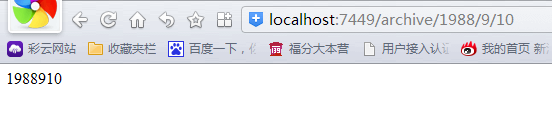
而当我输入不满足约束条件的地址时,http://localhost:7449/archive/1988/09/34,如下截图:
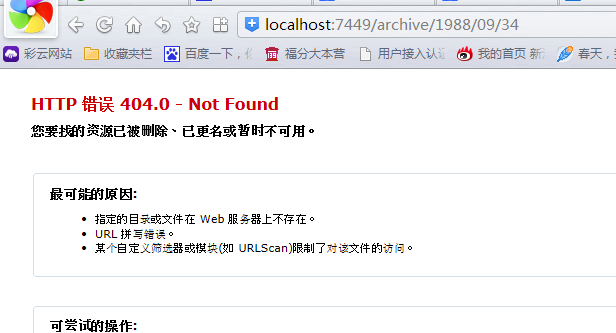
由此可见,当输入非法路由时,路由系统会当做错误处理,所以我们可以为MVC路由设置约束,以规范路由格式。
好了,今天写到这里。希望能对你有所帮助O(∩_∩)O哈哈~
ASP.NET MVC 路由进阶(之二)--自定义路由约束的更多相关文章
- ASP.NET MVC简单编程之(二)经典路由篇
话题:请求从路由开始 在实际的ASP.NET MVC开发中,URL访问规则----路由的定义是非常重要的.因为任何一个请求都离不开路由.理解它,我们将能理解MVC处理请求的整个过程,灵活地定义系统各种 ...
- Asp.net mvc 知多少(二)
本系列主要翻译自<ASP.NET MVC Interview Questions and Answers >- By Shailendra Chauhan,想看英文原版的可访问http:/ ...
- ASP.NET MVC案例教程(二)
ASP.NET MVC案例教程(二) 让第一个页面跑起来 现在,我们来实现公告系统中的第一个页面——首页.它非常简单,只包括所有公告分类的列表,并且每个列表项是一个超链接.其中分类数据是用我们的Moc ...
- MVC系列——MVC源码学习:打造自己的MVC框架(三:自定义路由规则)
前言:上篇介绍了下自己的MVC框架前两个版本,经过两天的整理,版本三基本已经完成,今天还是发出来供大家参考和学习.虽然微软的Routing功能已经非常强大,完全没有必要再“重复造轮子”了,但博主还是觉 ...
- ASP.NET MVC学习笔记(二)笔记
接下来我们一起了解ASP.NET MVC的最重要的核心技术,了解ASP.NET MVC的开发框架,生命周期,技术细节. 一.Routing与ASP.NET MVC生命周期 1.Routing——网址路 ...
- ASP.NET MVC 5 入门-2控制器、路由
一.创建项目: 上起始页,选择新项目. 在中新的项目对话框中,右侧语言类别选择C# ,然后项目类型选择Web,然后选择ASP.NET Web 应用程序 (.NET Framework) 项目模板. 将 ...
- asp.net mvc源码分析-DefaultModelBinder 自定义的普通数据类型的绑定和验证
原文:asp.net mvc源码分析-DefaultModelBinder 自定义的普通数据类型的绑定和验证 在前面的文章中我们曾经涉及到ControllerActionInvoker类GetPara ...
- Asp.Net MVC学习总结(二)——控制器与动作(Controller And Action)
一.理解控制器 1.1.什么是控制器 控制器是包含必要的处理请求的.NET类,控制器的角色封装了应用程序逻辑,控制器主要是负责处理请求,实行对模型的操作,选择视图呈现给用户. 简单理解:实现了ICon ...
- [译]Asp.net MVC 之 Contorllers(二)
URL路由模块 取代URL重写 路由请求 URL路由模块的内部结构 应用程序路由 URL模式和路由 定义应用程序路由 处理路由 路由处理程序 处理物理文件请求 防止路由定义的URL 属性路由 书接上回 ...
随机推荐
- 如何给你的VS2010添加创建文件后的头注释
修改VS自带的模板 1) 类文件 D:\Program Files (x86)\Microsoft Visual Studio 10.0\Common7\IDE\ItemTemplatesCache\ ...
- visual studio 2012进行C语言开发[图文]
现在大家计算机大概都脱离XP了,so,之前蛮多可以用的编译器,可能放在我们现在的Win7,win8下面会出现一些比如不兼容了之类的问题.其实,用微软强大的IDE-visual studio系列,也是可 ...
- alternatives命令使用方法
alternatives命令使用方法 alternatives是Linux下的一个功能强大的命令.仅仅能在root权限下运行.如系统中有几个命令功能十分相似,却又不能任意删除,那么能够用 altern ...
- delphi array应用 DayOfWeek星期几判断
//array应用 DayOfWeek星期几判断 procedure TForm1.Button1Click(Sender: TObject);var days:array[1..7] of s ...
- ListView美化:去阴影、底色、选中色
原文:http://blog.csdn.net/wxg630815/article/details/6987305 1.去滑动到顶点和底边时的黑色阴影 [html] view plaincopy ...
- JUnit---Java单元测试必备工具
在我们每天业务代码都写不完,为什么还要写测试代码呢,项目完成之后我再测不行吗? 看起来像是增加了代码量,但是它恰恰帮你减少了后期测试排错的时间,每个team,每个人都是有Bug指标的,首先,每次你 ...
- HOW MYSQL USES INTERNAL TEMPORARY TABLES
HOW MYSQL USES INTERNAL TEMPORARY TABLES Table of Contents [hide] 1)UNION queries 2)Some views 3)SQL ...
- qsort函数、sort函数 (精心整理篇)
先说明一下qsort和sort,只能对连续内存的数据进行排序,像链表这样的结构是无法排序的. 首先说一下, qsort qsort(基本快速排序的方法,每次把数组分成两部分和中间的一个划分值,而对于有 ...
- 出错处理完美搭配之perror&exit
对于库函数出错处理有两个十分有用的函数perror和exit: 一.错误报告 perror函数用一种简单统一的方式报告错误.ANSI C中的许多库函数,尤其是I/O函数,会调用操作系统去执行一些工作. ...
- IOC(依赖注入)原理
IoC,直观地讲,就是容器控制程序之间的关系,而非传统实现中,由程序代码直接操控.这也就是所谓"控制反转"的概念所在.控制权由应用代码中转到了外部容器,控制权的转移是所谓反转.Io ...