
Unity UGUI 图片 轴对称效果 减少资源
制作UI的过程中,为了节省资源,对称的图一般美术切一半给我们
手动拼图 有时会出现拼接处出现裂缝或重叠
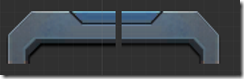
调整大小时也不方便 得一块一块调整
所以就用BaseMeshEffect 的ModifyMesh写了一个脚本
效果是
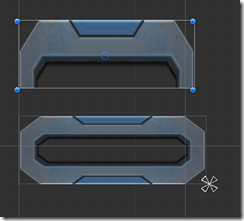
这样调整这种拼接的UI会方便一些
using UnityEngine;
using System.Collections.Generic;

using UnityEngine.UI;

[AddComponentMenu("UI/Effects/TestImageGhost")]

public class TestImageGhost : BaseMeshEffect

{

    public enum Type

    {

        Double,

        Quad,

    }

    [SerializeField]

    private Type m_type = Type.Double;

    [SerializeField]

    private bool m_UseGraphicAlpha = true;

    private Vector2 xy;

    public Type GhostType

    {

        get { return m_type; }

        set

        {

            if (m_type == value)

                return;

            m_type = value;

            if (graphic != null)

                graphic.SetVerticesDirty();

        }

    }

#if UNITY_EDITOR

    protected override void OnValidate()

    {

        xy = this.GetComponent<RectTransform>().sizeDelta;

        base.OnValidate();

        if (graphic != null)

            graphic.SetVerticesDirty();

    }

#endif

    protected override void OnEnable()

    {

        base.OnEnable();

        if (graphic != null)

            graphic.SetVerticesDirty();

        xy = this.GetComponent<RectTransform>().sizeDelta;

        Debug.Log("dfsdf");

    }

    public bool useGraphicAlpha

    {

        get { return m_UseGraphicAlpha; }

        set

        {

            m_UseGraphicAlpha = value;

            if (graphic != null)

                graphic.SetVerticesDirty();

        }

    }

    protected void ApplyGhostDouble(List<UIVertex> verts, int start, int end, float x1, float y1, float x2, float y2,bool self = false)

    {

        UIVertex vt;

        var neededCpacity = verts.Count * ;

        if (verts.Capacity < neededCpacity)

            verts.Capacity = neededCpacity;

        for (int i = start; i < end; i++)

        {

            vt = verts[i];

            if(!self)

                verts.Add(vt);//添加一遍mesh

            Vector3 v = vt.position;

            int offset = i % ;

            switch (offset)

            {

                case :

                case :

                case : v.x += x1; break;

                case :

                case :

                case : v.x += x2; break;

            }

            switch (offset)

            {

                case :

                case :

                case : v.y += y1; break;

                case :

                case :

                case : v.y += y2; break;

            }

            vt.position = v;

            verts[i] = vt;

        }

    }

    protected void ApplyGhost(List<UIVertex> verts, int start, int end)

    {

        if (m_type == Type.Double)

        {

            var neededCpacity = verts.Count * ;

            if (verts.Capacity < neededCpacity)

                verts.Capacity = neededCpacity;

            ApplyGhostDouble(verts, start, end, , , -xy.x / ,);

            start = end;

            end = verts.Count;

            ApplyGhostDouble(verts, start, end, xy.x, , -xy.x / , ,true);

        }

        else

        {

            var neededCpacity = verts.Count * ;

            if (verts.Capacity < neededCpacity)

                verts.Capacity = neededCpacity;

            start = ;

            end = verts.Count;

            ApplyGhostDouble(verts, start, end,  , , -xy.x / , xy.y / );

            start = end;

            end = verts.Count;

            ApplyGhostDouble(verts, start, end, xy.x ,, -xy.x / , xy.y / );

            start = end;

            end = verts.Count;

            ApplyGhostDouble(verts, start, end, , -xy.y, -xy.x / , xy.y / );

            start = end;

            end = verts.Count;

            ApplyGhostDouble(verts, start, end, xy.x, -xy.y, -xy.x / , xy.y / , true);

        }

    }

    public override void ModifyMesh(VertexHelper vh)

    {

        if (!IsActive())

            return;

        xy = GetComponent<RectTransform>().sizeDelta;

        List<UIVertex> output = new List<UIVertex>();

        vh.GetUIVertexStream(output);

        ApplyGhost(output, , output.Count);

        vh.Clear();

        vh.AddUIVertexTriangleStream(output);

    }

}
Unity UGUI 图片 轴对称效果 减少资源的更多相关文章
- Unity UGUI在鼠标位置不同时 图片浮动效果
/// <summary> /// 在鼠标位置不同时 图片浮动效果 /// </summary> public class TiltWindow : MonoBehaviour ...
- Unity Shader 效果(1) :图片流光效果
很多游戏Logo中可以看到这种流光效果,一般的实现方案就是对带有光条的图片uv根据时间进行移动,然后和原图就行叠加实现,不过实现过程中稍稍有点需要注意的地方.之前考虑过风宇冲的实现方式,但是考虑到sh ...
- [Unity UGUI]ScrollRect效果大全
UGUI各种优化效果 本文所实现的UGUI效果需求如下: - 支持缩放滑动效果 - 支持动态缩放循环加载 - 支持大数据固定Item复用加载 - 支持不用Mask遮罩无限循环加载 - 支持Object ...
- Unity UGUI图文混排源码(二)
Unity UGUI图文混排源码(一):http://blog.csdn.net/qq992817263/article/details/51112304 Unity UGUI图文混排源码(二):ht ...
- Unity UGUI图文混排源码(一)
Unity UGUI图文混排源码(一):http://blog.csdn.net/qq992817263/article/details/51112304 Unity UGUI图文混排源码(二):ht ...
- Unity UGUI实现图文混排
目前在unity实现图文混排的好像都是通过自定义字体然后在文本获取字符的位置,用图片替换掉图片标签,这样对于支持英文来说,并没有什么影响.然后对于中文来说就是一个相当麻烦的事了,毕竟图文混排多用于游戏 ...
- Unity UGUI Layout自动排版组件用法介绍
Unity UGUI布局组件 本文提供全流程,中文翻译. Chinar 坚持将简单的生活方式,带给世人!(拥有更好的阅读体验 -- 高分辨率用户请根据需求调整网页缩放比例) Chinar -- 心分享 ...
- NGUI和UGUI图片字 艺术字(Bitmap图片转文字)制作方法
用图片字而不是图片 美术和程序的配合,需要程序能够很快抓住问题重点并提出解决方案.美术出的图片字比我们使用的字体更好好看,那么是否要一个个图片去拼成数字呢? NGUI创建图片字 准备材料 美术提供的数 ...
- js鼠标滚轮滚动图片切换效果
效果体验网址:http://keleyi.com/keleyi/phtml/image/12.htm HTML文件代码: <!DOCTYPE html PUBLIC "-//W3C// ...
随机推荐
- CentOS 7安装Oracle (CentOS Linux release 7.5.1804)
从安装操作系统到完成oracle安装 1.安装centos7 下载CentOS7 iso安装包,配置虚拟机,由于只进行oracle安装练习,随便配置20G空间.选择安装文件. 开机,开始安装系统: 直 ...
- P1247 取火柴游戏
题目描述 输入k及k个整数n1,n2,-,nk,表示有k堆火柴棒,第i堆火柴棒的根数为ni:接着便是你和计算机取火柴棒的对弈游戏.取的规则如下:每次可以从一堆中取走若干根火柴,也可以一堆全部取走,但不 ...
- Failed to introspect bean class [org.springframework.orm.hibernate5.LocalSessionFactoryBean] for lookup method metadata: could not find class that it depends on; nested exception is java.lang.NoClass
依赖引入 错误可能版本 不对 Failed to introspect bean class [org.springframework.orm.hibernate5.LocalSessionFact ...
- Chrome Google 快捷键
窗口和标签页快捷方式 Ctrl+N 打开新窗口 按住 Ctrl 键,然后点击链接 在新标签页中打开链接 按住 Shift 键,然后点击链接 在新窗口中打开链接 Alt+F4 关闭当前窗口 Ctrl+ ...
- PADS快捷键
问:在pads layout中怎样显示或隐藏铺铜的效果 答: 无模命令:po 或者spo 前者是平面层 后者是混合层. 同时你可以在ctrl+alt+c 色彩项中关闭 copper . 使用 无模命令 ...
- numpy数组用法大全
机器学习的最基础模块就是numpy模块了,而numpy模块中的数组操作又是重中之重,所以我们要把数组的各种方法弄得明明白白的,以下就是数组的一些常用方法 1.创建各种各样的数组: import num ...
- Less Is More【少即是多】
Less Is More Adults understand what it feels like to be flooed with objects. 成年人知道被物品淹没的感觉. Why do w ...
- stm32+lwip(五):以太网帧发送测试
我是卓波,很高兴你来看我的博客. 系列文章: stm32+lwip(一):使用STM32CubeMX生成项目 stm32+lwip(二):UDP测试 stm32+lwip(三):TCP测试 stm32 ...
- DATAGUARD实施文档
DATAGUARD实施文档 一.前期准备及备机安装: 通过获取到的主机信息规划备机数据库安装基础信息:(注:在安装备机时需要尽量保障与主机库信息一致,以下表格中的备机信息为根据主机信息规划的安装信息. ...
- 3106: [cqoi2013]棋盘游戏
3106: [cqoi2013]棋盘游戏 链接 分析: 极大极小搜索 + 记忆化. 代码 #include<bits/stdc++.h> using namespace std; type ...