
虚拟机上使用 opecnv 读取USB摄像头无法显示
使用opecv读取USB摄像头时候,无法显示图像。
设置
首先查看虚拟机Ubuntu检测摄像头是否已正常插入:
ls /dev/video*
结果为:

设置虚拟机USB属性:
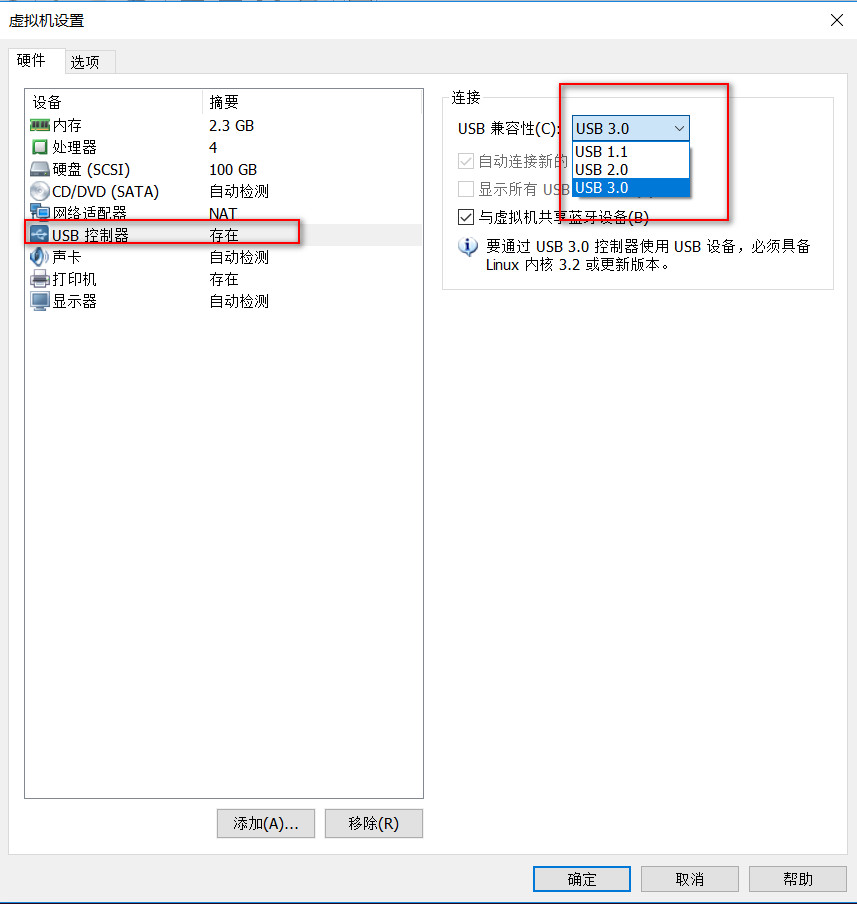
USB的兼容性设置为USB3.0。

将USB连接到虚拟机上。
程序
#include <sys/types.h>

#include <sys/stat.h>

#include <fcntl.h>

#include <stdio.h>

#include <stdlib.h>

#include <string.h>

#include <unistd.h>

#include <pthread.h>

#include <errno.h>

#include <sys/socket.h>

#include <netinet/in.h>

#include <time.h>

#include <math.h>

#include <sys/ioctl.h>

#include <linux/fb.h>

#include <iostream>

#include <signal.h>

#include <string>

#include <iostream>

#include <opencv2/opencv.hpp>

using namespace cv;

using namespace std;

int main()

{

    VideoCapture capture(1);

    if(capture.isOpened())

    {

        cout<<"success"<<endl;

    }

    Mat frame;

    while (capture.isOpened())

    {

	capture >> frame;

  	if (!frame.empty())

        {

            //imshow("edges", frame);

	    imwrite("test.bmp",frame);

 	    imshow("capture", frame);

	    //cout<<"can get ";

        }

        else

        {

            //cout<<"can not get";

        }

        if(waitKey(10) == 27)

            break;

    }

    return 0;

}
Makefile
LIBS += -L /usr/lib/ -lstdc++

LIBS += `pkg-config --libs opencv`

TARGET = test

target:

	$(CC) $(CFLAGS) -o  $(TARGET)   $(SRCS) $(INC) $(LIBS)

    	#*****************finished building*****************

clean:

	rm -f $(TARGET)
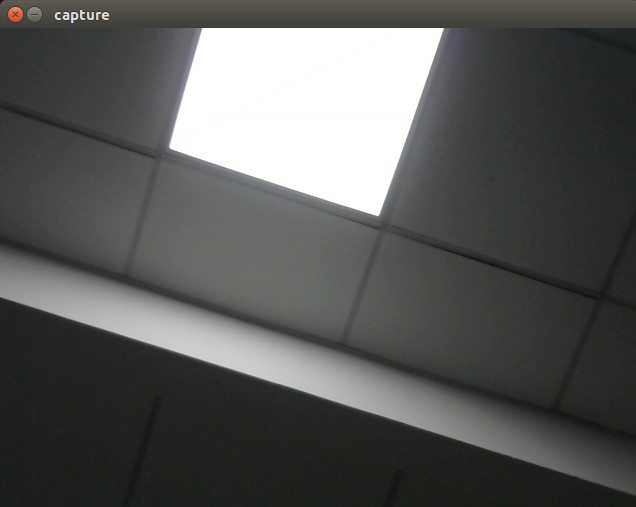
成功打开:
注意
capture(0)是笔记本摄像头,capture(1)是USB摄像头。
虚拟机上使用 opecnv 读取USB摄像头无法显示的更多相关文章
- python opencv 读取USB摄像头的像素问题
问题描述 每次调用capture读取video的时候,还回的像素都是640x480,不管是笔记本的摄像头还是USB摄像头,明明我的摄像头是支持130万读取的功能的呀. 问题分析 一番查找,关于用ope ...
- ubuntu-Linux系统读取USB摄像头数据(gspca)
将摄像头图像保存为jpg格式.摄像头需要是gspca免驱的.uvc若用uvc格式的需要在图像中插入Huffman表.否则无法正常显示. 程序代码: #include <stdio.h> # ...
- ubuntu-Linux系统读取USB摄像头数据(uvc)
这几天在做小车的过程中,需要用到图像采集.我想现在用的摄像头是UVC免驱的.根据国嵌的教程中有一个gspca摄像头的程序.我发现把gspca的采集程序用到uvc上时,在显示图像的时候提示没有huffm ...
- unity3d 读取usb摄像头
using UnityEngine; using System.Collections; public class C : MonoBehaviour { private WebCamTexture ...
- USB摄像头无法正常读取问题
opencv读取摄像头或者视频一种是早期版本的IplImage结构体,图片就存在结构体指针IplImage*中,另一种是Mat类,两者在操作上略有差异,且opencv2都兼容这两个版本,前面的博客也说 ...
- [运维] 如何访问虚拟机上的 Tomcat ?
环境: 虚拟机: VMware 15 pro 操作系统 Linux CentOS 7 64 物理机: Windows 7 事先准备: 1: 下载 Tomcat 的压缩包 apache-t ...
- 在linux下玩转usb摄像头
硬件平台:PC机一台 .usb摄像头 操作系统:Linux3.0.8 交叉编译环境:arm-none-Linux-gnueabi-gcc 4.5.1 调试步骤: 一.linux 内核解压 1.1使用 ...
- 25、写一个USB摄像头驱动程序(有ioctrl分析)
videobuf2-core.h中的vb2_buffer,记录了v4l2_buffer ,驱动可以对vb2_buffer的v4l2_buffer进行操控, vb2_buffer是v4l2框架层的代码, ...
- 在Windows Azure虚拟机上开发Windows 8 应用
前提条件 Windows Azure开发者账号:如果您拥有微软MSDN Subscription账户,那么意味着您可免费申请Windows Azure开发者账号. 创建虚拟机 点击Windows Az ...
随机推荐
- linux之shell编程初步
#################适用于CentOS6################## #!/bin/bash ########################################## ...
- 相机IMU融合四部曲(一):D-LG-EKF详细解读
相机IMU融合四部曲(一):D-LG-EKF详细解读 极品巧克力 前言 前两篇文章<Google Cardbord的九轴融合算法>,<Madgwick算法详细解读>,讨论的都是 ...
- python3--json反序列化
# Auther: Aaron Fan # 加载文件中的数据 import json with open('test.txt','r',encoding='utf-8') as f: info = j ...
- Smarty简介
Smarty是一个使用PHP写出来的模板引擎,是目前业界最著名的PHP模板引擎之一.它分离了逻辑代码和外在的内容,提供了一种易于管理和使用的方法,用来将原本与HTML代码混杂在一起PHP代码逻辑分离. ...
- .NET开源MSSQL、Redis监控产品Opserver之Exception配置
异常日志的记录和监控主要依赖于StackExchange.Exceptional组件,默认已经被引进来了. 先看下config文件夹下的ExceptionsSettings.json.example文 ...
- ceph之osd
一.删除osd ceph osd out 1ceph osd down 1systemctl stop ceph-osd@1ceph osd crush remove osd.1ceph osd rm ...
- error: failed to push some refs to 'https://git.oschina.net/bluede/TuShuGuanLi.g it'
出现了这样的错,可以强制提交 git push -u origin master -f
- CodeForces 47E. Cannon(离线暴力+数学)
E. Cannon time limit per test 3 seconds memory limit per test 256 megabytes input standard input out ...
- 直接通过Response输出流写文件,浏览器表现为下载文件
response.setContentType("application/x-download"); response.addHeader("Content-Dispos ...
- 优化MYSQL配置文件MY.INI
table_cache=1024 物理内存越大,设置就越大.默认为2402,调到512-1024最佳.由于每个客户端连接都会至少访问一个表,因此此参数的值与max_connections有关.当某一连 ...